Tuesday, December 21, 2021

Installing apt-get and bash into the .Net 6 Alpine container

The minimal container image of .Net 6 comes really lightweight. The name of the image at least we are using is dotnet/runtime:6.0.1-alpine3.14. It has very little footprint below 40-50 MB during runtime. But that doesn't even have a ping utility, bash shell, sudo command, and not even the apt-get to install other packages. This minimal behavior makes it difficult to debug.

Below goes the steps to install apt-get into that container to troubleshoot applications especially when deployed in Kubernetes.

Tuesday, November 23, 2021

DevOps - Importance of deleting container images by CI pipeline after pushing to registry

When we use self-hosted Azure pipeline agents, we may encounter the below issue during the build process. This is not a hard issue to troubleshoot. The reason is there in the error message.

Error processing tar file(exit status 1): open /root/.local/share/NuGet/v3-cache/670c1461c29885f9aa22c281d8b7da90845b38e4$ps:_api.nuget.org_v3_index.json/nupkg_system.reflection.metadata.1.4.2.dat: no space left on device

##[error]Error processing tar file(exit status 1): open /root/.local/share/NuGet/v3-cache/670c1461c29885f9aa22c281d8b7da90845b38e4$ps:_api.nuget.org_v3_index.json/nupkg_system.reflection.metadata.1.4.2.dat: no space left on device

##[error]The process '/usr/bin/docker' failed with exit code 1

Solution

Clean up the artifacts from the build server once it is uploaded to the permanent artifact's location. Also, clean up any residual that is produced as part of the build process such as unit test results. In our case, we faced this issue due to the leftover container images in a Linux build server. We have to delete the local images after pushing to Azure Container Registry.

Workaround

By default, Docker files (containers, images, etc) are located in /var/lib/docker which is part of the / filesystem. We can check how much space is left by using the df -h Linux command.

There are at least 2 workarounds

Option 1 - increase storage

Increase the size of the current / file system. This is easy if the build server is in the cloud environment. There will be some downtime of course.

Option 2 - change docker storage location

Mount new storage to the build server and point the docker to use that as the storage location. Below are the steps.

  • The default location of docker images is specified in the /etc/docker/daemon.json file. The property name is "data-root"
  • That can be changed to the newly mounted location.
  • Restart the Docker daemon.
    • sudo systemctl daemon-reload 
    • sudo systemctl restart docker
A totally different option is to get rid of self-hosted agents and use the Azure agents. This depends on the project requirements and enterprise policies.

References

Tuesday, November 16, 2021

Azure @ Enterprise - AAD App registration - Should I need it if "Admin consent required" is "No"

Security is hard. Especially every vendor says they follow the standard of oAuth and implement differently. Let us look at the Azure App registration's API permissions blade. 


<image permissions blade>

We can see there are 3 columns that may confuse us. One is the Type and 2 at last that denote whether the permission requires admin consent and the status column showing whether admin consent is granted or not.

Further, it reveals something very interesting. The 'User.Read' permission doesn't require admin consent but it's given. Why in the world someone needs to do like this?

Let us try to unmask the mystery or just read the docs.

Delegated permission v/s application permission types

It's very simple. The delegated permission is only for users and the application permission is for applications. To make it more simple, 'Delegated' means the users can delegate an application to do something on behalf of the user. Here the application is not acting as an application instead of as a user.

Application permissions is allowing applications to perform something as if it is done by the application. eg: scheduled tasks, queued tasks in general daemon apps

Column 'Admin consent required'

This means the developer or the publisher of the permission put a requirement that this permission is tenant-wide and important. So it requires Admin consent.  Let us consider 2 scenarios where admin consent is not required.

What if admin consent is not required and it's not given and used by the user app

When an application demands permission that doesn't require admin consent and is used by an interactive user application, there will be a consent form that pops up that asks the user to give consent

In short

The user has to give his consent even if the admin consent is not required.

What if admin consent is not required and it's not given and used by the daemon app

Here the app will fail because that application is not running under user context and there is no one to give consent.
Admin consent is always required for the daemon apps to work with application permissions.

This completes the answer to the title question. Yes we need admin consent for the daemon applications even if "Admin consent required" is "No" 

What if admin consent is not required but given and used by the user app

If the admin has given the consent, there is no need for the user to give consent again as its tenant wide permission. The consent popup will not be shown.

Special cases

ROPC Flow

This refers to Resource Owner Password Credentials flow where the application can act as a user by obtaining the user's credential (password). It can obtain the credential from its own configuration file when running as a daemon application or from the user when it's running as a user-facing UI application. 

When it is running as a daemon we normally create a service account and keep its credentials in the application configuration. In both cases, admin consent is required.
Whatever the case the ROPC is not recommended by MSFT

Restrict users from consenting

Even if a publisher application doesn't require admin consent the AAD tenant admin can override that to enforce admin consent for all permissions. This leaves users with no permission to give consent.

ReadTheDocs

https://docs.microsoft.com/en-us/azure/active-directory/develop/v2-permissions-and-consent#using-the-admin-consent-endpoint

https://docs.microsoft.com/en-us/azure/active-directory/develop/application-consent-experience#app-requires-a-permission-within-the-users-scope-of-authority

https://docs.microsoft.com/en-us/azure/active-directory/manage-apps/configure-admin-consent-workflow

https://docs.microsoft.com/en-us/azure/active-directory/manage-apps/grant-admin-consent

Tuesday, October 26, 2021

Can we read console inputs in .Net Core BackgroundService?

Alert: This is a basic question-answer post for my tailored googling purpose. you may easily skip this post.

Background

.Net Core API model simplified many things such as dependency injection, logging, etc...One major thing is the background service to perform background operations. There are many use cases for BackgroundService. More of how to use BackgroundService and its interface IHostedService and how to host can be found in the official documentation.

Question

When we use BackgoundService, one simple question may arise in our minds. Can we get user input from the console by the code running inside the BackgroundService?

Answer

The answer is yes we can get the inputs from the console. There is a sample available in my GitHub repo that acts as a template for .Net console apps.

Why this post?

This post is mainly for my tailored googling purpose. I got this question 2-3 times. Next time I can search it easily by prefixing joymon😀

Interesting links regarding BackgroundService hosting

https://docs.microsoft.com/en-us/dotnet/architecture/microservices/multi-container-microservice-net-applications/background-tasks-with-ihostedservice

https://medium.com/@daniel.sagita/backgroundservice-for-a-long-running-work-3debe8f8d25b

Thursday, October 21, 2021

[Video] Configuring container environment variables for ASP.Net WebAPI hosted inside Kubernetes on Docker Desktop

This is the second video in the Kubernetes series. Actually, when I started vlogging, I had decided that I will make short videos of max 5 minutes. But unfortunately, I was not able to stick to that. Here onwards I am planning to stick with my time limit. 

What is new?

We have to configure applications based on the environment it runs. It is not different for containerized applications running in Kubernetes. This video is showing how to configure the environment variables for the containers.

It uses an ASP.Net Core WebAPI application that returns the environment variable name when invoked with the name. It uses .Net 5 and basic YAML to deploy to Kubernetes that is running on Docker Desktop using WSL2 as a backend.

No more details. Please watch the video below.

References

https://kubernetes.io/docs/concepts/configuration/configmap/

Tuesday, October 12, 2021

GitHub template project for .Net console Menu driven applications having DI and Logging capabilities

This is simple introduction to one of the new open source projects that I started in GitHub. It is not solving any planet scale problems but a simple problem of setting up a menu driven console application. Currently  every time when I start a PoC (Proof of Concept) application I start as blank console application then add the required infrastructure libraries. Those libraries include the logging, menu etc...Also a dependency injection framework. 

It is a GitHub project template and below is the link that has the DI, Logging and Menu (using EasyConsoleStd). Let me know if there are better starter templates to use.
 
Note that this is just a GitHub project template, not released as dotnet command extension. In other words if this is made that way, anyone can easily use with below command 

dotnet new <my template name>
Converting this as dotnet template is in consideration. But mean time if I get a better template why should I spend time?

Why Dependency Injection?

All the time, we start PoC as temporary arrangement to demo technology capabilities or feasibility of a solution. If its for a small project and deployed in to predefined environments, its fine. But think about the application needs to be installed in various departments or business units of a big enterprise with different environment configurations. Then our application may fail and we need to prove that the environment doesn't have the capabilities by using this PoC application. In such scenarios The PoC lives for months and on most of the environment failure, we may discover one more additional scenarios to be tested that cause changes to the PoC. As we all know the DI frameworks helps to do changes easily.

One more scenario depends on the dev team. We (from architecture or research or sales team) create a PoC and hand over to the dev team on the expectation that they know that the code we handed over is PoC grade. Never copy paste or extend that PoC to production. But sometimes it doesn't happen that way. So better do the PoC with DI so that even if dev team extend it, there will be minimum quality.

Why develop PoC as Menu driven application ? Don't you know about test projects

The scenario mentioned above about the variety of environments is the answer. If we want to run only on dev machine, its fine to do as test project having each scenario as test method. But its difficult to run a test project in production environment to debug something in isolation. 
eg: We are able to enqueue messages to ServiceBus in dev environment but in production it failed because some device in production network doesn't like AMQP traffic.

Another psychological reason is that demoing a console app with menu options gives an impression that something complex is going on. If we run tests from Visual Studio the same impact will not be there.

Why menu in the console app? Can't you use the command line switches?

Same psychological reason. The reason for PoC is that something that we are proving that we don't know. It may require days to get a PoC working. After this much time, if we just run a command line application with different arguments in a demo, there is a high chance that the stakeholders / managers think the developer is lazy. Mean time if we show a menu in the PoC with 10-15 options, it give a different impression. Coding efforts is more or less same.

I feels like I am becoming more of a sales demo guy. So stopping here. Let me know your comments.

Tuesday, September 21, 2021

Azure @ Enterprise - PowerShell to send message to Azure Service Bus Queue

We all know that Azure and PowerShell are friends. This post discusses how can we use PowerShell to work with the data place of Azure Service Bus. The example here is about queueing a message into the Service Bus queue.

Problem

We did implement a messaging architecture using Azure Service Bus Queue. The consumer is a .Net app that connects to the Service Bus Queue using Service Principal + Certificate. It works fine in lower environments such as dev, QA, etc... but stopped working in higher environments. Below was the message.

"An existing connection was forcibly closed by the remote host ErrorCode: ConnectionReset (ServiceCommunicationProblem);"

As it is a higher environment, there is no way we can install troubleshooting tools or even don't have access to the Azure portal.

Troubleshooting

Since there is no portal access and cannot install tools we decided to simulate how the application consumes Service Bus using PowerShell.

The first step was easy to connect to Azure using cmdlets using the Service Principal+Certificate and generate JWT. But the next step was not easy.

By the way, this requires the installation of Az.Accounts PowerShell module in the production machine. :)

Since PowerShell is considered an admin thing than a dev tool, admins normally allow it.

Challenge

The problem is that there is no official PowerShell package from Microsoft to work with the data place of ServiceBus. The official PowerShell module supports control plane functions such as create service bus namespace(New-ServiceBusNamespace), create queues (New-AzServiceBusQueue), etc. Even interacting with the data plane is not there in Azure CLI. We were not able to find any community-built PowerShell cmdlets too except for some tutorials on how to send messages.  

Solution

Finally, we had to get our hands dirty by making HTTP calls from PowerShell. The REST endpoints are properly documented to easily craft the requests. The PowerShell source code to send messages is available on GitHub.

https://github.com/ms-azure-demos/servicebus-queues-powershell

The root cause of the problem

When we run the PowerShell script from the same machine the app is running, it worked!!!. That eliminated the questions of what ports are open etc. The remaining difference between the .Net application sending messages v/s PowerShell was the AMQP v/s simple HTTP. .Net application uses AMQP by default and we didn't put an option in the application to fall back to HTTP. We checked whether the ports are open and they are. Hence concluded the higher environment network is not allowing AMQP traffic. Some network devices are on the way that doesn't like the AMQP traffic. 

Tuesday, September 14, 2021

Azure @ Enterprise - PowerShell log in as service principal + certificate and generate JWT access token

The enterprise always loves to increase the security posture. One authentication approach enterprise takes in Azure is App registration with a service principal. The advantage here is that the service principal can use certificates to authenticate instead of passwords. Certificates are secure than passwords as those can be centrally managed.

Problem

If our application uses the service principal + certificate and it is working fine, there is no issue. But the problem starts when something goes wrong. If we log in to the portal using our credentials and try scenarios that are failing, we may see everything works fine. But things go wrong when the application logs in using service principal. It may be a permission issue, expired certificates or passwords, etc...

What if the problems appeared first in production where enterprises don't allow any changes to the environment. ie no debugging tools are allowed to install etc...

Solution

The solution is to troubleshoot the scenario as close as how the application works. We have to log in as the service principal and try the application scenarios. 

As always in enterprise the best method to troubleshoot in production environments is PowerShell. Below goes the code to log into Azure from PowerShell using service principal and generating a JWT access token.

The Connect-AzAccount cmdlet provides different ways to log in. Using the service principal is one of the methods.
Please note that the Az.Accounts need a minimum of Windows PowerShell 5.1 or PowerShell 7 version.

Once the PowerShell session is authenticated, we can perform various operations as the service principal. 

In most cases, the access token is not really required. There are PowerShell SDKs for most of the Azure services. We can directly use them. But in some cases like interacting with the data plane of Service Bus, we may need to use the access token and embed it in the Authorization header of the HTTP request.

Limitations

It reads the certificate from the personal store unless loaded from a file. We cannot pass an X509Certificate object to the Connect-AzAccount cmdlet. There is already an issue in GitHub to track it.

Update : 2021-10-30

What if we don't have permission to install Az.Accounts module?

Recently, I came to one production debugging situation where there is no permission to install the Az.Accounts module and even no connectivity to the internet to get the module. The only way is to write everything ourselves. Fortunately, someone had already done that and it is available publicly. If interested read the official docs.

Tuesday, August 31, 2021

Install .Net Runtime and run .Net apps in Raspberry Pi 4

Here we are continuing the experiments with Raspberry Pi 4. As a .Net developer, what is the meaning if we cannot install .Net into RasPi and run one program?

Please note this post is aiming at installing the .Net runtime, not the SDK. Development and compilation will be done outside of RasPi. Also, this is not aiming to run ASP.Net, just simple .Net console apps only.

Do we really need to install .Net runtime to RasPi?

It depends. If we want to run a self-contained application, there is no need to install the .Net runtime. Follow the below steps as mentioned in Microsoft docs.
  • Publish with the 'linux-arm' option.
  • Copy the folder to RasPi
  • Give execute permission
  • Run the app

It worked like a breeze. But the self-contained publish model includes the runtime and is really big. The above screenshot shows the size is around 80MB for a simple console application. To avoid that, we can install the runtime.

Attempt 1 - Install the apt-get way

When we google, we get the answers that we have to execute some scripts to install .Net runtime. The sudo apt-get is nowhere available. But I decided to give it a try using the Microsoft tutorial targeted to Ubuntu 21.04.
It failed gracefully with a series of messages

 "E: Unable to locate package dotnet-runtime-5.0
E: Couldn't find any package by glob 'dotnet-runtime-5.0'
E: Couldn't find any package by regex 'dotnet-runtime-5.0'"

The screenshot is given below

Let us do the next attempt.

Attempt 2 - Install using the scripts 

This time let's follow the Microsoft link as is https://docs.microsoft.com/en-us/dotnet/iot/deployment. I run the first command and below goes the output.

Wow. It installed the SDK. The above link is not at all talking anything about SDK. It's just talking about deploying the framework-dependent applications only. Let us check what is installed

Microsoft is great. We just asked .Net runtime. But we got SDK and ASPNetCore runtime as well. Now our RasPi is a full-fledged web server.

Once we have the installation ready. Get the published application. Make sure published as Framework-dependent and Target runtime set to Portable. Then run the normal command as below

dotnet "app.dll"

Closing thoughts

It is better to publish as a self-contained app to avoid the installation of .Net. The footprint will be big but it is easy to clean up. There will be new .Net versions releasing every year and their patches. If we keep with those releases, the .Net installation itself may be a big footprint later. (I am yet to check what it means .Net 5 and .Net 6 installed side by side)

Happy IoTing.

Tuesday, August 24, 2021

Generate pdf from markdown files in a folder using markdown-pdf

I am a big fan of markdown language for writing documents. One of the scenarios we encounter using markdown is to generate a pdf file or convert the markdown files to some other format. This post is to introduce an NPM package that converts markdown files to pdf file. It is considerably old but still does the job.

markdown-pdf

markdown-pdf npm library is open source software with MIT license. They have just enough documentation as well. It can be used as a command and as a library to use from our nodejs applications.

The limitations I found are as follows.

There is no direct API to convert an entire folder of markdown (.md) files. We have to iterate the folder by ourselves and give it all the file paths. Another problem is to insert page breaks between the markdown files. But that also can be overcome by using pre-processing markdown interceptor and some css tricks.

Sample code

Enough talking. The sample code to perform the below use cases with this library is available in GitHub repo.
  • How a folder can be given to markdown-pdf as there is no direct API
  • How to preprocess markdown files
  • How to give a custom CSS file

How it works

Internally it converts the markdown to HTML by using the remarkable npm library. Once the HTML files are available, it uses the phantomjs to load the HTML in the browser then print as pdf from there. It supports custom CSS files as well. 

Now it might be clear how the line breaks are inserted into the PDF files.

Use cases

If our documentation is prepared using markdown, the pdf file can be generated using this library through the CI/CD pipelines. 

Other libraries

References

Tuesday, August 17, 2021

[Video] Running simple ASP.Net Web API in Kubernetes on Docker Desktop

This post mainly contains the notes that I used to create a video. The video talks about hosting ASP.Net WebAPI into Kubernetes. The API can be accessible from the host machine using http://localhost:<port>/. The aim is to show simple hosting in Kubernetes that runs using Docker Desktop. 

It is advised to watch the video to get more clarity. 

Dev environment

Please refer to the previous post about setting up Docker Desktop and K8s environment. Along with that, it is required to have Visual Studio 2019 with docker container ASP.Net tools installed.

Source code

This post is not about creating a new visual studio project and enable the K8s support. Instead, download the sample from the below location

https://github.com/joymon/dotnet-demos/tree/master/web/webapi/simple-k8s-hosting/SimpleK8sHosting

Running using Docker Desktop

Just click on the run button in Visual Studio 2019 to run using Docker Desktop. The Dockerfile and other setups are already done in the sample.

Publish to Docker hub - the image registry

Below are the commands to tag and push to Docker Hub

Tuesday, August 3, 2021

Getting started with Kubernetes dev environment using Docker Desktop

This is 3rd or 4th time, I am learning Kubernetes (hereafter mostly refer as K8s short form) hands-on sessions. Every time I learn the kubectl command and its options, I forget as there were no chances to apply in the day job. Another mistake I did all those times was missing to post learning to this blog.

Hope this time I will get a chance to use it in the day job and not miss posting the Kubernetes learning on to this blog.

This post is very basic. The aim is to get started with the Kubernetes development environment using Docker Desktop. Below are the steps at a high level to get started. Detailed steps with videos are available on the internet.

Install Docker with Kubernetes support

The first step is to download the Docker Desktop and install it. It's straightforward as installing any other software in Windows. It is free and requires virtualization to be turned on. 
In order to run the Linux containers, it is better to enable the WSL2 backend. There are detailed instructions available to get it done including how to enable WSL2 on Windows.

Kubernetes support is only available when we use the Linux container mode. Note that Docker Desktop supports both Windows and Linux modes.

Points to note

  • Better don't take the experimental build. Stay one version below the current stable version.
  • This installation will modify our hosts file in Windows. Better not change anything.
  • It is better to have an 8 core 16GB machine to work smoothly with container workloads.

Install Kubernetes dashboard

For beginners, it is easy to understand what is going on in the K8s cluster by looking at a UI dashboard application. K8s don't install a UI dashboard by default. That dashboard can be installed by using the below PowerShell commands.

Tuesday, July 27, 2021

Zero Trust security model

This post is about a design approach for loosely disconnected components of a system or a group of networked devices. Those components are normally different processes serving WebAPI, Database, or consuming applications. Or if wet think from networking aspect those are different devices inside a network. Mainly those are inside a perimeter network of an enterprise. 

More than programming, this is about enterprise architecture and no code snippets. Please continue if interested. 

What's before Zero Trust Security Model

Before Zero security model, there were models where only the external endpoints are protected. Whatever happens inside a trusted network area is considered secure. Some examples below

  • An AD server simply responds to the requests that come from a web server inside the trusted network.
  • If the webserver only exposing 443 for external traffic and uses 80 for internal services, it simply responds to requests in 80 without authenticating. This is on the assumption that the request can only originate from within that server.
This is applicable when the network is fully managed and has a clearly defined boundary

Zero Trust model

When systems became more cloud-friendly or hybrid, they started spanning across multiple networks. For example, it is not feasible to store big data within the enterprise network. Often they are offloaded to cloud services. That is the place where that data can be analyzed using modern big data tools such as Spark. 
Sometimes due to regulatory requirements data needs to be stored on-premise but compute can be in the cloud. They may need to run big Spark clusters on the cloud but needs to access the data from on-premise storage.

Often those networks are not controlled by the enterprise. The concept of inherent trust is no more applicable in this new world.

This is the reason for the Zero Trust model to get importance. This term is coined by John Kindervag in the year 2010 but there seem traces of this term from 1994 according to the internet. From my perspective more than who invented it, I focus on what is it.

The main pillars of the Zero Trust model are the centralized identity of users, devices, and applications, verification of those identities before serving, authorization based on lease privileged access, assume there can be a breach but make sure the firewalls, API gateways, and monitoring are in place, a segmented network so that the surface area is very less.

The Zero Trust model implementation guidelines are available for the major clouds such as Azure, AWS, and GCP. Also available for the Kubernetes clusters where people host microservices.

References

Case studies

This is a buzzword like what Microservice, Serverless was one time. Knowingly or unknowingly we will reach this model as the cloud is inevitable for enterprises. Please note this was there in Thoughtworks technology radar in 2020 but later removed.

Tuesday, July 20, 2021

Azure @ Enterprise - Why I recommend Kubernetes as app hosting platform?

I started writing this post 2-3 years back. Mainly when Apache Spark 2.3 started supporting Kubernetes (K8s) in 2018. It was obvious that Kubernetes is taking over app hosting space the same way virtual machines took over physical machines. All are expected to understand where the industry is moving and adopt. Hence I paused this post as there is nothing I need to endorse. But it's time to resume this post and publish it.

If you are already using container and K8s orchestration, feel free to skip this post and save time.

Basics

Containers

Please refer to my 2015 post about Software Containerization via Docker - First look and some thoughts for very low-level basics. The container can be understood as a micro virtual machine with the application(s) and runtime isolated from each other. It has a file system inside it, it can expose ports for networking. Mount external storage.

This mainly co-evolved with the microservice architecture where the huge systems are separately developed and deployed as small services that own their own data and release cadence.

Kubernetes

Officially 
"Kubernetes is a portable, extensible, open-source platform for managing containerized workloads and services, that facilitates both declarative configuration and automation." - Kubernets.io

In short, it is the container orchestration engine.

What is and why do we need container orchestration?

 In my own words, orchestration is  
  • Where to run
    • Horizontal scaling - Mechanism to use multiple nodes(VMs are called nodes) to run containers of the same system. Nodes are expected to fail at any time.
    • Deciding where to run the container - The mechanism to specify what node executes what container. Eg: a particular container in the solution may need to run on the Linux node another may need a Windows node. Some containers may need GPU to be present on the node
    • Can also include virtual nodes that even can use Azure Container Instances.
  • Deployment and rollback
    • Ability to rollback easily in case something goes wrong in deployment
    • It is expected to have failures in deployments but the orchestration system should be able to roll back easily to the previous known state.
  • Networking
    • Determine how the containers are allowed to communicate with each other and what ports are exposed to outside.
    • Also has load balancing capability
    • Also has routing capability.
  • Service discovery
    • The services/components in the system should be able to discover the endpoints to other services as the services may be deployed to multiple nodes.
  • Resource allocation
    • Determines how much system resources need to be given to each container.
  • Storage mounting
    • Ability to mount external storage
  • Scaling
    • The mechanism to specify how many container instances are to be running at a time. Eg: Based on Azure queue messages it has to scale out / horizontal scale.
  • Secret and configuration management
    • Secrets can even be stored in Azure KeyVault and places like that. But that may not work on-prem. An orchestration engine needs to have secret management.
    • Configuration management is another aspect of any software system. The containers need to be initialized with proper configuration wherever it runs.
  • CRON
    • Capability to execute a container based on CRON expression.
  • Health monitoring & self-healing
    • Monitor the state of the containers and make sure the state is true to the definition of the system. Eg: If a container crashes, the orchestrator makes sure it's started again.
Hope the above explains what and why orchestration?

Links

There are people out there who can explain orchestration better than me.

Why Kubernetes?

It is the currently available best container orchestration engine. It supports most of the capabilities mentioned in the above list of what and why orchestration. For further reading refer to K8s documentation.

What Kubernetes is not?

It is equally important to understand what Kubernetes is not for. They
  • Don’t have native CI/CD concepts.
  • Don't have a data storage engine. RDBMS Rollbacks are not supported out of the box. Better be backward compatible. 
  • Don’t have a built-in blue-green deployment strategy
  • Don’t have a built-in serverless function or event-driven execution
  • Don’t have a built-in message broker, service bus, etc… we have to use external or run a container for message broker.
More in their documentation.

How and where to host

K8s can be run on top of virtual or physical machines or in the cloud.

On-premise

It can be installed on-premise on top of virtual machines or physical machines. The machines are called nodes as well. Control nodes need to be Linux, worker nodes can be either Windows or Linux. If your organization is a hard-core windows shop, no luck here.

Cloud

Major cloud providers provide an easier way to host K8s applications.

Why Kubernetes is good for enterprises?

  • Vendor-neutral and portable
    • If cloud providers increase fees, easy to switch from one vendor to other
    • Worst case start and maintain on-prem K8s cluster
    • Never do own cluster if you are a start-up and hosting a single application.
  • No vendor lock-in due to native PaaS model
  • Environment parity
    • Less 'it works in my machine' comments from developers
  • High density
    • Can pack more things in resources. Less wastage.
  • Multi-tenancy
    • Multiple apps of the enterprise can share a single cluster via namespaces-based isolation.
  • Fewer operations cost
    • Due to high density and multi-tenant nature less operation cost to make the cluster up and running.
  • A clear view of architecture
    • Just reviewing the YAML files will give a clear idea of how the system is designed. No more surprises because the settings and configurations are spread across many places.
  • Repeatability
    • Since the container is immutable, it can be used years later if we want to see how the app did run earlier.
  • No need for private cloud software
    • An on-premise cloud can be created on the K8s cluster without any private cloud software such as OpenStack. The K8s cluster is the cloud where applications are separated by namespaces. Oh yes, the storage needs to be managed.

Learning curve

It will not be an easy journey to the Kubernetes. Engineering teams (Dev and DevOps if you have separate teams) need to be upskilled as there are a lot of new concepts in K8s. Some below
  • Namespaces
  • Nodes - Control and worker nodes
  • Controllers - ReplicaController, NodeController
  • Deployment
  • ReplicaSet
  • Pod
  • StatefulSet
  • DaemonSet
  • Service
  • Job, CronJob
  • Volume, Persistent Volume, etc...
  • ConfigMaps
  • Secrets
  • Policies, Resource Quota
  • Selectors
  • YAML (Not that specific to K8s)
  • Kubectl
I didn't get a comprehensive mind-map showing all so planning to prepare one. It is advisable to upskill the team by hiring external people who already have experience with K8s. Converting an existing team that doesn't know K8s to experts is tough unless you are ok to accept failures.

Tuesday, July 13, 2021

Setting up home NAS - Part 4 - Raspberry Pi to build locally redundant NAS for home

This is the 5th post in the "Setting up home NAS" series. Below are the previous posts. It is not required to read previous posts to understand this. But that gives some background on this series.

Introduction

I was running below model for the home NAS system. My main contributor is the video category. My DJI Osmo Pocket produces high-bitrate videos. Also the RAWs.
  • Primary
    • A router attached USB drive working as NAS. \\192.168.1.1\share. It is of 1TB capacity
    • Sync the files to my personal computer that has a 500GB drive. So effectively getting only 500GB which are backed up. SyncToy is working fine for on-demand sync
  • Secondary (after publishing to YouTube)
    • Combine all the raw videos to single and upload to YouTube in private visibility
    • One back up to another external disk that has 2TB.
    • That means during editing time, 2 copies are in the router attached USB drive and personal laptop. After publishing, one uploaded to YouTube and the other copy in the different 2 TB hard disk.
As the COVID-19 pandemic slowed down and places got opened, I got chances to visit more places. Meaning more files to primary storage. One trip brings close to 10Gigs. The 500GB limit is almost reached its 3/4th capacity.

Problem

All my previous posts were explaining a problem and a solution. Every time a new problem. This time it is again going to reach the capacity and I had to do something to increase NAS storage space. As always I need two copies of files to be kept. Not an enterprise-grade NAS.

Requirement

This time I did some requirement engineering. Its nothing but looking at the past on how much data I was generating and forecasted how much more I would be in 

Below are some facts I could see
  • After I bought DJI Osmo Pocket there are a lot of videos coming out from trips
  • One trip produce 10GB on average
  • There are around 1.5 trips avg we are making per month. ~15GB
  • We shoot some videos at home as well. 2.5-3 GB
  • Adding the above + a buffer of 2GB ~ 20GB per month ~ 240GB/year ~ 1200GB/ 1.2TB for 5 years
    • Buffer is required for technical video downloads and anything which may come on our way.
  • There have to be 2 copies resulting in 2,400 GBs. But once published one backup is in YouTube itself with visibility private. So the final requirement is 1.8TB
There can be 2 systems similar to what I have now. Once published the videos can be moved to secondary.

Options

Is it time to think big or just add more drives? My YouTube channels are still in it's infancy. No hope to get monetized in the near future. The google ads revenue from Blogs is just enough to renew the https://joymononline.in site.

If I spend more and I lose interest in YouTubing, there will be trips but just photos coming out from those. Photos can easily be stored in 2 places by using Google Photos and one hard drive.

Currently, I have one more 1TB internal hard disk which is taken from the personal laptop when it was upgraded to SSD. Total of 1 TB hard disks x2, 2 TB hard disk x 1, and 500 GB on a personal laptop.
Below are the options I could find 
  1. RaspberryPi 4 or a similar low-powered device. Connect 1 TB hard drives to it and use as primary. Secondary continue as it
  2. Dedicated NAS device.
  3. Build a server machine by sourcing refurbished parts.
  4. Store in the cloud. OneDrive/Google drive etc...
If the budget is not a constraint, I would be going with the cloud option only. 

Solution

Finally decided to go with RaspberryPi 4. Below are the rationale
  • Its low power
  • It can be used for something else
    • If I lose interest in Youtubing which reduces the data generation.
    • If the OneDrive or Google Drive drastically reduce their price for me to afford for 2TB.
    • If our total family income increases and gets more budget to tech things cloud storage would be affordable. Yes, we do some family budgeting on the expenses. It is a big topic on its own
  • I am already planning to learn Linux and would like to learn the shell way. Why don't I learn with my own problems?
  • To advance my career, I would like to learn more about enterprise IT concerns. Dealing with my own problems would be a good starting point
  • Obviously, my requirement of 1.8TB for the next 5 years can be satisfied with this setup. The only problem would be the slow publishing of videos which causes more videos to stay in primary storage which has only 1TB capacity.
The architecture would be similar to what I am using now
  • Primary storage
    • 1TB connected to RPi, expose as \\SMB shared path
    • Backup 1TB attached to the router. 
    • Daily sync RPi connected the drive to the router attached one
    • We will be seeing why can't I just connect 2 HDDs to RPi 4 which has 2 USB 3 ports
  • Secondary
    • Same setup as of now

Home NAS using Raspberry Pi

Finally, we are discussing the business. Let us see what are the decisions, steps and issues faced.

Decisions

There are some decisions to be made

Size of RPi

The RPi 4 comes in different sizes based on the RAM. Many users say it requires only 2 GB to run as NAS. 8GB would definitely be overkill. So settled on 4GB RPi

Powered USB Hub

This is more electrical than setting up something. The very basic is any electrical equipment needs a power source. When we connect the hard disk to RasPi via a USB port, the power source of the HDD is RasPi. If RasPi cannot provide enough power to the HDD, it cannot function normally. We know the voltage is 5V but that is not all. We need to understand the maximum Watt requirement of HDD during its operation. Rotational Disk-based HDD requires the highest power to start spinning up. RasPi should be able to give that power though it may require less power during operation. In order to connect the dots, we need to consider the current as well which is measured in Amperes often noted in devices using either A or Amps or mA (milli Amps). Below is the relation that we learned in school.

W = VA

or

W=V*A (just for developers)

If one device specify W and V and another device specify V and A we can kind of do this calculation to see whether they match up 

Specs

It's time to read specs that nobody likes. RasPi specs say all 4 USB devices can together draw 1.2A of current. We know the voltage is 5V. So the max Power that can be given out through all the USB ports is 1.2 * 5V = 6W

In my case, I have 2.5" a laptop drive which has a requirement of 1.2Amps during spin up and an operational requirement of .8Amps. Meaning I can connect only one HDD to the RasPi directly at a time without an external power source. If I need to connect both the HDDs to RasPi, I would require a USB hub that has its own power source. Or buy another external HDD that is powered by a separate adapter.

This is the reason why I had to still connect my backup HDD of primary storage to the router. The router has enough power to drive HDD.

RPi OS

There are many operating systems available for RasPi. Even we can have Windows using its IoT Core edition. But decided to go with Raspberry Pi OS (Rasbian) as that is targeted to this device.

HDD FileSytem

Prefer to go with NTFS than Linux native Ext format. The main reason is in case RasPi fails I can connect the HDDs to my personal windows laptop. Planning to slowly migrate to Linux by starting with USB Linux installation with persistence storage.

Sync method

Our aim is to have one HDD connected to RasPi and another HDD to router and sync them. One more decision to be made is how to sync these 2 HDDs. There are 2 options I could find though they are not for solving the same issue and mutually exclusive.

  • RAID

There are already articles available on how to set up. Here is one good article on the same. I don't recommend this approach as this is mirroring. As soon as we do a change, it's replicated. No way to get the old copy in case we accidentally delete something.

  • RSYNC

This is a utility command which can sync 2 folders. The command has to execute to get the sync to happen. We can schedule easily during off-hours. Since it's home use, any time starting at 1 AM is fine. But the time depends on how your family members use the system.

There are disadvantages as well. If we copy something in the morning then in the afternoon primary hard disk failed. We lose the data as the sync happens only the next day at 1 AM. Also, if we accidentally delete something and we recognize it next week, there is no way to retrieve it.

I decided to go with this approach. Below is the link
https://www.howtogeek.com/139433/how-to-turn-a-raspberry-pi-into-a-low-power-network-storage-device/

Steps to get NAS up and running from RPi

These steps are mainly based on the article above in the RSYNC section. But there are some additional steps. Only the deviations and issues faced are documented rest of this article. Better to read the above article before reading further.

Let us start with something, not in that article.

Setting time zone

When we set up for the first time, the timezone would be the UK hence the time. If the location is not in the UK, it is better to change the time zone. Changing the timezone will update the time accordingly. I am not adding the step here as it's simply obtained by google.

Mount points

The tutorial mentioned above already has an instruction to install the NTFS driver. That has to be done before mounting the NTFS formatted drives. 

There are 2 mountings to be done. 

First mounting the USB drive connected to RasPi. To check the USB drive detected or not, use the below command

Tuesday, June 29, 2021

Can we have WebAPI controllers in different assemblies?

The question is clear from the title itself. Let us put the environment details to get more clarity.

Problem

It is an ASP.Net Core 2.1 Web API application that runs on .Net Framework 4.8. It has its own controller classes in its assembly. In addition to that, there are some controller classes in other projects that need to be added via the nuget package manager. Assuming they are not conflicting.

This was not supported out of the box prior to ASP.Net Core 2.1 where we have to inherit our web API controller classes from the base APIController class. We had to do something with the ControllerBuilder class or inherit the IAssemblyResolver class. Something complex.

Solution

With ASP.Net Core 2.1, there is no need to complicate things as long as we are inheriting the controller class from the ControllerBase class and decorate it with [ApiController].

We have to make sure the other assembly that contains the controller classes is available in /bin folder of the hosting application. If not in the /bin folder it's reachable to be loaded into the application.

Sample

It's not complete by just telling it is simple. A working solution can be downloaded from GitHub. It has a readme.md file to get started.

Points to note

When we have multiple controller assemblies, we need to make sure the controllers are not conflicting with each other.

APIController v/s ControllerBase

Now there may be a question arising. What is the difference between these APIController v/s ControllerBase classes for ASP.Net WebAPI? Tune for a dedicated blog post on it. Wait it's something that happened years back. Why should there be one more blog post? The answer is right there in StackOverflow.  Below are the main points.

For more details refer to the official Microsoft link that explains the MVC and WebAPI merge.

Tuesday, June 22, 2021

Close all overdue Azure DevOps work items with Python

As software engineers, we need to track our work items even if we are working as freelancers or for an enterprise. Those work items constitute the health of the project also helping the management to understand the high-level view. Every company has its own ALM software to track the work. One of the famous ALM is Azure DevOps (ADO hereafter) from Microsoft.

Problem

In an ideal situation, we should plan our tasks for every day. Good if we can plan in advance and close the work items as soon as it's done. But sometimes we may not be able to make the ADO work items sync with reality. It may be due to long release days. Unexpected support issues, shortage of team members, etc. At the end of the billing cycle finance department will be chasing us to close work items. At that time closing each and every item manually is time-consuming. There are many ways to tackle it such as import to Excel close all and sync. We may use any no-code low-code platforms such as Power Automate to automate the task. Developers who use those platforms normally called 'citizen developers'. I strongly recommend trying any of these methods to automate this type of work. There is no need to code.

The no-code, low-code platforms generally offer building blocks to do simple day-to-day operations then provide extensibility via plug-ins or by invoking web requests / Web APIs. The plug-ins require coding efforts. Invoking web requests needs deep knowledge of Web APIs and how the service is structured.

Potential solution

As developers, we are proud of our programming ability and may not want to become citizen developers. For those, there are SDKs available to automate Azure DevOps work items. Also when the no-code, low-code platform doesn't have required customizations, we have to use the SDKs or make direct Web API calls to Azure Dev Ops.

We can use the Python SDK given by Azure DevOps as one of the mediums to interact with Azure Dev Ops to close all the OverDue work items.

Code is available on GitHub.

How to use is already documented in the readme.md files. Please follow that.

Code walkthrough

The Git Repo has enough comments. I am also planning a YouTube video explaining the same.

Tuesday, June 15, 2021

What is .fuse_hiddenXXX in Linux

Recently I set up a NAS based on Raspberry Pi. Every day at 1 AM, it replicates files from one external hard disk to another. It uses 'rsync' command to perform the task. The output of  'rsync' command is saved into a file that later emailed to me. 

It was going good. But nowadays I started seeing the below messages in the email suspecting some kind of failure.

deleting temp/2021/.fuse_hidden000de458000000dd

deleting temp/2021/.fuse_hidden000de453000000de

When I navigated to the location I was not able to see those files. After spending some time googling, I came to answer.  It is happening due to access conflicts and nothing to be worried about.

This seems a well-known thing in the Linux world but new to some like me who are entering Linux from Windows.


Tuesday, June 8, 2021

Setting samesite:strict in pre .Net 4.7.2 versions to fix CSRF

CSRF is a type of web security attack where the attacker site loaded side by side with our web application and attacker site making HTTP requests to our application as the signed-in user. This happens when our authentication mechanism is based on cookies and is accessible to the attacker's site. When the attacker site postback or make HTTP GET call, the cookie is transmitted to our web application and it identifies as a valid user.

How to fix it?

There are 2 ways to my understanding.

Traditional (Pre SPA - Single Page Application)

This method relies upon one more security measure on the top of the authentication cookie. That is normally called as RequestVerificationToken. Below is the working 

  1. When the page is served to the client, the server will inject an encrypted token in a hidden field
  2. The client fills data in the form. Then perform submit operation.
  3. The incoming POST request is validated by the server for the hidden field. If that field is not available or not able to decrypt using the key in hand, reject the request.
Now think about the attacker's site posting back, that request has the cookie but not the hidden field. This is because the attacker site cannot access the DOM of our web application.

SPA

SPA model doesn't use page-level postback. Instead, it sends and receives data in AJAX requests. The web application's static assets (HTML, JS & CSS) normally loaded during the first time of application load. It may even be served from a CDN. We cannot use the RequestVerificationToken via the hidden field here as the page is not posted back when we do operations.

Here we have another way. It is nothing but fixing the original problem. Blocking the browser not to send the auth cookie when a request is made from another web page, usually the attacker's site. In order to tell the browser not to share cookies, we can use the Same-Site flag on the authentication cookie. This should be done by the server at the time of initial login. The value should be set to same-site: strict.

Now we are going to see how to set the same-site flag to strict in ASP.Net. 

Setting Same-Site to Strict in ASP.Net

If we are using the latest version of .Net starting from 4.7.2, it is easy as below code snippet.

Tuesday, May 18, 2021

PowerShell to check if private key is there in certificate

This is a small tip that can be considered as a continuation of an older post.  That was about validating the X509 certificate using PowerShell. As we all know, PowerShell is the way to execute almost anything in production, where using any other software is prohibited. 

The new problem encountered was that the certificate is there but no private key. When we use that certificate to obtain the Azure AAD token it fails. Below goes the snippet to check. 

Tuesday, May 4, 2021

Uncomment section in XML file using C#.Net

Requirement 

As part of the installation, some XML fragments (eg: <authentication>) need to be uncommented in web.config file based on the environment,. This can be done either via PowerShell or C#.Net as this has to be triggered from MSI installation. Never during the runtime of the application.

Alternatives

We can either do string-based detection and replace it. Or use XML parser of .Net. Since the string parser is complex, let us stick with the .Net library to replace it.

Solution

The below code snippets is replacing the commented <authentication> tag in XML with its uncommented version.

Tuesday, April 27, 2021

Azure @ Enterprise - Mind map of Azure Virtual Machines

Below is the mind map created as part of preparing for the AZ-303 exam.

This is created using PlantUML that helps us to code diagrams. Checked into the GitHub. PRs are welcome.

Tuesday, April 20, 2021

Azure @ Enterprise - Tracing to Console in different Azure SDKs for .Net

Introduction

Microsoft constantly improves the SDKs. As a side effect, we have to work with new SDKs. Earlier SDK names start with MicsoftAzure or WindowsAzure, next it was Microsoft.Azure. The recent one starts with Azure. Sometimes it's easy to migrate to the latest SDK, but sometimes it's difficult. There is one full post about the dilemma of choosing the Azure SDKs.

The best practice is to be with the latest and greatest version of SDKs

Every time the SDK changes, the logging mechanism also may change. This post is to discuss differences in SDK logging. For simplicity, we are going to look at the logging mechanism that outputs into the console. The same mechanism can be leveraged to write into any other persistent storage.

Why logging is important?

It really depends on the time developers are getting to release products in quality. But whatever the case today or tomorrow we as developers will end up debugging why our code failed in certain situations. The Azure works by HTTP WebAPIs and these SDKs are mainly wrapping that HTTP requests. If we are running in an unrestricted environment, we may not encounter any issues. But if it is from an enterprise environment that has its own hardening policies and restrictions, we will definitely encounter issues and end up debugging. If we are able to see the requests payloads in the console, it would be easy to debug at least in development time. Or just be use our friend Fiddler.

Azure.*

Let us start with the latest SDK as of today. Not sure if it's V12(Storage Blobs) or V4(KeyVault Secrets) or V7 (ServiceBus). The nuget packages are all starting with Azure. are the latest. It all starts from this GitHub repo where the source code lives. There is a documentation page that explains how the logging can be achieved using these SDKs. The essence of the approach is as follows.

Tuesday, April 6, 2021

SharePoint.com storage requirement due to versioning

Introduction 

Recently we were trying to migrate the document storage system from SQL FileStream to SharePoint.com. One of the criteria we are looking forward to in SharePoint.com is versioning. Since its SaaS model, we are sure the total storage is limited in SharePoint.com site. Obviously, we were interested in how the versioning affects the storage.

Question

Our first understanding was that Microsoft will be doing some magic behind the scene to capture the delta and the storage will not be the ~size of document * no of versions. But need confirmation we cannot just go with assumptions.

The question basically is does SharePoint.com count each version as an individual document or it stores only the changes similar to Git?

We did a good amount of google. But didn't get anything great that confirms the behavior. Fortunately, we are lucky to have Microsoft Development Manager with us. He did a good job finding the right people and finally, we got the answer.

Answer

It was different than what we think. Almost all versions count towards total storage. ie if there is a file of 1 MB and edited 3 times the total storage is 3 MBs.

We can easily confirm by browsing to the storman.aspx page.

Tuesday, March 9, 2021

Mind map on SQL Server Performance

Below is the mind map. The mind map is not complete. These are some ideas I got while working closely in performance.
These are just pointers to quickly refer what are the things to check when someone reports SQL Server performance issues. Need to google for the details on how to really optimize the performance.

Feel free to click on it and explore. Below is the link to GitHub. Feel free to issue pull requests if there are important things missing.


Tuesday, March 2, 2021

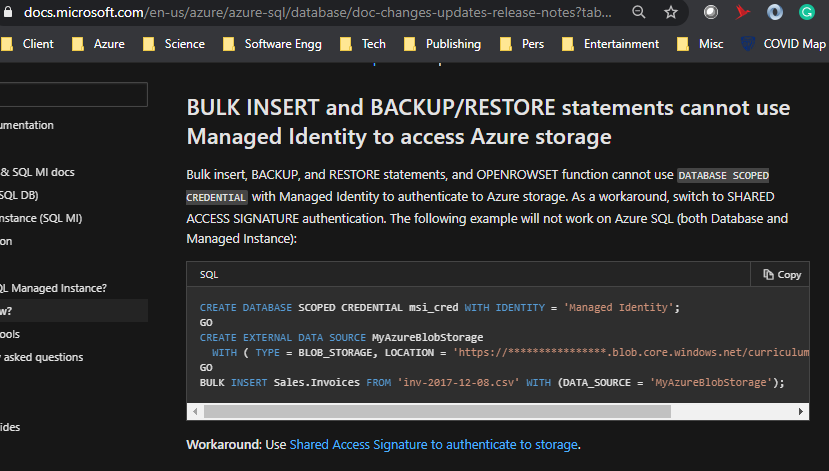
Azure @ Enterprise - Managed Identity formerly MSI to bulk insert from Azure Data Lake Gen2 (ADLS Gen2) to Azure SQL Database

Requirement

Bulk insert a CSV format file from Azure Data lake Gen2 to Azure SQL using the system-assigned managed identity (Managed Service Identity) as the authentication mechanism.

Official link

As per the Microsoft link, it is not supported. The most secure way seems the SAS token-based database scoped credential.

BULK INSERT and BACKUP/RESTORE statements cannot use Managed Identity to access Azure storage


Verifying the above

The first step is to create a system-assigned managed identity to the Azure SQL Server. As of writing this post, it seems there is no way to do this from the Azure portal unless we use PowerShell. Below goes the step.

The command is az sql server update -g <resource group> -s <sql server name> -i

The next step is to create Azure Data lake Gen 2 account. How to create that is skipped in this post as that is already available on the internet. The next step is to give the required permissions to the SQL Server's identity to access the Azure Data lake Gen 2 account.
The permissions can be more restricted based on the use case. Now lets us see how the SQL scripts look like.


It works. 

We got an undocumented feature to work that allows Azure SQL to connect to Azure Data Lake Gen2 account using system-assigned managed identity.

Tuesday, February 23, 2021

[Video] Azure @ Enterprise - ROPC flow in Azure AD

Here is the next video about authentication using Microsoft Identity Platform formerly Azure Active Directory Developer Platform.

Here we discuss ROPC flow in OAuth that is not recommended but a use case for it. The sample uses C# .Net


Additional references

https://medium.com/@dany74q/service-to-service-auth-with-azure-ad-msi-oauth-2-0-step-by-step-a1aed196b1e1

https://docs.microsoft.com/en-us/azure/active-directory/develop/msal-authentication-flows

https://docs.microsoft.com/en-us/azure/active-directory-b2c/add-ropc-policy?tabs=app-reg-ga&pivots=b2c-user-flow