Showing posts with label VS 2010. Show all posts

Tuesday, February 24, 2015

Group by test class name in VS2012 Test Explorer

Background

Writing unit test case is always a good practice in programming. It gives confidence to re-factor code and make sure each and every piece is working properly. If individual pieces are working good mostly the application will work after integration.

Basics of Visual studio unit test framework

Visual Studio has out of the box unit testing framework. We can create test classes and those classes can contain test methods. Normally if we follow proper naming convention to relate production code with test projects, it is easy to see how the tests are performing. One of the naming convention for unit test class and methods names can be as follows
  • Let the test project name be same as production project but suffix the test project with .Tests
  • For each production code method, create a unit test class.
  • Each scenario in the production method can be one test method in test class.
  • Test class name can be <Scenario>_<Production Method Name>{}
  • Method name can be <Test case specification>_<Expected behavior>()
eg: Production code

    public static class ObjectFactory
    {
        public static object CreateObject(string fullyQualifiedClassAndAssemblyName, object[] constructorParameters)
        {
//Production code which uses reflection to create object.
        }
    }

Unit test class

[TestClass, ExcludeFromCodeCoverage]
public class ObjectFactory_CreateObject
{
        [TestMethod, Timeout(1000)]
        public void WhenFullyQualifiedClassAndAssemblyNamePassedAndClassIsInternal_ShouldSucceed()
        {
//Test code
        }
        [TestMethod,ExpectedException(typeof(FileNotFoundException))]
        public void WhenFullyQualifiedClassAndNonExistingAssemblyNamePassed_ThrowFileNotFoundException()
        {
//Test code
        }
}

The main benefit of this naming convention is, it does not need any additional documentation to describe the what the test does. When we avoid one more item from maintenance, we are increasing productivity.

Running test cases from visual studio

We can easily trigger the unit test execution and see the results in "Test Results" window in VS 2010. The results will be shown with test name by default. The same functionality is there in VS2012 as well, but the window name is changed from "Test Results" to "Test explorer".

Problem

When the project grows, there are high chance that programmers forget to write test cases. Or even if there is strict enforcement, they will tend to write one test method like below for each and every production method.

[TestClass]
public class EmailSender_Send
{
        [TestMethod]
        public void WithProperparameter_ShouldSucceed()
        {
//Test code
        }
}
[TestClass]
public class Scheduler_CreateSchedule
{
        [TestMethod(), Timeout(30000)]
        public void WithProperParameters_ShouldSuccessed()
        {
//Test code
        }
}

Normally the test results will be displayed only with the test name and the test name is the test method name. That ends up in the test result window with all tests with same name. Its very difficult to understand from the review perspective.

If we want to see the test class name we can group by the test class name as below. This works well in VS2010.
[Photo taken from http://www.ladislavmrnka.com/wp-content/uploads/2012/09/TestView.png]

The same functionality in VS2012 named Test Explorer doesn't have Group by Class name in its earlier production releases. The group by popup is shown as below when try to group by class name.
This is really useless for somebody who want to see the test results. There is no idea why Microsoft removed a useful feature from earlier version in new release. But fortunately its back in later VS2012 updates. When this post is written, the latest update was Update 4.

Happy coding. Yes unit testing is part of coding:)

Tuesday, August 19, 2014

Why Visual Studio 2010 closes itself without loading the UI when we launch devenv.exe

On a fine day, I could see that my Visual Studio stopped loading up, when I try to start VS IDE. It shows the splash screen for some seconds and then popup an alert dialog as below and exit itself.

The 'Microsoft.VisualStudio.TeamFoundation.PowerTools.TfptPackage, Microsoft.VisualStudio.TeamFoundation.PowerTools, Version=10.0.0.0, Culture=neutral, PublicKeyToken=b03f5f7f11d50a3a' package did not load correctly.


The problem may have been caused by a configuration change or by the installation of another extension. You can get more information by running the application together with the /log parameter on the command line, and then examining the file 'C:\Users\<user>\AppData\Roaming\Microsoft\VisualStudio\10.0\ActivityLog.xml'.

I could see that the devenv.exe process is not present after the alert box. As usual first option I tried was restarting the machine. But that didn't help me.

Then I uninstalled the VS 2010 team foundation power tools as its mentioned in the message. Restarted machine. Still no improvement. Then I tried running VS in safemode to make sure none of the plug-ins are getting loaded which might caused error while loading. No luck.

After the above step I understood that its something complicated and I need to run the Visual Studio with logging enabled so that I can examine the log. After running with log enabled, I was able to see the below suspicious entry in the log file.

<entry>
    <record>39</record>
    <time>2014/08/08 18:11:33.997</time>
    <type>Warning</type>
    <source>VisualStudio</source>
    <description>The CTM file is out of date and should be deleted and rebuilt, but the file &apos;C:\ProgramData\Microsoft\VisualStudio\10.0\1033\devenv.CTM&apos; could not be deleted.</description>
  </entry>

What is this CTM file? I did some google and got some links to fix it. But unfortunately nothing worked out.

I had to spent half day to reach this point. There was no benefit researching on this as its taking my productive time. So decided to re-install Visual Studio. Then the next issue started. I am using VS 2010 Ultimate and the infrastructure team in my office don't have the DVD as the license is with client. So finally settled in installing VS 2012 Pro in my machine. I had to agree on that as VS is my tool. That day went smooth with VS 2012.

On next day out of curiosity, I tried to launch VS 2010 and surprisingly it worked. Still this time, its a wonder for me.

Monday, May 19, 2014

Why the compilation error 'The "EnsureBindingRedirects" task failed unexpectedly'

Recently I moved to our company's US office located at New Jersey. When I moved to new office, I had to return my laptop to Kochi office. There was arrangement done to upload all my files to company's FTP server so that I can download once I get machine from US office.

When I got the new machine and compile one of my visual studio solution, it showed a wired compilation error as below. It was not associated to any of the projects inside the solution.

Error     66     The "EnsureBindingRedirects" task failed unexpectedly.
System.MissingMethodException: Method not found: 'System.String System.Reflection.AssemblyName.get_CultureName()'.
   at Roxel.BuildTasks.EnsureBindingRedirects.MergeBindingRedirectsForReferences()
   at Roxel.BuildTasks.EnsureBindingRedirects.Execute()
   at Microsoft.Build.BackEnd.TaskExecutionHost.Microsoft.Build.BackEnd.ITaskExecutionHost.Execute()
   at Microsoft.Build.BackEnd.TaskBuilder.ExecuteInstantiatedTask(ITaskExecutionHost taskExecutionHost, TaskLoggingContext taskLoggingContext, TaskHost taskHost, ItemBucket bucket, TaskExecutionMode howToExecuteTask, Boolean& taskResult)

The google says its because of missing culture name in web.config file. I corrected it, in one of the MVC web project in the solution but the issue still persisted. Then a deep google gave insight to async related dlls of Microsoft. 

At some point, I had installed a nuget package named 'Microsoft.Bcl.Async' which helps to use the async keyword in pre .Net 4.5 versions. I just removed that package and it started working. For me that solution is just a single place testing solution where it contains all types of projects so that I can try any kind of PoCs.

More details about fixing the issue are available in the below link.
http://blogs.msdn.com/b/bclteam/archive/2013/04/17/microsoft-bcl-async-is-now-stable.aspx?PageIndex=3

Monday, April 21, 2014

How to remove Antlr3.Runtime & WebGrease from your ASP.Net MVC web application

What is Antlr3.Runtime & WebGrease

As of a new programmer those are the dll which increase the size of their project. Before we remove these dlls we should know what are those dlls and their duties? Those are the dlls used for Bundling and Minification. By default the Visual Studio adds those nuget packages in the newly created MVC web application.

http://westdiscgolf.blogspot.in/2012/06/aspnet-mvc-4-webapi-rc-what-on-earth-is.html
http://www.asp.net/mvc/tutorials/mvc-4/bundling-and-minification

When should we remove Antlr3.Runtime & WebGrease

Next thing we need to understand when we should remove those and why we need to remove? If you are creating a production application, never remove as those libraries will increase the performance of our application. We may not require if we are doing any of the following.
  • Creating a PoC and mailing the same which don't deal with minification and bundling.
  • Creating a sample for blogging.

Removing Antlr3.Runtime.dll & WebGrease.dll packages

Method 1 - nuget uninstallation

Below are the steps proper steps if we have the solutions in proper condiction
  • Open nuget package manager console or UI.
  • Execute the command Uninstall-package 'package name'.The order of removal is as follows
    • Microsoft.AspNet.Web.Optimization
    • WebGrease
    • Antlr
  • Follow the common steps for method 1 & 2

Method 2 - Manual removal

Use these steps if you are not able to make it via nuget.
  • Manually remove the reference to the Antlr3.Runtime.dll, WebGrease.dll & Microsoft.AspNet.Web.Optimization from solution explorer
  • Follow the common steps for method 1 & 2

Common steps for Method 1& 2

  • Remove or exclude the App_Start\BundleConfig.cs file.
  • Remove the method call BundleConfig.RegisterBundles(BundleTable.Bundles); from Global.asax.cs
  • Remove the import using System.Web.Optimization; from all code files.
  • Remove the @Scripts.Render() and @Styles.Render method calls from your view files
  • It will make the application fail, if we are using scripts and styles. You need to explicitly add the styles and scripts to the application For example to render styles add the below line.
  • <link rel="stylesheet" href="@Url.Content("~/Content/site.css")">
  • Remove the "System.Web.Optimization" entry from views\web.config file->
    <system.web.webPages.razor> -> <namespaces>
    
  • Clean the solution and delete everything in \bin folder

Method 3 - Remove the packages folder and bin folder and ask the user to sync nuget packages

As you see the problem its about sending the sample code to other user and his easiness to run the same. If the target developer knows about nuget, let him install the nuget packages before running the sample. This is the actual solution provided the target developer have enough internet connectivity to sync nuget packages.

I have tried this in MVC 4 & 5 from VS2010 & VS 2013 without any issues.
Happy coding.

Monday, December 2, 2013

Unable to debug 64bit .net app in VS 2010, because sos is not getting loaded

Recently I had to debug one of our research application for memory leaks. It is developed in Visual Studio 2010 as 64 bit .Net application with considerable amount of unmanaged (Win32 API) calls. Since I have Visual Studio 2010 Pro, thought of debugging in VS itself, for just a change.

How to debug in Visual Studio using sos extensions

Initially I enabled the unmanaged debugging in the project properties which is the first thing to do when starting sos debugging in VisualStudio. Then I tried loading sos as usual in Immediate window.

.load "C:\Windows\Microsoft.NET\Framework64\v4.0.30319\sos.dll"

But it ended up as

Error during command: extension c:\windows\microsoft.net\framework64\v4.0.30319\sos.dll could not load (error 193)

Oh I forgot one thing, we cannot debug 64 bit applications in VS 2010 because VS 2010 process is running as 32 bit even the OS and machine are running in 64 bit. I can see devenv.exe is a 32bit process in Task Manager, but I am not sure about the reason but people says it.

Thats fine. I changed the application to x86 ie 32 bit. Then I tried to load sos. But surprised to see another error message.

.load C:\Windows\Microsoft.NET\Framework\v4.0.30319\SOS.dll
Error during command: IDebugClient asked for unimplemented interface
Error during command: Exception c0000005 occurred at 2A5E7EAE

This is interesting. I had no other way except googling the same error message. The first result itself told that there is an issue reported to Microsoft on this

If there is .Net 4.5 installed we cannot load sos in VS 2010

http://connect.microsoft.com/VisualStudio/feedback/details/742882/after-installing-visual-studio-11-beta-load-sos-fails-in-visual-studio-2010

I have .Net 4.5 installed in my machine which I cannot un-install for this silly thing. Yes I had to go back to WinDbg, the command line world to do my job.

Tuesday, July 9, 2013

Error - Azure 2.0 installation via Web Installer - You have a newer version of NuGet installed that's incompatible with ASP.NET MVC 3 Tools Update

When

During installing Windows Azure SDK and Tools 2.0 for VS 2010 through Web Platform Installer 4.5. Also during installing some more products via Web Platform Installer.

Full Error

"You have a newer version of NuGet installed that's incompatible with ASP.NET MVC 3 Tools Update. To continue installing this product, please refer to http://go.microsoft.com/fwlink/?LinkId=266638."

If we click on the link it will redirect to ASP.Net/MVC site. No idea why there is a problem with nuget version and ASP.Net MVC 3 when installing Azure

Machine configuration / Environment

Windows 7 64bit
Visual Studio 2010 with Nuget installed via VS Extension manager.
Microsoft Web Platform Installer 4.5

Microsoft Status 

Resolved & Closed. There is a work around mentioned in MSFT connect which instructs to uninstall the nuget and install again.

My status

Some people confirmed that they are able to. But still it exists in my environment, even if I uninstall Nuget and try using Web Platform installer.

My resolution / workaround

Without using, Web platform installer directly install by downloading full installer from here.This is applicable to all the products which shows error in Web Platform Installer.

Monday, May 13, 2013

My VS 2010 Extension to remove duplicate blank lines is online

The problem

In my current project, we deal with a large legacy code base on a day to day basis. Some of the files inside are of 4000 lines of code and more. One of the reason for these huge files, is the continuous white spaces or multiple blank lines along with other reasons such as lack of SOLID principles.

No of lines is not an issue for an experienced intelligent developer, if he think from the technical point of view. But there is a mental blocking, when a new person is assigned with a bug in these areas. They look at the code and thinks, it's huge and need more time to find out the location and fix which eventually leads to delivery problems. 

Simple solution

As far as I understand, there is no silver bullet to solve the issue of increasing lines due to lack of SOLID principles in the code. That  needs to come from the heart of each developer. So lets focus on the issue of increasing lines, due to multiple blanks lines.

There is regex and the Visual Studio search and replace box supports it. We can use the appropriate regex to find multiple blank lines and replace with single empty line. Below is a link to regex which replaces double blank lines to single.


But as I told in the problem, if the developers are intelligent, the no of lines will not be an issue to them and they will be familiar with regex too. The case is different here. People needs single click easy solution and it lead to Visual Studio extensions.

My solution

Its simple. I used a simple Visual studio menu extensibility project after installing VS 2010 sdk and on the menu click, replaced the editor text after removing multiple blank lines.

How you can use it

The beauty of the new Visual Studio extensibility, is the ease of sharing our extensions to the world. I hosted my extension in Visual Studio gallery and you can download and use from the below link.

http://visualstudiogallery.msdn.microsoft.com/27edfcc0-a935-4126-bdaa-fb366173ad0b

But I would suggest you going to Visual Studio 2010 tools -> extension manager and search for "remove blank lines" in the online store and install from there.

Source code

Feel free to reuse / browse the code in code plex. removeblanklines.codeplex.com
Do whatever you want with the code base. If you have any queries please post as comment here or send a mail.

Below are some links which helped me during development.

Disable / enable VS menus based on criteria
GUIDs of existing VS menu command GUIDs http://msdn.microsoft.com/en-us/library/cc826118.aspx

Monday, July 30, 2012

Not able to compile due to missing temp files

Have you ever encountered an error like below which makes your beautiful C# or VB.Net code as just txt file. I believe if the code is not getting compiling its just like a txt file. You must have seen if you are a frequent user of windows disk clean up utility or CCleaner.

“Visual Studio 2010 “cannot find” C:\Users\[USERNAME]\AppData\Local\Temp\1\.NETFramework,Version=v4.0.AssemblyAttributes.vb “

Please don’t doubt your code when you see problems like this after cleaning your temp files using any cleaning utilities. Why this is happening is because of Microsoft Visual Studio’s usage of temp space to achieve its functionalities. When VSTS cannot find the temp file which was copied earlier it reports errors.

Do a clean and rebuild on your solution to solve this issue. Never doubt your code or your team members like what I did when I first saw this error Smile. Goto the below link to see what MSFT is saying about the same error.

http://connect.microsoft.com/VisualStudio/feedback/details/515041/unable-to-open-module-file-when-an-existing-solution-is-loaded

Friday, March 16, 2012

ASP.Net MVC 3 : T4 Text templates for generating dynamic mail body

Actually there is no relation between ASP.Net MVC 3 and T4 Text templates. I added MVC in title as I learned template feature while working on registration module of an ASP.Net MVC 3 project. You can even have T4 Templates in console application.

The problem

As part of Azure ACS service our client wants to have our own custom identity provider which should stand with google and facebook. The specialty of our identity provider is, it can provide role details through claims as it uses simple ASP.Net membership. We selected thinktecture's IdentityServer and hosted in Azure. Initially we were hard coding the users and after successful implementation we started to think about registration. The target product is a mobile application and initial thought was to have a registration page in the website of the mobile app. But there are chances that a user may need to register from the mobile app when he finds it interesting . It is little difficult for him to go to the website and come back with his credentials. So decided to extend identity server to have registration.

As it is in agile model we started to write the module where we were able to complete registration with in hours. But when we talk to people we came to remember the normal registration process followed in other sites. ie a confirmation mail with code should be send and once confirmed a welcome mail.

How that confirmation code is generated is another story which I can tell in a future post. But that was one day job to complete and got it tested in Azure quickly. The system just sends a mail with confirmation link .When we opened the mail it never looked that much stylish like a production app. What is wrong with that ? Oh the contents. It's my English which sometime even I cannot understand .

Yes.Its not a developer's task to write stylish English and format the communication with colors and other stuff. Client has no ready made format for the mail at that point. But I needed to complete the module and switch to another important one. So how to give a customizable solution to this mailing problem where the developer will be free from changes in the mail content and style?


The proposals


There are so many solutions available to have customizable template based mailing solution such as
The solution - T4 Templates

The first 2 options needs one more nuget package into our application which we don't wan't as it is already flooded with nuget packages. They offer really sophisticated features in sending mails but we decided to go with the T4 templates method which don't want any new library to be added / installed.

Implementing T4 Templates for dynamic mails

It involves mainly 2 steps. Creating T4 template and render to get the actual text to be sent.

Creating T4 templates

It is easy as adding a .cs file. Right click on the project in solution explorer and select Add => New Item. In the dialog select C# => General => Preprocessed Text Template .The extension of the file will be '.tt'. It also generate a .cs along with that like a xaml or aspx file. You can have some thing as follows inside the template.


<#@ output extension=".txt" #>
<#@ template language="C#" #>
 
<!DOCTYPE HTML PUBLIC "-//W3C//DTD HTML 4.0 Transitional//EN">
<html>
 <head>
  <title>Welcome to your site!</title>
 </head>
 <body>
  <strong>Welcome to your site !!</strong><br/>
  <br />
  Your confirmation code is : <i><#= this.ConfirmationCode #> </i>.
  <br /><br />
  You may use the above code in the confirmation screen or click on the below link to confirm your registration.
  <br/><br />
  Your confirmation link : <a href="<#= this.ConfirmLink + this.ConfirmationCode #>"><#= this.ConfirmLink + this.ConfirmationCode #></a> 
 </body>
</html>


You can see some inline code in the template what are they ? They are nothing but properties of the ConfirmMail class.Is there a class generated? How to add properties to the class > Is it by editing the design   er generated cs file? No.

Adding partial class for template & properties

If you want to add properties or methods to the T4 template you need to first add a partial class as new cs file. The challenge here is to have 2 files with same name. That is any way not possible.So have the naming convention as ConfirmMail.partial.cs. Add those properties there.

Code - ConfirmMail.partial.cs

    public partial class ConfirmMail
    {
        public string ConfirmationCode { get; private set; }
        public string ConfirmLink { get; private set; }
        public ConfirmMail(string confirmationCode, string confirmLink)
        {
            this.ConfirmationCode = confirmationCode;
            this.ConfirmLink = confirmLink;
        }
    }


NB: Don't add the properties in the generated file because each time the editor refresh those properties will be deleted

Rendering template

Now you have the template and the place holders to replace to values. The remaining task is to render the template with actual values. Its simple as creating an object of the class and calling the TransformText() method.


            var template = new ConfirmMail(confirmCode, confirmLink);
            return template.TransformText();

The method TransformText is not coming from any base class.Its just a virtual method in the generated ConfirmMail class.

IntelliSense support in editing T4 Templates

By default Visual studio don't have support for editing T4 templates. But you can install VSTS 2010 extensions such as VisualT4 to edit the templates with intelli sense support.

Please don't think that the application of T4 templates are only in sending mail. You can even generate dynamic code, views and so many other things. Hope you had a spike in your brain which initiated thoughts on application of T4 Templates


The code support doesn't stop with some property substitutions . You can have loops inside the T4 template like MVC RAZOR views. More details can be obtained from below links


Links
http://msdn.microsoft.com/en-us/library/ee844259.aspx

Tuesday, February 14, 2012

Handling WCF FaultContract & FaultException in Silverlight

What is FaultContract in WCF and how to handle fault exception in a windows application has been posted 1 year ago in this same blog itself. Some time back we one of colleague was trying to implement the same in his Silverlight application and he was not able to leverage my post to accomplish his task as Silverlight uses async pattern to call the service and the binding is basicHttp. The basicHttpBinding uses the SOAP protocol and it returns the fault using the HTTP 500 series status code which cannot be understood by Silverlight. So we modify the WCF response using custom EndPointBehavior and a MessageInspector to return using HTTP 200 code.

All those details are specified in the MSDN itself. What I am doing here is to post a sample in Silverlight 4.0 :-)
http://msdn.microsoft.com/en-us/library/ee844556(v=vs.95).aspx

No its not just a sample. It describes how to write client side code which is not mentioned in the MSDN article.Mainly where to put try catch to catch the fault exception. For the server side code and configurations just look at the MSDN article. Client side code you can get from below section.


   1:  private void GetChar(String ipString, int position)
   2:  {
   3:          MyServiceReference.MyServiceClient client = new MyServiceReference.MyServiceClient();
   4:          client.GetCharCompleted += (sender, e) =>
   5:          {
   6:              try
   7:              {
   8:                  if (e.Error != null) throw e.Error;
   9:                  MessageBox.Show("Extracted character: " + e.Result.ToString());
  10:              }
  11:              catch (FaultException<MyServiceReference.MyException> ex)
  12:              {
  13:                  MessageBox.Show("FaultException occurred " + ex.Detail.ExMessage);
  14:              }
  15:              catch (FaultException ex)
  16:              {
  17:                  MessageBox.Show(ex.Message);
  18:              }
  19:          };
  20:          client.GetCharAsync(ipString, position);
  21:  }

The main difference is the position of try catch blocks .In the sync service calls it will be wrapping the service call itself.Here we have 2 ways as the exception comes through the e.Error property.Either we can check the type in the handler itself or throw to handle by the callers.

Tuesday, January 17, 2012

List of my favourite Visual Studio 2010 Extensions

There is no question that Visual  Studio is my favourite, the most used and best code editor. Now I am using Visual Studio 2010 waiting for the final release of VSTS 2011. When we use VSTS 2010 sometime we feel that, it would be nice if it has one more feature which may increase our productivity. If you start feeling like that don't wait to open the Visual Studio Extension Manager.It will look as below and it is the place where you can get the desired features as extensions which are not delivered with VS 2010 where most of them are developed by third parties.
Select the Online gallery and search for the words which match your interest.I am sure that you will find almost what you need. Just select and install from Extension Manager itself. When I used it I could see that it saved lot of time especially the spell check extension :-) .Below are some extensions I am using .Hope any .Net developer can use those to leverage his productivity.

  • Productivity Power Tools - This brings you a new Tool window called Solution Navigator which is a much improved version of Solution Explorer.Using the Solution Navigator you can drill down till the method name and open the method directly. Also it comes with a good search mechanism and much more.
  • Spell Checker - This works like the office spell check and will surely help you to write method names without spelling mistake.
  • Indent Guides - Draws a line vertically to connect your braces.
  • Regex Editor - A handy utility to test regex patterns before checking in your code.
  • TFS Power Tools - If you are using Visual Studio TFS as code repository.
NB: If you just google for visual studio 2010 extensions you will get tons of VS extension lists like this. But use it, only if you think your system is capable enough to handle the extensions. Otherwise it will decrease your productivity.

Monday, January 2, 2012

Creating simple ASP.Net MVC 3 RAZOR application and adding a view to list users

I am really new to Razor the new view engine of ASP.Net MVC and decided to have a look at it during last weekend. First I started with what are the specialties of RAZOR and could see that it is more simple than the traditional ASP.Net view engine. Then I searched for the differences between the asp.net view engine and the Razor in terms of usage which will help me to write Razor view.Also I got the list which says how the Razor view elements are converted to HTML elements.

Seems we are ready to taste RAZOR through a sample application. Again searched for creating simple razor application and got the link which explains how to create a user list with option such as edit,list...
http://www.asp.net/mvc/tutorials/overview/creating-a-mvc-3-application-with-razor-and-unobtrusive-javascript

But it looks little complicated to me as we need to create model and all. So decided to just list down the user list from Membership provider.Steps goes as follows.
  1. Create a new ASP.Net MVC 3 project with default templates which will setup the membership provider and some pages such as the login, create new user etc...
  2. Create a new action in HomeController.cs named "Users". Add the below code to return the MembershipUserCollection.
    public ActionResult Users()
    {
          return View(Membership.GetAllUsers());
    }
  3. Right click on the "Users" Action method definition and select the "Add view".Use the same master page of other views(~/Views/Shared/_Layout.cshtml)
  4. Go to the added view and add the below lines in it.
    @{
        ViewBag.Title = "Users";
        Layout = "~/Views/Shared/_Layout.cshtml";
    }
    <h2>Users</h2>
    @foreach (var user in Model)
    { 
        @user.UserName
    }

  5. Go to master page and add action along with Home and About.
    <li>@Html.ActionLink("Users", "Users", "Home")</li>
Hope the steps are self explanatory. From the Action method in the Controller we are passing the MembershipUserCollection as model and that model is being enumerated in the RAZOR View to display the UserName.

More on ASP.Net MVC 3
http://msdn.microsoft.com/en-us/library/gg416514(v=vs.98).aspx
http://davidhayden.com/blog/dave/archive/2011/01/05/ASPNETMVC3TutorialsIndex.aspx

Monday, December 26, 2011

Creating and exposing simple REST based services in WCF 4.0

ReST (Representational State Transfer) is something which makes the web service url easy to remember by pointing a resource rather than a web page.ie it done have the page.aspx and the query string syntax. For example consider the scenario where I need to get the details of employee named “Joy”

Traditional way : www.company.com/Employee.aspx?name=Joy
ReST way : www.company.com/employees/Joy

There is not question that the Rest URL is simple. Now lets look at how to create such a service in .Net 4.0.
  • Create a web application normally.
  • Add a WCF service to the project.
  • Right click on the .svc file and view markup . Add Factory="System.ServiceModel.Activation.WebServiceHostFactory into the <%@ ServiceHost node.
  • In the Service interface methods add [WebGet] attribute. This makes them visible to the ReST service. Set the URI template of the WebGet properly.
So above are the steps to follow. Lets now see one example Service contract.Famous DoWork method to ReST.
[ServiceContract]
public interface IMyService
{
        [OperationContract]
        [WebGet]
        string DoWork ();
}
The implementation is same.No change .
public class MyService : IMyService
{
    public string DoWork ()
    {
        return "Yes.Our ReST service worked!!!";
    }
}

All set.Hit F5 and in the browser type http://localhost:<port>/myservice.svc/dowork .You can see the output as xml.
<?xml version="1.0"?>
<string xmlns="http://schemas.microsoft.com/2003/10/Serialization/">Yes.Our ReST service worked!!!</string>


WCF ReST return as JSON

Its little difficult for the calling party to process the xml and one more issue is the xml is heavy.So the immediate solution which comes to this scenario is the JSON format. Its easy to make our output to JSON.Just change the WebGet to specify JSON format as follows.

[WebGet(ResponseFormat=WebMessageFormat.Json)]


How to pass parameters to the WCF ReST services

Nobody is going to have only simple services as above in any of the projects. Passing arguments are necessary in WCF ReST services and its supports too using the UriTemplate property of WebGet.

[OperationContract]
[WebGet(UriTemplate="/Add/{a}/{b}")]
int Add ( string a, string b );
Implementation as follows.
public int Add(string a, string b)
{
    int num1, num2;
    if (int.TryParse(a, out num1) && int.TryParse(b, out num2))
    {
        return num1 + num2;
    }
    throw new ArgumentException("Give numbers to add");
}

Look at the UriTemplate it tells how the arguments are going to arrive. So call the service appropriately.


Points to Note

The steps which I performed are very basic and this is working since the framework is 4.0 where it automatically use the WebHttpBinding and other configurations. If you are using old frameworks you may need to set the binding properly.

Another thing is the parameters here are string. So convert them accordingly. I don't thing a sample is needed to see this in your computer.

There are more scenarios in this like such as how to pass and return complex types and how to use the Http Post etc...Hope I can post later.

Monday, November 14, 2011

Generic retry mechanism & catch using generic exception type

Couple of weeks back we faced one situation where a portion of our code breaks due to a IIS not available situation and we were advised to implement a retry mechanism.Hope I can talk about that server down problem in future posts. The retry mechanism needs to implement based on the exception which will occur on that particular scenario. We tried test code by putting the try catch block and could see its working in one place. But there  are a bunch of other areas we need to modify the code.Also in future too developers may need to use this retry mechanism.
The architect resting in me jumped and said that we can use a generic retry mechanism using .net generics. My colleagues were in little confusion about how to achieve a generic mechanism for retry where the size and location of code differs and spread out in 150 projects.With the help of Action delegate I was able to convince them and the subsequent google gave us ready made code to do the same.
public static void ExecuteWithRetry( Action action, UInt16 noOfAttempts )
{
    //Validate args:Throw exception on retryCount=0
    int count = 1;
    for (; ; count++)
    {
        try
        {
            action();
            break;
        }
        catch (ReTryableException ex)
        {
            Log(ex, count);
            if (count == noOfAttempts) throw;
        }
    }
}

Everybody became happy like after the first fight seen in movies. We know that the movie needs to complete its 2 hours with excitement and for that villain  should come back with more power. Here too the villain come back when the perfectionist in me put forward the suggestion of making it real generic so that we can move to the utility project and can be consumed by other fellow developers as well. So we rewrote the logic as follows.


public static void ExecuteWithRetry<TException> ( Action action, UInt16 noOfAttempts ) where TException :Exception   
{
    //Validate args:Throw exception on retryCount=0
    int count=1;
    for(;;count++)
    {
        try
        {
            action();
            break;
        }
        catch (TException ex)
        {
            Log(ex, count);
            if (count == noOfAttempts) throw;
        }
    } 
}

Oh what an idea sir ji…There was one more suggestion came to make retry after specific interval. But before that we tried to integrate modified function in our app.

Catching exception using generic type

Here starts the second part of the story. When we run from Visual studio it didn’t hit the catch block!!! Theoretically there are no issues but practically it failed. At least for some moment surrounding people even I thought that our understanding about either Exception handling or generics is wrong. Even we thought of getting rid of this concept and write redundant retry code everywhere. But when we came back to our original state , we googled it and find that it is a BUG in .Net when running inside Visual Studio debugging mode.We tried running by double clicking the application and it works perfect.We were also able to see this bug in the Microsoft connect and says its fixed.

There is on workaround available for this issue its as follows

catch (Exception ex)
{
    TException tEx = ex as TException;
    if (tEx != null) { /*Process */}
    else throw;
}

This changed my perception

“The bug is there only due to poor dev’s coding mistake never by compilers, development tools or the framework”

to

“Compilers, development tools and frameworks are also coded by developers”.

Later I happen to read a post about fixing a compiler bug which enforced my perception.

Monday, October 24, 2011

Fusion log viewer fuslogvw ie Assembly Binding Log Viewer

When you work with .net and your dlls are scattered around GAC, application bin, or reference assemblies its very difficult to check which version of dll is loaded in the application. Without knowing that you cannot ensure that your code changes are in effect. For small projects you can put Console.WriteLine or Messagebox.Show to indicate your code change .But when we talk about bigger applications with hundreds of project and thousands of code files ,it is not practical.Also there are chances that your message box code might get checked into the code repository which gives fun for others.

Another scenario is creating and maintaining AppDomains .There are concepts like ApplicationBasePath, PrivateBinPath for the appdomains which decides from where the runtime should load the assembly or what is the sequence in searching for assembly. If you are versioning your application there are chances for MissingMethodException if the loaded assembly is not compatible with the versions.

All these things says we need to profile/inspect the assembly loading behavior in .net on the fly to make sure the dlls are loaded from correct location and it is the Fusion log viewer which comes with Visual Studio.

Starting the tool
  • Make sure the registry entry HKLM\Software\Microsoft\Fusion\ForceLog is 1
  • Goto visual studio command prompt.
  • Type and enter 'fuslogvw'
  • This will bring you the tool window.Make sure the log path is correct.
  • Now run your assembly.
  • Once the application loads click on the refresh button in the assembly log viewer.
  • You got the details of assemblies loaded with loading history and from which location
This is very useful in my current project to identify assembly loading where we have versioning and play with AppDomains all around.

Tuesday, April 12, 2011

Class AutoResetEvent

The class AutoResetEvent is used in threading to make one thread wait for a signal, till a specified time.The program execution will continue, if any of the above said situation occurs.ie either on the timeout or on signal arrival.The signal here means calling a method on AutoResetEvent class.

The above said is theory.Lets see how to use this class in practical scenarios.

   1: AutoResetEvent autoEvent = new AutoResetEvent(false);


   2: bool _canContinue = autoEvent.WaitOne(4000);


   3: if (_canContinue) 


   4: { 


   5:                     LogMsg(string.Format("Somebody interupted.So resume"),ConsoleColor.Yellow); 


   6: } 


   7: else 


   8: { 


   9:                     LogMsg(string.Format("Nobody interupted.So exit"), ConsoleColor.Yellow); 


  10: }


After the line WaitOne the thread wait for 4000 seconds or till a signal occurs.If the signal comes the return value will be true.Else false.So if we write the above line in a loop we can continue or exit the loop based on the request.Below is the code to signal or interrupt the thread.

autoEvent.Set();


It is obvious that the autoEvent should have visibility outside the method as well in order to invoke the method.

Practical scenario

You need to write a scheduler which processes queue of objects in a separate thread.The objects to the queue are expected to arrive in a bulk manner.ie the scheduling will happen continuously for a short span of time and rest of the time it will be idle.So once the thread is started and completed one cycle of processing queue, you cannot exit the thread.Rather you need to wait for some time say 4 secs for more items into the queue.But if any object comes to the queue before or with in that 4 secs  you need to process those.Else exit the thread after 4 secs.

This scenario has happened in our project and our lead architect came with AutoSetEvent solution.Uploaded  a sample which process a list of string in this way.

Another useful classes in threading

ManualResetEvent ,WaitHandle

For better understanding see the Threading sample available in your VisualStudio installation folder. It is located in Language Samples\Threading.It explains threading using the producer-consumers problem.

Tuesday, January 4, 2011

Loading SOS dll from Visualstudio for debugging

The Windbg is really an amazing debugging tool.With sos.dll we can even realize the working of garbage collector through windbg. Earlier my understanding was ,I need to use Windbg to use sos.dll for debugging.Now I realized that we can even load the sos.dll from immediate window of visual studio while debugging. Its very cool.One tool for everything...

Below are some links which explains how to load sos debugger from VSTS immediate window and see the memory details.

http://blog.mohammadjalloul.com/blogs/mo/archive/2010/02/21/the-large-object-heap.aspx
http://blogs.msdn.com/b/vijaysk/archive/2007/11/15/sos-your-visual-studio.aspx
http://msdn.microsoft.com/en-us/library/yy6d2sxs%28v=VS.100%29.aspx

Note : The Express edition of Visual studio doesn’t support this sos debugging.

Tuesday, October 5, 2010

Starting jQuery

I have been hearing about jQuery from the day it is introduced. My thought was ,it is just a  javascript library and who wants it, where I have my favorite Silverlight with C# support & Flash. They served all the needs at client side / browser and I didn’t even cared about creating a sample using jQuery.

But now things changed with the arrival of HTML 5.It has so many capabilities which I thought a RIA can only support.What does that mean? Death of RIA technologies such as Silverlight & Flash? Most probably they will.If the normal HTML page is capable of rendering the rich web contents who will go for a third party RIA application?

That is about the UI.The story never ends with UI alone.What about the interactivity? That is the main attraction of RIA technologies.When HTML 5 comes how the interaction will take place? Obviously we need to write code to get the interaction.So in those days the hero will be javascript which is a good friend of HTML from the very beginning.

Next question.How much code we need to write to accomplish UI interactions like what Silverlight and Flash giving to us right now? Its a big .So what a normal developer will do? He just creates a library which is reusable in all his projects.That is what jQuery javascript library means.

If you still didn’t understand the importance of jQuery, here is the last sentence.Once the HTML 5 is in place we need javascript to make the page interactive and jQuery will help us to write less code to achieve more functionalities.We can also expect ASP.Net 5/6 emitting HTML 5 contents with stunning animations :-)

The main motivation to write this post is a seminar conducted in our company about jQuery.One of my colleagues explained it very well.

What is jQuery

jQuery is just a javascript library ie a .js file containing some functions and classes which helps the developer to write minimal code. For example lets consider the scenario of changing the width of a div on a button click.

The normal js code.

<script type="text/javascript">
   1: function btnIncrease_Click() {
   2:     div1.style.width = "400px";
   3: }
</script>
<body>
<div id="div1" style="width:100px;height:63px; background-color:Red" ></div>
<input type="button" name="btnIncrease" value ="Increase size" onclick="btnIncrease_Click()" />
</body>


The jQuery equivalent

<script src="Scripts/jquery-1.4.1-vsdoc.js" type="text/javascript"></script>
   1:  
   2: btn1<script type="text/javascript">$(document).ready(function () {
   3:         //$("#div1").fadeOut("normal", function () { });
   4:         $("#btn1").click(function () {
   5:             jQuery("#div1").width("400px");
   6:         });
   7:     });
</script>
<div id="div1" style="width:100px;height:63px; background-color:Red" ></div>
<input type="button" id="btn1" name="btnIncrease" value ="Increase size"/>


Its very simple in the first look if you are good in javascript.We are including a js file which is the jQuery library and using the ‘$’ symbol. We are calling the functions inside the library.The event subscription of the button.click,we are doing in the documentReady event.#btn1 will translate to the btn1 object and on its click we are changing the size of the div.

Ok.Let us think in another way.If you have 10 divs which are using same style class how will you change the size of all those divs? The jQuery implementation is given below.


<script type="text/javascript">
   1:  
   2:     $(document).ready(function () {
   3:         //$("#div1").fadeOut("normal", function () { });
   4:         $("#btn1").click(function () {
   5:             jQuery(".divStyle").width("200px");
   6:         });
   7:     });
</script>


Its very simple use .divStyle as the parameter and its done.

Visual Studio & Intellisense


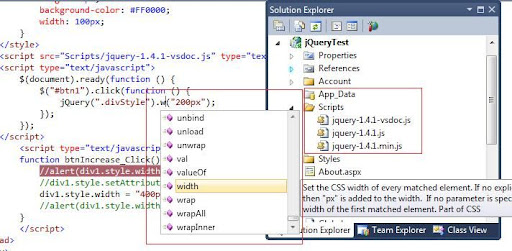
I am from the Visual studio environement and I would like to be in it.So I obviously look for the VS intellisense support .And it is there if you use the vs specific version of jQuery.

jquery-1.4.1-vsdoc.js

In VS2010 if you create a new ASP.Net project you can find the jQuery library in the scripts folder.The above picture shows 3 js files for jQuery which does the same job.If you use jquery-1.4.1-vsdoc.js you will the the intellisense as shown in the image.


Don’t confuse with the $ symbol which is there in the jQuery like me.Its just a variable.You may use jQuery instead of $.See the js file if you want to change it to your name.

if you are non Visual Studio developer download the jQuery library from http://docs.jquery.com/Downloading_jQuery