Showing posts with label Windows Azure. Show all posts

Tuesday, April 9, 2019

Visual Studio Online / Azure DevOps load testing - On-premise agent service is not starting

This is a simple troubleshooting post related to VisualStudio Online or Azure DevOps load testing.
The load testing needs agent programs to be installed on multiple machines to generate load. We can use agents provided by Microsoft as well if our application is straight forward and accessible from Microsoft hosted agents.

If we are in Enterprise or in restricted environments, we may have application hosted internally and only accessible via domain joined machines or via other constraints. Then we need to run the agent program on premise.

Problem

The agent program is a windows services which we can see in services.msc console. Sometimes the agent service gets stopped and below error will show up when we try to restart.

---------------------------
Services
---------------------------
The VSTSLoadAgentService service on Local Computer started and then stopped. Some services stop automatically if they are not in use by other services or programs.
---------------------------
OK 
---------------------------

Solution

Since this Azure DevOps load testing tool is deprecated now and ending its life next year around this time, lets not go into the details why its not working. Lets see a hack.

As standard Microsoft solution which is as famous as machine restart, lets uninstall and install the agent program again and it will work.

Since the installation is by running below PowerShell scripts, it doesn't seems polluting registry and all.

Uninstalling agent

Uninstall command needs the agent name. If the name if unknown, first we need to get agents list. Example is as follows.

.ManageVSTSCloudLoadAgent.ps1 -TeamServicesAccountName https://<organization>.visualstudio.com -PATToken <PATToken> -AgentGroupName <group name> -GetAgents

to uninstall an agent follow the below command.

.ManageVSTSCloudLoadAgent.ps1 -TeamServicesAccountName https://<organization>.visualstudio.com -PATToken <PATToken> -DeleteAgent -AgentGroupName <group name> -AgentName <agent name>

Now install the agent again.

.ManageVSTSCloudLoadAgent.ps1 -TeamServicesAccountName https://<organization>.visualstudio.com -PATToken <PATToken> -ConfigureAgent -AgentGroupName <group name>

The ManageVSTSCloudLoadAgent.ps1 file can be downloaded from this location. The commands above has some parameters enclosed in '<' & '>' as placeholders. We need to use actual values there.

Tuesday, February 19, 2019

Azure @ Enterprise - What the *** is https://neu-breeziest-in.cloudapp.net/

The *** can be read as 'Url' or 'Uri'. Don't get confused with the * which is often used for replacement of 4 letter English words.

Background

It was late night debugging with Microsoft teams on a critical support ticket. Critical support ticket means there will be Microsoft team engaged 24x7 till the issue is resolved. Their support engineers keep on changing every 8 hours. To my understanding its costly but we are at enterprise where things happen differently as money doesn't seems a factor.

The issue was related to VSO(Visual Studio Online) driven VSTS load testing tool showing high number than the IIS web server logs.

After giving logs and long hours of waiting time , Microsoft came up with interesting discovery that our web application hosted in IIS which is under the load test is making lot of calls to the below URL. The calls are failing and due to making lot of connections the ports in web server is exhausted hence the issue?

https://neu-breeziest-in.cloudapp.net/

Come on Microsoft. The issue is the different.Numbers shown in IIS logs time-taken v/s the request time shown in the VSTS load testing result. Anything can happen in the web server, but as long as the VSTS tool can show matching time with IIS, we are good. Then we can start baseline performance test and optimizations.

What is actually https://neu-breeziest-in.cloudapp.net/

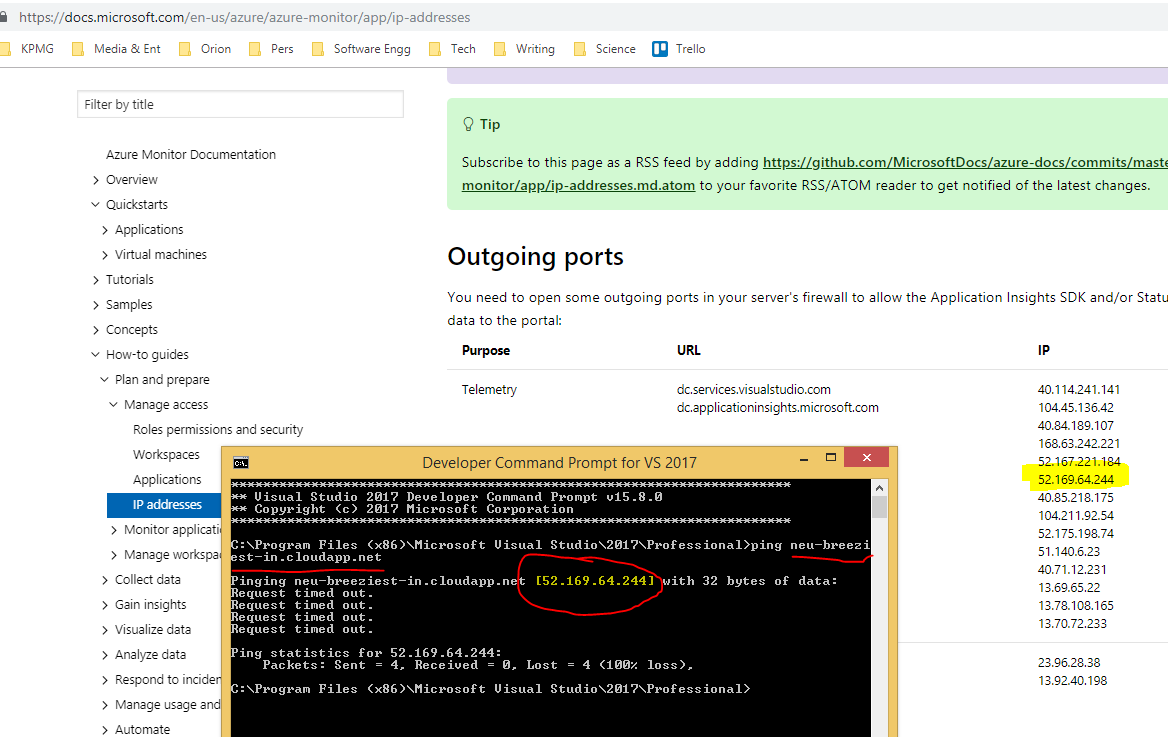
However we have to answer the question from Microsoft regardless its relevant in the situation. So just tried to ping the domain. Attached the screenshot.


Yes it is Azure AppInsight calls going out from the web application. It uses default configuration of AppInsight SDK when its installed via nuget package manager. It has sampling settings of 5 entries per second.

https://docs.microsoft.com/en-us/azure/azure-monitor/app/ip-addresses

We continued the tests after disabling AppInsights but still the problem persisted. The problem of VSO load tests showing high request execution time where IIS time-taken field shows very low. That issue is still going on even during the time of writing this post. More on that will be posted once the issue is settled.

Are there more of this kind

When we googled the URL we could see very less references. One below.
http://steveloughran.blogspot.com/2017/02/why-https-is-so-essential-and-auto.html

We further understood that the 'neu' in the below url is for North EU Azure data center.
https://neu-breeziest-in.cloudapp.net/

So there will be another urls pointing to other data centers. If you came across this kind of interesting  URLs to where outgoing communications is going from your application, keep in mind its the fun from Microsoft. 

The important recommendation is, we should be opening communication ports to specific IPs based on Azure documentation than entire cloudapp.net.

Tuesday, June 26, 2018

Azure @ Enterprise - Finding the usage of vNet and Subnet IPs

There is a common myth that networking is easy in Cloud environment. At least considering Azure ,its is not true. If we are in Enterprise and want to implement security at the networking level we have to deal with vNets, subnets and their associated rule mechanisms such as NSG and much more. If it is a small deployment, there will be less confusion about vNet and subnets inside that and how many IPs used and free etc...Even re-balancing subnets even easy.

But that may not be the situation in an Enterprise where so many systems or departments share one subscription or same networking infrastructure. Things may often go out of control and will end up in situation where there are no more IPs or subnets for new applications.

The first challenge is to identify the usage of current vNets and Subnets inside them. We can get the details from Azure portal but its difficult if we want to consolidate to one view to take actions.

Below is a simple script to list down what are the subnets inside a particular vNet and how many IPs are possible and how many are used

Get-AzureRmVirtualNetwork -Name <Name of vNet> -ResourceGroupName <Name of vNet's RG > `
| Get-AzureRmVirtualNetworkSubnetConfig `
| Sort -Property Name `
| Select -Property Name, `
                   AddressPrefix, `
                   @{Name='Available IPs';Expression={[Math]::Pow(2,32-$_.AddressPrefix.split('/')[1])}}, `
                   @{Name='Used IPs';Expression = {$_.IpConfigurations.Count}}

Please note it shows the possible IPs not displayed as an integer instead as CIDR notation. If we are familiar to networking, we can easily understand how many IPs are available excluding the reserved IPs in Azure, what is the start IP and end IP etc... There are lot of hosted tools available to interpret the CIDR notation.

Once we knew there are issues such as vNets are fragmented, we have to think about solutions. We can easily suggest to change the policy to allot a vNet per department or system or application. There are trade offs in both the approaches.  If we allocate big vNet to a department and they don't have enough applications, all those will be unused. Also all departments need experts to manage the networks. The decision has to be made case by case.

Happy Networking...

Tuesday, May 1, 2018

Azure @ Enterprise - Finding Subnet of HDICluster via PowerShell

Enterprise love putting resources into virtual network(vNet) thinking that, it brings certain high level of free security via isolation. HDInsight clusters can also be put into vNet. What to do if we have a HDICluster which is added to Subnet earlier and we don't know the Subnet name now?

Silly question. Isn't it? Just go to portal and see the cluster properties. That is what below MSDN article says.
https://docs.microsoft.com/en-us/azure/hdinsight/hdinsight-administer-use-portal-linux#list-and-show-clusters

Unfortunately our corporate subscription is only showing vNet name in the properties not Subnet. So how to get the Subnet name?

Finding Subnet of HDICluster

Powershell help us here. Below goes the script

$hdiClusterName = "POC001Joy"
$hdiCluster = (Get-AzureRmHDInsightCluster -clustername $hdiClusterName)
$resourceProperties =(Get-AzureRmResource -ResourceId (Get-AzureRmHDInsightCluster -clustername $hdiClusterName).Id).properties
$resourceProperties.computeProfile.roles[0].virtualNetworkProfile.subnet

It simply gets the object of HDInsight resource and navigate to the required property. The object model is little confusing but its there.

The above PowerShell script can be directly entered into Azure Portal or run after logging into Azure from PowerShell window / ISE.

An issue has been added to the MSDN documentation article related to this missing subnet name.

Enjoy Scripting...

Tuesday, March 6, 2018

Azure @ Enterprise - Limits on AppServices

AppService mechanism allows free tier to host Azure WebApps. Though this has 2 min execution timeout, it is a good place to host web sites.If we ask is this enterprise friendly, we will end up in different answers. It has enterprise friendly mechanism called AppServiceEnvironment to host applications in isolated environment ie an environment which is not open to public. Enterprise can host its internal services in it.

Though it says technically we can host any .Net application, it has good number of limits. For example if we have legacy application which uses any COM component, it cannot be used in AppService. This post is a journey towards such a limit

Puppeteer

It is a browser specifically Chrome automation framework in NodeJS. It helps to start headless browser instance and control it via JavaScript.  It needs a separate post to explain about Puppeteer. Ideally if we host the code in Azure NodeJS WebApp, it should work.

But fails due to unavailability of of some APIs in WebApp.

Details on WebAPI limits 

Below goes the error message
Error: spawn UNKNOWN
    at _errnoException (util.js:1022:11)
    at ChildProcess.spawn (internal/child_process.js:323:11)
    at Object.exports.spawn (child_process.js:502:9)
    at Function.launch (D:\home\site\wwwroot\node_modules\puppeteer\lib\Launcher.js:81:40)
    at Function.launch (D:\home\site\wwwroot\node_modules\puppeteer\lib\Puppeteer.js:25:21)
    at Server.<anonymous> (D:\home\site\wwwroot\server.js:14:39)
    at emitTwo (events.js:126:13)
    at Server.emit (events.js:214:7)
    at parserOnIncoming (_http_server.js:602:12)
    at HTTPParser.parserOnHeadersComplete (_http_common.js:116:23) code: 'UNKNOWN', errno: 'UNKNOWN', syscall: 'spawn' }
started server.js

How to reach to a conclusion that Puppeteer not supported in Azure WebApp? Lets look at the below issue logged in their GitHub project


This will take us to the Azure Functions page which says Windows based Azure Functions don't support headless browsers? Really are there windows based functions and Linux based functions?

Unfortunately yes. The Below link explains the same.

This again takes us to the kudu page where the limit is documented.
https://github.com/projectkudu/kudu/wiki/Azure-Web-App-sandbox#win32ksys-user32gdi32-restrictions

Moral of the story. Read the docs and understand what it really means.

Tuesday, October 17, 2017

Running multiple instances of AzCopy.exe command

AzCopy.exe is really an amazing tool for data transfer. But if we run multiple instances of AzCopy we may get below error.

AzCopy Command - AzCopy /Source:c:\temp\source /Dest:https://<storage account>.blob.core.windows.net/test /DestSAS:"<SAS>" /pattern:"" /s

An error occurred while reading the restart journal from "C:\Users\<user name>\AppData\Local\Microsoft\Azure\AzCopy". Detailed error: The process cannot access the file 'C:\Users\<user name>\AppData\Local\Microsoft\Azure\AzCopy\AzCopyCheckpoint.jnl' because it is being used by another process.

The error is pretty much clear. AzCopy keeps a journal file for resume functionality and if we don't specify the journal file location in command it uses default location and when second AzCopy starts it cannot read journal file.

The fix is to specify the location for .jnl. AzCopy Command goes as follows
AzCopy /Source:c:\temp\source /Dest:https://<storage account>.blob.core.windows.net/test /DestSAS:"<SAS>" /pattern:"" /s /z:<unique folder for azcopy command>

If we are running AzCopy from the command window it is easy to find out. But, if AzCopy is invoked from applications (PowerShell or .Net) in parallel it is difficult to find out because we might have disabled all the messages using /y. AzCopy has /v: switch which redirect the logs to a file. That will help to troubleshoot.

Tuesday, September 26, 2017

What is wasb(s) protocol for accessing Azure blob storage

WASB Protocol

I didn't get a chance to study wasb(s) protocol before I had to use it for HDInsight related tasks. So it was trial and error in the initial time. That lead me to take a decision to write detailed post on the wasb protocol since it helps us especially when we are Hadoop in Azure world.

But before writing, thought of googling for similar work. Why should there be one more post in the internet with same content? The results were interesting. Below are the links explaining what is wasbs protocol for accessing Azure storage blob.

https://blogs.msdn.microsoft.com/cindygross/2015/02/03/why-wasb-makes-hadoop-on-azure-so-very-cool/
https://blogs.msdn.microsoft.com/cindygross/2015/02/04/understanding-wasb-and-hadoop-storage-in-azure/

But these were not answering all the questions I had. So decided to add those here.

Can .Net access the wasbs:// url

.Net really don't need to access Azure blob storage via wasbs protocol. It can access via SDK using corresponding object model. Or it can access using https protocol.

References

Tuesday, August 29, 2017

Azure Application Insights - End to end correlation from Angular to internal WCF services

Azure AppInsights is one of the PaaS offering which can be easily configured to our application and leverage capabilities. And it really works without any changes in our application. But does it helps us more than any other tools? May be yes with default setup. We will really love it if we can get end to end correlation to understand what is happening in our system. Production debugging will be a breeze with correlation. 

This post is talking about how can we correlate activities happening in different tiers of our system and see it in one place. Lets take a scenario where an Angular application is interfacing with users, it calls ReST endpoints to talk to front end services and front end services communicate with other internal services. We can correlate operations originating from client side to related operations happening in the internal services.

Prerequisite

  • Basic knowledge about AngularJS 1.x
  • Knowledge about WCF services.
  • Knowledge about setting up AppInsights service

Sample setup

It is advised to download the sample from below location before reading further. Below goes the structure of sample.

AngularJS application just does one thing. Finding the area of circle if we give radius. For finding area, it calls a ReST web service.
It sends one event during startup. Another one during calculating the area ie when calling the FronEndWCFService. These are custom AppInsights events

FronEndWCFService is a simple WCF service hosted using webHttpBinding to get ReST end points. It calculates the area using the parameter radius. It don't know the value of pi. It dependent on InternalService to get the value of pi. During the calculation it sends some custom events/operations to AppInsights.

InternalService is hosted using net.pipe binding. It has one method which returns the value of Pi. It also sends some custom events to AppInsights.

The above 3 components are hosted inside IIS and enabled with AppInsights for default system events.

Running the sample

  • Make sure the 3 web applications are hosted in IIS.
    • The web application has to net.pipe binding to host InternalService.
    • Try to browse the service Urls.
  • Give the Url of InternalService in the web config of FrontEndWCFService so that it can call.
  • Obtain AppInsights instrumentation key by either creating a new instance in Azure or copy from existing AppInsights instance. Replace this key into web applications. Better use visual studio search and replace and the word to replace with key is {Your Key} .There are 3 files to get the instrumentation key. 
    • /AngularClient/Views/Shared/_Layout.cshtml
    • /FrontEndWCFService/ApplicationInsights.config
    • /InternalService/ApplicationInsights.config
  • Run the AngularClient application in browser.
    • During the application load, it will log "Custom init event from JS"
    • When we give the radius in the text box and click on button it will log "Custom event from JS before service call"

Viewing the AppInsights

It may take some time to get the entries reflected in the AppInsight in the Azure portal. It is better to go to the analytics portal of ApplicationInsight instance and view the results. In the analytics portal, the details can be seen as follows.

The entries highlighted in the name column are the custom events generated by different tiers in the system. Along with custom events the system will generate event if AppInsights collectors are attached to the processes. That can be done by connecting interceptors in the WCF or HttpModules in Web request pipelines.

Understanding correlation results

The operation_id column is the id which really correlate the operations. The id has to be unique and the parent_id can be any id used previously. It can be a tree of related events.

Don't get confused on the term 'events' used here. AppInsight can accept events, operations, traces etc...For easy reference term event is used.

Q&A

How does a web request from Angular gets correlated with servers

When we send web request from Angular or any client if we send http header "Request-Id" it will be treated as operation_id by server side, if we have the AppInsight request interceptors

Why the sample has 2 methods in Angular to write custom AppInsights

When the application is getting initialized, the appInsights object may not have the context ready.If so we have to put into queue. Once the context is initialized, we can use it to set operation_id. At that point the queue will be null.

Should I write any code for intercepting incoming web/WCF requests to read correlation data?

No we just need to use already available nuget packages and setup our web.config appropriately.

Should I write any code for intercepting the out going web/WCF requests to write correlation data?

No we just need to use already available nuget packages and setup our web.config appropriately.

References

https://docs.microsoft.com/en-us/azure/application-insights/application-insights-correlation
https://github.com/Azure/diagnostics-correlation
https://github.com/Microsoft/ApplicationInsights-JS
https://github.com/aspnet/Microsoft.AspNet.TelemetryCorrelation
https://mitra.computa.asia/article/msdn-modifying-and-filtering-telemetry-appinsights-javascript-sdk-telemetry-initializer

Tuesday, August 1, 2017

Architecting Azure limits - Azure Search

When we look at Azure evangelism, we could see that it is projected as a platform where we can scale to infinity. Some even go to a level where scale is magic. Just put the code in Azure and it scale automatically without we worrying about anything. But not all are true. When we design in Azure platform we are limited to scaling characteristics of each service. Often it demands us to design application or support tools to align with the nature of Azure service(s) we selected. To do it efficiently we should know the limits of Azure services. In other words our Azure architecture revolves around Azure limits.

Lets take Azure Search in this post. Please note that these limits might be changed in future by Azure platform. So it might not be accurate for long. 

Limits of Azure Search

Total services per subscription - 43 (Among this there are limits in different tiers eg: only 6 services in s3 tier)

Data storage

Maximum number of indexes in search service - 200 (S2 & S3 tiers)
Partitions per service - 12
Max partition size - 200GB (S3 tier)
The above 2 define the max index size  = 200GB*12
Maximum documents - 120 million/partition or 1.4 Billion / service

Query 

Replicas per service - 12( S1,S2 & S3)
Estimated queries per replica - 60/second 
The above limits total of 12*60 = 720 queries per second.
The latest limits can be found in the below link.
https://docs.microsoft.com/en-us/azure/azure-subscription-service-limits#search-limits

This clearly indicate that using one subscription we cannot build another google. May be Azure will increase the limits later. The advantage here is that the index is doing some kind of compression so the source data size doesn't directly translate to index size.

Azure search in SaaS / Multi-tenancy scenarios

If we really want isolation of tenant data, we should put one tenant data into one services. But there is limit of 6 in the higher levels. Next level of isolation is putting tenant data by search index. The search index gives us different URL to get better isolation. But in this approach, we are limited to 200 indexes / service. When we gets 201th tenant, we have to add one more service. That is either a change in the application or support tool specific to the limits of Azure search service. 

The last resort is to tag the documents by tenant. But that is less secure. More design guidelines related to multi-tenancy can be found below.

If we distribute the data in multiple indexes the query has to change since the out of box querying is towards an index. If we want to search one search term in multiple indexes, it translate to one http call to one index.

Azure search service has got really nice features which otherwise would be difficult to code ourselves. But as any other abstraction, it comes with limits. We should be careful when designing the application by not falling into the marketing materials and magic claims.

Is Azure search really pay per use?

Since it is offered as PaaS, we may assume that it is pay per use. But that is not true for Azure search. When we provision a search service it starts charging regardless of the usage(data stored and the search queries issued). More details on pricing can be found in the below link.


The advantage here is that we gets one more level of scaling inside the service which has pricing tier defined. The scaling inside a search service is called Search units.

Is Azure search auto scaling

Not fully automatic. When we create a search service there will be a default search unit. When we want to scale we have to increase it explicitly. This is another knowledge our application or support tool has to have in order to scale. Else human intervention is required when a scaling need arises such as more data getting added or more users are expected in busy season. More details below.


In simple sense when the data volume increased increase the partitions and when queries increase increase the replicas as the query limit is per replica.

Tuesday, October 6, 2015

Azure WebJobs - Internals and how tos

This is my attempt to index the features of Azure WebJobs in single place. Mainly for my reference.

What is Azure WebJobs

It is a feature of Windows Azure cloud more specifically WebApps to execute long running operations agnostic to platform / language. It can run executable files continuously, on demand or using a schedule. We can give .bat, .ps1, .exes and more as executable files to the Azure WebJob which it will execute as per the configuration. It uses an engine called kudu to achieve the functionality.

WebJobs does't know how to execute a job/function on events such as when a message arrives in Azure storage queue or a blob is uploaded. We need to write our own listening logic to these events in the executable script and execute corresponding actions on event.

If we are writing .Net exe as WebJob and want to listen to queue, blob etc..., the WebJobs SDK will help us to write it better. This is nothing but a collection of assemblies (.dll files) which our .Net project can refer.

What is Azure WebJobs SDK

.Net based framework which we can use to write triggerable functions. The SDK calls our functions on the trigger. It does many useful actions before and after our function execution. Some example of such actions are

  • Binds the values of queue or blob to the variables which our function has.
  • It mark the message as completed if our function didn't throw any exception. (Delete from the queue)
  • If the execution fails for 5(configurable) times it moves the message to poison queue.
The important thing to note here is This SDK is not coupled with Azure as it is just a listening mechanism and we can extend it to listen to our own custom events and invoke the handler functions.


http://azure.microsoft.com/blog/2014/10/25/announcing-the-1-0-0-rtm-of-microsoft-azure-webjobs-sdk/

How the .exe or script deployed in Azure machines

The WebJobs is a feature of Azure WebApps and it owns the job executable. Executable(s) are stored inside \\app_data\jobs\ folder separated by the type of the job and folder name as job name.

Using Azure WebJobs SDK outside Azure

Running outside of Azure and still listen to Azure

https://azure.microsoft.com/en-us/documentation/articles/websites-dotnet-webjobs-sdk/#workerrole

Listening to our custom events and invoking functions

There is support for invoking the functions manually using JobHost.Call() method. But there is no option for adding our own polling/listening logic. The polling needs to be done out side of SDK in our code and we can just call the function. 

Ideally if we are writing our own polling logic which is not polling the Azure properties, we don't need WebJobs SDK. But if we are migrating from another queue system to Azure queues, as part of step by step migration, we can first migrate the functions to SDK format and listen to old queue technology. Then in next phase we can start listen to Azure queue.

2 types of trigger

There is triggering mechanism on Azure WebJobs. Also there is different triggering mechanism on invoking a function written using WebJobs SDK.

Triggering Azure WebJobs

Even if we forget about WebJobs SDK this is still applicable as WebJobs is a feature of Azure WebApp. This feature is not tied with WebJobs SDK. It uses kudo engine to trigger Azure WebJobs. We can write Jobs in technologies other than .Net. I am really thankful to MSFT for opening up their eyes to see the whole world.

There are mainly 3 different type of invocation.
  • Continuous - Azure will make sure one instance of our WebJob exe or script is always running
  • OnDemand - Azure will run our exe whenever a request is received. Once its started it can run for long. Azure will kill it if its idle for configured time.
  • Run on Schdule - Azure will trigger execution of WebJob (.exe or supported script file) on the schedule. It uses Azure Scheduler to invoke the WebJob.

If we are writing .Net console exe application and use for WebJob task, the WebJob SDK comes into picture. We can even write our own logic in exe to monitor the queues and start corresponding function to process.

Triggering functions inside .Net exe written using WebJob SDK

If we use SDK, SDK provides options to just write functions which will be called by SDK on different triggers. SDK can listen to changes in Azure Storage Queue,Blobs etc... and based on the function registration, it will call our functions.

If the exe is not running, there is no way our function will get executed regardless of what ever SDK we use.

Azure WebJob SDK Magics

The WebJobs SDK does so many magic to make the life of developer easier so that they can concentrate on their business than the hosting and plumbing works.

Function based

Even if we don't know about class concept in OOP we can write web jobs as webjob SDK simply needs a function which will be executed on certain conditions.

Attribute based

We need to tell the SDK about us to do the magic and that is done via attributes. The queue, blob names to listen the object which is stored in the queue data all needs to be specified in attributes.

Serialization

The SDK serialize the queue data for us so that we simply gets the object via parameter when our function gets called.

Token replacement

We can use tokens inside the attributes and those will be automatically replaced by SDK. If we want to have a new blob for logging based on messageId property in our custom message object just use log\{messageId}. Then SDK will try to find if there is any messageId property in the message object and replace the token with actual value.

Storage Management

We just need to tell the blob name to the SDK via attributes. It will make sure the blob is there for us. 

Convention

It is really expecting 2 config entries. AzureWebJobsDashboard & AzureWebJobsStorage. These are used by SDK to connect to our Azure account.

Things to remember

Multiple function executions in WebJobs SDK

There are chances that WebJob SDK may call our functions multiple times for same queue item as part of retry and handling failures. So we need to make sure that even if the function execute twice it should not produce any damage.
Recommended approach would be to keep our own state for the queued item, update it when execution completed.Have a check in function beginning to make sure we are not redoing the operation.

Do not use static variables

When we register our functions with Azure WebJobs SDK, it invokes our functions in different threads. But its in same AppDomain. So its same as how ASP.Net handles the requests using different threads. If we use static variables there are chances that different threads will manipulate same value and we will end up in deep trouble.

Do not use .Net lock

As everybody knows the lock keyword works in process. It doesn't have any relevance in other process or other machine. In Azure it is easy to scale to multiple instances ie different machines. 

So short cuts such as lock, taking while migrating legacy code into WebJobs might not work well when scaled. The issues may pop up inconsistently so better avoid static variables and lock 

Don't write intermediate state to local files

This is the basics of any scalable background processing mechanism as there are chances that after failing the process may be picked by another machine. Then it will not resume from where it failed last time.

How tos - WebJobs SDK

https://azure.microsoft.com/en-us/documentation/articles/websites-dotnet-webjobs-sdk-storage-queues-how-to/
http://joymonscode.blogspot.com/2015/09/azure-webjobs-one-webjob-sdk-exe.html

Tuesday, September 15, 2015

Azure WebJobs - HTTP (409) Conflict causing Microsoft.WindowsAzure.Storage.StorageException

Below is another exception which can happen if we are using shared storage resources in WebJobs. HTTP 409 is not commonly implemented by web servers as its reserved for applications to convey specific conflicts in requests.

[07/14/2015 18:28:28 > 65f7a4: SYS INFO] Status changed to Initializing
[07/14/2015 18:28:32 > 65f7a4: SYS INFO] Run script 'AzureWebJob45.exe' with script host - 'WindowsScriptHost'
[07/14/2015 18:28:32 > 65f7a4: SYS INFO] Status changed to Running
[07/14/2015 18:28:33 > 65f7a4: ERR ]
[07/14/2015 18:28:33 > 65f7a4: ERR ] Unhandled Exception: Microsoft.WindowsAzure.Storage.StorageException: The remote server returned an error: (409) Conflict. ---> System.Net.WebException: The remote server returned an error: (409) Conflict.
[07/14/2015 18:28:33 > 65f7a4: ERR ]    at Microsoft.WindowsAzure.Storage.Shared.Protocol.HttpResponseParsers.ProcessExpectedStatusCodeNoException[T](HttpStatusCode expectedStatusCode, HttpStatusCode actualStatusCode, T retVal, StorageCommandBase`1 cmd, Exception ex)
[07/14/2015 18:28:33 > 65f7a4: ERR ]    at Microsoft.WindowsAzure.Storage.Blob.CloudBlobContainer.<CreateContainerImpl>b__27(RESTCommand`1 cmd, HttpWebResponse resp, Exception ex, OperationContext ctx)
[07/14/2015 18:28:33 > 65f7a4: ERR ]    at Microsoft.WindowsAzure.Storage.Core.Executor.Executor.EndGetResponse[T](IAsyncResult getResponseResult)
[07/14/2015 18:28:33 > 65f7a4: ERR ]    --- End of inner exception stack trace ---
[07/14/2015 18:28:33 > 65f7a4: ERR ]    at Microsoft.WindowsAzure.Storage.Core.Util.StorageAsyncResult`1.End()
[07/14/2015 18:28:33 > 65f7a4: ERR ]    at Microsoft.WindowsAzure.Storage.Blob.CloudBlobContainer.EndCreateIfNotExists(IAsyncResult asyncResult)
[07/14/2015 18:28:33 > 65f7a4: ERR ]    at Microsoft.WindowsAzure.Storage.Core.Util.AsyncExtensions.<>c__DisplayClass1`1.<CreateCallback>b__0(IAsyncResult ar)
[07/14/2015 18:28:33 > 65f7a4: ERR ] --- End of stack trace from previous location where exception was thrown ---
[07/14/2015 18:28:33 > 65f7a4: ERR ]    at System.Runtime.CompilerServices.TaskAwaiter.ThrowForNonSuccess(Task task)
[07/14/2015 18:28:33 > 65f7a4: ERR ]    at System.Runtime.CompilerServices.TaskAwaiter.HandleNonSuccessAndDebuggerNotification(Task task)
[07/14/2015 18:28:33 > 65f7a4: ERR ]    at Microsoft.Azure.WebJobs.Host.Executors.DynamicHostIdProvider.<TryInitializeIdAsync>d__10.MoveNext()
[07/14/2015 18:28:33 > 65f7a4: ERR ] --- End of stack trace from previous location where exception was thrown ---
[07/14/2015 18:28:33 > 65f7a4: ERR ]    at System.Runtime.CompilerServices.TaskAwaiter.ThrowForNonSuccess(Task task)
[07/14/2015 18:28:33 > 65f7a4: ERR ]    at System.Runtime.CompilerServices.TaskAwaiter.HandleNonSuccessAndDebuggerNotification(Task task)
[07/14/2015 18:28:33 > 65f7a4: ERR ]    at Microsoft.Azure.WebJobs.Host.Executors.DynamicHostIdProvider.<GetOrCreateHostIdAsync>d__0.MoveNext()
[07/14/2015 18:28:33 > 65f7a4: ERR ] --- End of stack trace from previous location where exception was thrown ---
[07/14/2015 18:28:33 > 65f7a4: ERR ]    at System.Runtime.CompilerServices.TaskAwaiter.ThrowForNonSuccess(Task task)
[07/14/2015 18:28:33 > 65f7a4: ERR ]    at System.Runtime.CompilerServices.TaskAwaiter.HandleNonSuccessAndDebuggerNotification(Task task)
[07/14/2015 18:28:33 > 65f7a4: ERR ]    at System.Runtime.CompilerServices.TaskAwaiter.ValidateEnd(Task task)
[07/14/2015 18:28:33 > 65f7a4: ERR ]    at Microsoft.Azure.WebJobs.Host.Executors.JobHostContext.<CreateAndLogHostStartedAsync>d__2.MoveNext()
[07/14/2015 18:28:33 > 65f7a4: ERR ] --- End of stack trace from previous location where exception was thrown ---
[07/14/2015 18:28:33 > 65f7a4: ERR ]    at System.Runtime.CompilerServices.TaskAwaiter.ThrowForNonSuccess(Task task)
[07/14/2015 18:28:33 > 65f7a4: ERR ]    at System.Runtime.CompilerServices.TaskAwaiter.HandleNonSuccessAndDebuggerNotification(Task task)
[07/14/2015 18:28:33 > 65f7a4: ERR ]    at Microsoft.Azure.WebJobs.JobHost.<CreateContextAndLogHostStartedAsync>d__f.MoveNext()
[07/14/2015 18:28:33 > 65f7a4: ERR ] --- End of stack trace from previous location where exception was thrown ---
[07/14/2015 18:28:33 > 65f7a4: ERR ]    at System.Runtime.CompilerServices.TaskAwaiter.ThrowForNonSuccess(Task task)
[07/14/2015 18:28:33 > 65f7a4: ERR ]    at System.Runtime.CompilerServices.TaskAwaiter.HandleNonSuccessAndDebuggerNotification(Task task)
[07/14/2015 18:28:33 > 65f7a4: ERR ]    at Microsoft.Azure.WebJobs.JobHost.<StartAsyncCore>d__0.MoveNext()
[07/14/2015 18:28:33 > 65f7a4: ERR ] --- End of stack trace from previous location where exception was thrown ---
[07/14/2015 18:28:33 > 65f7a4: ERR ]    at System.Runtime.CompilerServices.TaskAwaiter.ThrowForNonSuccess(Task task)
[07/14/2015 18:28:33 > 65f7a4: ERR ]    at System.Runtime.CompilerServices.TaskAwaiter.HandleNonSuccessAndDebuggerNotification(Task task)
[07/14/2015 18:28:33 > 65f7a4: ERR ]    at Microsoft.Azure.WebJobs.JobHost.Start()
[07/14/2015 18:28:33 > 65f7a4: ERR ]    at Microsoft.Azure.WebJobs.JobHost.RunAndBlock()
[07/14/2015 18:28:33 > 65f7a4: ERR ]    at AzureWebJob45.Program.Main()
[07/14/2015 18:28:33 > 65f7a4: SYS INFO] Status changed to Failed
[07/14/2015 18:28:33 > 65f7a4: SYS ERR ] Job failed due to exit code -532462766

To resolve this in WebJobs
  • Check for any console.logging statements which are supposed to be shared by different WebJob executions. Avoid if any.
  • Also make sure the blobs, tables and all are not shared between the executions. We can share common SQL tables as the concurrency is handled by SQL Server. This is true for other databases such as Oracle and all.

Tuesday, July 9, 2013

Error - Azure 2.0 installation via Web Installer - You have a newer version of NuGet installed that's incompatible with ASP.NET MVC 3 Tools Update

When

During installing Windows Azure SDK and Tools 2.0 for VS 2010 through Web Platform Installer 4.5. Also during installing some more products via Web Platform Installer.

Full Error

"You have a newer version of NuGet installed that's incompatible with ASP.NET MVC 3 Tools Update. To continue installing this product, please refer to http://go.microsoft.com/fwlink/?LinkId=266638."

If we click on the link it will redirect to ASP.Net/MVC site. No idea why there is a problem with nuget version and ASP.Net MVC 3 when installing Azure

Machine configuration / Environment

Windows 7 64bit
Visual Studio 2010 with Nuget installed via VS Extension manager.
Microsoft Web Platform Installer 4.5

Microsoft Status 

Resolved & Closed. There is a work around mentioned in MSFT connect which instructs to uninstall the nuget and install again.

My status

Some people confirmed that they are able to. But still it exists in my environment, even if I uninstall Nuget and try using Web Platform installer.

My resolution / workaround

Without using, Web platform installer directly install by downloading full installer from here.This is applicable to all the products which shows error in Web Platform Installer.

Monday, June 24, 2013

Service Bus for Windows Server - Getting started

Background

Recently we got a big web project which will be public facing unlike most of the other projects. The security becomes really important as its dealing with students and as always students are more brilliant in hacking than the professional hackers. So it is decided to isolate the modules even physically at the DB level itself. Wow...Yes it really means the database machines of each module can be switched off when that module is not in use.

The architecture is really nice. But that doesn't really solve all the problems. The modules share some data among them. Since the database or each module is different, some tables or columns needs to be replicated in to other databases, if corresponding module needs same data. It raised the old famous question about syncing.

How do we sync the data between modules as they are physically separate and even can be switched off individually?

I am not directly part of the project but whenever I am in reviews of the project, and asks about the syncing, I hear same answer. "It will be done by the service bus."

What is this service bus? Are you referring to the same Windows Azure Service bus? Are you referring to any back end database technology which will sync the data? Or is that any magic software which will read the developers mind and copy the data from selected table columns of one database and copy to another table in a different database? Almost every time there will be a big silence.

I had tried Windows Azure service bus in the early days of Azure and its mainly for integrating independent systems using messaging and of course we can leverage messaging for syncing data.

When we develop huge systems especially for web like FB or Google, we cannot develop it as single application. It must be split into different independent sub systems and they should work together to serve the customer needs. To achieve smooth integration and communication among these sub systems there should be a strong messaging mechanism. Service Bus for windows is such a strong messaging mechanism.

If we take a logging module which is an essential feature of big systems, it should be built as independent system. So that all the other modules such as front end web servers and back end processing servers can use this logging without much overheads. To get a better view of importance of subsystems, think in the other way where the logging is integrated in web server. In such a situation web server needs to prepare the html page response as it's primary duty after that, it needs to log. The logging taskcan be split into 2. Prepare the log message and write the log. Obviously the time to prepare the log message cannot be avoided as web server is the only one which knows what it did and what to log. But what about the time to write log. If the web server tries to open a file or DB connection and write itself, it will add some time to the overall turn around time of web request. Instead of that what about just publishing a log message to the service bus, so that it can be processed later by the logging sub system? To develop such a messaging system, first let us look at how to get a hands on experience with Service Bus for Windows server

What is ServiceBus

There are already so many definitions available. The general architecture term for these kind of messaging systems is  Enterprise Service Bus. There are commercial as well as open source implementations of ESB such as NServiceBus, Oracle ESB etc...Microsoft implemented the concept of ESB as 'Windows Azure Service Bus' and they released the same product to stand alone servers (can be an Azure VM or privately hosted) named 'Service Bus for Windows Server'. Are the Service Bus implementations for Azure and Windows Server same? No. You can check the comparison here.

Service Bus for Windows uses SQL Server for keeping the messages and other contextual information.

Installing Service Bus for Windows Server in Windows 7 development machine

Service Bus has 2 parts .One is the infrastructure and services and next is the APIs to interact with the Service Bus. The current version is 1.0. You may download both from 

This contains 3 files as of now. We are interested in 'ServiceBus.exe'. Install by double clicking. The installer uses web plat form installer so that it will install all the dependencies as well. You may avoid the above download by using web plat form installer directly for installing service bus.

Successful installation mostly asks for windows restart.After restarting you can see the below folder created.

<Install drive>:\Program Files\Service Bus\1.0 - This the path to service bus APIs dlls.

Also you can locate so many .sql files as well. Those are required to configure the SQL databases needed
for Service Bus operations.

Configuring Service Bus

Next task is configuring the service bus. For that either you can navigate via start menu and start "Service Bus Configuration" program or directly execute the exe located at 

<install drive>:\Program Files\Service Bus\1.0\Microsoft.ServiceBus.ConfigWizard.exe

This will ask for some basic things about Service Bus farm. Those mainly include your windows domain password, a security key etc...It will create the service bus farm and add the computer to that then create the service namespace etc...Once you configure the farm you can see a dialog which tells your computer is already in the farm along with a button for leaving the farm.

Better copy the details and keep in a text file .The details looks like below

Starting
Created and configured Service Bus farm management database.
Created and configured Service Bus gateway database.
Creating default container.
Microsoft.ServiceBus.Commands.SBFarmInfo

Processing completed
Validating input and configuration parameters.
Installing auto-generated certificate.
Granting 'Log on as Service' privilege to the run as account.
Windows Fabric configuration started.
Running Windows Fabric deployment.
Windows Fabric starting.
Service Bus configuration started.
Updating database.
Service Bus services starting.
Updating local registry.
Successfully added this host to the farm.
Microsoft.ServiceBus.Commands.SBFarmInfo

Processing completed
Name: ServiceBusDefaultNamespace
AddressingScheme: Path
CreatedTime: 6/21/2013 1:00:07 PM
IssuerName: ServiceBusDefaultNamespace
IssuerUri: ServiceBusDefaultNamespace
ManageUsers: <**username**>@<**domain**>
DnsEntry:
PrimarySymmetricKey: <**encryped key ending =**>
SecondarySymmetricKey:

Processing completed
Endpoint=sb://<**computer name**>.<**domain**>/ServiceBusDefaultNamespace;StsEndpoint=https://<**computer name**>.<**domain**>:9355/ServiceBusDefaultNamespace;RuntimePort=9354;ManagementPort=9355 

Processing completed


First Service Bus Application

The first application which we are going to see is about messaging in topics and subscriptions world. There are always 2 ways to have our first application. Obviously first one is create ourselves from scratch. Next download applications of others which can be sophisticated or their first application itself. I selected to take existing application from service bus samples project in codeplex. Downloaded the samples zip and started with ..\CSharp\GettingStarted\BrokeredMessaging\MessagingWithTopics on the assumption that I can change the sample easily to fit to the stand alone machine environment.

Error / Challenge - 1 - Terminologies

I would like to call it as challenge rather than error. The Service Bus introduces so many terminologies. Some of those are already existing and related to other technologies but some are specific to service bus.

STS - This is a general term which deals with the service which serves security tokens
Namespace - Groups the service bus features. eg: one namespace can have queues and topics.
Topic - This is service bus specific term.Refers to the category of messages. Messages will be send using this topic.
Subscription - This is a virtual queue create on topic. Copy of each message will be available in all subscriptions of topic.*
Message - The atomic communication packet in the Service Bus which is assiciated to topic.

Error / Challenge - 2 - Service Bus for windows still refer Windows Azure

Got this error when running the sample after changing the ServiceNamespace and IssuerName  

The token provider was unable to provide a security token while accessing 'https://servicebusdefaultnamespace-sb.accesscontrol.windows.net/WRAPv0.9/'. Token provider returned message: 'Error:Code:401:SubCode:T0:Detail:ACS50009:

Seems like there are still some references to Azure existing in the Service Bus code. When MSFT brought the same framework to standalone Windows Servers they might forgot this. 

I changed the code as follows.

Uri serviceUri = ServiceBusEnvironment.CreateServiceUri("sb", ServiceNamespace,"<full machinename>");


But this doesn't solve the issue .Still it refers Azure. The Uri create became "sb://servicebusdefaultnamespace.servicebus.windows.net/<full machine name>/"

Then I went to the extent of hard coding

Uri serviceUri = new Uri(@"sb://servicebusdefaultnamespace.<full machine name>/");


Now interesting error 
"uri provided servicebusdefaultnamespace.<full machine name> does not match Service Bus domain: servicebus.windows.net."

Oh its still in love with Azure. By default its pointing to windows azure namespace. 

As of my understanding there is no coding / API ways to redirect to our Service Bus installation. So relay on the config way. But before that I did a reflection of the Microsoft.ServiceBus.dll to find out the hard coding and I succed in by exploring the constructor of Microsoft.ServiceBus.RelayEnvironment.ConfigSettings class. There the name of config file is hardcoded to servicebus.config. Inspecting the ReadConfigSettings() method in same ConfigSerrings class give insight to the location where we need to put the servicebus.config file.

The file should be either at the application root folder or in the config folder of .Net framework. Obviously this was identified by others and posted in their blogs. My bad google skills. The location is %Windir%\Microsoft.NET\Framework[64]\v4.0.30319\Config

Error / Challenge - 3 - Authentication and token issues

You will get so many network related issues if you try to execute the sample further. Some are below.

"The token provider was unable to provide a security token while accessing 'https://servicebusdefaultnamespace-sb.<full machine name>/WRAPv0.9/'. Token provider returned message: 'The remote name could not be resolved: 'servicebusdefaultnamespace-sb.<full machine name>'.

Where from that <namespace>-sb came? No idea.

You can try giving the STS Url to the token provider. 

TokenProvider tokenProvider1 = 
                TokenProvider.CreateSharedSecretTokenProvider(IssuerName, IssuerKey,new Uri(@"https://<full machine name>:9355/ServiceBusDefaultNamespace/"));

But then you will get

"The token provider service was not avaliable when obtaining a token for 'https://<machine name:9355/ServiceBusDefaultNamespace/WRAPv0.9/"

What is this WRAP?

If you are not familiar, you can try with WindowsTokenProvider as follows
TokenProvider tokenProvider1 = 
                TokenProvider.CreateWindowsTokenProvider(new List<Uri>() { new Uri(@"https://<full machine name>:9355/ServiceBusDefaultNamespace") });
            
Which will end up as
"The token provider was unable to provide a security token while accessing 'https://<full machine name>:9355/ServiceBusDefaultNamespace/$STS/Windows/'. Token provider returned message: '<Error><Code>400</Code><Detail>Cannot resolve a namespace for scope: http://servicebusdefaultnamespace.<full machine name>/IssueTrackingTopic/"

All these issues / exceptions will be raising when the execute the below statement.

if (namespaceManager1.TopicExists("IssueTrackingTopic"))

So better follow the below way which I collected by googling.


string stsUri = string.Format("sb://{0}.{1}:{2}/", Environment.MachineName, domain,port);
string namespaceUri = string.Format("https://{0}.{1}:{2}/{3}/", machineName, domain,port, ServiceNamespace);
 
TokenProvider tokenProvider = TokenProvider.CreateWindowsTokenProvider(new List<Uri>() { new Uri(stsUri) });
NamespaceManager namespaceManager = new NamespaceManager(namespaceUri, tokenProvider);
            
            // Delete if exists
if (namespaceManager.TopicExists("IssueTrackingTopic"))
            {
                namespaceManager.DeleteTopic("IssueTrackingTopic");
            }


Now its working till the namespace manager checking for topic. But if you debug further it will fail at another point which is nothing but during message sending


                myTopicClient.Send(message);

Error message will be
"The token provider was unable to provide a security token while accessing 'https://<full machine name>:9355/$STS/Windows/'. Token provider returned message: '<Error><Code>400</Code><Detail>Cannot resolve a namespace for scope: http://servicebusdefaultnamespace.<full machine name>/IssueTrackingTopic"

This is because the address which we gave during MessagingFactory creation is wrong. 

Correct as below.

string messagingUri = string.Format("sb://{0}.{1}/{2}/", machineName, domain, ServiceNamespace);
MessagingFactory factory = MessagingFactory.Create(messagingUri, tokenProvider); 

During this long exercise, at a bad moment I though of turning off the network connectivity. From then I started getting another error message 


The token provider was unable to provide a security token while accessing 'https://<full machine name>:9355/$STS/Windows/'. Token provider returned message: '<Error><Code>401</Code><Detail>The security token service cannot translate sid 'S-1-5-*1-3**18*34*9-23***35**9-21*****38-8**0' associated to user '<domain>\<user name>'


This because I am using my company laptop and my login is in the company DNS (companydomain\username). This shows that the Service Bus needs constant connection to the domain controller as well.

Service Bus sample walk through

The modified sample can be downloaded from sky drive.
 

The main assembly reference needed for this application is Microsoft.ServiceBus. The location of Microsoft.ServiceBus.dll is as follows.

<Install drive>:\Program Files\Service Bus\1.0\Microsoft.ServiceBus.dll

As I told this is a modified version of ..\CSharp\GettingStarted\BrokeredMessaging\MessagingWithTopics sample which is available in codeplex. This basically has 2 exes.

Working

First one sender.exe, will create a 'Topic' in the Service Bus installed locally. Then add 2 Subscriptions  and send 3 messages. Wait for key stroke. Upon key stroke, it will delete the created topic along with messages. Which means you need to run the receiver.exe when sender is waiting for key stroke.

Second the receiver.exe listen for the messages using 2 subscriptions in the same topic. One subscription just reads the message and other read and delete messages. Messages are same. That's why if we run the receiver again, it will not receive the messages.

Both the exes can be found in ..\binaries folder

Sample Configuration

Main thing you need to give the proper service name space. The default is - ServiceBusDefaultNamespace.
Next is the Port number. The default is 9355.
The windows domain user account, I used is same as my login. So it will automatically take the credentials.If you are using different token provider you need to change the code. So it is advised to run the sample in the same Windows 7 machine where the service bus is configured

Also this sample doesn't cover the scenarios where the Service Bus is installed in other server machine and different clients accessing from different domains with different authentication mechanisms.

Trouble shooting and monitoring Service Bus

As you seen above, the environment is really hard to maintain. There may be situations where the message may disappear or vanishing of subscriptions or topics etc... So its always good to have a general service bus explorer application to monitor the health of the system. Luckily there are 2 tools available to explore the service bus and they are.

Visual Studio integrated service bus explorer
Service Bus explorer - Download

References

Monday, December 5, 2011

Successfully tried Windows Azure AppFabric Caching in Azure environment

You might have wondered why I am telling this as an achievement. It is meant to cache the data and what is there to say "Successfully tried". Yes.There are so many things to say about it even though there are so many articles which explain how to cache in a step by step manner with images. Roughly speaking it took me 3 days to test the caching in the real Azure hosted environment. Below are the issues we faced during the process.

Issue 1 : Wrong SDK version ie Azure SDK to Azure Guest OS mapping


Initially I was using Azure SDK 1.6 which is not supported in the Azure production servers. More details are explained here. Most of the time we were getting the DataCacheException with ErrorCode<ERRCA0017> which is nothing but RetryLater. Funny part is when we reverted to SDK 1.5 retry disappeared.

Issue 2 : Windows AppFabric v/s Azure AppFabric


Azure emulator don't have support to simulate Azure caching. So the idea was to use the Windows AppFabric cache which can be installed in our local machines and later change the configuration to use the actual Azure AppFabric .After configuring Windows AppFabric using Windows PowerShell and all we were able to connect to the local cache .But after hosting the same code to Azure, we came to know that there are some differences between Windows Server AppFabric and the Azure AppFabric. It made us rewrite our AppFabricCacheProvider class based on the Azure AppFabric caching API reference. The exceptions we got at this stage was NotSupportedException.
Below are some links which explains how to setup Windows Server AppFabric caching.
http://msdn.microsoft.com/en-us/library/ff637746.aspx
http://www.wadewegner.com/2010/08/getting-started-with-windows-server-appfabric-cache/

Issue 3 : Network issues to access caching clusters in your development environment


We tried to access the real Azure AppFabric cache from out development environment. The Azure caching machine was not reachable from our normal company network. My be some firewalls were in middle. We had resolved it using another external internet connection which don't have any restriction.
If you happen to face this issue, you will get exception which says it cannot access some particular IPAddress which you can easily verify by pinging or tracert

Issue 4 : AppFabric dlls to be included in the Azure publish package.


After 2 days we were able to successfully implement the caching framework and access Azure AppFabric cache from services in our development environment.Everybody became happy for some moment .But we lost the mood when we hosted our services in the Azure. Since we haven't implemented any logging framework it was really difficult for us to get the exact exception. The exception was mainly happening on the line .


DataCacheFactoryConfiguration = new DataCacheFactoryConfiguration("clientName");


Finally we were able to track that down to assembly not found issues ie "The system cannot find the file specified. Could not load file or assembly 'Microsoft.WindowsFabric.Common, Version=1.0.0.0" . Yes we were missing some dlls in the package which we uploaded to Azure. It was from the C:\Program Files\Windows Azure AppFabric SDK\V1.5\Assemblies\NET4.0\Cache folder.We added all the dlls, present in this location to our package and it stated working. Better refer these dlls in your web project / service host project so that these will be packaged automatically.

Microsoft.Web.DistributedCache.dll
Microsoft.WindowsFabric.Common.dll
Microsoft.WindowsFabric.Data.Common.dll

The question remains ,how it worked in the emulator? Answer was simple. All these dlls were in our GAC. in Azure machines, GAC don't have these dlls.

There were so many minor issues like the letter casing of <dataCacheClients>,should we use the <dataCacheClients> or <dataCacheClient> section in the config, port 22233 was blocked etc...Below are some links if you are struggling to get Azure AppFabric Caching working

http://blog.bareweb.eu/2011/07/hello-world-with-azure-appfabric-caching-service-v1-0/
Exercise 3: Creating a Reusable and Extensible Caching Layer
Appendix 1: Table of Error Code Strings