Showing posts with label Web Development. Show all posts

Tuesday, January 24, 2023

Freemium Mock Web APIs for testing - Beeceptor

Often when we develop we will end up in situations where we need to simulate the real scenario by mocking the dependencies. It may be databases, Web APIs, or container images. There was a separate post on mock container images that echo HTTP. 

Problem

There are scenarios where we may not be having the opportunity to run containers to expose the mock Web APIs. This post about handling such scenarios

Solutions

There are many solutions to address this.

Hosting Web API from our machine

We don't need to code from scratch. Just search in GitHub and we can get many. Simply clone and run.

Using internet-hosted mock Web APIs

This works if our development environment has access to the internet. There are paid as well as freemium services. One such freemium service is Beeceptor. 

Please note this post is not sponsored by Beeceptor also the author is not at all affiliated to the service. Their service saved some time today hence this post.

Some features are below
  • The free tier gives 50 requests per day. 
  • Integrated with Google and GitHub accounts. No need to remember one more password.
  • Support delay even in the free tier.
  • Support custom response headers and status codes.
  • The HTTP responses can be configured quickly using the 'Mocking Rules' editor.

This is not a sophisticated mock Web API provider but it helps us to get quick mocks

Happy mocking...

Tuesday, May 17, 2022

CORS with Windows Authentication in IIS

This post is about web security. How to enable CORS when the producer uses Windows authentication¹. The primary technology stack used here is Microsoft.Net.

Background

The web works on WebAPIs. WebAPIs are the entry points to consume services produced by producers. Often, the WebAPIs are exposed to the web applications published by the same producer. Say, Yahoo Finance is exposing WebAPIs to retrieve financial data. If they don't protect the API, anyone can build a web application by consuming the Yahoo Finance API. They can place Google ads for monetization.

To prevent that, browsers have a mechanism. That will allow sites to call APIs having the same domain name. But, there will be genuine situations to allow cross-domain access. An application needs to call a WeatherAPI exposed in a different domain name..

CORS

Cross-Origin Resource Sharing comes to help when we want to control who can call our APIs. It is based on headers. We can summarize as follows
  1. The browser asks the producer whether it allows the current application's domain name to call API
    1. It's called preflight using the HTTP OPTIONS verb.
  2. The producer responds to the browser with whether it allows calls from the current domain name. Including what HTTP verbs are supported. 
Read the Mozilla docs² for a better understanding.

If the producer is using ASP.Net Framework technology, they can specify who can access it by having the below web.config entries.

<system.webServer>
    <httpProtocol>
      <customHeaders>
        <clear />
        <add name="Access-Control-Allow-Origin" value="https://consumer.com" />
        <add name="Access-Control-Allow-Methods" value="GET,POST,OPTIONS" />
        <add name="Access-Control-Allow-Headers" value="*" />
        <add name="Access-Control-Allow-Credentials" value="true" />
      </customHeaders>
    </httpProtocol>  
 
Hope the above code snippet is self-explanatory. It allows the https://consumer.com domain to access the producer's APIs only using HTTP GET, and POST verbs. It is possible as the producer is sending these custom headers whenever any call is made to it.

The same can be done using C# or VB.Net code as well.

Problem

This works great for most of the scenarios other than Windows authentication. When the producer is using Windows Authentication, things go wrong. The reason is preflight request doesn't have any authentication information. The producer will fail the preflight request. Causing the browser to cancel any further requests.

Solution

The Windows authentication is normally enabled at the webserver level. If it's ASP.Net on .Net Framework, there will be web.config. Follow the below steps
  • The preflight requests should be anonymous
  • To do that have <authorization> tag as follows 
<authorization>
      <allow verbs="OPTIONS" users="*"/>
      <deny users="?" />
</authorization>

Now anyone who is hitting the OPTIONS endpoint will have the custom headers even if the authentication is windows.

How to do this in ASP.Net Core?

The ASP.Net Core model uses middleware technology to achieve the CORS headers³. The <authorization> tag mechanism is achieved by Authorization middleware. 

References

Tuesday, January 25, 2022

PowerShell to list all the IIS Web Applications using IISAdministration

When it comes to automating Internet Information Services (IIS) Web server there are multiple choices. One with Appcmd command and the other with PowerShell. In PowerShell itself, there are different modules to manage. The WebAdministration is the legacy and IISAdministration is modern. More on that was written in a previous post about "Change recycle settings of IIS AppPools using PowerShell & appcmd.exe"

Let us get into the business of this post

Problem

There is an existing system that uses the on-premises model for hosting web applications. Windows Server 2019 + IIS is the hosting model. As the first step to the cloud, these servers were lifted and shifted to the Azure. Now to reduce the cost and time to market of course to improve the developer agility the IaaS model needs to be upgraded to containers. AKS is the preferred choice as it is in Azure. As part of the analysis and capacity planning the # of containers needs to be evaluated from the existing IIS-based deployment model.  ie count the web applications in IIS.

So this post is about listing all the web applications inside IIS web server that are spread across different IIS websites.

Solution

Since the last post about IIS automation was using WebAdministration, I thought of going with IISAdministration this time as it's the latest to replace the former.

Hope the code is self-explanatory. If the above embedding is not working please check the GitHub file.

Enjoy scripting...

Tuesday, April 14, 2020

Change recycle settings of IIS AppPools using PowerShell & appcmd.exe

Background

The app pool recycle is a hack to hide our or .Net's poor memory management. When we refer poor .Net memory management, it means the LOH fragmentation which was not compacted in earlier versions of .Net CLR. Hence we need to set up the app pool recycle in IIS.

Changing or 'recycling' setting of an app pool in one server one time is easy and can be manual. But what if there are many app pools, servers and had to do multiple times. Obviously, it should be automated. This post is about some snippets about automating the same using some of the provided mechanisms.

AppCmd

This is a command which we can use to manipulate IIS programmatically from IIS 7 onwards. Location of appcmd.exe is [install drive]:\Windows\System32\inetsrv\appcmd.exe. Direct commands to manipulate IIS entities are very easy but chaining the commands is a little different. If we are from PowerShell background, we feel it very odd. It outputs XML and subsequent commands to read XML as input.

Below is a mix of PowerShell and AppCmd.exe to disable periodic recycling of app pools.

Import-Module WebAdministration
$pools= dir IIS:\AppPools
$pools | Foreach-Object{
    $appPoolName=$_.name
    $cmd="C:\Windows\System32\inetsrv\appcmd.exe set apppool /apppool.name: '$appPoolName' /-recycling.periodicRestart.schedule"
    Invoke-expression $cmd
}

As clear in the above snippet, the PowerShell iterates thought the AppPool and invoke the AppCmd.exe for each app pool with its name
Another drawback of AppCmd.exe is that we cannot manage remote machines using this command only. We need to combine with PowerShell to execute this command in the remote machine.

PowerShell

There are 2 PowerShell modules.

WebAdministration

  • This mainly gives a provider which we can query just like file system
  • Microsoft considers WebAdministration PowerShell module legacy and not bringing to Nano server. Clearly means someday WebAdministration will be discontinued from support.

IISAdministration


PowerShell Function to set Recycling

Though WebAdministration is considered legacy, this post uses that to achieve the job of managing AppPool recycling.

function Set-ApplicationPoolRecycleTimes {     
    param ([string]$ApplicationPoolName, [string[]]$RestartTimes)
    Import-Module WebAdministration       
    Clear-ItemProperty IIS:\AppPools\$ApplicationPoolName -Name Recycling.periodicRestart.schedule       
    foreach( $restartTime in $RestartTimes)
    {
        New-ItemProperty -Path "IIS:\AppPools\$ApplicationPoolName" -Name Recycling.periodicRestart.schedule -Value @{value=$restartTime}           
    }
}

It has 2 parameters. First it clears the existing settings and then applies the new settings.Below is the method to call function to clear recycling. Just skip the second parameter $RestartTimes to clear the property.

Set-ApplicationPoolRecycleTimes -ApplicationPoolName 'DefaultAppPool'

The code below shows how to call the function to set new times. The parameters can be given just comma-separated or as and string array.

Set-ApplicationPoolRecycleTimes -ApplicationPoolName "DefaultAppPool" -RestartTimes "1:00","2:00","14:00"

Please note that the times expected are in 24-hr clock format. If we use the AM or PM what the IIS manager shows, this script will error with cast exception.

Let's see how we can manage all the app pools in a machine.

Applying to all the pools

Just loop all the app pools and call the function.

$pools= dir IIS:\AppPools
#$pools | ForEach-Object { Set-ApplicationPoolRecycleTimes($_.name) }

PowerShell has Invoke-Command to run scripts in remote machines. The same method can be used to control IIS in remote machines.

References

https://www.habaneroconsulting.com/stories/insights/2013/set-the-specific-times-to-recycle-an-application-pool-with-powershell
https://forums.iis.net/t/1229302.aspx

Tuesday, March 31, 2020

Mind map - front end browser application development

Another mind map? Yes, that too about the web development. Not sure this will help anyone as there are a lot of mind maps if we google for frontend development mind map or mind map of front end browser app development. But most of those are not up to our convenience. For example with the advent of Webpack, we may safely avoid older module systems and task runners. 
In short, need is my own mind map which may not be useful to others as the existing mind maps are not satisfying me.

PlantUML based coded mind map on front end browser development

Below is the PlantUML based coded mind map on front end web browser development.

Please click on the image to get clickable svg format

Other mind maps

Tuesday, November 19, 2019

Azure @ Enterprise - Microsoft Identity Platform - Minimal configurations to enable AAD authentication in AppService WebApp

Welcome to Azure @ Enterprise series. In this post, we are going to discuss something about the Microsoft Identity Platform formerly known as Azure Active Directory Developer Platform or AAD v1. We will be seeing how to enable authentication to an Azure AppService Webapp using the Microsoft Identity Platform. There are many tutorials available on the internet to do the same thing. So why one more?

This tutorial is to demonstrate the procedure with minimal configuration settings. Please note that this is not the quickest. For the quickest, please refer to the link provided which uses the express configuration mode.

https://microsoft.github.io/AzureTipsAndTricks/blog/tip184.html

The problem with express settings is that we cannot understand what is going on behind the scene. Sometimes we don't get predictable results when we want to replicate in different environments.

Prerequisite

It would be really great if we have a basic understanding of some concepts to understand better.

- Basic knowledge about web applications and authentication
- Basic knowledge about Azure Web Apps and hosting to Azure
- Basic knowledge about Azure Active directory

Phase 1 - Create and host web application to Azure web app

The aim of this phase is clear as just hosting a new web application into the Azure web app. After hosting, the web application is expected to be accessible anonymously through the internet by just using its URL. Anonymous means without any login mechanism. We will be using Microsoft Visual Studio 2019 to complete the steps in this phase. It can create and host web applications to Azure as App Service Web App.

This phase has multiple steps. The first step open Visual Studio 2019, then creates a new web project. Do some changes to distinguish our application. Test by pressing the run button. It will start a development web server and open the browser pointing to the development server.

Once we feel comfortable with the application, we can publish it to Azure App Service Web App. 
  1. Right-click on the project
  2. Select publish
  3. It will open
Note the URL of the web app which is ending with .azurewebsites.net. Let's take the application URL as https://aadapp.azurewebsites.net/

Phase 2 - Create an Azure AD App Registration

The second phase is to create an App Registration in Azure Active directory. 

The first step here is to go to the Azure portal then to Active directory and click 'App registration' to reach the app registrations page. Create new app registration. Give the name. It is just a display name. For the time being, select the first option in the "Supported account types" radio button group. This will not help if we need to get users from other AAD tenants logged into our application. The next input which is Redirect URI labeled optional is the tricky one. For the use case in this post, we need to fill the URI. The URL is our Azure App Service Web app URI suffixed with '.auth/login/aad/callback'

In this case, the URI would be

Now its time to click the 'Register' button which creates app registration.

The next step is to clean up unwanted settings in App Registrations so that it has minimal settings. Go to 'Authentication'. Click on the 'Try out the new experience' button. This blade would someday get rid of the old experience so better to try the new experience at the earliest. We need the 'Redirect URI'. Logout URL we can skip for now. Make sure the ID Token is checked in the Implicit grant section. No need to treat as a public client as we are not using any of the flows listed. Supported account types section has the value which allows authentication of accounts in one AAD tenant. 

Now lets clean up the Certificates and secrets blade. Since this App registration is not going to be used for getting tokens it doesn't require any secrets.
Next blade called 'API permissions' will have some permissions filled up by default. For our use case that is not required. So let us remove it.
'Expose as API' blade has scopes and authorized client applications. Those are not required for our use case. Simply clean those too in case something there.
The other blades 'Owners', 'Roles and administrators' don't have anything with the auth flow. Manifest has the JSON representation of the resource. Nothing to do there.

Phase 3 - Enable Web App to authenticate via App Registration

Previous phases created a publicly accessible web application and app registration. Apart from Redirect URI, there is no relation between those 2 things. The web application still works anonymously. This phase is to connect the web application to the app registration so that it will force the users to get authenticated via Azure AD.

The first step is to go to the 'Authentication / Authorization' blade. Then turn the App Service Authentication on.
Now select the action to take when a request is not authenticated. It is 'Log in with Azure Active Directory'.
The next step is to configure the Active Directory provider. Click on the Activity Directory option to see the settings. Select the Advanced mode as we are all advanced users. Enter the App registration id into the 'Client ID' field. Isser Url is essential and it can be crafted by prefixing https://login.microsoftonline.com/ to the Azure Active Directory Tenant Id.  It will end up something like below.

https://login.microsoftonline.com/ea1945af-c42b-4482-89e8-abf25ba86249

Press 'OK' then click on 'Save' to save settings to the web application.

Testing

Make sure the cache is cleared in case it is the same browser instance that opened the page earlier. Better open an incognito window and browse the App Service Web App URL. It will redirect to the Azure AD login page. Enter the credentials of a user who is in the same Active Directory Tenant. Remember the setting we gave while creating App registration. If the credentials are right, the browser will redirect back to our Azure App Service Web application URL and shows the page.

More testing

How do we ensure the login really happened? Is it serving the page anonymously even after login? We can see the logged-in user details using a magic URL.
https://aadapp.azurewebsites.net/.auth/me

Video

Step by step video can be found on youtube.

References & Troubleshooting

Details about the openid configuration.
https://login.microsoftonline.com/{AAD Id}/v2.0/.well-known/openid-configuration

https://login.microsoftonline.com/common/v2.0/.well-known/openid-configuration

Tuesday, June 18, 2019

PlantUML - Code, Generate and Publish Mind-maps from GitPages

Introduction

This post mainly aims to provide an idea how we can use PlantUML to create mind maps and host them from GitPages without spending anything. It obviously need a computing device with browser and internet connection.

PlantUML

No need to have introduction again, as there were posts written earlier on the same. Just to summarize
  • It is a textual representation of diagrams.
  • Helps to version and compare changes applied.
  • Can render in different visual formats from the same textual definitions.

Mind maps

It is diagramming model where information about one concept is represented in relation with other related topics. More on Wiki.

Coding Mind maps

The setup explained in previous post is enough for coding mind maps. PlantUML supports mind maps out of the box in latest versions as beta.

Rendering diagram

Though the ideal way to publish into web is HTML, there seems some issues in generating HTML files out of the box. So better get it into image formats and embed into HTML using <img> tag. 

If we are using our machines during development, it is easy to have control over the environment and install GraphViz and Java runtime needed for PlantUML. Now a days everybody uses continuous integration and delivery method. The CI/CD environments with full control mostly require fees and here we are trying to achieve without any cost. Let is see how to get the diagrams published in free?

One way is to use containers where entire ecosystem would be present and use it in CI/CD environment. Another way which we are going to see is via proxy service of PlantUML

Using the proxy service is very simple. The official www.plantuml.com site has a service hosted in below url

http://www.plantuml.com/plantuml/proxy?src=<accessible URL to the plantuml file>

This src query string pair accepts a source url where the PlantUML code file is present and returns converted image representation.

eg:The below URL gives the png file corresponds to the PlantUML file located at the path mentioned in src query string parameter
http://www.plantuml.com/plantuml/proxy?src=https://raw.githubusercontent.com/mind-maps/software/master/debugging/before-debugging-others-problem.puml

More details on controlling the behavior can be found in this post.

The moment we got the png back via an URL, we can easily publish using html files. No need to have CI/CD systems and dealing with containers or build environments.

Publishing

GitPages provides free sub domain based web site hosting free and we can host mind maps directly from the GitHub repository. Using the markdown, we can easily convert the above mentioned url into an link <a> or <img> tag.

eg:A link in markdown file (.md) can be denoted as below

[Debugging](http://www.plantuml.com/plantuml/proxy?cache=no&src=https://raw.githubusercontent.com/mind-maps/software/master/debugging/before-debugging-others-problem.puml)

Sample repo

Source repo which hosts the puml files & hosting .md files - https://github.com/mind-maps/software
Sub domain & URL based web site which GitPages gives for repo- https://mind-maps.github.io/software/

The .md files gets automatically converted into HTML and served. If there is index.md it would be taken as default when we didn't mention anything in the url. GitPages internally uses Jekyll and customization can be done. One such customization in the above repo is in below URL. Since Jekyll and customization is not in the scope of this post, please google for more details.

Below are not essential but just to give complete picture
Sub domain based organization URL - https://mind-maps.github.io/
Repo of organization web site - https://github.com/mind-maps/mind-maps.github.io

Enjoy documenting...

Tuesday, May 28, 2019

IIS Logging time-taken = server request processing time + NETWORK TIME

When we do application development and hosting ourselves its an easy life. If something we miss, our nights and weekends are simply gone. A different kind of easy life. But what if we develop and someone else host and maintain? It adds additional efforts to bring both the parties into same page regarding root cause of errors, performance etc...

Most of the enterprise world works as 2 separate teams for development and hosting. One of the issue  in syncing both operations and development regarding performance often arise is around the IIS logs. IIS logs shows 5 digits or 6 digits values in time-taken field. It may simply reach to development as application issue. Most of the administrators know time-taken field includes the network time to move the payloads along with execution time. But still there are admins who just pass over those issues to development without thinking what is going on the network devices, ActiveDirectory, security gateways and what not in the route.

If its clear and not expecting any of these type of issues from operation admins, please feel free to stop reading further on this post. This post is mainly intended to developers and admins who needs to know little in depth about the time-taken field and how to find the application processing time from the time-taken field.

Oh yes its simply to look at the IIS Failed Request tracing(FREB here onwards). Again feel free to stop reading as its simple as looking at FREB logs to find the network time separated from application execution time.

The below is for people who wants to reproduce a network delay and see what FREB shows. Truly for hands on enthusiasts.

Sample server application

The network delay mainly happens in below situations
  • If the payload is really large
  • Security gateways placed between the user and servers to prevent attack takes extra time in inspecting packets or if the bandwidth is really slow. 
  • If the Active Directory or other identity providers which are placed before the application is taking time.
Most of the small responses would be cached so IIS shows proper time in the time-taken field.

The test application which we are going to use has a simple web api as below.
http://localhost/TimeTakenTestServer/api/files/2

It gives random 2 MB text data back. The last number in the URL shows how many MBs of text to be returned. The WebAPI caches the random string so that subsequent requests don't need the time to generate the data. Its just reading from cache.

How to create such a request is out of this post. But for those who are interested can check out a sample in below repo location.

<Code location>

Simulate delay

Delay can be simulated in different ways.

Chrome F12 network profile

Chrome dev tools has option to introduce artificial delays. It can be used to create delays. But please note that this will not work for smaller payloads as it gets buffered in HTTP driver or IIS levels.

.Net app to slow reads using TCP API

If we use TCP classes in .Net, we can simulate delays. If we use higher level APIs, either they may not have the option to put delays or they might be reading from network level buffers.

Chrome F12 tools to demo the problem

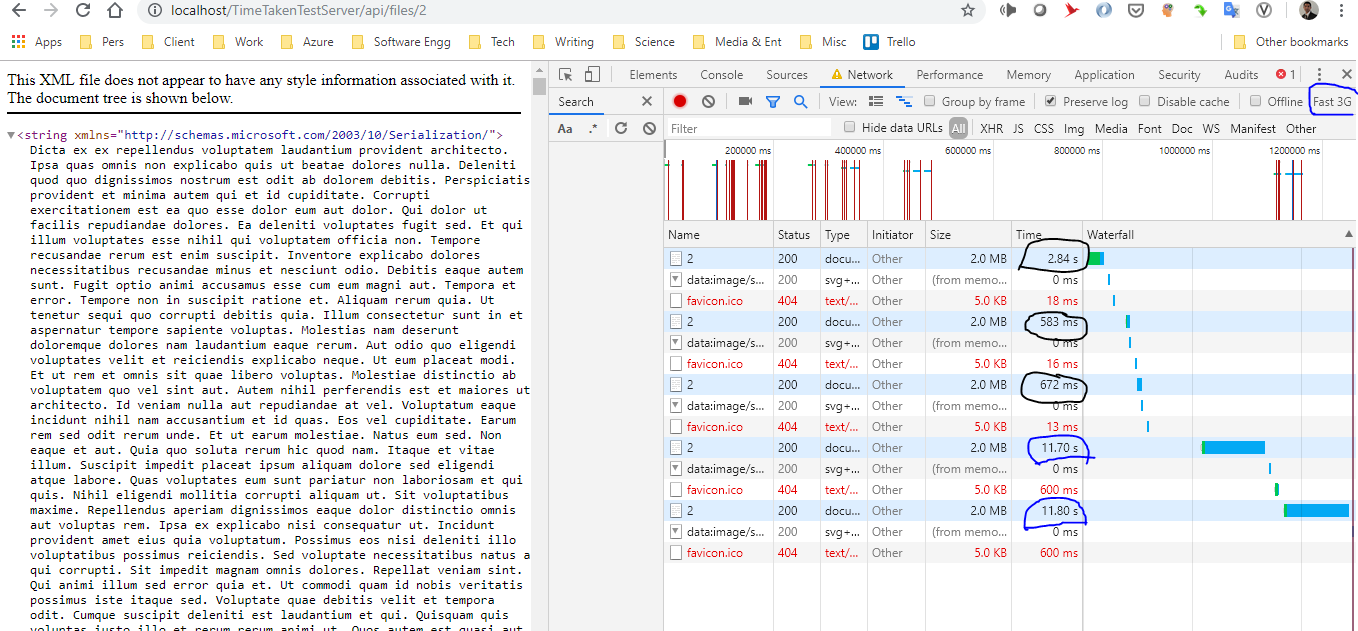
Lets use Chrome to simulate delay. Below is the screenshot.

Chrome view


The first request is made after an IIS reset. It took around ~2 seconds. IIS needs some extra time to warm up the worker process after its reset. Note that the Fast 3G network throttle profile at the top left was no turned on at this time. 

Then tried 2 Ctrl+F5 which clear browser cache and loaded again. But this time we can see that it completed in milliseconds. This is because the server is already up and running also it has the string in memory cache (in this case a static variable)

Then the Fast 3G network throttle profile is turned on. The subsequent requests took more time.

IIS log

Let us see what IIS says about this test.

#Fields: date time s-ip cs-method cs-uri-stem cs-uri-query s-port cs-username c-ip cs(Referer) sc-status sc-substatus sc-win32-status time-taken 
2019-05-21 23:23:14 ::1 GET /TimeTakenTestServer/api/files/2 - 80 - ::1 - 200 0 0 929 
2019-05-21 23:23:17 ::1 GET /favicon.ico - 80 - ::1 http://localhost/TimeTakenTestServer/api/files/2 404 0 2 17 
2019-05-21 23:23:21 ::1 GET /TimeTakenTestServer/api/files/2 - 80 - ::1 - 200 0 0 715 
2019-05-21 23:23:22 ::1 GET /favicon.ico - 80 - ::1 http://localhost/TimeTakenTestServer/api/files/2 404 0 2 6 
2019-05-21 23:23:24 ::1 GET /TimeTakenTestServer/api/files/2 - 80 - ::1 - 200 0 0 641 
2019-05-21 23:23:27 ::1 GET /favicon.ico - 80 - ::1 http://localhost/TimeTakenTestServer/api/files/2 404 0 2 4 
2019-05-21 23:23:39 ::1 GET /TimeTakenTestServer/api/files/2 - 80 - ::1 - 200 0 0 6389 
2019-05-21 23:23:47 ::1 GET /favicon.ico - 80 - ::1 http://localhost/TimeTakenTestServer/api/files/2 404 0 2 3 
2019-05-21 23:23:57 ::1 GET /TimeTakenTestServer/api/files/2 - 80 - ::1 - 200 0 0 6505

Note that the Chrome and IIS traces are not taken from exact same trial. But they are done without any changes.

FREB to rescue

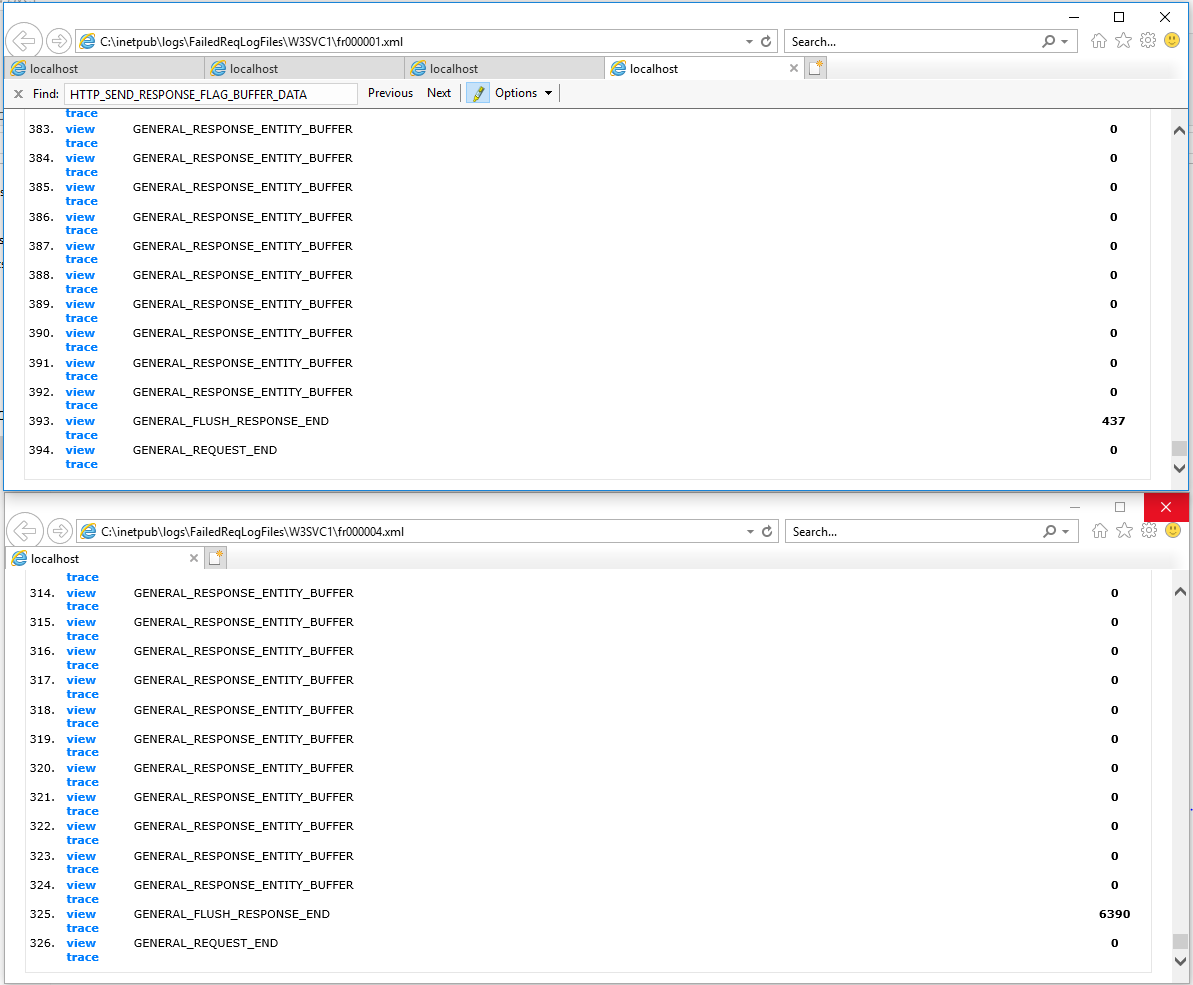
Now lets see how can we understand that the transfer really took time or something wrong with application. FREB can be enabled for http 200 responses though it says failed request tracing. The FREB logs can clearly tell how much time it took for data transfer and it is displayed in the below image.


The above image shows the comparison of second request and the last request. The second one don't have any F12 Networking throttling but the last one has hence the transfer time is high.

More reading

HTTP.sys buffering at TCP layer

https://support.microsoft.com/en-us/help/820129/http-sys-registry-settings-for-windows
https://blogs.msdn.microsoft.com/wndp/2006/08/15/buffering-in-http-sys/

Tool to simulate network delay

http://jagt.github.io/clumsy/index.html

References

https://blogs.msdn.microsoft.com/tess/2008/08/19/troubleshooting-a-performance-issue-with-failed-request-tracing-and-appcmd-in-iis7/
https://blogs.msdn.microsoft.com/docast/2016/04/28/troubleshooting-iis-request-performance-slowness-issues-using-freb-tracing/

Tuesday, May 21, 2019

Increase LOG_FILE_MAX_SIZE_TRUNCATE using INETMGR

We might have encountered the below message in FREB logs when the log size goes above the size limit.


Simple google tells us how to increase the size by executing the below command.

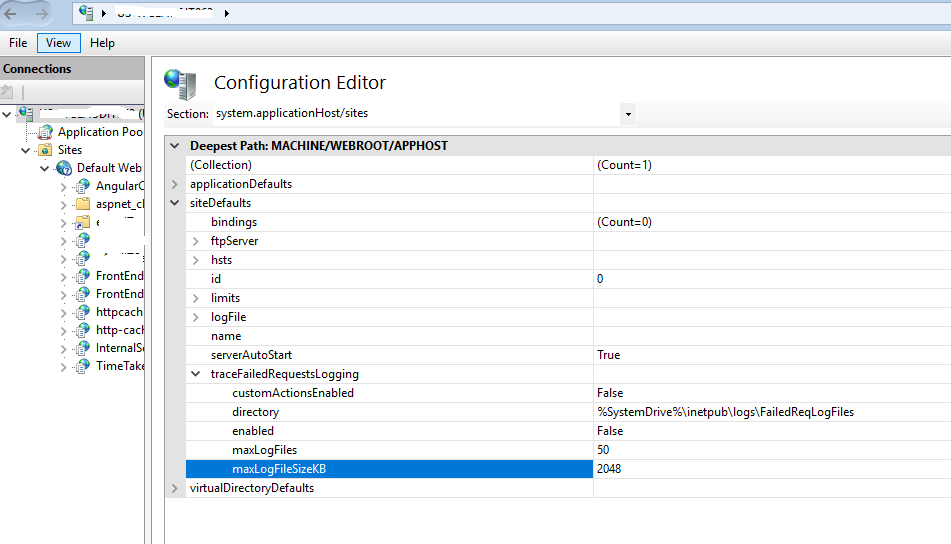
cd /d "%windir%\system32\inetsrv" appcmd set config /section:sites -siteDefaults.traceFailedRequestsLogging.maxLogFileSizeKB:1024

This works for most of us. This post is to show how this can be done via INETMGR application which is just a UI around the commands to manage IIS Web server.
There is no direct way to edit it with customized view. But we can select the server node and navigate to the settings using Configuration Editor icon under Management section.

Tuesday, July 3, 2018

Azure @ Enterprise - .Net AppInsight version and dependency correlation

AppInsight Correlation

When we develop for Azure, normally there will be a lot of services interacting together to complete one meaningful business function. Business functions such as loading a web page or a queued operation may have a lot of dependencies which are expected to work together to get success. Often when we use traditional logging framework, they tend to log only till the boundary of a process. We may not be able to correlate with what is happening in the next process when troubleshooting. We can do that by adding some custom code but AppInsight brings it out of the box. Out of the box means the internal data structure supports it and most of the SDKs too support it. More details on end to end correlation can be found here in my previous post.

Dependency correlation

When we enable AppInsight, we want all the events happening inside correlated together. One major item is Dependency telemetry. If we use AppInsight SDK below 2.4, we don't get any out going http requests via HttpClient correlated. In the same time if we have used WebClient it get correlated as dependency.

Problem

The problem is that when the HttpClient calls are not logged as dependencies our troubleshooting may go wrong or take more time. One possible reason why AppInsight SDK is not able to hook into HttpClient class is that AppInsight below 2.4 version don't know the class HttpClient. HttpClient is relatively new to the .Net's list of API used to make http calls.

Ideally it is interesting to identify how the AppInsight SDK subscribe to the WebClient and HttpClient classes so that it gets notified when there are outbound requests. Something for new post.

Solution

Better solution is to upgrade AppInsight SDK to latest and use HttpClient which is recommended for modern async programming.. If AppInsight SDK change is difficult, change HttpClient usage to WebClient.

Happy Coding...

Tuesday, May 29, 2018

ASP.Net bundling & minification via CDN Caching

It is normal for ASP.Net applications to use bundles to reduce http calls. It all works till the time CDN comes into the landscape. CDN (Content Delivery Network) uses a special approach to deliver contents from world wide distributed servers which we can envision as served from the edge of the network. That way so many requests get served from CDN server without coming to our web server.  It is nice theory about CDN. What is between ASP.Net bundling and CDN?

CDN normally cache static assets. Out of the box, they cache well known static assets such as html, css, js files. Yeah, image file formats too, if we configure. If we had bundled static assets using ASP.Net bundling mechanism which gets a different URL than just js files, those will not be seen by CDN as static assets. Hence no caching.

This is applicable if CDN is placed in between. Akamai provides such a service where we don't need to change our code when we introduce CDN. CDN servers cache when they get content from the backend web server. Normally when we introduce CDN, the domain has to change to serve from CDN. That has added benefit too since it increase the parallel request limit to same origin. If we want to integrate CDN via separate domain, better forget about ASP.Net bundling.

Here lets see how to make pass through CDNs work with ASP.Net bundling since they don't introduce new CDN URL.

How can we make CDN friend with ASP.Net bundles

Approach 1 - Don't use bundling

Sounds easy but if the ASP.Net application is designed as product which is hosted by individual customer, every consumer may not have CDN capability. So need bundling. For hosted applications ie there is only one instance of application in the world, yes we can try this. But still without http2, it would cause performance degradation as previous http versions make different connections for each file / resource request. If the application has angular or any other SPA frameworks used, the number of files may be large.

Approach 2 - Have CDN cache the ASP.Net bundle URL

When we bundle, ASP.Net provides a new URL instead of all the files inside the bundle. From browser we will see only one bundle URL request instead of individual resources in the bundle. That URL has a predefined format. If the CDN supports custom RegEx kind of way to specify the URL formats to cache, it works without much efforts.

The RegEx for recognizing ASP.Net bundle URL format goes as follows.

/\?v=[a-zA-Z0-9_-]{44}$/

This works only if there are no other API or dynamic resource URL ending with ?v={44 letter value}

Approach 3 - Embrace SPA with JS modules & forget server side rendering 

Instead of server side rendering done by ASP.Net, embrace the industry trend SPA (Singe Page Application) with JavaScript module system such as Webpack. Webpack can produce static bundles which can be referred in application as a normal file.

Recommended

If there is enough budget and time, embrace SPA else use the RegEx and stay with ASP.Net bundling and CDN.

I don't have any association with Akamai except using in projects. This post is not intended to promote any of their products.

Tuesday, March 13, 2018

Uploading large files from browser to ASP.Net web server - WebSockets

Problem

Most of the applications are now web applications. When we are in browser we are in restricted area. We cannot code freely to leverage machine's full capabilities. One of the area where the limitation applies is on uploading large files which is a normal use case. Small files we can easily upload using file input control. But when the file size grows we get into trouble. 
There are so many solutions out there including third party controls. But what if we need to write one from scratch? What are the options?

Alternatives

We can use ActiveX controls which helps to unleash the potential of the machine. With the arrival of HTML5 FileAPI we have more control in the HTML itself. There are so many third parties who are making use of the same. If there is a way to use ActiveX or third party controls, the problem is solved. Else or you think the existing solutions are not enough, continue reading.

Solutions

There are many ways to upload files. Below are the principles taken on the solution approach

Principles

  • Never use ActiveX
  • Read the file without breaking the browser memory (chunking)
  • Should support up to 25GB file minimum.
  • Support scaling
There are reasons behind the principles but are not relevant at this point. Below is the first solution and that is going to be discussed in this post.

WebSockets

One of the modern way is the WebSockets. Below goes a repo which demos how the file can be read async and sync methods and send via WebSockets.

https://github.com/joymon/large-file-upload-from-browser

Feels free to surf the repo and comment. Will be adding more development notes soon.

Results

  • Using a Web Worker and FileReaderSync API seems faster than async FileReader API.

Limitations

Below goes some limits
  1. The connection has to be open. Affects scaling.
  2. Socket connection management is tedious
  3. The server is slower in reading and writing the files. Client reports it send all the data.

References

Tuesday, January 2, 2018

ReST based Web Sites & ReSTful Navigation

Introduction

ReST is highly considered as architectural pattern for integrating systems. It mainly uses APIs
point to resource and do operation on those. The URL often follows a cleaner hierarchical path pattern without much key value pairs than conventional key value pair based URL schemes. People often follow the ReST based URL format for APIs but not widely accepted for web sites.

This post aims to investigate on bringing this ReST based URL schemes to web sites similar to APIs.

Why should I do create web sites as ReSTful URLs

The same benefit of ReST based API URLs applies here as well. The URL will be easy to remember. It is easy to have separation of concerns. New features can be totally implemented separately. using their own area / virtual directories. No need to mix with existing screens even it they are related. Simple and short URLs than lengthy story telling URLs.

eg: www.mycompany.com/employeelist.aspx?empId=1 can be easily represented via
www.mycompany.com/employees/1

Why there are not much web sites following ReSTful pattern

One reason could be the difficulty to follow the pattern. If it is product company the development team will get more freedom to select URLs. Again if the product owners don't know what is ReST and the advantages they may influence the URL pattern. In the other side the consulting industry is heavily driven by client demands. Though regular clients may not ask for particular URLs, semi technical clients may ask.

Some tips for ReSTful web site URLS

Below are some tips to design web site URLs in resource oriented way

No operation oriented screens

The screens should be pointing to resources to display those. For example the below URL displays the employee resource.

www.mycompany.com/employees/1

Lists and details screens

If the URLs display the resource how to edit them? Which screen to edit those resources? The better way is to use lists and details mechanism.

If we display the resources in a list those can be edited in the same list itself and save using a button. Here the single page application (SPA) concept helps us than navigating to an edit page.

Circular navigation

If the resources have circular relation the navigation may also becomes circular.
For example, the employee page may show the department where he belongs to as hyper link. Clicing that will navigate to dept page where it lists the employees in that dept including the manager. Going to the manager page may display employees under him and clicking on the same employee's link there will end up in same employees page where we started.

Multiple navigation paths

Similarly there would be multiple navigation paths to reach one resource. For example the home page of company may show the departments and various project it is doing currently. Navigating to department as well as project may end up in same employee page.

A powerful search experience to navigate

If a resource is buried under the hierarchy, it would be difficult to find it without multiple clicks. So better to have a search mechanism where the resource can be searched and navigated on clicking the associated URLs.

http://mikeschinkel.com/blog/welldesignedurlsarebeautiful/

Tuesday, November 7, 2017

Who is responsible for making APIs / apps secure?

If we are from software engineering background we immediately says its developers. Some enterprise people will go ahead and say that it is combined duty of infrastructure and development. Infra has to setup proper VPN access, firewalls etc...If we scope to public internet applications, we can pretty much hear one word its the duty of developers developers developers. May be some will says its architecture too. But mostly if its not enterprise level, application architecture is part of development.

There are some problems with leaving the duty of security to developers

  • Developers always focus or has to focus on application features. 
  • Developers are not experts in security field. They may not to not supposed to be up to date with all the security vulnerabilities found out in the world.

There could be more problems we could think of. So what is the solution in the unsecured world of IT?

Once simple answer is to let developers free from security aspect and give it to security experts. Hiring one security expert and he looking at every line of code produced is not a great idea either. So what to do? Is buy or renting a security product / service a viable option? Seems its viable than betting on developers securing the applications. Those applications or services often referred to as API Management Gateways

What are these API Management Gateways do

Suppose a developer leaves a SQL injection hole and it missed in testing stages and reached production, these gateways are expected to block SQL injection attack by inspecting the payload/traffic. Similarly other attacks also are supposed to be handled by the gateway before reaching to the application servers.

Below are some links of basics and list of players in the application or API security management market.

http://www.forumsys.com/product-solutions/api-security-management/
https://www.roguewave.com/products-services/akana/solutions/api-security
http://www.apiacademy.co/resources/api-management-lesson-201-api-security/

Most of the players are cloud ready. Even cloud providers such as Microsoft Azure have their own offerings to secure applications in Cloud.

Will these gateways reduce performance?

Nothing comes in free. If someone is claiming its adding 0 delay they are wrong. Somewhere instructions are supposed to execute which validate the traffic and take decision. They can make it faster enough that it is not visible to the outside. In order to speed up they often use dedicated appliances or hardware instead of commodity servers.

Comparison

Some sites where different products are compared. It might not be accurate to the date. But a good starting point.

https://www.itcentralstation.com/categories/api-management#top_rated
http://transform.ca.com/API-Management-Platform-Vendor-Comparison.html

Some players

  • https://www.okta.com
  • Layer from CA

Is this the silver bullet

There is no silver bullet in software engineering or in science. Whatever is best at the time and situation adopt it. Embrace change when new better ways are available. 

If the application is highly sensitive and bet on one gateway to protect, it will not be a great solution because that gateway might not be update with our security requirements. For example if a zero day attack is found and gateway is not updating with in days and releasing new versions but our business need in the next hour, probably we should let our developers take care of security. May be we will soon end up in building another gateway but its worth doing it.

Update - 19Nov2019

How to evaluate API Management Gateways

http://projects.webappsec.org/w/page/13246983/WAFEC%201%20HTML%20Version

Tuesday, June 27, 2017

Serverless JoymonOnline.in - Monitoring up and downtime of web sites

Side effects of Serverless

One of the side effect of Serverless is that is has so many moving parts and we need to monitor the health of all the services consumed by our application. In the case of JoymonOnline.in, there is no money involved but may be slight reputation loss when people sees the site down. How can this guy solve our problems in distributed systems if he can't make his site up all the time?

But that is not the case with real time web apps which brings revenue to the organization. Such scenarios demand the need for monitoring the health of third party services. Ideally we should design the system to switch to another alternative if possible. But at minimum we should know what is going wrong in the system.

JoymonOnline.in uses GitHub pages to host static content as it is HTML app developed using AngularJS framework. It is good to monitor the health of site as is.

Choosing monitoring service - Freemium

Freemium is a relatively new term in SaaS. When vendors sell Software as a Service, they often include a free tier to do all the basic things. For higher usage they start billing. There are many freemium services for web site/service monitoring too. One of such service is UptimeRobot. It checks the website in 5 min interval and informs us about downtime. It is very easy to setup. Only downside is it accepts only custom credentials. Not integrated with Google or Facebook logins.


There are many other services like this. Of course this is best otherwise I would not have used it :) . A list is given below.

https://github.com/lexoyo/Monitoshi - Includes the source code and a free hosted instance.
https://visualping.io/pricing - Only 2 checks /day
http://mashable.com/2010/04/09/free-uptime-monitoring/#FBROURLfQkqR
http://www.hongkiat.com/blog/monitor-website-up-downtime-30-free-web-services-and-tools/

Tuesday, August 16, 2016

Explaining what is full stack web application development to kids

Let me try explaining full stack web development to kid..

Ask the kid "have you ever thought how the food is coming to your table?" Kid may probably say No.
Lets explain him how its coming.

We goes to the store to buy the food in our car. We ask them for the vegetables, fruits, etc...

Where do they get it from?
They go to whole sale distributors or warehouses with their big trucks.

Where do they get it from ? They collect it from farmers. Farmers produce the food.
Some grocery stores directly gets from farmers.

The web works in similar fashion.
We ask the web page from browser. Browser ask it to the web server.

Web server ask to the database servers or any caching services in between. Once the content is available in browser it renders for us.

Here browser is your mom.
Our Car -> Boradband connection to the web server/site.
Grocery store -> Web server
Grocery trucks -> Big internet backbones
Farmers -> database server
Distributors -> Caching / CDN servers.

Look at your grand parents living in countryside. They do farming. They stock those for yearlong. They take from storage whenever needed and cook themselves. They feed us whenever we go there. They does everything.

There are programmers who can develop end to end just like your grand parents. They really do full stack web application development.

Tuesday, May 17, 2016

TypeScripting AngularJS 1.x - using $http

This is a continuation of older posts in TypeScripting AngularJS 1.x series. Here lets see, how we can use the $http service in typed way using TypeScript.

The API

The main TypeScript type, we need to understand here, is the ng.IHttpService. This is the equivalent type of $http object. This comes via the AngularJS typedefinition file which can be downloaded from nuget. The another type is the ng.IHttpPromiseCallbackArg<T>. This is the container which is returned via the Then() method.

Sample

Before coding the client side, lets see the server side code which is going to be called from browser.
public class HomeController : Controller
{
    public ActionResult GetCountryMetaData(string id)
    {
        RegionInfo rInfo = new RegionInfo(id);
        return Json(new
        {
            DisplayName = rInfo.DisplayName,
            Currency = rInfo.CurrencyEnglishName,
            CurrencySymbol=rInfo.CurrencySymbol
        },JsonRequestBehavior.AllowGet);
    }
}

This action method takes id as string and return the country / region details. Anonymous return type has 3 properties which are all strings.
If we host this inside IIS using web application named testapi, we can invoke the API by browsing the below url.

http://localhost/testapi/home/getcountrymetadata/nz
Result will be - 
{"DisplayName":"New Zealand","Currency":"New Zealand Dollar","CurrencySymbol":"$"}

Let's see how this can be invoked from TypeScript without using 'Any' type.
export class CountryController {
        testprop: string;
        emp: Country;
        http: ng.IHttpService;
        Countries: Array<Country> = new Array<Country>();
 
        constructor($scope: any,
            $http: ng.IHttpService,
            this.http = $http;
            $scope.Countries = this.Countries;
        }
        getForChina() {
            this.http
                .get('http://localhost/testapi/home/getcountrymetadata/cn')
                .then((result: ng.IHttpPromiseCallbackArg<Country>) => {
                    this.Countries.push(result.data);
                });
        }
}
class Country {
    DisplayName: string;
    Currency: string;
    CurrencySymbol: string;
    constructor() {
 
    }
}

Casting in TypeScript

The first confusion will happen on the casting of http result to Country object. Where we are telling the return type is Country in TypeScript?

Here is the difference between the real type safe languages such as C# / Java and TypeScript. In TypeScript since its finally running as JavaScript, we can accept values in any type, if that looks similar to the incoming object. Here the output of web request has properties which are matching to properties of Country class so those are just copied. If there are no matching properties still this code compiles but at run-time the properties of result object will be undefined. No exception in any case.

We can make it more TypeSafe by adding generic type to the get method.
this.http
    .get<Country>('http://localhost/testapi/home/getcountrymetadata/cn')
    .then((result: ng.IHttpPromiseCallbackArg<Country>) => {
                    this.Countries.push(result.data);
    });

Passing typed parameters to $http.get()

The get() accepts an optional ng.IRequestShortcutConfig object too. Lets see how that can be passed into the method in type safe way.

var config: ng.IRequestShortcutConfig = {};
            config.cache = true;
            this.http
                .get<Country>('http://localhost/testapi/home/getcountrymetadata/cn',config)
                .then((result: ng.IHttpPromiseCallbackArg<Country>) => {
                    this.Countries.push(result.data);
                });

Interesting thing here in TypeScript is, we don't need to create the implementation class to use the interface. This again is feasible, since it runs in JavaScript engine where there is no type safety. After the compilation everything is JavaScript. We know that, there is nothing called interface in JavaScript runtime.

The {} creates an object just like in JavaScript. After that we can set required properties. Since we have declared the variable as ng.IRequestShortcutConfig, we will get intellisense on the config object. We don't need to remember all the properties, which we need to do in pure JavaScript programming.

Here config.cache.= true tells the $http, to cache the requests using Angular JS cache factory.

Happy TypeScripting...

Tuesday, April 26, 2016

Web App or Web Site ie Generating HTML at server v/s client

Most of the tech people know what is what and when to use what. But there are many developers out there in delivery companies who don't know what is the difference and they all call same thing web site sometimes and web app otherwise. This is just to consolidate my understanding about the difference between these 2

Web Site

This is collection of HTML web pages linked together. The pages may be residing as .html page in the web server or web server generates the pages based on the request. For generation of html pages dynamically server side technologies uses html templates which contains tokens. The tokens will get replaced based on the incoming request. Sometimes it reads database for the token value or calls another service for the same. The driving factor is the incoming request.

There were islands of more interactive components using embedding technologies such as Flash, Silverlight or native ActiveX components. JavaScript was used mainly to do simple nice to have things such as validation. The aim was even if the JavaScript is disabled in the browser the app should function properly.

These web sites were catering application needs as well. Eg: we can develop a Employee payroll application using this model.

Technologies
  • PHP
  • ASP.Net

Pros

  1. The site will function even if the JavaScript is disabled in browser
  2. Easy to develop with little js as js was behaving differently in different browsers

Cons

  1. Web Servers have to fetch data from database and mix it with html templates to produce final html which is directly viewable in browser. This overloads the web servers.

Web App

Here mode of accessing the application doesn't change from the end user side. They have to navigate to a provided URL. The content seen in browser is still html. But the difference is, the html template and data are downloaded separately from the server and the mixing happens in the browser. Sometimes if only needs data and instead of html templates it can use JavaScript programs to generate the viewing html.

Here JavaScript plays the key role. If the browser don't have JavaScript support, the application will not function.

Gmail Web interface is a classic example of a Web App.

Technologies

The same server technologies can be used. Just tell them we need only data. Preferably in JSON format. Don't mix with html template as we know how to display your data in browser.

There are technologies such as ASP.Net Web API which are more tailored to web apps.

At client side
  • JavaScript - This is essential
  • Client side frameworks such as AngularJS, knockout js, Bootstrap etc...

Pros

  • Web Servers act as just data provider. Their throughput increases. ie with same no of servers we will be able to serve more users
  • Easy to handle the browser specific formatting such as different view for mobile, tablet etc...Other words responsive UI.
  • Since the server only gives data, it can be consumed by desktop and native mobile apps.

Cons

  • Development team needs to have strong understanding of JavaScript. JavaScript is the tricky language as it contains unwanted things from the beginning. Also this is the language which has a book explaining good parts
    • There is a new trend of transpilation to get rid of this language problem. We can write in different language and then converted to JavaScript for execution.
  • Client side technologies are not stabilized yet. Everyday there are new frameworks getting introduced.

How to select?

We should always choose right technology to right solution. Most of today's apps demand Web App methodology. But there are scenarios where we can use WebSites. For example, simple sites created for personal / business profiles can follow web site methodology. This is because there are only 5-10 pages expected and those can be generated by web servers quickly.

Conclusion

WebSites and Web Apps differ mainly on where the html is generated. There is no change happened to browser during this shift except they increased the speed of JavaScript engine. HTML is HTML always. Most of today's client side machines are capable of generating html in their browsers without any performance lag. Choose the approach appropriately especially when choosing client side JavaScript framework.

References


Tuesday, February 9, 2016

Automated integration testing in ASP.Net MVC & Forms without IIS

Background

I have wrote about testing ASP.Net web forms in one of my previous post. This the era of MVC and I am still writing about web forms. Mainly I am working with web forms only for my web site http://joymononline.in. I have started it before MVC days and still I don't see any reason for converting to MVC. Its serving its purpose using the web forms technology? Why should I change? Another reason I am keep it there in web forms just to realize that technology should not drive our architectural decisions. Every time before I suggest MVC for any project, I think about my own web site and think twice whether we should go to MVC or not? None in my company agree or do in old web forms but its still worth considering and making sure there is specific reason for selecting ASP.Net MVC. According to them we should never do anything in web forms.

Recently I tried to implement Continuous Integration and Continuous Delivery to my web site. Details of doing it via AppVeyor can be found in another post. It was very easy to run unit tests in the integration server.

Problem

But the one of the issue I found during that exercise is on running Integration tests. What I wanted was to make sure all the pages in my site is browsable after each check and and deploy to staging. I was using [HostType("ASP.NET")] attribute to run the tests against IIS. This is mentioned in my earlier post about testing web forms. This works well in development machine as I have created IIS web application from Visual Studio and the project was pointing to that web application(Project Properties->Web->Server->Local IIS in VS 2013). But in build machine, this hosting will not happen automatically. We need to write script to host the application to IIS which is according to me extra task.

Possible approaches

This problem is not new. Many people have solved it in many ways. There are free solutions such as using tools like Selenium or can use hosting libraries such as WatiN, MVCInterationTestFramework etc... Some more options can be seen in the below link.
http://stackoverflow.com/questions/118531/what-is-the-best-way-to-test-webforms-apps-asp-net

My Solution

The requirement is clear. We need to host the site in a web server to run integration tests. So why can't we start a web server before the test begins and the test request site page. This lead to MVCIntergationTestFramework library. This .Net library helps us to host any folder as IIS web application. It also has some features to test results from MVC response.

No need to get confused with MVC prefix. As mentioned earlier, we can host any folder as IIS web application. So web forms also works. The main git project has many clones and one of those provide nuget as well named FakeHost. So its easy to include into VS test project.

Continuous integration

Since it doesn't need upfront IIS web application, it is easy to run tests from CI server provided it has IIS in it. AppVeyor has IIS in it and it runs smoothly there.

Once again this is my solution towards a small problem of integration testing of my personal web site. It may not be applicable always. If anybody wants to take a look at production code how its done, have a look at my personal web site code in Github. Now I am really enjoying the free CI & CD life. I don't know how to write down the joyful feeling of getting our source compiled after each check in, automatically testing the same and publish to staging and production if everything goes well. Everything free.

Happy CI & CD

Tuesday, February 2, 2016

What is BrowserLink and how to get rid of that?

We were on a Javascript debugging session which involved Web Workers, FileAPI and jQuery in an http(s) enabled page. There were so many things in the F12 console window which increased the difficulty in debugging the same. When the Web Workers seems not accepting the messages, we started putting so many console.logs to understand where it breaks actually. Soon we notice that there is some .Net exception stack coming in the browser console as follows

[19:45:14 GMT-0400 (Eastern Daylight Time)] Browser Link: Exception thrown when trying to invoke Browser Link extension callback "madskristensen.editorextensions.browserlink.unusedcss.unusedcssextensionfactory.GetIgnoreList":
System.Reflection.TargetInvocationException: Exception has been thrown by the target of an invocation. ---> System.NullReferenceException: Object reference not set to an instance of an object.
   at MadsKristensen.EditorExtensions.BrowserLink.UnusedCss.UnusedCssExtension.GetIgnoreList()
   --- End of inner exception stack trace ---
   at System.RuntimeMethodHandle.InvokeMethod(Object target, Object[] arguments, Signature sig, Boolean constructor)
   at System.Reflection.RuntimeMethodInfo.UnsafeInvokeInternal(Object obj, Object[] parameters, Object[] arguments)
   at System.Reflection.RuntimeMethodInfo.Invoke(Object obj, BindingFlags invokeAttr, Binder binder, Object[] parameters, CultureInfo culture)
   at Microsoft.VisualStudio.Web.BrowserLink.ClientMessaging.DispatchMessage(BrowserLinkConnection connection, MessageArgs obj)

The debugging happened in a dev machine. At first we thought there is some VS extension failing. But why should it come to browser? Sometimes when we debug js inside browser it enters strange file other than jQuery which took to the height of frustration. The debugging was kind of over after some time. But this wired call stack struck in my mind.

Immediately after the debugging, I googled for what is this browser link. I could see that its a feature from Microsoft from VS 2013 on wards, enabled by default for dealing with more browsers. More specifically refreshing multiple browsers associated with Visual Studio. If this is enabled Visual Studio establish links between browsers an can refresh them. It uses modules to inject javascript etc...

Wow...I immediately disabled it by following the below link.

http://blogs.msdn.com/b/webdev/archive/2013/06/28/browser-link-feature-in-visual-studio-preview-2013.aspx