Showing posts with label Software Containerization. Show all posts

Tuesday, March 14, 2023

Azure @ Enterprise - Windows containers in AKS - Memory allocation black magic

There were many predictions made in my blogs. Death of Silverlight and WPF. Oh WPF is still available Windows Phone prediction missed to post separately. Now I am predicting the future of Windows OS. The server side is already taken by Linux even in the Microsoft Azure infrastructure from 2015 onwards. The client side will soon be dominated by Chrome OS once the 5G is available to everyone and the browser gets more power with WebAssembly.

If we have a chance do not go for the Windows container. Go to the windows container if there is absolutely no way to use the Linux container. It may be due to budget constraints to migrate from .Net Framework to .Net Core, unavailability of certain legacy COM components, etc.

Kubernetes memory management

Kubernetes orchestrates containers by scheduling them into nodes which are mainly virtual machines. If the node has 32 GB memory will that all be available to containers? 
No. It will be distributed to the below participants
  • Node operating system is software running in node.
  • In order to manage the containers Kubernetes needs to run software in every node called kubelet, proxy, etc.
  • If we have installed third-party CSI drivers and monitoring agents, they also need to run on every node. 
  • Kubernetes keeps some aside to anticipate spikes. That is not considered when allocating
They all are processes from the side of the OS and all require node resources.

Not all memory, CPU and other node resources are available to containers

It's fine. Let's understand the calculation of how much these resources are needed for the infrastructure Since memory is easy to digest let's calculate how much memory is available to the containers.
It is documented in Kubernetes official docs so no need to repeat it here. The only thing missing is the difference between the Windows and Linux container and the driver memory.

Windows nodes in AKS resource reservations

AKS(Azure Kubernetes Service) is just a managed service of Kubernetes hosted by Azure. Something like a laundry shop managing washers and dryers for its customers.

The node memory reservation in AKS is well documented. 
Windows nodes are treated separately in AKS and they need additional 2GB
  • Eviction threshold
    • 750Mi
  • Kubelet
    • 25% of the first 4 GB of memory
    • 20% of the next 4 GB of memory (up to 8 GB)
    • 10% of the next 8 GB of memory (up to 16 GB)
    • 6% of the next 112 GB of memory (up to 128 GB)
    • 2% of any memory above 128 GB
  • Windows node
    • Additional 2 GB

The resource reservation calculation for 7GB nodes 

7 GB Linux node memory reservations.
0.75 + (0.25*4) + (0.20*3) = 0.75GB + 1GB + 0.6GB = 2.35GB  ~33.57%

7 GB Windows node memory reservations.
0.75 + (0.25*4) + (0.20*3) + 2 = 0.75GB + 1GB + 0.6GB + 2 GB = 4.35GB ~62.14%

Previously we saw that there can be drivers running inside the node that will also require memory. Below is a screenshot from the running node with a decent amount of drivers in a windows node.

7 GB Windows node memory reservations
Please note the memory requirement for same drivers is less in Linux nodes in the same cluster. Also the number of drivers varies by workload requirement
Let us do math again.

7 GB Windows node with some drivers running

Considering only the request as that is the minimum required.

Driver memory = 300+200+600+50+120+120+120+512 = 2.02GB

Total memory = 4.35GB + 2.02 GB =  6.37 GB ~91% of memory is reserved

The resource reservation calculation for 32GB windows nodes

Without drivers 0.75 + (0.25*4) + (0.20*4) + (0.10*8) + (.06*16) + 2 = 0.75GB + 1GB + 0.8GB + 0.8GB + 0.96GB + 2 GB = 6.31GB

With drivers 6.31GB + 2.02GB = 8.33GB ~26.03% reserved 

The resource reservation calculation for 128 GB windows nodes

Without drivers 0.75 + (0.25*4) + (0.20*4) + (0.10*8) + (.06*112) + 2 = 0.75GB + 1GB + 0.8GB + 0.8GB + 6.72GB + 2 GB = 12.07GB

With drivers 12.07GB + 2.02GB = 14.09GB ~11.00% reserved => 113.91GB to containers
All these calculations are done with default recommended values
In case there is any calculation mistake found, please respond in the comments section.

Lessons learned

  • Do not get into the windows container if possible.
  • If windows containers are inevitable, use bigger nodes such as 128GB.

References

Tuesday, December 27, 2022

Azure @ Enterprise - DNS->PublicIP->Azure App Gateway->Pod Using App Gateway Ingress controller

This is another GitHub project introduction post. This time introduces a repo that shows how an end-to-end Azure solution can be set up from Azure DNS -> Public IP Address -> Azure App Gateway -> Azure Kubernetes Service with Application Gateway Ingress controller AGIC hereafter.

This is a standard use case of how to expose a web application from Kubernetes via standard Azure  networking services such as DNS, Public IP Address and AAG

Problem

When we want to route traffic to AKS, the primary question is how to set up the ingress. Traditionally we use NGINX ingress controller and it was not a question at all. Now with Azure Application Gateway Ingress Controller, we just need to justify the decision.

What is Application Gateway Ingress Controller?

It is one of the Kubernetes Ingress controllers that can only work with Azure Application Gateway. The major differences with NGINX are
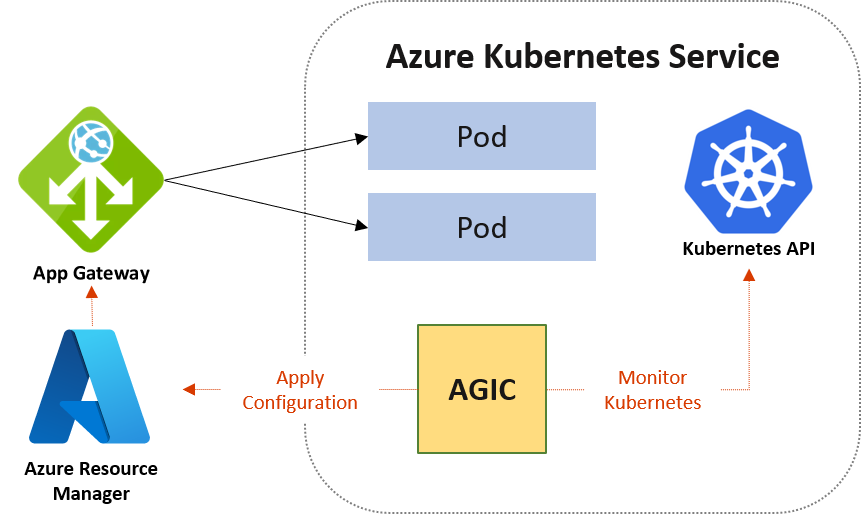
  • AGIC will monitor the cluster and update the Azure Application Gateway back with routing IPs.
  • AGIC uses Pod IPs as the backend instead of the service IP address. If there are 3 pods there will be 3 IPs in the Application Gateway backend pool
  • In order to update the Azure App Gateway, the AGIC should have Azure RBAC permissions via user-assigned managed identity. 

Photo credits go to the official docs.

My recommendation is not to use this AGIC as it's having issues.

There will be a separate post on issues with AGIC. 

Setting up

Below is the repo that has biceps and required PowerShell to set up end to end. 


Please note not all things are automated. Readme.md has the details.

References

https://github.com/paolosalvatori/aks-multi-tenant-agic

https://raw.githubusercontent.com/Azure/application-gateway-kubernetes-ingress/master/docs/examples/aspnetapp.yaml

https://github.com/Azure/application-gateway-kubernetes-ingress/blob/master/docs/setup/install-new.md

Tuesday, December 20, 2022

Azure @ Enterprise - Networking at pod level inside AKS using Calico

This post is to introduce networking inside the Kubernetes cluster at the pod level. There may be questions about why as application developers we need to worry about networking inside the Kubernetes cluster? 

It depends on how the Kubernetes cluster is planned in the organization. If we are lucky our project may be getting its own Kubernetes cluster. But often we ended up as a tenant inside another Kubernetes cluster. Our application may need to access a public API URL, if we set the networking rules at the cluster level, all the applications inside the cluster will get access. Organizations generally prefer something other than that. Also, we don't want some other application in the cluster accessing our database, Redis cache, etc... even if they have the credentials.
Hence we will end up dealing with the network policies at the pod level

Theory

Kubernetes defines networking policies as resource natively. But it doesn't have a built-in mechanism to enforce the networking rules.

For that, we need to use one of the network plugins. For more theory please read the docs. Now let us come to some practicals

Azure NPM v/s Calico

Since we are going to use Azure Kubernetes Service, we can focus on 2 plugins. Those are kinda natively supported by AKS.  One is Azure NPM (Network Policy Manager) and the other is Calico.

Though we may tend to think the Azure NPM is fully implemented in AKS as both start with Azure, the reality is otherwise. As of writing this post, the calico has better support including Windows Server 2019 in AKS. Some of the features of Azure NPM are still in preview. See the comparison of Azure NPM v/s Calico for more details.

As the title of the post shows we are going to use Calico.

Installation of Calico on AKS

As per calico documentation, there is a way to install calico on an existing AKS cluster. But when I followed it was not working efficiently.
So better enable Calico when we create the AKS cluster.

How the network policy looks like

The networking feels alien to at least some developers. It requires knowledge about IP addresses and notations, complex network setup screens or commands, etc. But don't worry the networking can be set up via YAML files.

If YAML feels alien to a developer nowadays he should rethink being a developer.

Sample

Enough theory. Please clone the below repo and check out how the networking policies can be applied.
Step-by-step details are not going to be added here as that sample will get more scenarios in the future.


All are welcome to give PRs or add issues to the repo.

References

Tuesday, December 13, 2022

Docker images to echo HTTP headers and other details for testing purpose

When we want to test simple features in Kubernetes, we need simple web server images. We don't need a full-fledged docker image but something that responds with the IP address, HTTP headers, etc... That way we can quickly test the load balancing and other basic features.

Some create new docker images to do so. But we don't need to as this is a common problem and others have already created such images. The best way to search is with the keyword 'echo' in the docker hub.

Below are some echo images

These are capable of responding differently according to the inputs given. It is really handy to simulate error messages, caching, etc...Check out for more details.

In case there is a better one, please comment.

Tuesday, December 6, 2022

Azure @ Enterprise - AGIC on AKS - Unexpected status code '403' while performing a GET on Application Gateway.

Context

When we want to route traffic from the internet to AKS through the Azure Application Gateway (AAG for short), there are 2 approaches to set up ingress in AKS. The traditional NGINX way where the flow is one way. But with  Application Gateway Ingress Contoller (AGIC for short), there is one more approach to solving the problem. AAG can route to the Pod IPs if it knows. 

  • Who will let AAG knows about the pod IPs? 
    • It is the AGIC running inside the AKS.
  • How does the AGIC authenticate to modify the AAG?
    • Using user-assigned managed identity with necessary permissions

Problem

When we simply create the AKS cluster with AGIC enabled, we expect that we can pass the pre-created managed identity to the AGIC that has permission to AAG. Note that the AGIC is not installed separately, instead enabling using AKS add-on. We are in the DevOps automation world, so we normally look for a declarative mechanism to do it. Obviously, the bicep will come on our way. When we look at the office bicep reference for AKS-managed clusters details on AGIC enablement are not available as of writing this post.  But there are links at the bottom to one of the ARM examples having AGIC capability. 

It has a section located at properties->addonProfiles->ingressApplicationGateway where we can give the details of AAG and the identity.

Since the ARM and bicep are like JavaScript and TypeScript, it is relatively easy to prepare the bicep given the equivalent ARM template.

After conversion when the bicep is run below warning showed up

Warning BCP073: The property "identity" is read-only. Expressions cannot be assigned to read-only properties. If this is an inaccuracy in the documentation, please report it to the Bicep Team. [https://aka.ms/bicep-type-issues]

If someone cares about the warning, he is not a developer. So ignored it and proceeded. Poor Azure documentation which is calling for help.

But after the creation of AKS it started showing errors when accessing via AAG. The logs of AGIC ingress pod shows the below error. 

kubectl logs ingress-appgw-deployment-<a random string> -n kube-system

E1206 02:34:30.289515       1 client.go:170] Code="ErrorApplicationGatewayForbidden" Message="Unexpected status code '403' while performing a GET on Application Gateway. You can use 'az role assignment create --role Reader --scope /subscriptions/<subid>/resourceGroups/K8ClusterWithAGIC --assignee dfb5d05b-cc65-46fa-a0b8-9fe93ebfed9e; az role assignment create --role Contributor --scope /subscriptions/1cd7467f-530b-4278-94ef-de3f5da74e0c/resourceGroups/<rgName>/providers/Microsoft.Network/applicationGateways/myappgw --assignee dfb5d05b-xxxx-xxxx-xxxx-9fe93ebfed9e' to assign permissions. AGIC Identity needs atleast has 'Contributor' access to Application Gateway 'myappgw' and 'Reader' access to Application Gateway's Resource Group '<rgName>'." InnerError="network.ApplicationGatewaysClient#Get: Failure responding to request: StatusCode=403 -- Original Error: autorest/azure: Service returned an error. Status=403 Code="AuthorizationFailed" Message="The client '41ff78bf-xxxx-xxxx-xxxx-180e4c7970a2' with object id '41ff78bf-3b92-xxxx-xxxx-180e4c7970a2' does not have authorization to perform action 'Microsoft.Network/applicationGateways/read' over scope '/subscriptions/<subid>/resourceGroups/<rgName>/providers/Microsoft.Network/applicationGateways/myappgw-' or the scope is invalid. If access was recently granted, please refresh your credentials.""

Step 1

Wonder why there is a section called solution? will come to know soon. The error is somewhat clear. But my pre-created managed identity has permissions. When we closely look we can see 2 issues 
  1. The error message shows a different client id of MI instead of what we have given.
  2. Since the client id used is different. It is newly created and obviously, it doesn't have permission to manage AAG.
The first issue because it is not using the identity that we passed to the bicep. We should have taken the warning seriously.

The solution is to give contributor access to AAG. Let us worry about the least permission later. The name of the newly created identity follows the below convention so it is easy to search.

"ingressapplicationgateway-<cluster name>"

Problem 2

Once we fix the issue, we may be thinking all good as AGIC has permission to AAG to create listeners, backend pools, and settings. But it is not enough as the below error started showing up.

E1206 02:59:09.217888       1 controller.go:141] network.ApplicationGatewaysClient#CreateOrUpdate: Failure sending request: StatusCode=0 -- Original Error: Code="LinkedAuthorizationFailed" Message="The client '41ff78bf-xxxx-xxxx-xxxx-180e4c7970a2' with object id '41ff78bf-xxxx-xxxx-xxxxx-180e4c7970a2' has permission to perform action 'Microsoft.Network/applicationGateways/write' on scope '/subscriptions/<subid>/resourceGroups/<rgName>/providers/Microsoft.Network/applicationGateways/myappgw'; however, it does not have permission to perform action 'Microsoft.ManagedIdentity/userAssignedIdentities/assign/action' on the linked scope(s) '/subscriptio957", FieldPath:""}): type: 'Warning' reason: 'FailedApplyingAppGwConfig' network.ApplicationGatewaysClient#CreateOrUpdate: Failure sending request: StatusCode=0 -- Original Error: Code="LinkedAuthorizationFailed" Message="The client '41ff78bf-xxxx-xxxx-xxxx-180e4c7970a2' with object id '41ff78bf-xxxx-xxxx-xxxx-180e4c7970a2' has permission to perform action 'Microsoft.Network/applicationGateways/write' on scope '/subscriptions/<subid>/resourceGroups/<rgName/providers/Microsoft.Network/applicationGateways/myappgw'; however, it does not have permission to perform action 'Microsoft.ManagedIdentity/userAssignedIdentities/assign/action' on the linked scope(s) '/subscriptions/<subid>/resourcegroups/<rg>/providers/Microsoft.ManagedIdentity/userAssignedIdentities/myappgw-ManagedIdentity' or the linked scope(s) are invalid."

Step 2

Here we can see 2 problems

  1. The error message is misleading with the same client id and object id. In fact, they are different. It seems people at Microsoft itself are confused about this AAD security mechanism.
  2. AGIC identity is looking for permissions on the identity of AAG.
God knows why the AGIC requires permission on AAG's managed identity to manage the AAG details. This issue can also be fixed by giving a contributor permission to the managed identity of AAG.

Happy debugging...

Read the docs

This is the standard answer we get when we do trial and error. As of writing this post, the permission on the identity of AAG is not mentioned in the brownfield installation.

References

  1. https://www.torivar.com/2022/09/16/aks-with-agic-existing-agw/ - Almost the same experience but with Terraform IaC

Tuesday, November 29, 2022

Azure @ Enterprise - Upgrade blocked!!! create new AKS cluster

Finally, it happened when upgrading an AKS cluster. Its nothing but a dead-end in upgrade and we have to create a new AKS cluster and migrate the workload with all settings

Why it was not upgraded?

Any upgrade requires some planning. After the upgrade, we need to make sure all the apps are running. Why bother? Let us keep the best practice aside, and upgrade when needed. Ideally, the environment is expected to be scripted so it is a single click to recreate

Reason for the current upgrade

I wanted to add a new node pool to the AKS cluster. When I am trying to add a node pool, it says the Kubernetes version is old. The cluster needs to be upgraded.


What if I try to upgrade AKS Cluster

It is not showing the available upgrade.

As per Microsoft guidelines, do not upgrade forcefully.

What is left

Unfortunately, it is very difficult to make sure the entire environment is scripted out. But now need to reverse engineer the cluster to script everything back and create a new cluster.

Next time consider enabling the auto upgrade feature.

References


Tuesday, November 15, 2022

Azure @ Enterprise - Scheduling task inside Windows container in Kubernetes

Problem

As part of my day job, we are doing a lift & shift of a giant monolith .NET 4.8 Windows-based application to Azure Kubernetes Service. Currently the application supports scheduling tasks that can be created and configured by the admins. Behind the scene, it creates scheduled tasks in Windows Task Scheduler pointing to the respective executable and passing right parameters.

How to do this in AKS or Kubernetes in general?

Solution

Since we need to limit the changes, we are planning to use the Windows task scheduler inside the container. Yes, it is going to be a Windows container and it may not be the most innovative solution in the world of containers where containers may be destroyed and recreated at any time.

Keeping the design things aside, this post is to explain how the Windows scheduled tasks can be created inside the container.

Nothing fancy, the same command that works inside a virtual machine to create a scheduled task will work inside Windows containers as well. Below goes the command.

Tuesday, April 12, 2022

Azure @ Enterprise - WCF netNamedPipe binding inside Windows container

Recently I was into serious discussions on containerizing 15+ years old distributed applications developed using the .Net Framework and hosted in IIS web server. The first suggestion or the approach coming to all our minds is to migrate to .Net 6 and containerize using Linux containers. Nobody thinks about Windows containers. But unfortunately, we need to think about containerizing it to Windows containers. We are not going to discuss the merits and demerits of Windows containers in this post or the rationale for that thought. But one of the technical tasks that will come if we use Windows containers.

Please note this needs some basic understanding of WCF (Windows Communication Foundation)

Problem

The current system has the below characteristics

  • It uses netNamedPipeBinding to expose internal services in every IIS box. 
  • The HTTP front-facing apps and APIs consume the internal net.pipe services to get things done.
  • The internal services are also hosted inside IIS. 

If we move to Windows containers one approach to solve this is to extract the internal services and host them as independent containers and use net.tcp binding to establish communication. It is simply that the net.pipe binding only works inside the machine.

But let us see how can we have netNamedPipe services inside the same container as the front-end services and establish the communication between services using net.pipe?

Challenges

  • The base image provided by Microsoft doesn't have support for hosting net.pipe services.
  • The UI tooling is limited when we are in the container world compared to IIS in the Windows server machines. We should have a good grip on using AppCmd command for IIS management or the PowerShell modules such as WebAdministration or IISAdministration used to manage IIS.

Solution

It is nothing fancy. This will work if we get the Dockerfile right. We need to enable the netNamedPipe binding at the machine level and set the bindings and protocols at the IIS level.

I am not giving many details in this post as the repo will get more updates into the readme.md file.

Happy coding.

Tuesday, December 21, 2021

Installing apt-get and bash into the .Net 6 Alpine container

The minimal container image of .Net 6 comes really lightweight. The name of the image at least we are using is dotnet/runtime:6.0.1-alpine3.14. It has very little footprint below 40-50 MB during runtime. But that doesn't even have a ping utility, bash shell, sudo command, and not even the apt-get to install other packages. This minimal behavior makes it difficult to debug.

Below goes the steps to install apt-get into that container to troubleshoot applications especially when deployed in Kubernetes.

Thursday, October 21, 2021

[Video] Configuring container environment variables for ASP.Net WebAPI hosted inside Kubernetes on Docker Desktop

This is the second video in the Kubernetes series. Actually, when I started vlogging, I had decided that I will make short videos of max 5 minutes. But unfortunately, I was not able to stick to that. Here onwards I am planning to stick with my time limit. 

What is new?

We have to configure applications based on the environment it runs. It is not different for containerized applications running in Kubernetes. This video is showing how to configure the environment variables for the containers.

It uses an ASP.Net Core WebAPI application that returns the environment variable name when invoked with the name. It uses .Net 5 and basic YAML to deploy to Kubernetes that is running on Docker Desktop using WSL2 as a backend.

No more details. Please watch the video below.

References

https://kubernetes.io/docs/concepts/configuration/configmap/

Tuesday, August 17, 2021

[Video] Running simple ASP.Net Web API in Kubernetes on Docker Desktop

This post mainly contains the notes that I used to create a video. The video talks about hosting ASP.Net WebAPI into Kubernetes. The API can be accessible from the host machine using http://localhost:<port>/. The aim is to show simple hosting in Kubernetes that runs using Docker Desktop. 

It is advised to watch the video to get more clarity. 

Dev environment

Please refer to the previous post about setting up Docker Desktop and K8s environment. Along with that, it is required to have Visual Studio 2019 with docker container ASP.Net tools installed.

Source code

This post is not about creating a new visual studio project and enable the K8s support. Instead, download the sample from the below location

https://github.com/joymon/dotnet-demos/tree/master/web/webapi/simple-k8s-hosting/SimpleK8sHosting

Running using Docker Desktop

Just click on the run button in Visual Studio 2019 to run using Docker Desktop. The Dockerfile and other setups are already done in the sample.

Publish to Docker hub - the image registry

Below are the commands to tag and push to Docker Hub

Tuesday, August 3, 2021

Getting started with Kubernetes dev environment using Docker Desktop

This is 3rd or 4th time, I am learning Kubernetes (hereafter mostly refer as K8s short form) hands-on sessions. Every time I learn the kubectl command and its options, I forget as there were no chances to apply in the day job. Another mistake I did all those times was missing to post learning to this blog.

Hope this time I will get a chance to use it in the day job and not miss posting the Kubernetes learning on to this blog.

This post is very basic. The aim is to get started with the Kubernetes development environment using Docker Desktop. Below are the steps at a high level to get started. Detailed steps with videos are available on the internet.

Install Docker with Kubernetes support

The first step is to download the Docker Desktop and install it. It's straightforward as installing any other software in Windows. It is free and requires virtualization to be turned on. 
In order to run the Linux containers, it is better to enable the WSL2 backend. There are detailed instructions available to get it done including how to enable WSL2 on Windows.

Kubernetes support is only available when we use the Linux container mode. Note that Docker Desktop supports both Windows and Linux modes.

Points to note

  • Better don't take the experimental build. Stay one version below the current stable version.
  • This installation will modify our hosts file in Windows. Better not change anything.
  • It is better to have an 8 core 16GB machine to work smoothly with container workloads.

Install Kubernetes dashboard

For beginners, it is easy to understand what is going on in the K8s cluster by looking at a UI dashboard application. K8s don't install a UI dashboard by default. That dashboard can be installed by using the below PowerShell commands.

Tuesday, July 20, 2021

Azure @ Enterprise - Why I recommend Kubernetes as app hosting platform?

I started writing this post 2-3 years back. Mainly when Apache Spark 2.3 started supporting Kubernetes (K8s) in 2018. It was obvious that Kubernetes is taking over app hosting space the same way virtual machines took over physical machines. All are expected to understand where the industry is moving and adopt. Hence I paused this post as there is nothing I need to endorse. But it's time to resume this post and publish it.

If you are already using container and K8s orchestration, feel free to skip this post and save time.

Basics

Containers

Please refer to my 2015 post about Software Containerization via Docker - First look and some thoughts for very low-level basics. The container can be understood as a micro virtual machine with the application(s) and runtime isolated from each other. It has a file system inside it, it can expose ports for networking. Mount external storage.

This mainly co-evolved with the microservice architecture where the huge systems are separately developed and deployed as small services that own their own data and release cadence.

Kubernetes

Officially 
"Kubernetes is a portable, extensible, open-source platform for managing containerized workloads and services, that facilitates both declarative configuration and automation." - Kubernets.io

In short, it is the container orchestration engine.

What is and why do we need container orchestration?

 In my own words, orchestration is  
  • Where to run
    • Horizontal scaling - Mechanism to use multiple nodes(VMs are called nodes) to run containers of the same system. Nodes are expected to fail at any time.
    • Deciding where to run the container - The mechanism to specify what node executes what container. Eg: a particular container in the solution may need to run on the Linux node another may need a Windows node. Some containers may need GPU to be present on the node
    • Can also include virtual nodes that even can use Azure Container Instances.
  • Deployment and rollback
    • Ability to rollback easily in case something goes wrong in deployment
    • It is expected to have failures in deployments but the orchestration system should be able to roll back easily to the previous known state.
  • Networking
    • Determine how the containers are allowed to communicate with each other and what ports are exposed to outside.
    • Also has load balancing capability
    • Also has routing capability.
  • Service discovery
    • The services/components in the system should be able to discover the endpoints to other services as the services may be deployed to multiple nodes.
  • Resource allocation
    • Determines how much system resources need to be given to each container.
  • Storage mounting
    • Ability to mount external storage
  • Scaling
    • The mechanism to specify how many container instances are to be running at a time. Eg: Based on Azure queue messages it has to scale out / horizontal scale.
  • Secret and configuration management
    • Secrets can even be stored in Azure KeyVault and places like that. But that may not work on-prem. An orchestration engine needs to have secret management.
    • Configuration management is another aspect of any software system. The containers need to be initialized with proper configuration wherever it runs.
  • CRON
    • Capability to execute a container based on CRON expression.
  • Health monitoring & self-healing
    • Monitor the state of the containers and make sure the state is true to the definition of the system. Eg: If a container crashes, the orchestrator makes sure it's started again.
Hope the above explains what and why orchestration?

Links

There are people out there who can explain orchestration better than me.

Why Kubernetes?

It is the currently available best container orchestration engine. It supports most of the capabilities mentioned in the above list of what and why orchestration. For further reading refer to K8s documentation.

What Kubernetes is not?

It is equally important to understand what Kubernetes is not for. They
  • Don’t have native CI/CD concepts.
  • Don't have a data storage engine. RDBMS Rollbacks are not supported out of the box. Better be backward compatible. 
  • Don’t have a built-in blue-green deployment strategy
  • Don’t have a built-in serverless function or event-driven execution
  • Don’t have a built-in message broker, service bus, etc… we have to use external or run a container for message broker.
More in their documentation.

How and where to host

K8s can be run on top of virtual or physical machines or in the cloud.

On-premise

It can be installed on-premise on top of virtual machines or physical machines. The machines are called nodes as well. Control nodes need to be Linux, worker nodes can be either Windows or Linux. If your organization is a hard-core windows shop, no luck here.

Cloud

Major cloud providers provide an easier way to host K8s applications.

Why Kubernetes is good for enterprises?

  • Vendor-neutral and portable
    • If cloud providers increase fees, easy to switch from one vendor to other
    • Worst case start and maintain on-prem K8s cluster
    • Never do own cluster if you are a start-up and hosting a single application.
  • No vendor lock-in due to native PaaS model
  • Environment parity
    • Less 'it works in my machine' comments from developers
  • High density
    • Can pack more things in resources. Less wastage.
  • Multi-tenancy
    • Multiple apps of the enterprise can share a single cluster via namespaces-based isolation.
  • Fewer operations cost
    • Due to high density and multi-tenant nature less operation cost to make the cluster up and running.
  • A clear view of architecture
    • Just reviewing the YAML files will give a clear idea of how the system is designed. No more surprises because the settings and configurations are spread across many places.
  • Repeatability
    • Since the container is immutable, it can be used years later if we want to see how the app did run earlier.
  • No need for private cloud software
    • An on-premise cloud can be created on the K8s cluster without any private cloud software such as OpenStack. The K8s cluster is the cloud where applications are separated by namespaces. Oh yes, the storage needs to be managed.

Learning curve

It will not be an easy journey to the Kubernetes. Engineering teams (Dev and DevOps if you have separate teams) need to be upskilled as there are a lot of new concepts in K8s. Some below
  • Namespaces
  • Nodes - Control and worker nodes
  • Controllers - ReplicaController, NodeController
  • Deployment
  • ReplicaSet
  • Pod
  • StatefulSet
  • DaemonSet
  • Service
  • Job, CronJob
  • Volume, Persistent Volume, etc...
  • ConfigMaps
  • Secrets
  • Policies, Resource Quota
  • Selectors
  • YAML (Not that specific to K8s)
  • Kubectl
I didn't get a comprehensive mind-map showing all so planning to prepare one. It is advisable to upskill the team by hiring external people who already have experience with K8s. Converting an existing team that doesn't know K8s to experts is tough unless you are ok to accept failures.

Tuesday, February 9, 2021

Dev environment in GitHub (Not codespaces)

After scripting my dev machine setup, naturally, my next aim became scripting specific application environments. Below are some reasons

Why we need to script out per application environment?

  • Different applications require different SDK versions, prerequisites. Making sure all apps are using the same version is time-consuming. 
  • Setting up the environment for one app to run may make another app fail.

The obvious answer I came to is containerization. The next question is where to run the container. It is GitHub codespaces. But it requires an invitation or we would be in the queue. So the next place is my own machine.

Solution

Finally ended up following multiple blog posts mentioned in references and reached to get it working. First I made my Hugo based personal website containerized. Below is the link to 2 files that are required to containerize.

https://github.com/joymon/site-hugo/tree/master/.devcontainer

One easy thing now in VS Code is an extension called "Remote Development" that packs multiple extensions required to run dev containers.

Hot reload / live-reload issue when using WSL2 backed containers in Windows

The problem I faced with this is the hot reload/live-reload is not working by just following the tutorials. This seems a known issue. One of the answers I have seen is to keep the file also in the Linux system. Another workaround people are suggesting is to use WSL1. 2 more are there. One to increase "fs.inotify.max_user_watches" property and the last one to use polling instead of subscribing to events to do hot reload.

More details can be found in the official documentation below.

https://docs.docker.com/docker-for-windows/wsl/#best-practices

https://docs.microsoft.com/en-us/windows/wsl/compare-versions#performance-across-os-file-systems

I am yet to test all those workarounds.

References

https://www.freecodecamp.org/news/put-your-dev-env-in-github/
https://markmcgookin.com/2020/11/12/vscode-devcontainer-using-dotnet5-0-net-5/

Tuesday, November 3, 2020

SQL Server from container - Before jumping into the bandwagon

It is easy to get started on development and simple testing using SQL containers. It was discussed in the previous post. But before putting into production and start developing real applications we had to make sure the below things at least.

SQL Server running inside Linux container doesn't mean its free

People from the Linux world or in general people tend to think that everything in Linux is free. But that is not true in the case of SQL Server similar to other enterprise software running in Linux. In order to use the SQL Server container in production, we need a valid license even in the Linux containers.

Configuring and operating

Running and operating containers is an added skill to the operation teams. We need to make sure our client or in-house operational teams are capable of doing it.

Feature parity

There are many factors influencing feature differences. Microsoft always says its the same codebase but features don't reflect that. Let's see the factors that decide features
  • Versions - Obviously there will be differences between SQL 2016, SQL 2017, and SQL 2019 features. The codebase is never the same though the latest may be built on top of the previous.
  • Editions - First level feature difference inside the same version is based on the edition. This is regardless of wherever we run the SQL instance. This makes sense as we need to give more money to unlock features. This is there from the early days of SQL Server.
  • Running platform - There are feature differences based on where the SQL instances run such as standalone inside Windows OS, Azure, and Linux containers.
  • Azure PaaS platform - Inside Azure, there are Azure SQL and Azure SQL managed Instance models. They have many feature differences.
The containerized SQL server is more like the Azure SQL than compared with desktop SQL installation. Features such as FileStream, CLR support are not available in SQL container. The full list of features that are not supported in the SQL container can be found here.

Production readiness

As per Microsoft, SQL Server on Windows Container is not production-ready. But SQL Linux containers are production-ready. They have documentation on High availability when running SQL Linux containers and how to orchestrate using Kubernetes.  But not sure currently companies are investing to just move their SQL workload to a containerized production environment. 

Everyone agrees to start using it for development and testing. Eventually, when more workloads start using the SQL Server Big Data Cluster features, production will also start using SQL Server in containers. There are also documentation says SQL container as is don't support clustering hence the DR can be done only by log shipping. The Kubernetes based HA for SQL containers may not be instantaneous for an RDBMS database like Always On Availability Groups or FCI. It may take some time to detect the failure and start the next container instance.

As of now, my takeaway is not to use SQL containers for critical production workloads.

Tuesday, October 27, 2020

SQL Server from container - Getting started

Background

Historically not only installing SQL servers, but most of the software had difficulties. The container technology such as Docker magically solved this by packaging software as installed VM like images called docker images. It is easy as downloading the image and start using the software. 
There are a lot of ways to get it working for us if we want to get SQL instance up and running using containers.

Why SQL Server from a container?

Let us see the benefits of running from containers

Running with minimal efforts

No need to spend time installing and configuring. Below single command will get us started provided the Docker is preinstalled. 
This is really useful if we just need to test something out.

Tuesday, April 21, 2020

Deploying PlantUML Server container to Azure App Service

Background

PlantUML is a plain text language for writing diagrams. We just type the diagram specifications and diagram visual can be generated from the same. Easy to version control, easy to compare what changed, etc...
Visual Studio Code helps us to edit the diagram easily with preview and the environment is easy to setup. We can commit the diagrams to GitHub or any version control which can be rendered using PlantUML server. www.plantuml.com has a free service that we can use to render the diagrams from GitHub.com which even we an embed in web sites.

There is a separate tutorial on publishing rendered PlantUML diagrams using the www.plantuml.com provided rendering server.

Problem

The problem with using www.plantuml.com provided rendering is that it uses HTTP. No secure HTTP(s). An example URL is given below.


There is an issue in the repo but not yet resolved.

Solution

One possible solution is to host the PlantUML server ourselves with our favorite hosting provider. If budget is a constraint, there are free hosting providers. Since its a Java application, we cannot host with GitHub pages or static file hosting providers. Another option is to host with cloud providers using their free tiers. Microsoft Azure has such an offering called App Service. They even allow containers to be hosted there.

This post is describing how we can host containerized PlantUML-Server in Azure App Service.

Steps

Below are steps to host our own PlantUML rendering server.
  1. Create Azure Web Sites
    1. Select Linux containers
    2. Image source = "Docker Hub"
    3. Repository Access = "Public"
    4. Image and optional tag = "plantuml/plantuml-server:tomcat"
    5. Create App Service
    6. If there are issues in Refreshing the container image
      1. Go to "Configuration Blade" look for "DOCKER_REGISTRY_SERVER_URL" setting
      2. Change to https://hub.docker.com if it is https://index.docker.io
  2. Prepare the URL
    1. Normal URL - http://www.plantuml.com/plantuml/proxy?src=<URL to .puml>
      1. eg:http://www.plantuml.com/plantuml/proxy?fmt=svg&cache=no&src=https://raw.githubusercontent.com/mind-maps/software/master/debugging/windows-network-debugging.puml
    2. Azure App Service URL - https://<app service name>.azurewebsites.net/proxy?src=<URL to .puml>
      1. eg:https://plantuml.azurewebsites.net/proxy?fmt=svg&cache=no&src=https://raw.githubusercontent.com/mind-maps/software/master/debugging/windows-network-debugging.puml
The only place where some confusion may occur is the container settings. Below is the screenshot to make things clear

Troubleshooting

Below are some issues faced during the initial setup. The steps above already taking care of the solution.

Docker registry server URL

When we create Azure App Service, by default it points to https://index.docker.io. As of writing this post, that shows it has plantuml/plantuml-server when we search. But throws HTTP 404 when we click on the link. But the https://hub.docker.com works fine. This issue is already in Docker Forums.

URL difference

Below is the URL if we use the proxy provided by plantuml.com

http://www.plantuml.com/plantuml/proxy?src=<URL to .puml>

When we host the PlantUML server the URL has to change the format is below for Azure App Service URL
https://<app service name>.azurewebsites.net/proxy?src=<URL to .puml>

The difference is that we don't need the /plantuml path just after the domain.

Tuesday, December 3, 2019

Linux Container not allowing to install packages - Selenium network debugging

It started with someone who needed to containerize Selenium. There is standard help available on how to do this. But less when something goes wrong. One such scenario is the network connectivity. In our enterprise environment, connectivity is a mystery and it played a villain role here too.

Selenium providing the debug version of the container image. We tried that to include the ping utility as ping is not part of the standard Ubuntu package.

Below is the Dockerfile we tried to install network utilities into the Selenium image


FROM selenium/standalone-chrome-debug:3.141.59-xenon
RUN apt-get update && apt-get install -y iputils-ping
RUN apt-get install dnsutils
EXPOSE 4444
EXPOSE 5900

Didn't worked. It was complaining about the permission to install. We never used any user name and password while doing anything in this exercise. So confused on how to give permissions. Also, we are mainly a Windows shop. Fewer experts in Linux.

Finally, google helped as usual. We switched to root by using the USER keyword in Dockerfile and get the utilities installed.

FROM selenium/standalone-chrome-debug:3.141.59-xenon
USER root
RUN apt-get update && apt-get install -y iputils-ping
RUN apt-get install dnsutils
EXPOSE 4444
EXPOSE 5900

The beauty of containers is that only one person has to struggle. The Selenium image with network utilities can be obtained from the below location.

https://hub.docker.com/r/joymon/selenium-standalone-chrome-debug-network

For a person from the Linux world working with containers for long, this may not be big news:)

References

https://github.com/WASdev/ci.docker/issues/194
https://github.com/SeleniumHQ/docker-selenium/issues/725

Tuesday, August 11, 2015

www.opencontainers.org - Standardizing the software containerization

Good to see that companies are uniting to create a single open source standard for packing software. It started June 22nd,2015. Right now different vendors such as Docker, Inc has their own standards and it would be difficult to get our software ported to another vendor. This open standard should solve this issue.

All the best to http://www.opencontainers.org/

Tuesday, May 12, 2015

Software Containerization via Docker - First look and some thoughts

I was hunting behind the architecture of micro services and its advantages in distributed systems development and maintenance. The word 'Docker' stuck me when I heard that word multiple times in  one of the talk regarding micro services in Netflix. In that talk Adrian repeatedly telling that the Docker helped them a lot to deliver fast.They are not at all bothered by "works in my machine" scenarios. Then I started investigating what is Docker?

What is Docker

Docker is a software containerization technique where software with its dependencies can be run independently in an isolated environment. The container is run by container engine which is running inside Linux OS. If we are hosting an web application inside web server hosted in the container, we need to explicitly open ports for that container to establish communication. There are APIs to do container operations. The main advantage is friction less movement of executable software from one environment to another environment. If we make sure once our software is running inside the docker container, that container can run in any place where the docker engine is available

This easily leads to a question of

What is the difference between a virtual machine and docker container?

What I have understood from my analysis is virtual machine is an OS running inside another OS. It is heavy as the host operating system. If we want to utilize same hardware for multiple operating systems, we can go for that. But if we need mobility of software only better way is container concept.

Solomon, Founder and CEO of Docker Inc simply comparing docker ecosystem with logistics industry in his talk posted in www.docker.com. 

To me, the virtual machines looks like below.
But is this what we need when we need to transport software in its running condition? Absolutely no. That is where container comes into play as follows.

The vehicle which is carrying the package doesn't need to bother about what is inside container as long as it adhere to standard container specifications. In software, we really don't need to carry the operating system when we want to move our software. But we need to carry the dependencies of course.

Is there any standard for containers in software industry as in logistics

I don't think there is one right now. Docker can have it's own container file format and APIs to manage the containers where competitors can have their own. But a standardization is really required and soon that would evolve as everybody needs to move their software such as on premise to cloud and vice versa.

Some Docker facts

  • It uses new API in Linux kernel
  • Right now the Docker engine can only work on top of Linux
    • If we want to host Docker engine in Windows or Mac, we need to use Linux VMs
  • The containers are Linux specific. Though we can host .Net via Mono.
  • It is used for easing the deployment and maintenance of distributed application. No meaning in running UI app inside docker container.
  • There is docker app store where we can uploaded our containers or get containers from others. Same like other app store. The major difference is we don't need to install the app, instead just use the already installed and configured software by running docker container on docker engine.

Is Docker ready for production?

I think yes, if we are dealing with services hosted inside Linux server boxes. For Microsoft .Net community its not. Again it's my opinion after some research may vary from person to person and scenario to scenario.

Docker from .Net developer's view

As Docker is not yet ready to directly run on Windows platform, I don't think, its the time for .Net developers to enter into the Docker world. Of course they can try out docker commands and host .Net services using Mono etc... Another thing we need to notice is that there is no windows containers which can be run by the docker engine.

There is a tool called Boot2Docker available for Windows users to host a minimal Linux OS and run the Docker engine inside it. Once the engine ie runtime is available any docker container can be run inside it.

Again, the main bottleneck why we can't run Docker engine in Windows is the usage of Linux specific APIs to build the Docker engine.

The good news is Microsoft announced partnership with Docker to bring the technology into Windows ecosystem. As usual it seems the strategy is cloud first. But in near future we can get Windows Servers supporting docker containers out of the box. More than that, if a standard for containerization comes as part of partnership, that would be a mile stone in software industry.

Other software container technologies

Docker is way ahead in the container business. But there are competitors as well in the software container business. Rock-It from CoreOS, ElasticBox , DrawBridge from Microsoft to name few.

Links


For those who are not able to follow what is Docker and containerization, try google or just wait for couple of months, you will certainly start hearing the word.