Showing posts with label Debugging. Show all posts

Tuesday, January 9, 2024

Samba from Raspberry Pi - Rejected an insecure guest logon [Solved]

This post is about troubleshooting connectivity issues to Raspberry Pi when accessing an SMB shared path.

Context

The aim is to expose a NAS from Raspberry Pi using Samba. It should be accessible only with authentication. The good thing in Windows is that it disables the anonymous access by default¹.
For authenticating there is a user created in Raspberry Pi. Below is the design.

Problem

When accessing SMB share from Windows 10 machine, it error out with

"\\raspberrypi.lan is not accessible. You might not have permission to use this network resource. Contact the administrator of this server to find out if you have access permissions.

You can't access this shared folder because your organization's security policies block unauthenticated guest access. These policies help protect your PC from unsafe or malicious devices on the network."

The event viewer shows the below.

Rejected an insecure guest logon.

User name: <user name>

Server name: \raspberrypi

Guidance:

This event indicates that the server attempted to log the user on as an unauthenticated guest and was denied by the client. Guest logons do not support standard security features such as signing and encryption. As a result, guest logons are vulnerable to man-in-the-middle attacks that can expose sensitive data on the network. Windows disables insecure guest logons by default. Microsoft does not recommend enabling insecure guest logons.

Analysis

It says the attempt is made as an unauthenticated user. But the dialog box for login was present and entered the username and password.

Root cause

The credentials were wrong. When the password was wrong, instead of telling wrong user name or password, it fall back to unauthenticated anonymous user access and that is rejected.

Why it takes that fall back?

It is bacause of a setting in Samba. The setting name is "map to guest". The default value is 'Never'² but the value was somehow different.

Solution / Fix

Make sure the smb.conf has "map to guest user" = 'never', if we want to enforce only authenticated users accessing the share. May be we can leave it as the default value is 'never'.

More more details refer Ansible scripts³ in previous post in this blog.

Happy debugging...

References

Tuesday, May 30, 2023

[Video] .Net Framework v/s .Net - HttpClient throwing TaskCancelled instead on Timeout

Today released a new video after long time. It is talking about 2 scenarios in .Net ecosystem related to HttpClient class and how it handles timeouts.

  • It is not throwing timeout exception on timeout
  • The behavior of handling timeout is different in traditional .Net Framework and modern .Net

Watch the video for more details


References

https://thomaslevesque.com/2018/02/25/better-timeout-handling-with-httpclient/

Tuesday, January 24, 2023

Freemium Mock Web APIs for testing - Beeceptor

Often when we develop we will end up in situations where we need to simulate the real scenario by mocking the dependencies. It may be databases, Web APIs, or container images. There was a separate post on mock container images that echo HTTP. 

Problem

There are scenarios where we may not be having the opportunity to run containers to expose the mock Web APIs. This post about handling such scenarios

Solutions

There are many solutions to address this.

Hosting Web API from our machine

We don't need to code from scratch. Just search in GitHub and we can get many. Simply clone and run.

Using internet-hosted mock Web APIs

This works if our development environment has access to the internet. There are paid as well as freemium services. One such freemium service is Beeceptor. 

Please note this post is not sponsored by Beeceptor also the author is not at all affiliated to the service. Their service saved some time today hence this post.

Some features are below
  • The free tier gives 50 requests per day. 
  • Integrated with Google and GitHub accounts. No need to remember one more password.
  • Support delay even in the free tier.
  • Support custom response headers and status codes.
  • The HTTP responses can be configured quickly using the 'Mocking Rules' editor.

This is not a sophisticated mock Web API provider but it helps us to get quick mocks

Happy mocking...

Tuesday, December 6, 2022

Azure @ Enterprise - AGIC on AKS - Unexpected status code '403' while performing a GET on Application Gateway.

Context

When we want to route traffic from the internet to AKS through the Azure Application Gateway (AAG for short), there are 2 approaches to set up ingress in AKS. The traditional NGINX way where the flow is one way. But with  Application Gateway Ingress Contoller (AGIC for short), there is one more approach to solving the problem. AAG can route to the Pod IPs if it knows. 

  • Who will let AAG knows about the pod IPs? 
    • It is the AGIC running inside the AKS.
  • How does the AGIC authenticate to modify the AAG?
    • Using user-assigned managed identity with necessary permissions

Problem

When we simply create the AKS cluster with AGIC enabled, we expect that we can pass the pre-created managed identity to the AGIC that has permission to AAG. Note that the AGIC is not installed separately, instead enabling using AKS add-on. We are in the DevOps automation world, so we normally look for a declarative mechanism to do it. Obviously, the bicep will come on our way. When we look at the office bicep reference for AKS-managed clusters details on AGIC enablement are not available as of writing this post.  But there are links at the bottom to one of the ARM examples having AGIC capability. 

It has a section located at properties->addonProfiles->ingressApplicationGateway where we can give the details of AAG and the identity.

Since the ARM and bicep are like JavaScript and TypeScript, it is relatively easy to prepare the bicep given the equivalent ARM template.

After conversion when the bicep is run below warning showed up

Warning BCP073: The property "identity" is read-only. Expressions cannot be assigned to read-only properties. If this is an inaccuracy in the documentation, please report it to the Bicep Team. [https://aka.ms/bicep-type-issues]

If someone cares about the warning, he is not a developer. So ignored it and proceeded. Poor Azure documentation which is calling for help.

But after the creation of AKS it started showing errors when accessing via AAG. The logs of AGIC ingress pod shows the below error. 

kubectl logs ingress-appgw-deployment-<a random string> -n kube-system

E1206 02:34:30.289515       1 client.go:170] Code="ErrorApplicationGatewayForbidden" Message="Unexpected status code '403' while performing a GET on Application Gateway. You can use 'az role assignment create --role Reader --scope /subscriptions/<subid>/resourceGroups/K8ClusterWithAGIC --assignee dfb5d05b-cc65-46fa-a0b8-9fe93ebfed9e; az role assignment create --role Contributor --scope /subscriptions/1cd7467f-530b-4278-94ef-de3f5da74e0c/resourceGroups/<rgName>/providers/Microsoft.Network/applicationGateways/myappgw --assignee dfb5d05b-xxxx-xxxx-xxxx-9fe93ebfed9e' to assign permissions. AGIC Identity needs atleast has 'Contributor' access to Application Gateway 'myappgw' and 'Reader' access to Application Gateway's Resource Group '<rgName>'." InnerError="network.ApplicationGatewaysClient#Get: Failure responding to request: StatusCode=403 -- Original Error: autorest/azure: Service returned an error. Status=403 Code="AuthorizationFailed" Message="The client '41ff78bf-xxxx-xxxx-xxxx-180e4c7970a2' with object id '41ff78bf-3b92-xxxx-xxxx-180e4c7970a2' does not have authorization to perform action 'Microsoft.Network/applicationGateways/read' over scope '/subscriptions/<subid>/resourceGroups/<rgName>/providers/Microsoft.Network/applicationGateways/myappgw-' or the scope is invalid. If access was recently granted, please refresh your credentials.""

Step 1

Wonder why there is a section called solution? will come to know soon. The error is somewhat clear. But my pre-created managed identity has permissions. When we closely look we can see 2 issues 
  1. The error message shows a different client id of MI instead of what we have given.
  2. Since the client id used is different. It is newly created and obviously, it doesn't have permission to manage AAG.
The first issue because it is not using the identity that we passed to the bicep. We should have taken the warning seriously.

The solution is to give contributor access to AAG. Let us worry about the least permission later. The name of the newly created identity follows the below convention so it is easy to search.

"ingressapplicationgateway-<cluster name>"

Problem 2

Once we fix the issue, we may be thinking all good as AGIC has permission to AAG to create listeners, backend pools, and settings. But it is not enough as the below error started showing up.

E1206 02:59:09.217888       1 controller.go:141] network.ApplicationGatewaysClient#CreateOrUpdate: Failure sending request: StatusCode=0 -- Original Error: Code="LinkedAuthorizationFailed" Message="The client '41ff78bf-xxxx-xxxx-xxxx-180e4c7970a2' with object id '41ff78bf-xxxx-xxxx-xxxxx-180e4c7970a2' has permission to perform action 'Microsoft.Network/applicationGateways/write' on scope '/subscriptions/<subid>/resourceGroups/<rgName>/providers/Microsoft.Network/applicationGateways/myappgw'; however, it does not have permission to perform action 'Microsoft.ManagedIdentity/userAssignedIdentities/assign/action' on the linked scope(s) '/subscriptio957", FieldPath:""}): type: 'Warning' reason: 'FailedApplyingAppGwConfig' network.ApplicationGatewaysClient#CreateOrUpdate: Failure sending request: StatusCode=0 -- Original Error: Code="LinkedAuthorizationFailed" Message="The client '41ff78bf-xxxx-xxxx-xxxx-180e4c7970a2' with object id '41ff78bf-xxxx-xxxx-xxxx-180e4c7970a2' has permission to perform action 'Microsoft.Network/applicationGateways/write' on scope '/subscriptions/<subid>/resourceGroups/<rgName/providers/Microsoft.Network/applicationGateways/myappgw'; however, it does not have permission to perform action 'Microsoft.ManagedIdentity/userAssignedIdentities/assign/action' on the linked scope(s) '/subscriptions/<subid>/resourcegroups/<rg>/providers/Microsoft.ManagedIdentity/userAssignedIdentities/myappgw-ManagedIdentity' or the linked scope(s) are invalid."

Step 2

Here we can see 2 problems

  1. The error message is misleading with the same client id and object id. In fact, they are different. It seems people at Microsoft itself are confused about this AAD security mechanism.
  2. AGIC identity is looking for permissions on the identity of AAG.
God knows why the AGIC requires permission on AAG's managed identity to manage the AAG details. This issue can also be fixed by giving a contributor permission to the managed identity of AAG.

Happy debugging...

Read the docs

This is the standard answer we get when we do trial and error. As of writing this post, the permission on the identity of AAG is not mentioned in the brownfield installation.

References

  1. https://www.torivar.com/2022/09/16/aks-with-agic-existing-agw/ - Almost the same experience but with Terraform IaC

Tuesday, July 5, 2022

Azure @ Enterprise - Serverless problems - Functions scales but Azure SQL and .Net Connection Pooling fails

Ideally this could have been a Twitter tweet.

Never make a intermediate component Serverless that auto scale

Serverless¹ is relatively new buzzword in the industry. We normally jump into serverless offerings as they are really attractive to manage and operate. The main feature that comes with Serverless is the auto scale. The Serverless compute that host out code is expected to scale out as the traffic increase.

Problem

If everything is that easy what is the problem? Let us consider the below architecture.


In case the architecture is not understandable, leave a comment. At first as a developer, we may not see any problem. But let us see this from the operations perspective.

  • It runs most of the day time
  • Intermittent failure starts in the evening
  • In the night it works fine again

Root cause

Debugging this problem would not be a herculean task as far as there is proper logging.
The S3 Azure SQL tier has limits ² on how many connections. During the day there are only users the load they generate can be handled by S3 tier. Evening there is overlap. Demon apps starts and there are still users. Then it fails. Again in the night users are logged out and it serves all daemon apps.

The catch here is the Azure Functions will auto scale but the SQL cannot hence fails.

References

Tuesday, January 18, 2022

Debugging why the deletion of PVC in Kubernetes is running indefinitely

This is related to troubleshooting Kubernetes deployment and requires good working knowledge about Kubernetes.

Issue

It all started with the issue of HELM chart deployment failing that are triggered from DevOps pipelines. The pipelines were using --atomic flag to make sure the failed deployments are getting rolled back. 

The deployments were working till last Friday and no changes to the HELM charts after that date.

Troubleshooting

The observable missing that we found when running kubectl get all is as follows.

0/3 nodes are available: 3 persistentvolumeclaim "my-azurefile-pvc" is being deleted.           Normal   NotTriggerScaleUp  2m42s (x91 over 17m)  cluster-autoscaler  pod didn't trigger scale-up: 1 persistentvolumeclaim "my-azurefile-pvc" is being deleted

This shows there is a PersistentVolumeClaim hanging around that needs to be deleted. Here is the PVC
The container is not starting due to PVC is not ready and its waiting.

The PVC was in the terminating state. Since it's in the terminating state but not terminating, the next step is to delete the my-azure-pvc and redeploy the HELM chart. When we tried to delete it using the below command, the command was not getting completed.

kubectl delete pvc/my-azurefile-pvc -n <namespace> --force

Warning: Immediate deletion does not wait for confirmation that the running resource has been terminated. The resource may continue to run on the cluster indefinitely.persistentvolumeclaim "my-azurefile-pvc" force deleted

Googling that revealed a possibility that it may have finalizers. We checked it and saw there is a finalizer.


Now we have to remove the finalizer by using the below command. The first command tried with namespace then it showed a wired error message as follows.

kubectl patch pvc my-azurefile-pvc -p '{"metadata":{"finalizers":null}}' -n <namespace>


Error from server (BadRequest): invalid character 'm' looking for beginning of object key string

There was no explanation I got from the internet where is this invalid 'm' character. 

Then we tried without namespace. Then it says the PVC resource is not available in default or I don't have the permission. Really I don't have permission in the default namespace instead I have permission to the namespace allocated to the application's dev instance. The behavior is wired as it's not able to find the resource in the right namespace.

kubectl patch pvc my-azurefile-pvc -p '{"metadata":{"finalizers":null}}'

Then get into research mode again. Then found that if there are any other containers in the cluster using the same PVC, the PVC resource cannot be deleted. We checked all the containers and could see there is another container from different HELM deployment is using it.

kubectl describe pod/<pod id> -n <namespace>

Uninstalled the deployment that created the above pod and the issue was solved.

Root cause

Not sure what caused the PVC to be not deleted in the first place. Maybe someone played in the cluster other than updating HELM charts from the DevOps pipeline.


Tuesday, September 21, 2021

Azure @ Enterprise - PowerShell to send message to Azure Service Bus Queue

We all know that Azure and PowerShell are friends. This post discusses how can we use PowerShell to work with the data place of Azure Service Bus. The example here is about queueing a message into the Service Bus queue.

Problem

We did implement a messaging architecture using Azure Service Bus Queue. The consumer is a .Net app that connects to the Service Bus Queue using Service Principal + Certificate. It works fine in lower environments such as dev, QA, etc... but stopped working in higher environments. Below was the message.

"An existing connection was forcibly closed by the remote host ErrorCode: ConnectionReset (ServiceCommunicationProblem);"

As it is a higher environment, there is no way we can install troubleshooting tools or even don't have access to the Azure portal.

Troubleshooting

Since there is no portal access and cannot install tools we decided to simulate how the application consumes Service Bus using PowerShell.

The first step was easy to connect to Azure using cmdlets using the Service Principal+Certificate and generate JWT. But the next step was not easy.

By the way, this requires the installation of Az.Accounts PowerShell module in the production machine. :)

Since PowerShell is considered an admin thing than a dev tool, admins normally allow it.

Challenge

The problem is that there is no official PowerShell package from Microsoft to work with the data place of ServiceBus. The official PowerShell module supports control plane functions such as create service bus namespace(New-ServiceBusNamespace), create queues (New-AzServiceBusQueue), etc. Even interacting with the data plane is not there in Azure CLI. We were not able to find any community-built PowerShell cmdlets too except for some tutorials on how to send messages.  

Solution

Finally, we had to get our hands dirty by making HTTP calls from PowerShell. The REST endpoints are properly documented to easily craft the requests. The PowerShell source code to send messages is available on GitHub.

https://github.com/ms-azure-demos/servicebus-queues-powershell

The root cause of the problem

When we run the PowerShell script from the same machine the app is running, it worked!!!. That eliminated the questions of what ports are open etc. The remaining difference between the .Net application sending messages v/s PowerShell was the AMQP v/s simple HTTP. .Net application uses AMQP by default and we didn't put an option in the application to fall back to HTTP. We checked whether the ports are open and they are. Hence concluded the higher environment network is not allowing AMQP traffic. Some network devices are on the way that doesn't like the AMQP traffic. 

Tuesday, June 15, 2021

What is .fuse_hiddenXXX in Linux

Recently I set up a NAS based on Raspberry Pi. Every day at 1 AM, it replicates files from one external hard disk to another. It uses 'rsync' command to perform the task. The output of  'rsync' command is saved into a file that later emailed to me. 

It was going good. But nowadays I started seeing the below messages in the email suspecting some kind of failure.

deleting temp/2021/.fuse_hidden000de458000000dd

deleting temp/2021/.fuse_hidden000de453000000de

When I navigated to the location I was not able to see those files. After spending some time googling, I came to answer.  It is happening due to access conflicts and nothing to be worried about.

This seems a well-known thing in the Linux world but new to some like me who are entering Linux from Windows.


Tuesday, April 20, 2021

Azure @ Enterprise - Tracing to Console in different Azure SDKs for .Net

Introduction

Microsoft constantly improves the SDKs. As a side effect, we have to work with new SDKs. Earlier SDK names start with MicsoftAzure or WindowsAzure, next it was Microsoft.Azure. The recent one starts with Azure. Sometimes it's easy to migrate to the latest SDK, but sometimes it's difficult. There is one full post about the dilemma of choosing the Azure SDKs.

The best practice is to be with the latest and greatest version of SDKs

Every time the SDK changes, the logging mechanism also may change. This post is to discuss differences in SDK logging. For simplicity, we are going to look at the logging mechanism that outputs into the console. The same mechanism can be leveraged to write into any other persistent storage.

Why logging is important?

It really depends on the time developers are getting to release products in quality. But whatever the case today or tomorrow we as developers will end up debugging why our code failed in certain situations. The Azure works by HTTP WebAPIs and these SDKs are mainly wrapping that HTTP requests. If we are running in an unrestricted environment, we may not encounter any issues. But if it is from an enterprise environment that has its own hardening policies and restrictions, we will definitely encounter issues and end up debugging. If we are able to see the requests payloads in the console, it would be easy to debug at least in development time. Or just be use our friend Fiddler.

Azure.*

Let us start with the latest SDK as of today. Not sure if it's V12(Storage Blobs) or V4(KeyVault Secrets) or V7 (ServiceBus). The nuget packages are all starting with Azure. are the latest. It all starts from this GitHub repo where the source code lives. There is a documentation page that explains how the logging can be achieved using these SDKs. The essence of the approach is as follows.

Tuesday, November 24, 2020

Linux case sensitivity in mounted network path - ls v/s cp commands

This is about simple troubleshooting did in the Raspberry Pi (Raspberry Pi OS ) environment that related to path sensitivity. As most of us know when Windows guys start in Linux it happens. But here it's a little interesting as the issue occurred on a path that is mounted from a shared path using cifs driver.

If this is already known and feels obvious, please skip.

Problem

The below copy command failed.

Friday, June 19, 2020

[Video] Scientific approach to software engineering - Debugging template

One of the previous posts in this post was about scientific debugging and a template to document our hypotheses. The same has been published as a video. Below is the embedded video


The audio didn't get sync properly. Let me know your feedback about the content as well as video presentation.

Tuesday, April 28, 2020

Setting up home NAS - Part 1 - Scientific debugging to get USB drive visible as \\share in network

Introduction

One of the previous posts was about scientific debugging and a template for debugging notes. The scientific approach really shines when we have to pause and resume the debugging. 
This is one live example where it is applied not necessarily in code debugging but fixing an issue with the home router

The requirement was to set up a home NAS. There are many ways to make it. A detailed post on home NAS would be coming in the future as part 2. One way is to set up a poor man's NAS like system is by connecting a USB drive to the home router if the router supports it. Nothing fancy. No high availability. Just a backup mechanism.

This post is to discuss one problem faced during the setup. 
After connecting the USB drive, the corresponding share is not getting visible to Win 10 machines.

Debugging a router problem would not be interesting to the readers of this blog as the majority are developers. But this gives a good example of how to follow scientific debugging which guarantees an output.

Solutions in internet

Optimum is the internet connection provider here but their connection guide doesn't have anything on it. Then checked the D-Link DIR-868L router page. That also not talking about any specific than marketing works. Then read the support page of the router. It has some more details including how to connect USB. But there is no special step mentioned. Just connect a USB drive and navigate to \\Router IP

Scientific debugging

Since its lockdown and debugging with kids (5 and 2 years) is extremely difficult as continuous troubleshooting is not at all possible. So I decided to follow the scientific debugging using the template created earlier. It is in gist and embedded below.

Tuesday, February 25, 2020

Scientific approach to software engineering - debugging template

What is scientific debugging

It is the practice of bringing "The scientific method" into debugging software problems. It is mainly driven by hypothesis. If we follow scientific debugging, we can easily offload state from our brain, easy to pause and resume debugging. Ultimately to save our nights and weekends.

One more template!

There are limited resources on the web talking about scientific debugging. More links in the resources section below. When we practice the scientific debugging we need to document the hypothesis and its results on the paper. As we all know, without a template, developers never document. Unfortunately, there is no good template available. Hence need to create below one.

It is a gist so anyone can issue a PR to update the same.

Resources

Happy debugging...

Tuesday, December 10, 2019

Networking for developers - Mind map of tools and commands

This can be considered as the second part of a previous post on Networking for .Net Web Developers. The textual version of tools and commands is not that intuitive to use. Here we have a mindmap of networking concepts, tools, and commands for debugging basic networking related issues.

Click on the image to see the SVG version of the same. SVG supports clicking hyperlinks.

An interesting thing here is that this diagram is also created using PlantUML and kept in GitHub. URL below.

https://github.com/mind-maps/software/blob/master/debugging/windows-network-debugging.puml
Feel free to issue a PR, in case of suggestions and additions.

How to set up an environment for editing PlantUML can be found here.

Tuesday, October 1, 2019

Azure @ Enterprise - Debugging App Service with Azure AD authentication issues

Not sure how many might have encountered the situation of debugging Azure App Service. Though Microsoft says it is PaaS (Platform as a Service) model, behind the scene it is IIS VMs on steroids. That is good in one way as we can debug in depth. Let us see one debug situation related to AAD authentication in App Service Web App.

Environment

A simple web application served from MVC action and it has some buttons making AJAX calls to the WebAPI Endpoints hosted in the same web application itself. Hosted as Azure App Service Web App. Application Insights configured through the portal itself.

AAD authentication enabled from the Azure Portal without any code change. No module, middleware or injectors used to deal with AAD done by development.

Issue - Symptom

After enabling AAD authentication and protection, the application returns HTTP 500 error instead of redirecting to the login page.

Analysis

Application Insights shows no activity. This is a point of confusion that the request reached to our web app or not. If not where in the Azure App Service runtime it failed.

Enabled logging in App Service. Then it started showing the below log for single HTTP request.
---
2019-10-01T18:39:11  Welcome, you are now connected to log-streaming service. The default timeout is 2 hours. Change the timeout with the App Setting SCM_LOGSTREAM_TIMEOUT (in seconds).
<!DOCTYPE html PUBLIC "-//W3C//DTD XHTML 1.0 Strict//EN" "http://www.w3.org/TR/xhtml1/DTD/xhtml1-strict.dtd">
<html xmlns="http://www.w3.org/1999/xhtml"><head><title>IIS Detailed Error - 500.79 - Internal Server Error</title>
<style type="text/css"><!--body{margin:0;font-size:.7em;font-family:Verdana,Arial,Helvetica,sans-serif;}code{margin:0;color:#006600;font-size:1.1em;font-weight:bold;}.config_source code{font-size:.8em;color:#000000;}pre{margin:0;font-size:1.4em;word-wrap:break-word;}ul,ol{margin:10px 0 10px 5px;}ul.first,ol.first{margin-top:5px;}fieldset{padding:0 15px 10px 15px;word-break:break-all;}.summary-container fieldset{padding-bottom:5px;margin-top:4px;}legend.no-expand-all{padding:2px 15px 4px 10px;margin:0 0 0 -12px;}legend{color:#333333;;margin:4px 0 8px -12px;_margin-top:0px;font-weight:bold;font-size:1em;}a:link,a:visited{color:#007EFF;font-weight:bold;}a:hover{text-decoration:none;}h1{font-size:2.4em;margin:0;color:#FFF;}h2{font-size:1.7em;margin:0;color:#CC0000;}h3{font-size:1.4em;margin:10px 0 0 0;color:#CC0000;}h4{font-size:1.2em;margin:10px 0 5px 0;}#header{width:96%;margin:0 0 0 0;padding:6px 2% 6px 2%;font-family:"trebuchet MS",Verdana,sans-serif;color:#FFF;background-color:#5C87B2;}#content{margin:0 0 0 2%;position:relative;}.summary-container,.content-container{background:#FFF;width:96%;margin-top:8px;padding:10px;position:relative;}.content-container p{margin:0 0 10px 0;}#details-left{width:35%;float:left;margin-right:2%;}#details-right{width:63%;float:left;overflow:hidden;}#server_version{width:96%;_height:1px;min-height:1px;margin:0 0 5px 0;padding:11px 2% 8px 2%;color:#FFFFFF;background-color:#5A7FA5;border-bottom:1px solid #C1CFDD;border-top:1px solid #4A6C8E;font-weight:normal;font-size:1em;color:#FFF;text-align:right;}#server_version p{margin:5px 0;}table{margin:4px 0 4px 0;width:100%;border:none;}td,th{vertical-align:top;padding:3px 0;text-align:left;font-weight:normal;border:none;}th{width:30%;text-align:right;padding-right:2%;font-weight:bold;}thead th{background-color:#ebebeb;width:25%;}#details-right th{width:20%;}table tr.alt td,table tr.alt th{}.highlight-code{color:#CC0000;font-weight:bold;font-style:italic;}.clear{clear:both;}.preferred{padding:0 5px 2px 5px;font-weight:normal;background:#006633;color:#FFF;font-size:.8em;}--></style>
</head>
<body><div id="content"><div class="content-container"><h3>
HTTP Error 500.79 - Internal Server Error</h3><h4>The page cannot be displayed because an internal server error has occurred.</h4></div><div class="content-container"><fieldset><h4>
Most likely causes:</h4><ul>
<li>IIS received the request; however, an internal error occurred during the processing of the request. The root cause of this error depends on which module handles the request and what was happening in the worker process when this error occurred.</li>
<li>IIS was not able to access the web.config file for the Web site or application. This can occur if the NTFS permissions are set incorrectly.</li>
<li>IIS was not able to process configuration for the Web site or application.</li>
<li>The authenticated user does not have permission to use this DLL.</li>
<li>The request is mapped to a managed handler but the .NET Extensibility Feature is not installed.</li> </ul></fieldset></div><div class="content-container"><fieldset>
<h4>Things you can try:</h4><ul>
<li>Ensure that the NTFS permissions for the web.config file are correct and allow access to the Web server's machine account.</li>
<li>Check the event logs to see if any additional information was logged.</li>
<li>Verify the permissions for the DLL.</li>
<li>Install the .NET Extensibility feature if the request is mapped to a managed handler.</li>
<li>Create a tracing rule to track failed requests for this HTTP status code. For more information about creating a tracing rule for failed requests, click <a href="http://go.microsoft.com/fwlink/?LinkID=66439">here</a>. </li> </ul></fieldset></div><div class="content-container"><fieldset>
<h4>Detailed Error Information:</h4><div id="details-left"><table border="0" cellpadding="0" cellspacing="0"><tr class="alt">
<th>Module</th><td>&nbsp;&nbsp;&nbsp;EasyAuthModule_32bit</td></tr><tr><th>Notification</th><td>&nbsp;&nbsp;&nbsp;BeginRequest</td></tr>
<tr class="alt"><th>Handler</th><td>&nbsp;&nbsp;&nbsp;ExtensionlessUrlHandler-Integrated-4.0</td></tr><tr><th>Error Code</th><td>&nbsp;&nbsp;&nbsp;0x80004005</td></tr>
</table></div><div id="details-right"><table border="0" cellpadding="0" cellspacing="0"><tr class="alt"><th>Requested URL</th><td>&nbsp;&nbsp;&nbsp;https://httpcaching:80/</td></tr><tr><th>Physical Path</th><td>&nbsp;&nbsp;&nbsp;D:\home\site\wwwroot</td></tr><tr class="alt"><th>Logon Method</th><td>&nbsp;&nbsp;&nbsp;Not yet determined</td></tr><tr><th>Logon User</th><td>&nbsp;&nbsp;&nbsp;Not yet determined</td></tr>
</table><div class="clear"></div></div></fieldset></div>
<div class="content-container"><fieldset><h4>More Information:</h4>This error means that there was a problem while processing the request. The request was received by the Web server, but during processing a fatal error occurred, causing the 500 error.<p><a href="http://go.microsoft.com/fwlink/?LinkID=62293&amp;IIS70Error=500,79,0x80004005,14393">View more information &raquo;</a></p><p>Microsoft Knowledge Base Articles:</p>

</fieldset></div></div></body></html><!DOCTYPE html PUBLIC "-//W3C//DTD XHTML 1.0 Strict//EN" "http://www.w3.org/TR/xhtml1/DTD/xhtml1-strict.dtd">
<html xmlns="http://www.w3.org/1999/xhtml"><head><title>IIS Detailed Error - 500.79 - Internal Server Error</title><style type="text/css"><!--body{margin:0;font-size:.7em;font-family:Verdana,Arial,Helvetica,sans-serif;}code{margin:0;color:#006600;font-size:1.1em;font-weight:bold;}.config_source code{font-size:.8em;color:#000000;}pre{margin:0;font-size:1.4em;word-wrap:break-word;}ul,ol{margin:10px 0 10px 5px;}ul.first,ol.first{margin-top:5px;}fieldset{padding:0 15px 10px 15px;word-break:break-all;}.summary-container fieldset{padding-bottom:5px;margin-top:4px;}legend.no-expand-all{padding:2px 15px 4px 10px;margin:0 0 0 -12px;}legend{color:#333333;;margin:4px 0 8px -12px;_margin-top:0px;font-weight:bold;font-size:1em;}a:link,a:visited{color:#007EFF;font-weight:bold;}a:hover{text-decoration:none;}h1{font-size:2.4em;margin:0;color:#FFF;}h2{font-size:1.7em;margin:0;color:#CC0000;}h3{font-size:1.4em;margin:10px 0 0 0;color:#CC0000;}h4{font-size:1.2em;margin:10px 0 5px 0;}#header{width:96%;margin:0 0 0 0;padding:6px 2% 6px 2%;font-family:"trebuchet MS",Verdana,sans-serif;color:#FFF;background-color:#5C87B2;}#content{margin:0 0 0 2%;position:relative;}.summary-container,.content-container{background:#FFF;width:96%;margin-top:8px;padding:10px;position:relative;}.content-container p{margin:0 0 10px 0;}#details-left{width:35%;float:left;margin-right:2%;}#details-right{width:63%;float:left;overflow:hidden;}#server_version{width:96%;_height:1px;min-height:1px;margin:0 0 5px 0;padding:11px 2% 8px 2%;color:#FFFFFF;background-color:#5A7FA5;border-bottom:1px solid #C1CFDD;border-top:1px solid #4A6C8E;font-weight:normal;font-size:1em;color:#FFF;text-align:right;}#server_version p{margin:5px 0;}table{margin:4px 0 4px 0;width:100%;border:none;}td,th{vertical-align:top;padding:3px 0;text-align:left;font-weight:normal;border:none;}th{width:30%;text-align:right;padding-right:2%;font-weight:bold;}thead th{background-color:#ebebeb;width:25%;}#details-right th{width:20%;}table tr.alt td,table tr.alt th{}.highlight-code{color:#CC0000;font-weight:bold;font-style:italic;}.clear{clear:both;}.preferred{padding:0 5px 2px 5px;font-weight:normal;background:#006633;color:#FFF;font-size:.8em;}--></style>
</head><body><div id="content"><div class="content-container"><h3>HTTP Error 500.79 - Internal Server Error</h3><h4>The page cannot be displayed because an internal server error has occurred.</h4></div><div class="content-container"><fieldset><h4>Most likely causes:</h4><ul> <li>IIS received the request; however, an internal error occurred during the processing of the request. The root cause of this error depends on which module handles the request and what was happening in the worker process when this error occurred.</li> <li>IIS was not able to access the web.config file for the Web site or application. This can occur if the NTFS permissions are set incorrectly.</li> <li>IIS was not able to process configuration for the Web site or application.</li> <li>The authenticated user does not have permission to use this DLL.</li> <li>The request is mapped to a managed handler but the .NET Extensibility Feature is not installed.</li> </ul></fieldset></div><div class="content-container"><fieldset><h4>Things you can try:</h4><ul> <li>Ensure that the NTFS permissions for the web.config file are correct and allow access to the Web server's machine account.</li> <li>Check the event logs to see if any additional information was logged.</li> <li>Verify the permissions for the DLL.</li> <li>Install the .NET Extensibility feature if the request is mapped to a managed handler.</li> <li>Create a tracing rule to track failed requests for this HTTP status code. For more information about creating a tracing rule for failed requests, click <a href="http://go.microsoft.com/fwlink/?LinkID=66439">here</a>. </li> </ul></fieldset></div>
<div class="content-container"><fieldset><h4>Detailed Error Information:</h4><div id="details-left"><table border="0" cellpadding="0" cellspacing="0"><tr class="alt"><th>Module</th><td>&nbsp;&nbsp;&nbsp;EasyAuthModule_32bit</td></tr><tr><th>Notification</th><td>&nbsp;&nbsp;&nbsp;BeginRequest</td></tr><tr class="alt"><th>Handler</th><td>&nbsp;&nbsp;&nbsp;StaticFile</td></tr><tr><th>Error Code</th><td>&nbsp;&nbsp;&nbsp;0x80004005</td></tr>
</table></div><div id="details-right"><table border="0" cellpadding="0" cellspacing="0"><tr class="alt"><th>Requested URL</th><td>&nbsp;&nbsp;&nbsp;https://httpcaching:80/favicon.ico</td></tr><tr><th>Physical Path</th><td>&nbsp;&nbsp;&nbsp;D:\home\site\wwwroot\favicon.ico</td></tr><tr class="alt"><th>Logon Method</th><td>&nbsp;&nbsp;&nbsp;Not yet determined</td></tr><tr><th>Logon User</th><td>&nbsp;&nbsp;&nbsp;Not yet determined</td></tr>
</table><div class="clear"></div></div></fieldset></div>
<div class="content-container"><fieldset><h4>More Information:</h4>This error means that there was a problem while processing the request. The request was received by the Web server, but during processing a fatal error occurred, causing the 500 error.<p><a href="http://go.microsoft.com/fwlink/?LinkID=62293&amp;IIS70Error=500,79,0x80004005,14393">View more information &raquo;</a></p><p>Microsoft Knowledge Base Articles:</p>
</fieldset></div></div></body></html>
2019-10-01T18:39:21  PID[11164] Information The Modules dll of version 1.0.0 has already been loaded.
2019-10-01T18:39:21  PID[11164] Critical    System.Reflection.TargetInvocationException: Exception has been thrown by the target of an invocation. ---> 
System.Reflection.TargetInvocationException: Exception has been thrown by the target of an invocation. ---> 
Microsoft.Azure.AppService.Middleware.ConfigurationErrorsException: The provided Issuer URL is not a valid absolute URI stringat Microsoft.Azure.AppService.Middleware.ModuleConfig.set_OpenIdIssuer(String value)--- 
End of inner exception stack trace ---
at System.RuntimeMethodHandle.InvokeMethod(Object target, Object[] arguments, Signature sig, Boolean constructor)
at System.Reflection.RuntimeMethodInfo.UnsafeInvokeInternal(Object obj, Object[] parameters, Object[] arguments)
at System.Reflection.RuntimeMethodInfo.Invoke(Object obj, BindingFlags invokeAttr, Binder binder, Object[] parameters, CultureInfo culture)
at System.Reflection.RuntimePropertyInfo.SetValue(Object obj, Object value, BindingFlags invokeAttr, Binder binder, Object[] index, CultureInfo culture)
at System.Reflection.RuntimePropertyInfo.SetValue(Object obj, Object value, Object[] index)
at Microsoft.Azure.AppService.Middleware.MiddlewareConfig.TryLoadConfig(Type type, HttpContextBase context)
at Microsoft.Azure.AppService.Middleware.ModuleConfig.EnsureConfigLoaded(HttpContextBase context)--- 
End of inner exception stack trace ---
at System.RuntimeMethodHandle.InvokeMethod(Object target, Object[] arguments, Signature sig, Boolean constructor)at System.Reflection.RuntimeMethodInfo.UnsafeInvokeInternal(Object obj, Object[] parameters, Object[] arguments)
at System.Reflection.RuntimeMethodInfo.Invoke(Object obj, BindingFlags invokeAttr, Binder binder, Object[] parameters, CultureInfo culture)at Microsoft.Azure.AppService.Middleware.ModuleManager.LoadModuleConfig(HttpContextBase context)at Microsoft.Azure.AppService.Middleware.ModuleManager.LoadAllModulesAndGetEnabledModules(HttpContextBase context)
at Microsoft.Azure.AppService.Middleware.HttpModuleDispatcher.EnsureInitialized(HttpContextBase context)at Microsoft.Azure.AppService.Middleware.HttpModuleDispatcher.<DispatchAsync>d__11.MoveNext()
2019-10-01T18:39:21  PID[11164] Information Sending response: 500.79 Internal Server Error
2019-10-01T18:39:21  PID[11164] Information The Modules dll of version 1.0.0 has already been loaded.
2019-10-01T18:39:21  PID[11164] Critical    System.Reflection.TargetInvocationException: Exception has been thrown by the target of an invocation. ---> System.Reflection.TargetInvocationException: Exception has been thrown by the target of an invocation. ---> Microsoft.Azure.AppService.Middleware.ConfigurationErrorsException: The provided Issuer URL is not a valid absolute URI stringat Microsoft.Azure.AppService.Middleware.ModuleConfig.set_OpenIdIssuer(String value)--- End of inner exception stack trace ---at System.RuntimeMethodHandle.InvokeMethod(Object target, Object[] arguments, Signature sig, Boolean constructor)at System.Reflection.RuntimeMethodInfo.UnsafeInvokeInternal(Object obj, Object[] parameters, Object[] arguments)at System.Reflection.RuntimeMethodInfo.Invoke(Object obj, BindingFlags invokeAttr, Binder binder, Object[] parameters, CultureInfo culture)at System.Reflection.RuntimePropertyInfo.SetValue(Object obj, Object value, BindingFlags invokeAttr, Binder binder, Object[] index, CultureInfo culture)at System.Reflection.RuntimePropertyInfo.SetValue(Object obj, Object value, Object[] index)at Microsoft.Azure.AppService.Middleware.MiddlewareConfig.TryLoadConfig(Type type, HttpContextBase context)at Microsoft.Azure.AppService.Middleware.ModuleConfig.EnsureConfigLoaded(HttpContextBase context)--- End of inner exception stack trace ---at System.RuntimeMethodHandle.InvokeMethod(Object target, Object[] arguments, Signature sig, Boolean constructor)at System.Reflection.RuntimeMethodInfo.UnsafeInvokeInternal(Object obj, Object[] parameters, Object[] arguments)at System.Reflection.RuntimeMethodInfo.Invoke(Object obj, BindingFlags invokeAttr, Binder binder, Object[] parameters, CultureInfo culture)at Microsoft.Azure.AppService.Middleware.ModuleManager.LoadModuleConfig(HttpContextBase context)at Microsoft.Azure.AppService.Middleware.ModuleManager.LoadAllModulesAndGetEnabledModules(HttpContextBase context)at Microsoft.Azure.AppService.Middleware.HttpModuleDispatcher.EnsureInitialized(HttpContextBase context)at Microsoft.Azure.AppService.Middleware.HttpModuleDispatcher.<DispatchAsync>d__11.MoveNext()
2019-10-01T18:39:21  PID[11164] Information Sending response: 500.79 Internal Server Error#Software: Microsoft Internet Information Services 8.0

---
The first part of the log is an HTML document. That can be viewed in the browser if we save that part into a .html file.

The second portion is a call stack. See the red highlighted area. It says the Issuer URL is not correct. Unfortunately, the Issuer URL in portal configuration was the GUID of the tenant. Not the proper URL.

Fix

Change the Issuer URL to its proper format using the tenant id. Sample below.
https://login.microsoftonline.com/<AAD Tenant Id>

Please note that all debugging sessions would not be this easy. Especially where multiple applications involved and calling each other.

Tuesday, August 27, 2019

Networking for .Net Web Developers

It is a common scenario web developers have to deal with networking issues. Sometimes they surface as functional issue, security or performance issue. If they have the background of computer science study stream, they are expected to know how the computer network works. But most of the developers in the software industry don't have computer science major. Also, even if they are, they might not have practical knowledge of networking. This is talking about mass development consulting scenarios not the product development companies where there are a lot of filtering during the interview. Quora has a question on whether the web developer should know the networking concepts.

However, when a developer grows into the technical lead then architect positions they should know how the network works. So it is better to start understanding the networking at the earliest.

Below are some concepts and tools with a simple description. The tools are either inbuilt in OS or completely free.

Tools & commands

Browser F12

This is the first place to look. Just press F12 button to open the developer tools in the browser. All modern browsers support the developer tools. It helps to identify how many resources downloaded to render a web page, the time-taken, and size for each request finally errors in JavaScript execution. It also helps to understand the time browser spent for rendering after the resources are downloaded.

Fiddler

This is acting as a proxy between browser and web server. The scenarios which are difficult to identify via Browser F12 tools can be found using Fiddler.
eg: If we want to simulate the presence of header or want to understand http compression is really present we can use fiddler

Wireshark

This is a little more advanced tool but comes with more power to analyze at low-level.

TCPDUMP

This a tool for collecting network dumps from production machines where Wireshark is not available. 

NETSTAT

This shows the current statistics of network connections. Inbuilt with Windows Os.

Resource monitor

Resource monitor tool in Windows OS can also show the connection stats. Open Resource Monitor and goto the 'Network' tab to see the network statistics

Logs

Let's look at the logs what we need to be aware of when troubleshooting network issues. The advantage here is that we can look at what happened. The monitoring tools above mostly shows what is the current situation.

Web server / IIS logs

It is better to start with the server logs which says what were the URLs users requested from the system and how the system responded.

Http.sys logs
FREB - This is IIS feature where we can see how the IIS pipeline executed the individual request. Good for troubleshooting authentication issues.

EventViewer

This is an excellent place for seeing what happened over time at the system level. There are inactive log sources that we can enable if the issue is not reproducing on-demand and expecting it will reproduce later in time.

Protocols & standards

Below is a list of protocols and standards to be aware. This is a growing list and applicable based on each application's nature. They operate at different layers of network communication. 

Must have

  • UDP
  • TCP/IP
  • HTTP
  • HTTP/2
  • SSL/TLS 1.2
  • SQL - TDS

Nice to have (as applicable to our application)


  • Authentication - OAuth, OIDC, Kerberos, NTLM
  • Files - FTP, SMB
  • Mail - SMTP

HTTP standards

These are some common standards HTTP has though they are not really low-level networking.
  • Caching headers
  • ETag
  • HTTP Compression 
  • Content-Types
  • Mime-Types

Courses

https://www.udacity.com/course/networking-for-web-developers--ud256

Conclusion

This is not a comprehensive list. It covers only the tools in Windows OS. The tool names may be different if the development platform is different.

Tuesday, August 13, 2019

System.Diagnostics logging in .Net - Trace sources

As developers, we often need to work with network issues. The first step is to finding out there is a network issue such as delay or package loss. This can be found by looking at Wireshark. But Wireshark needs some expertise. Also, it needs installation and mostly a restart after installation. When working in production environments it would be difficult to restart. But the other side is we can analyze without any changes to the application as setting diagnostics source needs application config changes.
But if we just consider the expertise needed for Wireshark, a better way is to collect some svc logs using Diagnostics. If required go for Wireshark as the second step of the analysis.

Diagnostics sources related to Network

We are not going to create another list. Below are the links to already existing tutorials

General networking

https://docs.microsoft.com/en-us/dotnet/framework/network-programming/how-to-configure-network-tracing
https://blogs.msdn.microsoft.com/waws/2017/03/14/how-to-get-a-system-net-trace-of-your-c-web-job/

WCF

Legacy ASMX

Other diagnostic sources

Since diagnostics source tracing is .Net feature, there are other diagnostics sources as well useful in different scenarios. Below are some collections.

https://stackoverflow.com/questions/2464071/what-is-the-list-of-trace-sources-supplied-by-the-net-framework

Unfortunately, it seems there is no official link of the full list of trace sources.

Tuesday, July 9, 2019

IIS Web server log parsing - URLs which takes highest percentage of time and payload

Identifying where to start fixing performance issues to increase throughput is a tricky question, if we are new to the web application. One way to find out what to fix is to find the costly URL operations in the application. If the IIS logs are available we can check what are the URLs taking highest % time in a given duration they are costly in the system 

Sometimes each URL may be taking 1 second but there are millions of instances and some other times there are less instances but each instance might be taking 10s of seconds. So finding the % of time a particular URL or pattern taking from the total request time if a good start than taking a long running but less in number URL request.

This helps if we need to increase the throughput of existing system or want to reduce the hardware maintaining the same throughput.

Below are the queries to find out the candidate URL. The fix has to be done by analyzing the URL and what and how it does internally.

Percentage of time spent time-taken

/*This script finds out what are the requests taking highest % of time in the entire duration of IIS logs
Better place the URLs to remove ids, GUIDs to find unique URLs*/

SELECT TOP 500  cs-uri-stem,
  COUNT(cs-uri-stem) AS TotalRequests,
  SUM(time-taken) AS SumTime,
  MUL(PROPSUM(time-taken), 100.0) AS PercentTime,
  MAX(time-taken) AS MaxTime,
  MIN(time-taken) AS MinTime,
  AVG(time-taken) AS AvgTime
FROM '[LOGFILEPATH]'
// WHERE condition for proper filtering
GROUP BY cs-uri-stem
ORDER BY PercentTime DESC

Percentage of % payload size 

SELECT TOP 500  cs-uri-stem,

  COUNT(cs-uri-stem) AS TotalRequests,
  SUM(sc-bytes) AS SumSCBytes,
  MUL(PROPSUM(sc-bytes), 100.0) AS PercentSize,
  MAX(sc-bytes) AS MaxSCBytes,
  MIN(sc-bytes) AS MinSCBytes,
  AVG(sc-bytes) AS AvgSCBytes

FROM '[LOGFILEPATH]'
// WHERE condition for proper filtering
GROUP BY cs-uri-stem

ORDER BY PercentSize DESC

Tuesday, May 28, 2019

IIS Logging time-taken = server request processing time + NETWORK TIME

When we do application development and hosting ourselves its an easy life. If something we miss, our nights and weekends are simply gone. A different kind of easy life. But what if we develop and someone else host and maintain? It adds additional efforts to bring both the parties into same page regarding root cause of errors, performance etc...

Most of the enterprise world works as 2 separate teams for development and hosting. One of the issue  in syncing both operations and development regarding performance often arise is around the IIS logs. IIS logs shows 5 digits or 6 digits values in time-taken field. It may simply reach to development as application issue. Most of the administrators know time-taken field includes the network time to move the payloads along with execution time. But still there are admins who just pass over those issues to development without thinking what is going on the network devices, ActiveDirectory, security gateways and what not in the route.

If its clear and not expecting any of these type of issues from operation admins, please feel free to stop reading further on this post. This post is mainly intended to developers and admins who needs to know little in depth about the time-taken field and how to find the application processing time from the time-taken field.

Oh yes its simply to look at the IIS Failed Request tracing(FREB here onwards). Again feel free to stop reading as its simple as looking at FREB logs to find the network time separated from application execution time.

The below is for people who wants to reproduce a network delay and see what FREB shows. Truly for hands on enthusiasts.

Sample server application

The network delay mainly happens in below situations
  • If the payload is really large
  • Security gateways placed between the user and servers to prevent attack takes extra time in inspecting packets or if the bandwidth is really slow. 
  • If the Active Directory or other identity providers which are placed before the application is taking time.
Most of the small responses would be cached so IIS shows proper time in the time-taken field.

The test application which we are going to use has a simple web api as below.
http://localhost/TimeTakenTestServer/api/files/2

It gives random 2 MB text data back. The last number in the URL shows how many MBs of text to be returned. The WebAPI caches the random string so that subsequent requests don't need the time to generate the data. Its just reading from cache.

How to create such a request is out of this post. But for those who are interested can check out a sample in below repo location.

<Code location>

Simulate delay

Delay can be simulated in different ways.

Chrome F12 network profile

Chrome dev tools has option to introduce artificial delays. It can be used to create delays. But please note that this will not work for smaller payloads as it gets buffered in HTTP driver or IIS levels.

.Net app to slow reads using TCP API

If we use TCP classes in .Net, we can simulate delays. If we use higher level APIs, either they may not have the option to put delays or they might be reading from network level buffers.

Chrome F12 tools to demo the problem

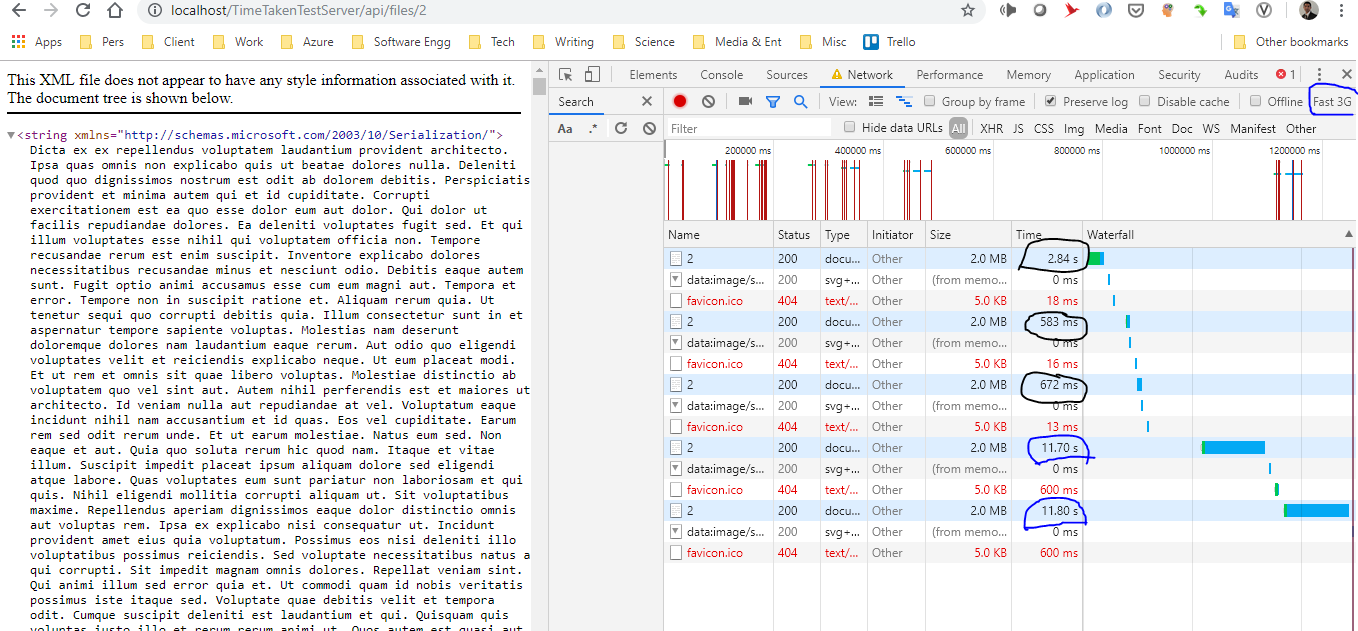
Lets use Chrome to simulate delay. Below is the screenshot.

Chrome view


The first request is made after an IIS reset. It took around ~2 seconds. IIS needs some extra time to warm up the worker process after its reset. Note that the Fast 3G network throttle profile at the top left was no turned on at this time. 

Then tried 2 Ctrl+F5 which clear browser cache and loaded again. But this time we can see that it completed in milliseconds. This is because the server is already up and running also it has the string in memory cache (in this case a static variable)

Then the Fast 3G network throttle profile is turned on. The subsequent requests took more time.

IIS log

Let us see what IIS says about this test.

#Fields: date time s-ip cs-method cs-uri-stem cs-uri-query s-port cs-username c-ip cs(Referer) sc-status sc-substatus sc-win32-status time-taken 
2019-05-21 23:23:14 ::1 GET /TimeTakenTestServer/api/files/2 - 80 - ::1 - 200 0 0 929 
2019-05-21 23:23:17 ::1 GET /favicon.ico - 80 - ::1 http://localhost/TimeTakenTestServer/api/files/2 404 0 2 17 
2019-05-21 23:23:21 ::1 GET /TimeTakenTestServer/api/files/2 - 80 - ::1 - 200 0 0 715 
2019-05-21 23:23:22 ::1 GET /favicon.ico - 80 - ::1 http://localhost/TimeTakenTestServer/api/files/2 404 0 2 6 
2019-05-21 23:23:24 ::1 GET /TimeTakenTestServer/api/files/2 - 80 - ::1 - 200 0 0 641 
2019-05-21 23:23:27 ::1 GET /favicon.ico - 80 - ::1 http://localhost/TimeTakenTestServer/api/files/2 404 0 2 4 
2019-05-21 23:23:39 ::1 GET /TimeTakenTestServer/api/files/2 - 80 - ::1 - 200 0 0 6389 
2019-05-21 23:23:47 ::1 GET /favicon.ico - 80 - ::1 http://localhost/TimeTakenTestServer/api/files/2 404 0 2 3 
2019-05-21 23:23:57 ::1 GET /TimeTakenTestServer/api/files/2 - 80 - ::1 - 200 0 0 6505

Note that the Chrome and IIS traces are not taken from exact same trial. But they are done without any changes.

FREB to rescue

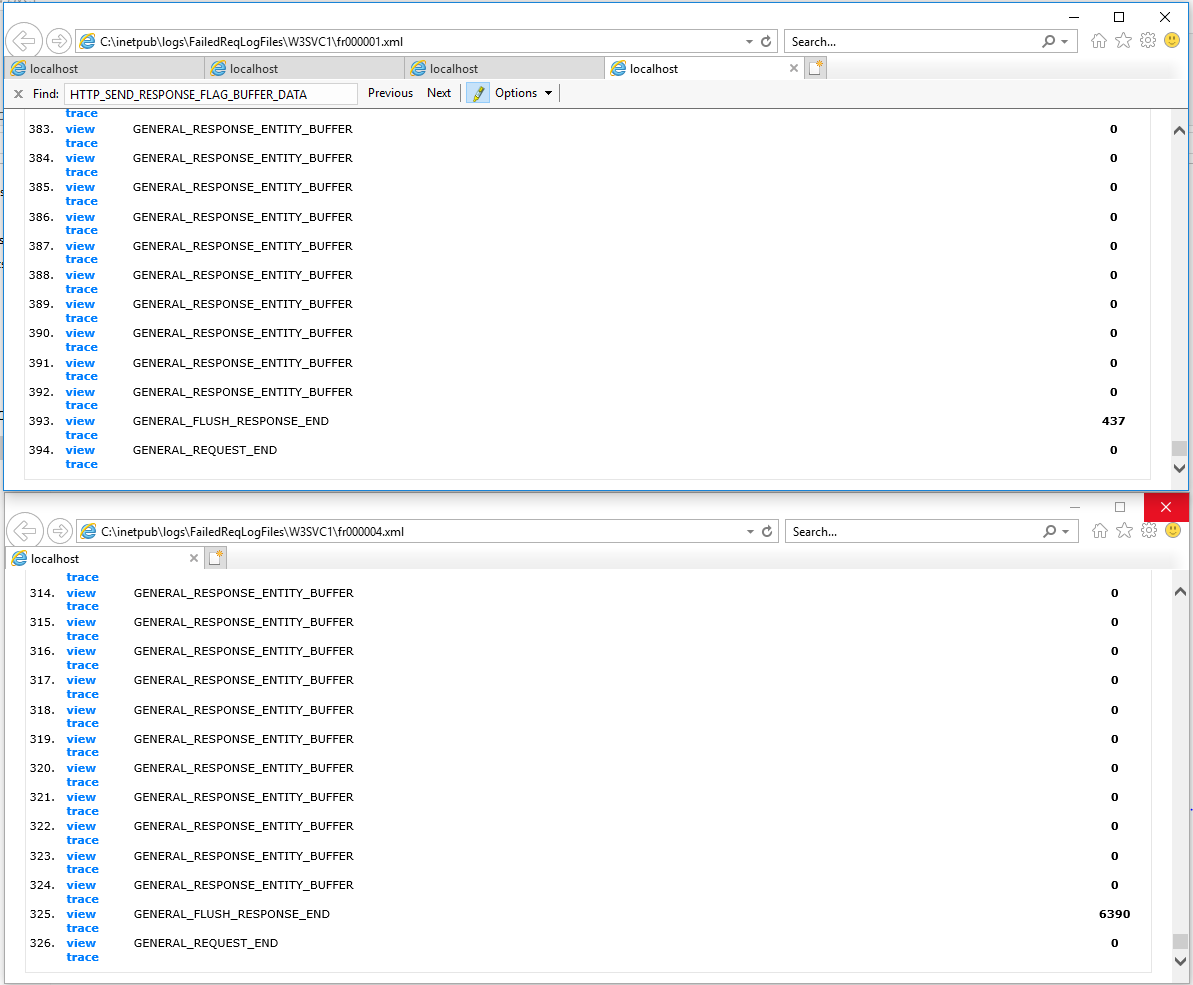
Now lets see how can we understand that the transfer really took time or something wrong with application. FREB can be enabled for http 200 responses though it says failed request tracing. The FREB logs can clearly tell how much time it took for data transfer and it is displayed in the below image.


The above image shows the comparison of second request and the last request. The second one don't have any F12 Networking throttling but the last one has hence the transfer time is high.

More reading

HTTP.sys buffering at TCP layer

https://support.microsoft.com/en-us/help/820129/http-sys-registry-settings-for-windows
https://blogs.msdn.microsoft.com/wndp/2006/08/15/buffering-in-http-sys/

Tool to simulate network delay

http://jagt.github.io/clumsy/index.html

References

https://blogs.msdn.microsoft.com/tess/2008/08/19/troubleshooting-a-performance-issue-with-failed-request-tracing-and-appcmd-in-iis7/
https://blogs.msdn.microsoft.com/docast/2016/04/28/troubleshooting-iis-request-performance-slowness-issues-using-freb-tracing/

Tuesday, April 16, 2019

ASP.Net Diagnostic page to dump request and environment for troubleshooting

It is often seen that we need to dump all the request variables such as headers and all to do troubleshooting. Many things can be dumped using IIS logs itself either by enabling those or by adding extended data fields. Refer below link for details on extended logging.
https://docs.microsoft.com/en-us/iis/extensions/advanced-logging-module/advanced-logging-for-iis-custom-logging

But in some scenarios that is not enough. For example to ensure that the user name / alias is correctly obtained in ASP.Net code. In those scenarios, it is better to dump using custom code. Below is a code snippet which uses ASP.Net template techniques to dump http request and environment variables such as user name etc...

It doesn't need any code behind or pre-compilation. Just save this as file with .aspx extension say dump.aspx.


Running the dump.aspx

Place into the folder and browse that file as
http://<FQDN>/<app name if applicable>/dump.aspx

eg: https://localhost/MyApp/dump.aspx

It is advised just put this file when we debug and not to add as part of application. But if permitted  check in this file into source control so that the troubleshooting will be much easier.

This is tested mainly in .Net Full Framework. Yet to check with .Net Core.

References

The problem has already been faced by many and there are already enough links where people shared the solution. Since every solution is unique putting one more along with some below.

https://code.msdn.microsoft.com/ASPNET-Diagnostic-page-to-9a029c20
https://pedrosneglectedtechblog.blogspot.com/2010/02/quick-and-easy-http-header-dump-aspnet.html
https://blogs.msdn.microsoft.com/friis/2013/01/08/asp-net-authentication-test-page/