Showing posts with label Web Security. Show all posts

Tuesday, January 16, 2024

Azure @ Enterprise - Postman to simulate api to api on behalf of flow

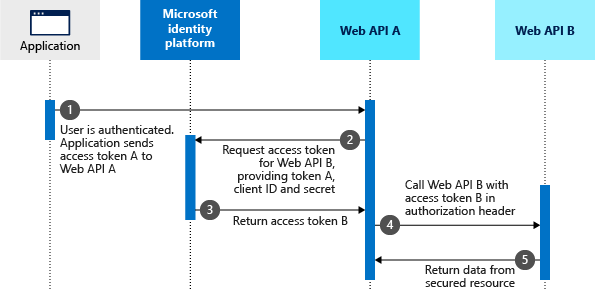
Often we encounter situation where we have one web api that needs to call another api as the incoming user. Basically our web api needs to impersonate the user to the next downstream api. Below goes the official diagram¹ from Microsoft.

Let us call the Web API A as middle tier API and Web API B as down stream api. Here we assume our application is an Angular web app.

Coding that auth flow is little complex. Before coding it is always good to understand how this can be done using Postman.

This require setting up Azure app registrations which are tricky to many developers. So we will detail those out. A glance of sample setup is below

  • Application
    • App registration (aad-testapp/b34ade37-*)
      • This app registration should have Postman's redirect url "https://oauth.pstmn.io/v1/callback"
      • This needs to have secret to be used from Postman
      • This should have permission to call aad-testapi1 with admin consent to avoid runtime individual user consent.
  • Middle tier web api (Web API A)
    • App registration (aad-testapi1/b6d5852b-*)
      • This should have secret to be used while asking for ob behalf of token
      • This should have permission to call aad-testapi2 with admin consernt to avoid runtime user consent.
  • Downstream api (Web API B)
    • App registration - (aad-testapi2/67d35db8-*)
      • No need to have certificates or secrets as this is not getting any token.
      • The expose and API section to have the aad-testapi1 to authorize and to avoid any consent
Once we have the above mental model, it would be easy to understand the relations. Below goes the screenshots for the above.

App registration for application (aad-testapp)


App registration for Middle tier api(aad-webapi1)

App registration for down stream api(aad-webapi2)


Now let us get into business of getting tokens

Getting First token A

This token is to talk between the client app and the middle tier API. This cane be done as normal way² in Postman.
We can use any url as we are not really making call to this web api. This token is used to obtain the ob behalf of token so that we can call the downstream api.

Set the Authorization to OAuth 2.0.
Now in the configure new token give the details as follows.

Here below 3 fields may attract queries. 

Let us details it, if the screenshot is not enough.

  • Auth Url - The url that ends with /authorize.
  • Access Token Url - The url that ends with /token.

These 2 urls can be seen if we take fiddler traces when the token is requested from Postman.

  • Scope - the scope to the aad-webapi1.
Once the values are set, click on the 'Get New Access Token' button. This will open a browser and ask for login. Once it is success it will redirect to the https://oauth.pstmn.io/v1/callback which will show a popup in browser to open Postman again. If all that is success Postman will show the new token.

This token we will be using as assertion in next step.

Getting on behalf of token B

Now we simulated the Angular client getting the token and it will be sending that in Authorization header. Let us simulate how the middle tier API going to get the on behalf of token using this token.

The url we are using is the normal token url of the tenant.
  • grant_type - no idea why it needs to be this string. It is as per the docs³. We normally expect this to be 'on_behalf_of', but it is not.
  • requested_token_use - here comes the word 'on_behalf_of'
  • client_id - is the id of middle tier app registration
  • client_secret - created in middle tier app registration
  • scope - poining to downstream api
  • assertion - this is the incoming token to middle tier api from the client application.
When we are coding in .Net we can use X509 certificate instead of client_secret
Click 'Send' button to get new token. This token can be used to call the downstream api.

Reference


Tuesday, December 26, 2023

Azure @ Enterprise - Entra - On behalf of flow - AADSTS50013: Assertion failed signature validation

Recently we were trying to achieve the below authentication scenario and we stuck with an exception as below. This post is about debugging the same issue.

"Exception MsalUiRequierdException with below message

"OnBehalfOfCredential authentication failed: AADSTS50013: Assertion failed signature validation. [Reason - Key was found, but use of the key to verify the signature failed., Thumbprint of key used by client: 'E41DE<cert thumbprint>D91', Found key 'Start=12/05/2023 17:16:57, End=12/05/2028 17:16:57', Please visit the Azure Portal, Graph Explorer or directly use MS Graph to see configured keys for app Id '00000000-0000-0000-0000-000000000000'. Review the documentation at https://docs.microsoft.com/en-us/graph/deployments to determine the corresponding service endpoint and https://docs.microsoft.com/en-us/graph/api/application-get?view=graph-rest-1.0&tabs=http to build a query request URL, such as 'https://graph.microsoft.com/beta/applications/00000000-0000-0000-0000-000000000000']. Trace ID: <guid> Correlation ID: <guid> Timestamp: 2023-12-22 16:15:05Z"

Below is the call stack

Azure.Identity.AuthenticationFailedException:
at Azure.Identity.CredentialDiagnosticScope.FailWrapAndThrow (Azure.Identity, Version=1.10.4.0, Culture=neutral, PublicKeyToken=92742159e12e44c8)
at Azure.Identity.OnBehalfOfCredential+d__19.MoveNext (Azure.Identity, Version=1.10.4.0, Culture=neutral, PublicKeyToken=92742159e12e44c8)
at System.Runtime.ExceptionServices.ExceptionDispatchInfo.Throw (System.Private.CoreLib, Version=6.0.0.0, Culture=neutral, PublicKeyToken=7cec85d7bea7798e)
at System.Runtime.CompilerServices.TaskAwaiter.ThrowForNonSuccess (System.Private.CoreLib, Version=6.0.0.0, Culture=neutral, PublicKeyToken=7cec85d7bea7798e)
at System.Runtime.CompilerServices.TaskAwaiter.HandleNonSuccessAndDebuggerNotification (System.Private.CoreLib, Version=6.0.0.0, Culture=neutral, PublicKeyToken=7cec85d7bea7798e)
at System.Runtime.CompilerServices.TaskAwaiter.ValidateEnd (System.Private.CoreLib, Version=6.0.0.0, Culture=neutral, PublicKeyToken=7cec85d7bea7798e)
at System.Threading.Tasks.ValueTask`1.get_Result (System.Private.CoreLib, Version=6.0.0.0, Culture=neutral, PublicKeyToken=7cec85d7bea7798e)
at System.Runtime.CompilerServices.ValueTaskAwaiter`1.GetResult (System.Private.CoreLib, Version=6.0.0.0, Culture=neutral, PublicKeyToken=7cec85d7bea7798e)
at MyAuthApi1.Controllers.WeatherForecastController+d__11.MoveNext (MyAuthApi1, Version=1.0.0.0, Culture=neutral, PublicKeyToken=null: /home/runner/work/aad-auth-test/aad-auth-test/MyAuthApi1/Controllers/WeatherForecastController.cs:137)

Inner exception Microsoft.Identity.Client.MsalUiRequiredException handled 

at Azure.Identity.CredentialDiagnosticScope.FailWrapAndThrow:
at Microsoft.Identity.Client.Internal.Requests.RequestBase+d__31.MoveNext (Microsoft.Identity.Client, Version=4.57.0.0, Culture=neutral, PublicKeyToken=0a613f4dd989e8ae)
at System.Runtime.ExceptionServices.ExceptionDispatchInfo.Throw (System.Private.CoreLib, Version=6.0.0.0, Culture=neutral, PublicKeyToken=7cec85d7bea7798e)
at System.Runtime.CompilerServices.TaskAwaiter.ThrowForNonSuccess (System.Private.CoreLib, Version=6.0.0.0, Culture=neutral, PublicKeyToken=7cec85d7bea7798e)
at System.Runtime.CompilerServices.TaskAwaiter.HandleNonSuccessAndDebuggerNotification (System.Private.CoreLib, Version=6.0.0.0, Culture=neutral, PublicKeyToken=7cec85d7bea7798e)
at System.Runtime.CompilerServices.ConfiguredTaskAwaitable`1+ConfiguredTaskAwaiter.GetResult (System.Private.CoreLib, Version=6.0.0.0, Culture=neutral, PublicKeyToken=7cec85d7bea7798e)
at Microsoft.Identity.Client.Internal.Requests.OnBehalfOfRequest+d__3.MoveNext (Microsoft.Identity.Client, Version=4.57.0.0, Culture=neutral, PublicKeyToken=0a613f4dd989e8ae)
at System.Runtime.ExceptionServices.ExceptionDispatchInfo.Throw (System.Private.CoreLib, Version=6.0.0.0, Culture=neutral, PublicKeyToken=7cec85d7bea7798e)
at System.Runtime.CompilerServices.TaskAwaiter.ThrowForNonSuccess (System.Private.CoreLib, Version=6.0.0.0, Culture=neutral, PublicKeyToken=7cec85d7bea7798e)
at System.Runtime.CompilerServices.TaskAwaiter.HandleNonSuccessAndDebuggerNotification (System.Private.CoreLib, Version=6.0.0.0, Culture=neutral, PublicKeyToken=7cec85d7bea7798e)
at System.Runtime.CompilerServices.ConfiguredTaskAwaitable`1+ConfiguredTaskAwaiter.GetResult (System.Private.CoreLib, Version=6.0.0.0, Culture=neutral, PublicKeyToken=7cec85d7bea7798e)
at Microsoft.Identity.Client.Internal.Requests.RequestBase+d__12.MoveNext (Microsoft.Identity.Client, Version=4.57.0.0, Culture=neutral, PublicKeyToken=0a613f4dd989e8ae)
at System.Runtime.ExceptionServices.ExceptionDispatchInfo.Throw (System.Private.CoreLib, Version=6.0.0.0, Culture=neutral, PublicKeyToken=7cec85d7bea7798e)
at System.Runtime.CompilerServices.TaskAwaiter.ThrowForNonSuccess (System.Private.CoreLib, Version=6.0.0.0, Culture=neutral, PublicKeyToken=7cec85d7bea7798e)
at System.Runtime.CompilerServices.TaskAwaiter.HandleNonSuccessAndDebuggerNotification (System.Private.CoreLib, Version=6.0.0.0, Culture=neutral, PublicKeyToken=7cec85d7bea7798e)
at System.Runtime.CompilerServices.ConfiguredTaskAwaitable`1+ConfiguredTaskAwaiter.GetResult (System.Private.CoreLib, Version=6.0.0.0, Culture=neutral, PublicKeyToken=7cec85d7bea7798e)
at Microsoft.Identity.Client.ApiConfig.Executors.ConfidentialClientExecutor+d__4.MoveNext (Microsoft.Identity.Client, Version=4.57.0.0, Culture=neutral, PublicKeyToken=0a613f4dd989e8ae)
at System.Runtime.ExceptionServices.ExceptionDispatchInfo.Throw (System.Private.CoreLib, Version=6.0.0.0, Culture=neutral, PublicKeyToken=7cec85d7bea7798e)
at System.Runtime.CompilerServices.TaskAwaiter.ThrowForNonSuccess (System.Private.CoreLib, Version=6.0.0.0, Culture=neutral, PublicKeyToken=7cec85d7bea7798e)
at System.Runtime.CompilerServices.TaskAwaiter.HandleNonSuccessAndDebuggerNotification (System.Private.CoreLib, Version=6.0.0.0, Culture=neutral, PublicKeyToken=7cec85d7bea7798e)
at System.Runtime.CompilerServices.ConfiguredTaskAwaitable`1+ConfiguredTaskAwaiter.GetResult (System.Private.CoreLib, Version=6.0.0.0, Culture=neutral, PublicKeyToken=7cec85d7bea7798e)
at Azure.Identity.AbstractAcquireTokenParameterBuilderExtensions+d__0`1.MoveNext (Azure.Identity, Version=1.10.4.0, Culture=neutral, PublicKeyToken=92742159e12e44c8)
at System.Runtime.ExceptionServices.ExceptionDispatchInfo.Throw (System.Private.CoreLib, Version=6.0.0.0, Culture=neutral, PublicKeyToken=7cec85d7bea7798e)
at System.Runtime.CompilerServices.TaskAwaiter.ThrowForNonSuccess (System.Private.CoreLib, Version=6.0.0.0, Culture=neutral, PublicKeyToken=7cec85d7bea7798e)
at System.Runtime.CompilerServices.TaskAwaiter.HandleNonSuccessAndDebuggerNotification (System.Private.CoreLib, Version=6.0.0.0, Culture=neutral, PublicKeyToken=7cec85d7bea7798e)
at System.Threading.Tasks.ValueTask`1.get_Result (System.Private.CoreLib, Version=6.0.0.0, Culture=neutral, PublicKeyToken=7cec85d7bea7798e)
at Azure.Identity.MsalConfidentialClient+d__27.MoveNext (Azure.Identity, Version=1.10.4.0, Culture=neutral, PublicKeyToken=92742159e12e44c8)
at System.Runtime.ExceptionServices.ExceptionDispatchInfo.Throw (System.Private.CoreLib, Version=6.0.0.0, Culture=neutral, PublicKeyToken=7cec85d7bea7798e)
at System.Runtime.CompilerServices.TaskAwaiter.ThrowForNonSuccess (System.Private.CoreLib, Version=6.0.0.0, Culture=neutral, PublicKeyToken=7cec85d7bea7798e)
at System.Runtime.CompilerServices.TaskAwaiter.HandleNonSuccessAndDebuggerNotification (System.Private.CoreLib, Version=6.0.0.0, Culture=neutral, PublicKeyToken=7cec85d7bea7798e)
at System.Threading.Tasks.ValueTask`1.get_Result (System.Private.CoreLib, Version=6.0.0.0, Culture=neutral, PublicKeyToken=7cec85d7bea7798e)
at Azure.Identity.MsalConfidentialClient+d__26.MoveNext (Azure.Identity, Version=1.10.4.0, Culture=neutral, PublicKeyToken=92742159e12e44c8)
at System.Runtime.ExceptionServices.ExceptionDispatchInfo.Throw (System.Private.CoreLib, Version=6.0.0.0, Culture=neutral, PublicKeyToken=7cec85d7bea7798e)
at System.Runtime.CompilerServices.TaskAwaiter.ThrowForNonSuccess (System.Private.CoreLib, Version=6.0.0.0, Culture=neutral, PublicKeyToken=7cec85d7bea7798e)
at System.Runtime.CompilerServices.TaskAwaiter.HandleNonSuccessAndDebuggerNotification (System.Private.CoreLib, Version=6.0.0.0, Culture=neutral, PublicKeyToken=7cec85d7bea7798e)
at System.Threading.Tasks.ValueTask`1.get_Result (System.Private.CoreLib, Version=6.0.0.0, Culture=neutral, PublicKeyToken=7cec85d7bea7798e)
at Azure.Identity.OnBehalfOfCredential+d__19.MoveNext (Azure.Identity, Version=1.10.4.0, Culture=neutral, PublicKeyToken=92742159e12e44c8)

The message emitted has not much relation with the actual root cause. Debugging steps are later converted to the scientific debugging¹template²for easier understanding. Below is the embedding of the same. Please click here in case it is not loading properly.

Happy debugging...

References



Tuesday, May 17, 2022

CORS with Windows Authentication in IIS

This post is about web security. How to enable CORS when the producer uses Windows authentication¹. The primary technology stack used here is Microsoft.Net.

Background

The web works on WebAPIs. WebAPIs are the entry points to consume services produced by producers. Often, the WebAPIs are exposed to the web applications published by the same producer. Say, Yahoo Finance is exposing WebAPIs to retrieve financial data. If they don't protect the API, anyone can build a web application by consuming the Yahoo Finance API. They can place Google ads for monetization.

To prevent that, browsers have a mechanism. That will allow sites to call APIs having the same domain name. But, there will be genuine situations to allow cross-domain access. An application needs to call a WeatherAPI exposed in a different domain name..

CORS

Cross-Origin Resource Sharing comes to help when we want to control who can call our APIs. It is based on headers. We can summarize as follows
  1. The browser asks the producer whether it allows the current application's domain name to call API
    1. It's called preflight using the HTTP OPTIONS verb.
  2. The producer responds to the browser with whether it allows calls from the current domain name. Including what HTTP verbs are supported. 
Read the Mozilla docs² for a better understanding.

If the producer is using ASP.Net Framework technology, they can specify who can access it by having the below web.config entries.

<system.webServer>
    <httpProtocol>
      <customHeaders>
        <clear />
        <add name="Access-Control-Allow-Origin" value="https://consumer.com" />
        <add name="Access-Control-Allow-Methods" value="GET,POST,OPTIONS" />
        <add name="Access-Control-Allow-Headers" value="*" />
        <add name="Access-Control-Allow-Credentials" value="true" />
      </customHeaders>
    </httpProtocol>  
 
Hope the above code snippet is self-explanatory. It allows the https://consumer.com domain to access the producer's APIs only using HTTP GET, and POST verbs. It is possible as the producer is sending these custom headers whenever any call is made to it.

The same can be done using C# or VB.Net code as well.

Problem

This works great for most of the scenarios other than Windows authentication. When the producer is using Windows Authentication, things go wrong. The reason is preflight request doesn't have any authentication information. The producer will fail the preflight request. Causing the browser to cancel any further requests.

Solution

The Windows authentication is normally enabled at the webserver level. If it's ASP.Net on .Net Framework, there will be web.config. Follow the below steps
  • The preflight requests should be anonymous
  • To do that have <authorization> tag as follows 
<authorization>
      <allow verbs="OPTIONS" users="*"/>
      <deny users="?" />
</authorization>

Now anyone who is hitting the OPTIONS endpoint will have the custom headers even if the authentication is windows.

How to do this in ASP.Net Core?

The ASP.Net Core model uses middleware technology to achieve the CORS headers³. The <authorization> tag mechanism is achieved by Authorization middleware. 

References

Tuesday, June 8, 2021

Setting samesite:strict in pre .Net 4.7.2 versions to fix CSRF

CSRF is a type of web security attack where the attacker site loaded side by side with our web application and attacker site making HTTP requests to our application as the signed-in user. This happens when our authentication mechanism is based on cookies and is accessible to the attacker's site. When the attacker site postback or make HTTP GET call, the cookie is transmitted to our web application and it identifies as a valid user.

How to fix it?

There are 2 ways to my understanding.

Traditional (Pre SPA - Single Page Application)

This method relies upon one more security measure on the top of the authentication cookie. That is normally called as RequestVerificationToken. Below is the working 

  1. When the page is served to the client, the server will inject an encrypted token in a hidden field
  2. The client fills data in the form. Then perform submit operation.
  3. The incoming POST request is validated by the server for the hidden field. If that field is not available or not able to decrypt using the key in hand, reject the request.
Now think about the attacker's site posting back, that request has the cookie but not the hidden field. This is because the attacker site cannot access the DOM of our web application.

SPA

SPA model doesn't use page-level postback. Instead, it sends and receives data in AJAX requests. The web application's static assets (HTML, JS & CSS) normally loaded during the first time of application load. It may even be served from a CDN. We cannot use the RequestVerificationToken via the hidden field here as the page is not posted back when we do operations.

Here we have another way. It is nothing but fixing the original problem. Blocking the browser not to send the auth cookie when a request is made from another web page, usually the attacker's site. In order to tell the browser not to share cookies, we can use the Same-Site flag on the authentication cookie. This should be done by the server at the time of initial login. The value should be set to same-site: strict.

Now we are going to see how to set the same-site flag to strict in ASP.Net. 

Setting Same-Site to Strict in ASP.Net

If we are using the latest version of .Net starting from 4.7.2, it is easy as below code snippet.

Tuesday, February 11, 2020

Azure @ Enterprise - Microsoft Identity Platform - Minimal steps to get Client Credentials Flow for AppService WebApp

Introduction

We are going to enable AAD authentication to AppService WebApp which has both browser applications as well as API. API can be tested by Postman.

Phases

Create and host application having web pages as well as API.
Create an Azure App registration.
Settings in App service to enable authentication.

Testing

The application tested from both browser as well as Postman

Browser

It is easy as browsing the URL. It will redirect to the login page then after entering credentials it will redirect back to the application URL.

Postman

This has 2 steps. Generating JWT is the first step. Then using that JWT in the authorization header, invoke the Web API.

Video


The issue which may encounter

References

https://azuretrendz.wordpress.com/2019/09/27/testing-with-postman/
https://docs.microsoft.com/en-us/azure/active-directory/develop/v2-oauth2-client-creds-grant-flow
https://docs.microsoft.com/en-us/azure/active-directory/develop/v1-oauth2-client-creds-grant-flow
https://docs.microsoft.com/en-us/azure/active-directory/develop/scenario-daemon-app-registration
https://docs.microsoft.com/en-us/azure/app-service/app-service-web-tutorial-auth-aadpp-service-web-tutorial-auth-aad
https://docs.microsoft.com/en-us/azure/active-directory/develop/scenario-protected-web-api-app-registration#if-your-web-api-is-called-by-a-daemon-app

Tuesday, January 28, 2020

Enabled HTTP(s) on joymononline.in without any certificate cost

Some people still argue that encrypting web traffic is costly and reduce performance. But most of us agree that the site should be secured when comparing the performance cost against security. If there are still questions why a website should be secured, please visit the links

https://developers.google.com/web/fundamentals/security/encrypt-in-transit/why-https
https://www.forbes.com/sites/forbestechcouncil/2018/05/18/why-an-ssl-certificate-is-important-for-your-company-website/#4fffd6c21dc3
https://kinsta.com/knowledgebase/how-ssl-works/

Earlier it was an additional cost to protect web site using an SSL certificate. But nowadays there are a lot of ways to get encryption without extra cost.

Difference ways for free SSL on GitHub pages

Before GitHub started officially supporting SSL on custom domains it was little complicated. One way was using other services such as Cloudflare. But the problem is that it adds one more component and a point of failure. So it is better to go with the GitHub approach itself.

My personal website joymononline.in is hosted in GitHub pages. So no cost for hosting. Only the domain registration needs money and it's done through GoDaddy. So both GitHub and the GoDaddy accounts have the changes to serve web site with HTTP. There is a separate post on how to serve a web site hosted in GitHub pages via a domain registered in GoDaddy.

Let's see how the HTTP(s) can be integrated into the mix.

Changes in GoDaddy

Updates to A records

Below are the existing records


The new IP addresses to point to new IPs

Changes in GitHub

No specific change required. Once the new DNS records are propagated we can see the site using https://joymononline.in address.
Once the site starts working, we may enforce HTTP(s) from GitHub so that even the HTTP traffic will be forced to use HTTP(s).

Troubleshooting

How bought my certificate?

If we have experience in setting up SSL earlier, this is an obvious question. Somebody had to buy or obtain the SSL certificate from an SSL authority. Here the certificate authority is Let's Encrypt.
GitHub did it for us.

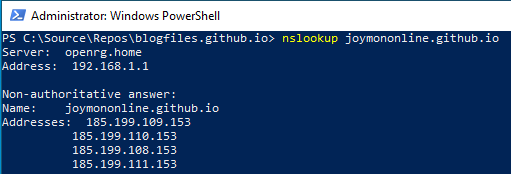
Checking the IP address

In Windows, we can use the below command to find the latest IP address


More on free SSL

https://letsencrypt.org/getting-started/
https://www.sslforfree.com
https://www.udemy.com/free-ssl-certificate/

References

https://github.blog/2018-05-01-github-pages-custom-domains-https/
https://help.github.com/en/github/working-with-github-pages/securing-your-github-pages-site-with-https

Tuesday, November 19, 2019

Azure @ Enterprise - Microsoft Identity Platform - Minimal configurations to enable AAD authentication in AppService WebApp

Welcome to Azure @ Enterprise series. In this post, we are going to discuss something about the Microsoft Identity Platform formerly known as Azure Active Directory Developer Platform or AAD v1. We will be seeing how to enable authentication to an Azure AppService Webapp using the Microsoft Identity Platform. There are many tutorials available on the internet to do the same thing. So why one more?

This tutorial is to demonstrate the procedure with minimal configuration settings. Please note that this is not the quickest. For the quickest, please refer to the link provided which uses the express configuration mode.

https://microsoft.github.io/AzureTipsAndTricks/blog/tip184.html

The problem with express settings is that we cannot understand what is going on behind the scene. Sometimes we don't get predictable results when we want to replicate in different environments.

Prerequisite

It would be really great if we have a basic understanding of some concepts to understand better.

- Basic knowledge about web applications and authentication
- Basic knowledge about Azure Web Apps and hosting to Azure
- Basic knowledge about Azure Active directory

Phase 1 - Create and host web application to Azure web app

The aim of this phase is clear as just hosting a new web application into the Azure web app. After hosting, the web application is expected to be accessible anonymously through the internet by just using its URL. Anonymous means without any login mechanism. We will be using Microsoft Visual Studio 2019 to complete the steps in this phase. It can create and host web applications to Azure as App Service Web App.

This phase has multiple steps. The first step open Visual Studio 2019, then creates a new web project. Do some changes to distinguish our application. Test by pressing the run button. It will start a development web server and open the browser pointing to the development server.

Once we feel comfortable with the application, we can publish it to Azure App Service Web App. 
  1. Right-click on the project
  2. Select publish
  3. It will open
Note the URL of the web app which is ending with .azurewebsites.net. Let's take the application URL as https://aadapp.azurewebsites.net/

Phase 2 - Create an Azure AD App Registration

The second phase is to create an App Registration in Azure Active directory. 

The first step here is to go to the Azure portal then to Active directory and click 'App registration' to reach the app registrations page. Create new app registration. Give the name. It is just a display name. For the time being, select the first option in the "Supported account types" radio button group. This will not help if we need to get users from other AAD tenants logged into our application. The next input which is Redirect URI labeled optional is the tricky one. For the use case in this post, we need to fill the URI. The URL is our Azure App Service Web app URI suffixed with '.auth/login/aad/callback'

In this case, the URI would be

Now its time to click the 'Register' button which creates app registration.

The next step is to clean up unwanted settings in App Registrations so that it has minimal settings. Go to 'Authentication'. Click on the 'Try out the new experience' button. This blade would someday get rid of the old experience so better to try the new experience at the earliest. We need the 'Redirect URI'. Logout URL we can skip for now. Make sure the ID Token is checked in the Implicit grant section. No need to treat as a public client as we are not using any of the flows listed. Supported account types section has the value which allows authentication of accounts in one AAD tenant. 

Now lets clean up the Certificates and secrets blade. Since this App registration is not going to be used for getting tokens it doesn't require any secrets.
Next blade called 'API permissions' will have some permissions filled up by default. For our use case that is not required. So let us remove it.
'Expose as API' blade has scopes and authorized client applications. Those are not required for our use case. Simply clean those too in case something there.
The other blades 'Owners', 'Roles and administrators' don't have anything with the auth flow. Manifest has the JSON representation of the resource. Nothing to do there.

Phase 3 - Enable Web App to authenticate via App Registration

Previous phases created a publicly accessible web application and app registration. Apart from Redirect URI, there is no relation between those 2 things. The web application still works anonymously. This phase is to connect the web application to the app registration so that it will force the users to get authenticated via Azure AD.

The first step is to go to the 'Authentication / Authorization' blade. Then turn the App Service Authentication on.
Now select the action to take when a request is not authenticated. It is 'Log in with Azure Active Directory'.
The next step is to configure the Active Directory provider. Click on the Activity Directory option to see the settings. Select the Advanced mode as we are all advanced users. Enter the App registration id into the 'Client ID' field. Isser Url is essential and it can be crafted by prefixing https://login.microsoftonline.com/ to the Azure Active Directory Tenant Id.  It will end up something like below.

https://login.microsoftonline.com/ea1945af-c42b-4482-89e8-abf25ba86249

Press 'OK' then click on 'Save' to save settings to the web application.

Testing

Make sure the cache is cleared in case it is the same browser instance that opened the page earlier. Better open an incognito window and browse the App Service Web App URL. It will redirect to the Azure AD login page. Enter the credentials of a user who is in the same Active Directory Tenant. Remember the setting we gave while creating App registration. If the credentials are right, the browser will redirect back to our Azure App Service Web application URL and shows the page.

More testing

How do we ensure the login really happened? Is it serving the page anonymously even after login? We can see the logged-in user details using a magic URL.
https://aadapp.azurewebsites.net/.auth/me

Video

Step by step video can be found on youtube.

References & Troubleshooting

Details about the openid configuration.
https://login.microsoftonline.com/{AAD Id}/v2.0/.well-known/openid-configuration

https://login.microsoftonline.com/common/v2.0/.well-known/openid-configuration

Tuesday, October 22, 2019

Azure @ Enterprise - Microsoft Identity Platform OAuth Mind map

Security is always tough for developers. They know how to make the app work in their machine. But clueless about how it has to work in real production with the highest security possible. It becomes more difficult when they need to understand protocols and implementation details of standards such as OAuth, Microsoft Identity Platform, etc...

I am not an exception from the above-said developer group. Learned the Azure AD and its mechanism the hard way and finally decided to make a mind map out of the knowledge. 

It is attached below. Click on the image to open SVG version to click on the links.

Since it uses a textual drawing tool called Plant UML, the source code is available. It is present in GitHub. As we all know Azure is evolving very rapidly. Any changes are welcome in the form of a pull request.


More mind maps

Tuesday, July 31, 2018

Azure @ Enterprise - Time bound SAS for WebJob to dequeue ServiceBus Queue messages

Context

Enterprise in 'Azure @ Enterprise' series refers to companies or projects which have stringent security measures and process guidelines which a normal developer may not think of. Or are not expected in the self service cloud world. Often the security measures are taken to make sure that the responsibility is moved to some other party or vendor so that people at Enterprise are free from low level details of those concerns.

If we are in non enterprise projects, developing a queued back end processing in Azure is super cool with Azure Queue and WebJobs. But in enterprise that is not the case, we have to make sure the service supports virtual network or not. Will that support encryption at rest as well as in transit. If it encrypt can the enterprise provide key etc...Basically enterprise don't want to fully trust the cloud vendor though in reality vendor own all and have full control.

Problem

Enterprise may evaluate Azure ServiceBus Queue is better than the Azure Storage Queue as per current feature sets and the standards what it used to evaluate. It may come out viceversa. If it demand key rotation for ServiceBus connection string with expiry, it is little difficult, if we had used only configuration(web.config or app.config) based connection string.

Even if it is not enterprise project, it is good practice to rotate the keys with expiry as long as the ServiceBus don't support hosting it inside the vNet. If it support hosting inside vNet, the attack surface could be less. Currently any Tom,Dick or Harry can launch brute force attack against the service bus end points.

Key rotation will not remove the attack surface but reduce the possibility of a successful attack.

https://feedback.azure.com/forums/216926-service-bus/suggestions/15619302-add-service-bus-to-vnet

Solution

It is possible to have key rotation even with the attribute based WebJob functions. We can have expiry to the keys as well. Lets see step by step.

Generating time based SAS (Shared Access Signature)

It is supported in ServiceBus. In order to generate one we need one Shared Access Policy. Normally when we create the SB instance, there will be 'RootManagerSharedAccessKey' with primary and secondary keys.

Ideally this is supposed to be done outside of the main application such as Azure Automation Code and the generated new time based SAS has to be in KeyVault. This will help to have only automation account knowing the high privileged Shared Access Policy key and WebJobs know only KeyVault secret name where the the time based Shared Access Signature is stored by Automation Runboook. If application has access to the KV, it can retrieve the SAS. 

Since the code to do SAS rotation using Azure Automation Runbook is not under the scope of this post, omitting that code. If anyone request through comments section, the code will be provided.

WebJob to read SAS and dequeue

Now lets come to WebJob code side. Before we start the JobHost to listen using RunAndBlock() on the thread, there is option to override to specify the connection string to the ServiceBus which uses the time based SAS. Below goes the code.

private static void RunAndBlock()
{
    var config = new JobHostConfiguration();
    config.UseServiceBus(ServiceBusConfigurationFactory.Get());

    if (config.IsDevelopment)
    {
        config.UseDevelopmentSettings();
    }
    var host = new JobHost(config);            
    host.RunAndBlock();
}

static class ServiceBusConfigurationFactory
{

    /// <summary>
    /// Returns the SB configuration
    /// </summary>
    /// <returns></returns>
    /// <remarks>Change this to read from Azure KV</remarks>
    internal static ServiceBusConfiguration Get()
    {
        return new ServiceBusConfiguration() {
            ConnectionString = BuildsSBConnectionString(GetITimeSensitiveSASTokenProvider().Get()),
        };
    }

    private static string BuildsSBConnectionString(string sharedAccessSignatureToken)
    {
        ServiceBusConnectionStringBuilder builder = new ServiceBusConnectionStringBuilder();
        builder.SharedAccessSignature = sharedAccessSignatureToken;
        builder.Endpoints.Add(new Uri("https://<name of SB instance>.servicebus.windows.net/"));
        string finalCon = builder.ToString();
        return finalCon;
    }

    private static ITimeSensitiveSASTokenProvider GetITimeSensitiveSASTokenProvider()
    {
        return new KVBasedimeSensitiveSASTokenProvider();
    }
}

The code is mostly self explanatory. When the first time main() of WebJob is started, it will get the ServiceBusConfiguration from the factory class. Factory uses provider class which knows how to talk to Azure KV or some other store where the SAS is present. Once the SAS is present, the connection string can be built from it.

One thing to remember is that the SAS is not connection string. Connecton string has to be 

Things to remember when working with ServiceBus

API Collision

There are 2 dependencies when we work with Azure ServiceBus. Microsoft.Azure.ServiceBus.dll & Microsoft.ServiceBus.dll and they both has classes with same name. Sometimes its very difficult to get the code compiled if downloaded as snippet.

What if the token expires after RunAndBlock() is invoked?

At least in testing there were no issues to the dequeued messages. All new instances of WebJob process, it takes the new connection string.

Tuesday, November 21, 2017

Azure @ Enterprise - Architecture to secure PaaS

When enterprise wants to use somebody else's computer, yes cloud/Azure is essentially just somebody else's computer, they want to make sure it is secure same to their on-premise environment. At least enterprise wants to delay the attack. Never think any security solution is final. Security measures are just about 'when' the attack will happen.

Multi-tenancy and Enterprise

Cloud is all about multi-tenancy. We have to share with others and enterprise always have doubt on it. When we share, will the other guy stole our assets or attack me? Whatever the cloud vendors assure that the cloud is secure and nothing gets leaked between the tenants, enterprise don't want to be just another tenant. They want their own space.

One way is to setup private cloud infrastructure inside enterprise. But it has upfront investment and lose the glory of auto scaling. So that is not the best options unless the security is the first concern.

Enter virtual networks

In order to give own space to enterprise or anybody who don't want to be another tenant, cloud providers started giving virtual networks. It ensures that our cloud resources are accessible only within the boundary of vNet and to have external communication separate gateways/tunnels are needed. They also support seamless connection to the enterprise's on premise network via VPN. That way enterprise can just lift and shift their classic virtual machine based solutions to Cloud and slowly adopt the cloud native features

In Amazon, it is called as VPC (Virtual Private Cloud) and in Azure it is simply virtual network or vNet for short.

vNet limits in Azure

Though there is vNet in Azure not all platform services are vNet ready. For example, we can put a virtual machine easily into vNet but Storage Account cannot. (Feature to limit Storage Account access to vNet is beta at the time of writing). Platform service such as AppService can be hosted inside vNet using a costly feature called AppServiceEnvironment.

Authenticating to platform services

Enterprise normally don't want to keep any secrets in application configuration. eg: Password to database connection should never be kept in web.config in case of an ASP.Net web application. Instead the app has to run under a specific IIS application pool and app pool user will be added to the database server hence app can use windows authentication. Or the authenticated user can be delegated to database directly. Again depends on the nature of application. We can ask then, what is the login password of app pool user? Is one or persons knowing it not a problem in enterprise?

In enterprise people changes often. If the identity is with people, it is easier to manage than keeping password in config. There are chances that someone in support may send the config file in mail or keep in \\shared drive etc... If it is app pool user and the password is with single team who installs the application, it is relatively safe. At least that is what enterprise believe.

Coming back to Azure. Not all Azure resources/platform services(PaaS) support windows/active directory based authentication. The application must preset password when it authenticate against the PaaS. So it demands apps to keep secrets such as passwords and connection strings with password in it. 

Enter KeyVault

Microsoft suggests to use a PaaS called KeyVault to keep secrets. It has HSM (Hardware Security Modules) and much more features. Then the question from enterprise turns out to be "Does KeyVault support vNet?" Answer is No. 
Should we keep the KeyVault's connection string with password in application's config? Then what is the difference between keeping database's connection string with password v/s KeyVault connction string with password in application's config?

So how do we protect KeyVault. If enterprise needs to be just another tenant in KeyVault, how to ensure the security? This post is about one way how can we protect connection to KeyVault which will protect other resources.

Architecture

The key message is simple here. 
In order to connect to KeyVault use certificate instead of password in application's config. 
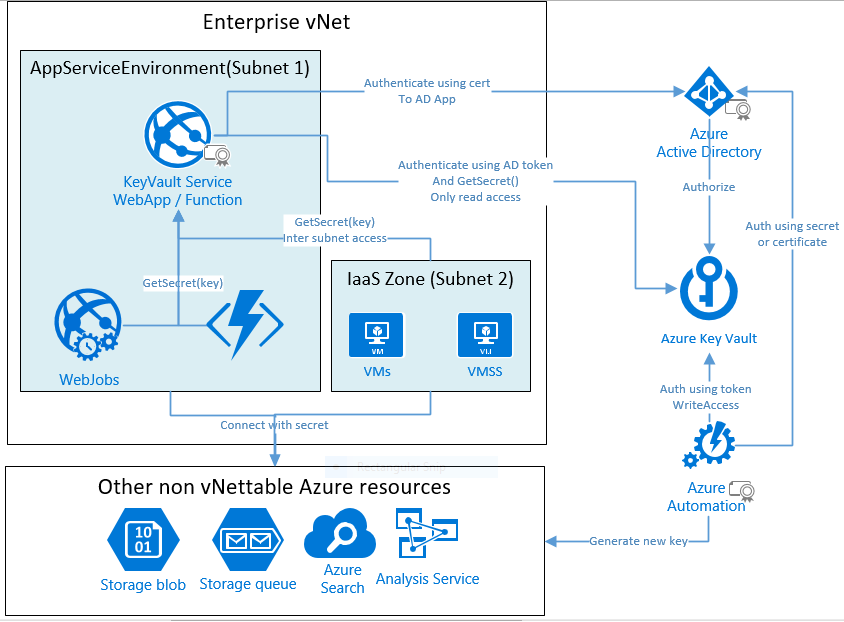
Rest is circus we do to get all working together. We can use Azure Function to talk to KeyVault and vNet to protect that function so that nobody from outside can access that Function. Only that Function needs to know the certificate and registered as Azure AD App etc...

Diagram

This is the diagram which shows how the things are put together.

How it works

KeyVault

Since all the Azure resources are not compatible with vNet and Active Directory based authentication, we cannot avoid keep the passwords and secrets. It is advised to keep the secrets in the KeyVault than in app or web.config.

This way the secrets will always be with one team who installs the application. 

Azure AD App

In order to access KeyVault we need to have an Azure Active Directory Application. KeyVault accepts the AD token to get authenticated. 

KeyVault Function/Web App

This is the only component which knows how to connect to Azure KeyVault via Azure AD. It is called by other components in the system whenever they need any secret. This must be the only one registered with AzureAD App.

Alternative is to register all the components as Azure AD App and have the certificate with them. So they can access KeyVault directly

ASE

ASE is required to make sure that the KeyVault Azure Function is accessible within the boundary of enterprise's private area ie vNet. This makes the KeyVault Function secure without accepting security credential in every http request.

Tuesday, November 7, 2017

Who is responsible for making APIs / apps secure?

If we are from software engineering background we immediately says its developers. Some enterprise people will go ahead and say that it is combined duty of infrastructure and development. Infra has to setup proper VPN access, firewalls etc...If we scope to public internet applications, we can pretty much hear one word its the duty of developers developers developers. May be some will says its architecture too. But mostly if its not enterprise level, application architecture is part of development.

There are some problems with leaving the duty of security to developers

  • Developers always focus or has to focus on application features. 
  • Developers are not experts in security field. They may not to not supposed to be up to date with all the security vulnerabilities found out in the world.

There could be more problems we could think of. So what is the solution in the unsecured world of IT?

Once simple answer is to let developers free from security aspect and give it to security experts. Hiring one security expert and he looking at every line of code produced is not a great idea either. So what to do? Is buy or renting a security product / service a viable option? Seems its viable than betting on developers securing the applications. Those applications or services often referred to as API Management Gateways

What are these API Management Gateways do

Suppose a developer leaves a SQL injection hole and it missed in testing stages and reached production, these gateways are expected to block SQL injection attack by inspecting the payload/traffic. Similarly other attacks also are supposed to be handled by the gateway before reaching to the application servers.

Below are some links of basics and list of players in the application or API security management market.

http://www.forumsys.com/product-solutions/api-security-management/
https://www.roguewave.com/products-services/akana/solutions/api-security
http://www.apiacademy.co/resources/api-management-lesson-201-api-security/

Most of the players are cloud ready. Even cloud providers such as Microsoft Azure have their own offerings to secure applications in Cloud.

Will these gateways reduce performance?

Nothing comes in free. If someone is claiming its adding 0 delay they are wrong. Somewhere instructions are supposed to execute which validate the traffic and take decision. They can make it faster enough that it is not visible to the outside. In order to speed up they often use dedicated appliances or hardware instead of commodity servers.

Comparison

Some sites where different products are compared. It might not be accurate to the date. But a good starting point.

https://www.itcentralstation.com/categories/api-management#top_rated
http://transform.ca.com/API-Management-Platform-Vendor-Comparison.html

Some players

  • https://www.okta.com
  • Layer from CA

Is this the silver bullet

There is no silver bullet in software engineering or in science. Whatever is best at the time and situation adopt it. Embrace change when new better ways are available. 

If the application is highly sensitive and bet on one gateway to protect, it will not be a great solution because that gateway might not be update with our security requirements. For example if a zero day attack is found and gateway is not updating with in days and releasing new versions but our business need in the next hour, probably we should let our developers take care of security. May be we will soon end up in building another gateway but its worth doing it.

Update - 19Nov2019

How to evaluate API Management Gateways

http://projects.webappsec.org/w/page/13246983/WAFEC%201%20HTML%20Version

Tuesday, July 29, 2014

Android - Making Facebook login works in HTML5 app hosted inside WebView

Context - Develop one app for all machines / platforms.

The software stake holders always want to target a large audience regardless of what machine / plat form their clients uses. That is one of the reason why software are often written as web application. If we write as web application, at least in theory it can run in any machine whether it is laptop,tablet or mobile also regardless of the OS Windows / Linux / Mac used in those machines. Another advantage going with web is the less development cost as we are developing one application. Its the trend among the developers / organizations.

There are so many arguments going on whether we should go with this HTML5 web apps to address this problem in case we are targeting mobile platforms only. Some people argue that we should go with Xamarin kind of converging platforms. But that won't help to run the app in laptops.

Another requirement from the stakeholder will be to have native web app even if we have working web application. That is to make sure the application is present in the app stores in the way standard mobile applications are present and users don't need to worry about the web application url. They just need to install the mobile app from the store.

So only one way to meet the above requirement of running in desktops, laptops and as native mobile app is to develop application using HTML5 and create native wrapper applications which uses WebBrowerControl / WebView to show the HTML5 web site inside the native mobile app.

But will that make our the development life easier? If the application is very simple, it is easy. But when the application gets more features, problems will starting popping up. Below is one of the problem we faced in such a scenario.

Problem

The application needs to have Facebook login. It is easy to setup that using the Facebook javascript sdk. It worked well when we try this from laptop and the mobile browser. But when the same is tried from native Android wrapper we got an issue. After Facebook login, it ends up in a blank white page. 

The analysis leads to Android WebView limitations. The Facebook login SDK normally creates browser window child window and after login it will close that window and control will be passed to parent window. But when we show the same page using Android WebView control. That javascript popup window closing is not working.

Solution

The solution is as follows 
  1. Show the FB login popup in a different WebView control
  2. After the login success, close that window. 
How do we achieve that? Below are the tasks to be done.

Task 1 - Show login popup in different WebView

There is already a WebView in the application. We need to catch the javascript popup show event happened inside the web page and show that popup in a different WebView control. To do that we need to follow steps below
  1. Subclass WebChromeClient and override it's onCreateWindow method. Name it as UriWebChromeClient
  2. From the onCreateWindow method create object of new WebView control and add to the view.
    1. When we create the second WebView control, associate that to our custom WebViewClient which we are going to create in Task 2. That is required to close this second WebView.
  3. The new UriWebChromeClient class object needs to be connected to the existing WebView by calling webViewObj.setWebChromeClient() Method

Task 2 - How to know FB authentication is success to hide WebView

Now we need to think how the Android web view knows whether the FB login is successful. It can only be determined by looking at a particular URL(https://m.facebook.com/v2.0/dialog/oauth) where the FB will be redirecting after login success. How do the Android web view knows that the web redirection happens? It can be done by sub classing WebViewClient class. Steps below
  1. Subclass the WebViewClient class.Name it as UriWebViewClient
  2. Override the onPageFinished() method of WebViewClient in the new inherited UriWebViewClient class and check for the url. If the URL is "https://m.facebook.com/v2.0/dialog/oauth", we can decide that the FB authentication is completed and its time to hide the second WebView.
  3. Override the shouldOverrideUrlLoading() method too and do the similar.
The code is mentioned in this SO link .Only difference from this link is the onPageFinished method overriding.

Reference links

Monday, May 26, 2014

Why the __RequestVerificationToken sent from @Html.AntiForgeryToken() is not changing

Recently we got an issue during the security review conducted by the client on an ASP.Net MVC 4 web application. It was related to the CSRF attacks. We have used the anti forgery token throughout our application. But the reviewer said that the token value generated by HTML helper is constant always. Ideally the "__RequestVerificationToken" value should not be same for the subsequent requests. But in our case the token value returned is always the same.

We were able to reproduce the issue easily using a sample application in our QA environment. But the same sample worked well in development servers. This helped us to narrow down the issue to the server configuration.

There were no forum questions about such an issue when we googled except one question in SO but there is no answer. Then the search turned towards relations between windows updates and anti forgery token. It lead to one SO link where it mentioned about a KB. Immediately installed the same in the QA test server and could see it worked. 

Below is the link to KB which solve the repetition of anti-forgery token issue across multiple page loads

http://support.microsoft.com/kb/2656351

Tuesday, April 29, 2014

XSS attack into ASP.Net MVC 4 site via Javascript comment

Introduction

Till this moment I strongly believe that, software security can not be achieved. I am telling this within my 6 academic + 8 professional years of experience with computer systems. I did building computer systems as well as hacking the same. Whenever I architect a system most of the time I was able to forecast the holes too. But since timely release of the application takes more priority in most of the cases, I have no way except building the systems with security holes. 
"Computer software security is always a concept like perfection"
Hacking a desktop based software is more easy because we can always see the source code which helps to understand how its being executed. Sorry to the new generation developers who born into the managed world. When the old generation says source code its always assembly language which cannot be obfuscated or protected. Assembly language is enough to understand how the system works.

Web systems are easy to build as it requires primary knowledge of HTML and one scripting language. Now a days with the penetration of Node.JS, one can create web sites with only HTML & Javascript knowledge without even knowing how the web works on request-response mechanism. If a hacker finds out a security hole in a desktop system and make use of it, the impact will be normally less. For example if somebody hacks the serial key mechanism, only some people are going to use it, unless he puts that in internet. But think about a web system, if attacker succeeds in hacking a bank web site, the impact will be huge.

XSS is one type of the web attack.In short we can define that as below

"Injecting script into the system as if, it is input data and getting the same script executed on other user's browser"

I know this is not easy to digest at the first glance. If you need more details, visit the below links.
Below is one sort of XSS attack which uses the query string to inject script and makes it available inside a script block.
http://buffered.io/posts/xss-flaws-via-mvc-model-binding-and-request.querystring-inconsistencies/

One more special case is to exploit the javascript encoding and passes the javascript via innerHTML property of html elements.
http://weblogs.asp.net/jgalloway/archive/2011/04/28/preventing-javascript-encoding-xss-attacks-in-asp-net-mvc.aspx

XSS via commented JS which has ASP.Net MVC RAZOR token

Normally in MVC people may not use the old query string technique.Also the sites will be having the ASP.Net request validation enabled. The ASP.Net request validation scans all the requests for any possible script tags and throws exception on the same.

What if the script came through an Action method without script tag and renders with the help of a commented line and get executed without even an HTML event? Again, the Action method can be invoked both by get requests and post requests.

We are going to discuss how such a situation can occur.

The victim Web application / ASP.Net site

In most of the cases the security holes are opened by the programmers unknowingly. Lets take an example of a simple web site. Here the programmer wants to implement a contact page where the contact person's name comes via an action method.

@model MvcExceptionHandlingDemo.Models.Contact
@{
    ViewBag.Title = "Contact";
}
 
<hgroup class="title">
    <h1>@ViewBag.Title.</h1>
    <h2>@ViewBag.Message</h2>
    @using (Html.BeginForm())
    {
        @Html.LabelFor(s => s.Name)    @Html.TextBoxFor(s => s.Name)
        <input type="submit" value="Change" />
    }
</hgroup>

        public ActionResult Contact(string name)
        {
            ViewBag.Message = name;
            if (ViewData.Model == null)
            {
                ViewData.Model=new Contact(){Name=name};
            }
            return View();
        }
        [HttpPost]
        public ActionResult Contact(Contact c)
        {
            ViewBag.Message = c.Name;
            if (ViewData.Model == null) ViewData.Model = c;
            return View();
        }

One of his intention was to show the social profile of that person by using some web services which accepts name. So wrote a javascript function. But later he commented the js code because he was not able to find suitable web API which gives the social profiles.

<script type="text/javascript">
    function dispProfile() {
        //var s = '@ViewBag.Message';
    }
</script>

How to conduct attack

The base for this attack is the option of rendering text into javascript which is commented. The MVC framework doesn't know about the javascript comment. So it will do its duty which is nothing but rendering the value in @ViewBag.Message property.

What string we should inject as script in this scenario is little tricky.
  1. We need to close the existing js function. 
  2. Then we can have our script. Since it is outside of the function it will get executed when page loads.
  3. Finally we need to have a dummy function with only starting '{' to make sure the script is in correct syntax
Below is one sample javascript which we can inject

';
}
alert(2024);
function dummy(){
//

This will make sure dispProfile() function closed properly. and write the attack script (Here it is alert(2024);) and starts a new dummy function to make the syntax proper.Otherwise the dispProfile() function will be in open state. So after the injection the rendered script will be as follows.

 <script>
    function dispProfile() {
        //var s = '&#39;;
}
alert(2024);
function dummy(){
//';
    }
</script>

One more thing to remember is how to inject this script .One of the option is to exploit the Contact action method with msg parameter. If we normally inject any script tag the ASP.Net request validation system will throw error. But here we are not injecting the script tag as it is. Instead some fragments of script. The script as its cannot be added to URL. For that we need to use the URLEncoded string of the script. Encoded URL can be

http://localhost:50471/Home/Contact?msg=%27%3B%0A%7D%0Aalert(2024)%3B%0Afunction%20dummy()%7B%0A%2F%2F

There are so many online URL encoding and decoding sites. Those can be used to do the encoding.

How to prevent

In this case the problem is commented code. The intention of the programmer is to stop the functionality of dispProfile() but he forgot the fact that its containing RAZOR token. He should have commented RAZOR code as well. In other words here same program is handled by 2 execution engines. RAZOR & Javascript. So when commented it should be commented for both the engines.

Sample application can be downloaded from the below link.