

We recently upgraded one of the SQL Server environments from E32s V3 (32Cores, 256GB) to F64s V2 (64Cores, 128GB) Azure machine tier. That was on the assumption that the CPU is peaked on load but memory is enough.
Surprisingly the application slowed down drastically!!
The initial hypothesis we came up is because of less RAM in the F64s V2(128GB) the system slowed down. But we didn't see any memory pressure in the performance counters. Then we run one more test and observed a peculiar behavior. During the load, not all 64 logical processors are getting utilized. That leads to further investigation and ended up in below message in SQL Server event logs
Date 11/20/2019 5:33:09 AM
Log SQL Server (Archive #1 - 11/23/2019 2:05:00 PM)
Log SQL Server (Archive #1 - 11/23/2019 2:05:00 PM)
Source Server
Message
SQL Server detected 2 sockets with 16 cores per socket and 32 logical processors per socket, 64 total logical processors; using 40 logical processors based on SQL Server licensing. This is an informational message; no user action is required.
SQL Server detected 2 sockets with 16 cores per socket and 32 logical processors per socket, 64 total logical processors; using 40 logical processors based on SQL Server licensing. This is an informational message; no user action is required.
Licensing problem! Yes due to lack of Core-based licensing, it is not able to leverage all the cores.
But wait a minute. We earlier had 32 cores only but now we have at least 40 cores in action though we have 64 in the machine. 40 should ideally perform better than 32.
SELECT cpu_countFROM sys.dm_os_sys_info
We have Microsoft support and below is the response got from them on why with 40 cores it is not performing well. ie if SQLServer is capped by lack of core-based licensing, why it will slow down.
NUMA & SQL Server Schedulers
SQL Server has its own operating system (SQLOS) that handles task management. SQLOS assigns one scheduler per logical processor to handle user based queries. Schedulers that are available to run user queries are considered online; schedulers that could run user queries but are not available to do so are considered offline. When the SQLOS starts it brings schedulers online on the first NUMA node, then the second, third, etc. until all schedulers are online or the CAL limitation has been reached.
The chart below shows a summary of the online schedulers under CAL licensing:
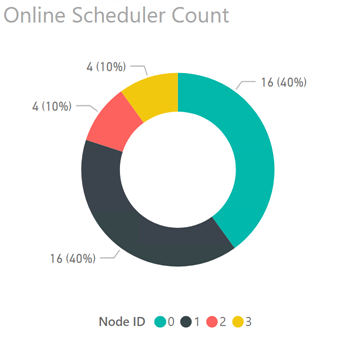
Each new connection to the instance is assigned a NUMA node based on a round-robin algorithm, e.g. connection 1 is assigned to NUMA node 0, connection 2 is assigned to NUMA node 1, connection 3 to NUMA node 2, connection 4 to NUMA node 3, and so on. (For more information on how scheduling algorithms work in SQL 2012 see How It Works: SQL Server 2012 Database Engine Task Scheduling at https://blogs.msdn.microsoft.com/psssql/2013/08/13/how-it-works-sql-server-2012-database-engine-task-scheduling/)
Under CAL based licensing SQL Server used all 16 logical CPUs on NUMA nodes 0 and 1 (80% of online schedulers) and 4 logical CPUs each on NUMA nodes 2 and 3 (20% of online schedulers); due to the round-robin assignment of new connections each NUMA node handled up to 25% of the total query workload. This resulted in Nodes 0 and 1 being relatively idle while Nodes 2 and 3 are always in use. The imbalance in workload results in a noticeable difference in performance for queries running on Nodes 0 and 1 vs Nodes 2 and 3. Essentially, Nodes 2 and 3 have between 2-4x the load factor of Nodes 0 and 1 at any given time.

