
Showing posts with label Database. Show all posts

Tuesday, October 21, 2014

Delete a SQL Server database schema with all its objects

Recently as part of R&D I had to delete all database schemas in a SQL Server Database. The major pain I foresee on identifying objects associated with it and deleting those in order. I was confident that somebody might have faced the same earlier and the script will be available as its, That's correct. I got a good link in first google itself. Its given below

http://ranjithk.com/2010/01/31/script-to-drop-all-objects-of-a-schema/#comment-428

Really thanks to this guy. But when I tried deleting the schema in my database using this SP, I got an error saying that the schema cannot be dropped as there are some user defined table types inside it. The technique which this guy used is to get the objects of schema is to query the sys.objects and that never gives the User Defined Table Types inside the schema.

SELECT *
FROM sys.objects SO
WHERE SO.schema_id = schema_id(@SchemaName) order by name

This might also be faced by some other people so read some comments but no luck. So had to spend sometime on the query and added the code to delete UDTT too.

--Add DROP TYPE statements into table
INSERT INTO #dropcode
SELECT 'DROP TYPE '+ @SchemaName + '.'+name
FROM   sys.types
WHERE  is_table_type = 1 and schema_id=schema_id(@SchemaName)

File can be downloaded from here
 
Once again thanks to Ranjith the author of original post and hope he wont mind me changing his work and redistributing

Tuesday, October 7, 2014

SQL Server internals - How to see where my data record stored

As I mentioned in many of my previous posts, its very difficult for me to learn something without seeing how its done internally. For example you can see how I explored .Net GC working in one my previous post. This time I am trying to learn how SQL Server stores that data internally.

Where SQL Server stores our tables & records?

As everybody knows, its in the disk only. But which file? Where its located. There are at least 2 files required for each database and we can see the file paths in the properties tab of SQL Server Database or query the details.

How the data records, tables are organized

We could see that the data is stored in normal files with extension .mdf,.ldf and .ndf. Does that mean we can open that in notepad and see it? Is the SQL Server just open the file and writing into it just like how we did in C/C++ labs in college?

Absolutely no. As SQL Server is a production ready software so it cannot do like academic code. It has more levels which optimize the storage techniques for maximum performance. One level is the file groups where we can specify more than one file for a group and associate with partition. Another level is the page. SQL Server considers a page as the atomic unit of storage. The page size is 8KB. It  does the IO operations such as reads / caches at page level only. Even if we need one record from a page, it reads the entire page.

Lets get into how the records are stored. As we know the physical storage order of records in SQL Server database is based on the clustered index and normally the primary key will be clustered index. We cannot have more than one physical storage order for data records. That's is why there is only one clustered index allowed.

How to inspect SQL Server pages

But there is something called non-clustered indexes. If the records cannot be physically stored in more than one order how they help us? Those are different data structures which tells the order of rows in a different way. Before going to "how the non-clustered indexes works" lets get full understanding about how the clustered index works and how to see the data inside page.

I am glad to say that people before me already thought in the same way and done enough hard work to explain the storage with good pictures. So why I need to do the task again? I just read their blogs and see understood how it works. So sharing the same via my blog.

Below is the blog post where I could see the storage is explained with undocumented SQL Server functions called DBCC IND & DBCC PAGE
http://www.mssqltips.com/sqlservertip/1578/using-dbcc-page-to-examine-sql-server-table-and-index-data/

References

http://www.practicalsqldba.com/2012/04/sql-server-index-fragmentation.html
https://www.simple-talk.com/sql/database-administration/sql-server-storage-internals-101/

My interest was about index fragmentation. So I did some more research on it and preparing my own post where we can see how fragmentation can be created and solved.

Tuesday, March 25, 2014

If statement in SQLCMD

SQLCMD is a nice utility to automate the SQL scripts execution.I became the fan of it years ago when I first used it for automating database creation and version upgrade of databases. The past sql automations using sqlcmd.exe were relatively simple. Most of those were using tokens and those tokens will be replaced with actual values when the execution starts. The values for tokens will be supplied by initiating programs and those programs may be of .bat, .vbs or .ps1 files at the most it will be invoked from the installers.

Recently we came to a situation where a branching is required in SQLCMD scripting. Basically we need to change the value of the token at runtime based no a database SELECT query. At that moment I realized that sqlcmd doesn't have branching statements. Team's initial decision to mitigate it was to call the database from the initiator programs.But those will make the .bat files really heavy or may need to write another PowerShell script or exe to do the job and get the value for sqlcmd token.

But a tight google exercise unveiled the below link which explains how to imitate the branching in sqlcmd. Its nothing but creating dynamic .sql file based on query result and executing the same from its creator sql file. I don't think I need to replicate the details again. So just open the link and have fun.


Wednesday, August 3, 2011

Collation and the temp tables

It’s a hack which I am going to describe in this post for the people who are working in tight delivery schedules. Hope everybody knows what is collation in SQL Server and how it cause issues if we use database objects in different collations in a query. Also note the task involved in changing an existing SQL Server instance to a different collation and how to change collation of system databases such as temp database or any other user database.

We were using SQL_Latin1_General_CP1_CI_AS collation till couple of months back and recently moved to Latin1_General_100_CI_AS_KS_WS collation. We created new database in Latin1_General_100_CI_AS_KS_WS and it worked in all the development machines without any issue .So we changed the testing servers to Latin1_General_100_CI_AS_KS_WS collation and it performed well. After some load testing we had to modify one SP which introduced temp tables. As it is related to load testing we first applied in the test server and it rocked. But when we take the same sp to development machines the a problem raised because we didn’t change the sql server instances of our development machines to Latin1_General_100_CI_AS_KS_WS which is a good time consuming process. That means the temp database is in different collation compared to our project database.

For example consider a simple scenario.We created a Address database in the Latin1_General_100_CI_AS_KS_WS collation where our sql server instance is in SQL_Latin1_General_CP1_CI_AS .We have a Person table (Id,Name) and Address Table (Id,PersonId,Address) which has person id as foreign key and we need to select details of some persons based on a particular person name list.Earlier we had a ‘in’ keyword based implementation and that we changed to temp table based implementation where the temp table is a table which has one column and it will be joined with the Address table to get the details. Ok its time to see some sql.

CREATE TABLE [dbo].[Person](
[Id] [int] NOT NULL,
[Name] [nvarchar](255) NULL,
PRIMARY KEY CLUSTERED
(
[Id] ASC
)


CREATE TABLE [dbo].[Address](
[Id] [int] NULL,
[PersonId] [int] NULL,
[Address] [nvarchar](max) NULL
) ON [PRIMARY]
GO
ALTER TABLE [dbo].[Address] WITH CHECK ADD CONSTRAINT [FK_Address_Person] FOREIGN KEY([PersonId])
REFERENCES [dbo].[Person] ([Id])

Here is the modified query to use the table variables which uses temp db.

IF NOT OBJECT_ID('tempdb..#Selected') IS NULL
DROP TABLE #Selected;
CREATE TABLE #Selected
(
Name nvarchar(255)
);
--Logic to fill the #Selected table
select #Selected.Name,[Address].[Address]
from #Selected join Person
on #Selected.name = Person.Name
join [Address]
on Person.Id =[Address].PersonId;


The error msg was “Cannot resolve the collation conflict between "Latin1_General_100_CI_AS_KS_WS" and "SQL_Latin1_General_CP1_CI_AS" in the equal to operation.”. This means the temp DB is still in SQL_Latin1_General_CP1_CI_AS collation and our DB is in Latin1_General_100_CI_AS_KS_WS collation which doesn’t allow us to do a comparison on strings.So as a hack or quick work around in development environment, we modified the query as follows which specifies the collation on the comparison.
IF NOT OBJECT_ID('tempdb..#Selected') IS NULL
DROP TABLE #Selected;
CREATE TABLE #Selected
(
Name nvarchar(255)
);
--Logic to fill the #Selected table
select #Selected.Name,[Address].[Address]
from #Selected join Person
on #Selected.name collate Latin1_General_100_CI_AS_KS_WS= Person.Name collate Latin1_General_100_CI_AS_KS_WS
join [Address]
on Person.Id =[Address].PersonId;


Happy scripting…

Tuesday, June 14, 2011

Setting specific permissions on database objects for a DB user

From the days I am learning RDBMS ,I am hearing that its secured and we can set permissions at the DB object level.When I talk to my fellow DBAs they tell me that they can control so many things to stop hacking.They can restrict an application from executing queries and limit to only stored procedures,delete permission can be revoked on certain tables for the application etc…Since I have not much worked in a real production environment, I didn’t get a chance to try all these.As you know in the development environment developer is the king and he will be having all the permissions.
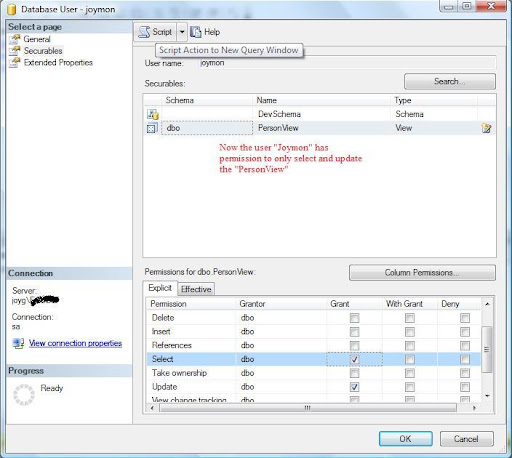
But last week I got a good opportunity to play with these permission settings.I had to grant update and select permission for a SQL database user on a particular view.Initially we did using the SQL Server Management Studio.It is very easy.Below are the steps.
  1. Navigate to <Your Database>->Security->Users and double click on the user to whom you need to grant or revoke permission.
  2. On the Database user window select the securables page.
  3. There are 2 portions at the right side.Top section is to select securables and below section for the Permissions on the selected securable.
  4. Add your securable using the search window.The search window can be poped up using the search button.
  5. You can add a securable in 3 modes.Specific database object,all object of specific type or all objects in a schema.
  6. Once you add the securable using the search window, the bottom pane will show you what are the permissions you can set on those db objects.
Very easy. Isn’t it? This will work out only if you are delivering your database as a backup.If you are planning to deliver the scripts, you can get the corresponding scripts on clicking the script button at the top of the Database user window.
Below is the Database user window where you can set the permissions visually.
This is the script generated when clicked on the button”Script Action to new query window”

use [AddressBook]
GO
GRANT SELECT ON [dbo].[PersonView] TO [joymon]
GO
use [AddressBook]
GO
GRANT UPDATE ON [dbo].[PersonView] TO [joymon]
GO

Friday, June 10, 2011

Querying all tables in a database using sp_foreachtable

Last week one of my colleague was struggling to write a sql script.After some time he came to me.His requirement was simple, he need to truncate all the tables in the DB.He wrote a script.But it was throwing exception because of foreign key relation ships.My first answer was to run that script for 10 or 20 times so that the child tables will get deleted in initial runs and in primary key tables will get deleted in last runs.A real hack!!isn’t it? I suggested this because he need to just clear a database for one time.

But after some time I thought of solving it properly.For that I didn’t try writing a new script or correcting his script.Just googled and got the below link.
http://stackoverflow.com/questions/155246/how-do-you-truncate-all-tables-in-a-database-using-tsql

It says 2 lines of code as follows.

-- disable all constraints
EXEC sp_msforeachtable 'ALTER TABLE ? NOCHECK CONSTRAINT all'

-- delete data in all tables
EXEC sp_MSForEachTable 'DELETE FROM ?'


Done.I again enforced the concept of modern programming especially in .Net and SQL server.ie “If you think your problem might be faced by somebody else, google it before even attempting”.


Also I would like to tell about the undocumented procedure sp_msforeachtable.Its very useful when you need to execute same operation in all the database tables.More details can be found in this link.Now a smart programmer you might have though whether there is anything for looping all the databases in the sql server instance.Yes its there.the name is sp_foreachdb.


Oh that is great.Everything related to db objects are available as for each?Unfortunately NO.But you can create your own foreach by following this article.Yes you can create your own  sp_foreachview,sp_foreachsp etc…I don’t think developers including sql developers need this very frequently.But the DBAs surely need this.


Happy scripting.

Thursday, April 21, 2011

Welcome to SQLCMD

Last couple of weeks I was mainly working in the backend side.Its nothing but SQL server 2008.We had to develop a bunch of scripts which will help the production DBAs to accomplish their tasks with less effort.Since the production environment is unknown and will vary to country to country we cannot put dbo.<table name> in any of our scripts.So we decided to put some tokens in the scripts like #schema#,#DB# etc…the DBA needs to replace these tokens in his environment before running the scripts.
Things went fine till the scripts were reviewed by Microsoft consultant Dimitri Furman .He suggested to use SQLCMD variables.
What is this SQLCMD variables? Do we really need to use that? But after having a script file of 100MB we automatically preferred the sqlcmd mode because SQL Server Management Studio is not suitable for executing such a big sql file.It will definitely crash.

Reasons why we selected SQLCMD
  • We have more files which needs to share the variables.Replacing in all the files is tedious.
  • We have large files which cannot be executed in SSMS.

SQLCMD is the command prompt type interface to execute sql queries.You can start the shell using the executable located in the below location.

<drive>:\Program Files\Microsoft SQL Server\90\Tools\Binn\SQLCMD.EXE

In the first look there is no change.But when we come to authoring sql files there can be changes.Main advantage is you can have scripting variables which will replace their values at run time both in the command mode and in the sql files.You can compare this to classic ASP or PHP programming which replaces the server script before sending to the browser.

Ok Lets see what is this scripting variable by looking at an example.

:setvar PersonName Joy
:setvar email joymon@gmail.com
INSERT INTO Person ([Name] ,[Id] ,[EMail])
VALUES('$(PersonName)', newId(), '$(email)')
GO


PersonName & email are variables and their current values are Joy & joymon@gmail.com respectively.When we refer them using the $() they will get replaced with the values.So here the values got replaced between the single quotes ‘’ and the query run smoothly.
Another advantage is we can call another script file from this using the :r keyword.See the example below.

r: "c:\queries\SQLQuery2.sql"


If we set a variable in one file and that file is calling another file the variables will be available in the second sql script also.If we took the above example,the variable $(PersonName) can be used in SQLQuery2.sql as well.There are lot many advantages, if you explore the possibilities of SQLCMD.Refer the below links for more details.

http://msdn.microsoft.com/en-us/library/ms188714.aspx

http://www.sqlbook.com/SQL-Server/SQLCMD-command-line-utility-13.aspx
Running the sql files with SQLCMD variables in SSMS
You can even run the sql files with SQLCMD variables in SSMS.For that change the query mode to SQLCMD.See the below screenshot.

Monday, March 21, 2011

SQL server ownership chaining

Now a days it becomes a habit to blog, if I learn something.Otherwise I am not feeling it completed.After a long time recently I got a big chance to learn some database related things due to the project which I am doing for my current company.Let me start with SQL server ownership chaining.

What is Database ownership chain?

We all know that what is database object.Everything we create in database is a database object eg:stored procedures,tables ,views etc…When we invoke or access one database object there are chances that it may access another object.This sequence is called the ownership chain.

To understand the scenario better lets take one example.There is a Order table and Order_Jan2011 view.To access the data from the view we have a StoredProcedure usp_GetOrders .When we access or call the sp that sp internally uses the view and that view uses the table.This is ownership chains.If all these objects are owned by one user and the identity which calls the sp  is the same user,there is nothing special.But what if these objects are owned by different users and the user accessing is somebody else? (User here refers to the database user.)

Bypassing security check based on ownership

Lets assume that there are 2 users DBUser and the AppUser.DBUser owns all the DB objects such as tables, views and SPs, where the AppUser has access to only the SPs.When the AppUser calls the SP to retrieve some data the database allows it because the SP and Table used by that are owned by single user that is DBUser.

Lets take one example to understand it clearly.Order Table ,Orders_Jan2011 & usp_GetOrders are owned by the DBUser and the AppUser has access to the SP.

User Relation DBObject
DBUser Owns Order ,Orders_Jan2011,usp_GetOrders
AppUser Has Access usp_GetOrders

When the AppUser calls the usp_GetOrders which calls the view it works.ie the data has retrieved from Orders_Jan2011even though the AppUser dont have permission on Orders_Jan2011.

Try out yourself

Get ready with SQLServer Management Studio (SSMS.exe) to execute the below queries.There are mainly 2 phases in creation.

Create The Users with required permission

create user DBUser without login
Exec sp_addrolemember @RoleName = 'db_owner', @MemberName = 'DBuser'
create user AppUser without login


We use login less users.Hope everybody knows who is login less user.Make the DBUser as db_owner to get the table,view & SP creation permission.

Create DBObjects in the context of DBUser

execute as user = 'DBUser'

--Create Table and insert 2 sample rows----
create table [Order] (Id int,OrderDate date,Details varchar(20))
insert into [Order] values (1,'1/1/2011','5 Laptops')
insert into [Order] values (2,'2/2/2011','2 Desktops')

---Create view that holds orders for the month Jan2011
go
create view Orders_Jan2011
as
select * from [Order] where YEAR(OrderDate)=2011 and MONTH(OrderDate)=1

--Create SP to get the orders and give permission to AppUser
go
create proc usp_GetOrders
as
--Parameterize and add Logic to call the correct view
select * from Orders_Jan2011
grant execute on usp_GetOrders to AppUser
revert

-----Checking the permissions in the context of AppUser------
execute as user = 'AppUser'
go
exec usp_GetOrders
--Executing the below queries will result in error --
--select * from [Order]
--select * from [Orders_Jan2011]
revert


Inserted 2 rows into the Order table.Now creation is over check accessing the DBObjects in the context of AppUser.

execute as user = 'AppUser'
exec usp_GetOrders
--Executing the below queries will result in error --
select * from [Order]
select * from [Orders_Jan2011]
revert


As said earlier the first line ie the SP call will work.Rest will result in error because AppUser don’t have access to those objects.Interesting thing here is sp internally uses the same view and table.

Hope everybody knows DB user impersonation.ie execute as user.The full script can be downloaded from here.

Is this good or bad

It depends own your scenario.There are support for cross database ownership chains.So choose it carefully.For more details see below link.

http://msdn.microsoft.com/en-us/library/ms188676.aspx

Monday, February 28, 2011

Comparing 2 databases

The comparison of databases are often required if you are dealing with business applications which has frequent change in databases. Most of the time its the difference between data base stored procedures and table schema.There are so many comparers available which even compares the table data!!.

One method is to write queries to find out sql differences.That suitable if we have some special comparison scenarios.Else use any tool which compares the data.

Here is one free database comparison tool which is free and compares the schema
http://dbcomparer.com/Download/Default.aspx

Wednesday, October 13, 2010

Reading and writing files in StoredProcedure

I don’t know why I didn’t thought about reading a text file from a stored procedure until I came across a requirement in SSRS.First I searched for something like usp_OpenFile and usp_ReadFile as usual.But no results.After that I realized that I can interact with system from SQL Server only through the Ole Automation.

It was another new thing to me.I have never used Ole Automation through SQL Server.It is not enabled in SQL server by default.We need to enable through the statement sp_configure.

First I tried to see the status of Ole Automation using the query

EXEC sp_configure 'Ole Automation Procedures';
GO


But this returned error saying that this is an advanced option.Then I turned on the advanced options by the below query


sp_configure 'show advanced options', 1;
GO
RECONFIGURE;
GO


After this I turned on Ole Automation.


sp_configure 'Ole Automation Procedures', 1;
GO
RECONFIGURE;
GO


Now the environment is ready for Ole Automation.Just need to execute the SQL which opens and reads a file using COM objects.


DECLARE 
@strPath VARCHAR(255),
@objFileSystem int,
@objTextStream int,
@strRead Varchar(8000),
@strCommand varchar(1000),
@HRESULT int,
@YesOrNo INT
--Initialize variables
select @strPath='c:\temp\test.txt'
select @strRead=''

--Creating the COM File System Object'
EXECUTE @HRESULT = sp_OACreate '
Scripting.FileSystemObject' , @objFileSystem OUT
--HRESULT will be 0 on success
if @HRESULT=0 select @strCommand=@strPath
--Open file
if @HRESULT=0 execute @HRESULT = sp_OAMethod @objFileSystem , '
OpenTextFile', @objTextStream OUT, @strCommand,1,false,0
--Checking for EOF
if @HRESULT=0 execute @HRESULT = sp_OAGetProperty @objTextStream, '
AtEndOfStream', @YesOrNo OUTPUT
--Reading file
IF @YesOrNo=0 and @HRESULT=0 execute @HRESULT = sp_OAMethod @objTextStream, '
ReadAll', @strRead OUTPUT
--Displays the read text.
select @strRead

-- Closing the file "'

if @HRESULT=0 execute @HRESULT = sp_OAMethod @objTextStream, 'Close'
EXECUTE sp_OADestroy @objTextStream


Its not easy if you are not from the COM world.It’s VB equivalent code can be found here in msdn.


You can use the same Ole Automation to write into file as well. Make it as function by returning the variable @strRead.If you just want to run this, copy above code  into a query window of SQL Server Management Studio and press F5.I am not sure whether this will work in other databases except SQL server 2008.


Happy scripting…

Sunday, January 17, 2010

Finding out which sps are in deadlock in SQL server

When my current Silverlight 3 project went into QA environment, I got one more chance to met my old friend.Yes It’s deadlock.But unfortunately we were not able to reproduce it in the dev environment.There started the problem.
But after a big battle in my dev machine I was able to reproduce the deadlock.Steps were simple.I just need to do the normal operations in the application at lightening speed.
Then we knew its a problem with the WCF service calls from the client to server.There were 2 calls going from client to server while saving where it is supposed to be one by according to the design of the application.But application is in QA.So we tried to resolve that by introducing some mechanisms in the DB.To continue that we needed the information about the SPs which are in deadlock.
Since our application implements the transaction from code and that transaction contains so many sp calls one by one it was very difficult to figure out which sp is in trouble.If we try debug mode there won’t be any deadlock.Finally our DBA given me 2 methods to find out the sps.
The below one give the details about the things happening inside the sql server including the SPID.

sp_who2

Execute the above command in SQL Server Management Studio on your DB.Once you get the SPID use that to find out exactly what is deadlocked in the below method.

dbcc inputbuffer (<SPID>)
I know for a DBA this is not a big thing.But for a developer I think this will help him a lot.

Tuesday, February 17, 2009