Showing posts with label CLR. Show all posts

Tuesday, April 4, 2017

ASP.Net IIS AppPool Recycling is a hack

From the beginning it was known to me that the IIS AppPool recycling is a hack. If a technology is matured enough to handle web traffic, it doesn't need periodic recycling of processes. To me there is no difference between support teams asking to restart machines to solve issues and app pool recycling. In both these cases, the memory is cleaned up.

Whenever I was involved in IIS applications, I instructed the teams to disable app pool recycling from the development time itself. But it never happened. According to most of developers and their managers that is a feature from IIS and why should they change defaults and bring unnecessary issues. Whenever I had direct delivery responsibility, I ensured that the app pool recycling is not enabled. There was mistake from my side as well that I never invested time to find out a valid Microsoft link which says do not recycle app pool process. But yesterday the time arrived. There was a client question on why the app pool recycling is disabled on some applications where majority has recycling. Those were framework level applications and in my direct control during development. 
If you have a problematic application and you cannot easily correct the code that causes the problems, you can limit the extent of these problems by periodically recycling the worker process that services the application. Microsoft
Finally got the link where MSFT says about app pool recycle. But the scenario again complicated for us. 3-4 web apps only disabled the app pool recycling and the other 50+ web apps not. Were those created with no quality and difficult to fix?

Stateful v/s Stateless IIS web apps

Here comes 2 different types of web apps. Some apps will be just to receive request and send response back. If we recycle these stateless apps, there is no harm to the behavior of the system as every request and its response pair is independent of other request-response pairs. So it is 'ok' to recycle. In case there are something going wrong with memory and unnoticed during dev and QA, it won't cause trouble in production as well. Since extensive memory, load, long running testing are not needed, we can develop in low cost.

Other type of apps will be maintaining some sort of state in the memory and state might be evolving over time. Also their behavior will be controlled by the current state. If we recycle the process, the state will be lost and their behavior will be wrong after recycling. Yes there is the answer.
It is 'ok' to recycle the stateless web apps but never recycle the stateful apps.
When it is said 'ok' means, there are no ways to fix in production. Other scenario is when there was no chance to properly test for long hours and LOH fragmentation during development. Again it is not recommended to keep a big state in memory which may cause scaling issues.

Better write programs properly and avoid app pool recycling.

LOH and recycling

Without mentioning Large Object Heap, any article about .Net memory management is incomplete. As all knows LOH was never getting compacted in earlier .Net versions. That causes large objects to be fragmented and finally lead to OutOfMemoryException. In those days, it was not a choice to enable AppPool recycling but we have to. I agree that there are programmatic mechanisms to avoid LOH fragmentation. But those are all costly during development and testing. Also requires high skills.

Links

https://weblogs.asp.net/owscott/why-is-the-iis-default-app-pool-recycle-set-to-1740-minutes

Tuesday, August 9, 2016

Why its called as Virtual Machine?

Introduction

We might have heard the term virtual machine a lot of times when we work with languages which compiles to intermediate format instead of machine code. Some examples are Java, C#, Vb.Net etc...

We might have also complained that application is slow because it is running in virtual machine. There are 2 types of virtual machines in software engineering. One is the virtual machines which are running an operating system inside another operating system. Such as Linux running inside Windows machine. The machines we are getting in cloud providers are virtual machines. There are managing softwares such as Hyper-V and all to manage those machines.

But this is not the virtual machine when we talk in terms of programming languages and platforms. Lets get an understanding about those virtual machines

Machine

What is a machine refers here? Its nothing but an execution hardware which can handle a finite set of instructions. In another words a turing machine which takes one instruction process it and takes next and go on. Instructions may be simple 'add A,B' for adding 2 CPU registers to complicated GPU instructions. 

Unmanaged world / the bare metal machine

The software execution world was running without a manager in the beginning.  In the beginning programmers were talking in terms of 1's and 0's to each other and to machine. It was very difficult to deal with. If we want to add 2 numbers we had to use something like

11001100 1010,0011 // To add 10+3. Assume 11001100 is the instruction for add.

This instruction is commonly known as opcode too. Short form of operation code. This tells the executor here its the CPU/Processor chip to perform an add operation and place the result in a predefined location. Mostly it will be accumulator.

Machine language

The above notation can be called as machine language. Only 1's and 0's which machine can understand as presence or absence of voltage. This was similar to days when developers were using punch cards to enter their programs to computers.

Soon developers started denoting the numbers in hex where the above machine language can be written as

CC 0A,03

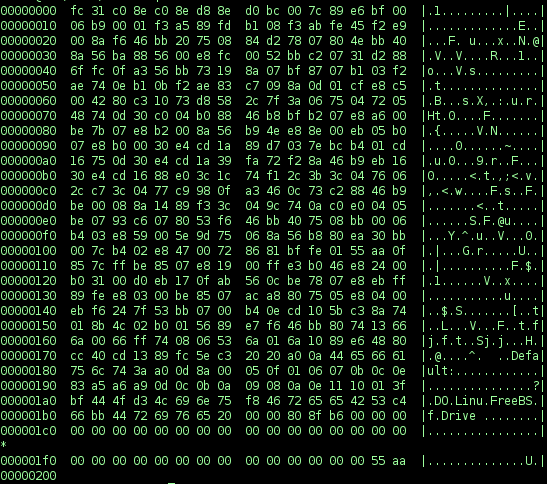
There are still some universities having 8085 based programming paper which gives this mode of entering programs in to computer. Even today we can open executable files and see it in hex format.
Everything in computer is actually in binary but for better understanding purpose, we can convert it to hex and display. Don't get confused with the ASCII representation at the right side. That is just coincidence. For example the opcode for add and ASCII code for 'D' may be same. Here the viewer application from where the screen shot is taken is trying to convert to ASCII for more readability.

Assmembly language

Soon people started using more human friendly instructions instead of hex instructions. That was called as assembly language. The above code can be written in assembly language as follows

Add 0A,03

Only the instruction / opcode changed data remained in hex.

Smart people created text editors in assembly language to write assembly language. That made the life of new developers easy as they can write programs editor which is built using assembly language itself.

There are no loops or most of the machines doesn't supported it. But we had an option to change the execution order based on conditions. Instructions such as JMP, JC JNC (Jump, Jump on Carry, Jump on No Carry) are some examples. Using these instructions developers were able to get loops implemented.

Till this point the developers were directly writing in the language the machine / hardware understands. After the assembly language, there were some programs started involving in between the program and machines.

Programs that prepare programs for execution

The concepts like macros, pre-processors etc...introduced the need for particular programs to prepare other programs for execution. In other words, if we are writing assembly language using English opcodes that needs to be converted to corresponding machine code. If we consider the above sample of

Add 0A,03

Someone has to convert this text 'Add' opcode to CC which is the binary equivalent of 11001100 for add instruction. The programs which are doing this conversion is called Assembler.

Still the assmebly language has instrcutions which can be directly mapped to an instruction which machine support. ie we have to read the manual of processor chip to know what are the instructions it supports.

High level languages

One to one relation between assembly language instruction to machine instruction was some kind of limitation and later people thought of more intuitive languages to program. A more human readable approach where instructions in program doesn't needs to have one to one relation to the machine code. Like assemblers, the program can be converted to machine language before execution. When converting, one instruction in this language can be converted as one more more machine instructions.

Yes the high level languages are born. Excellent example is C. We write in high level more human readable format and converted / compiled to machine instructions before execution.

This produced the concept of loops, functions variable types etc...Earlier it was all just bits and bytes with a jump instruction.

Internally loops might be using jump instructions, but to the developer, the details of machine was hidden. This helped more and more people to become developers. The don't need to how the machine works in the chip level or what is voltage or binary but still able to write programs.

Summary - unmanaged world

We can summarize this as a model where we prepare machine instructions either writing directly, or converting / compiling assembly or high level languages. Once it is ready just start execution. There is no one to manage its the machine and it just executes our code. 

Pros

  • Talks directly to the machine. Able to leverage full power as there is no additional overhead

Cons

  • Needs comparatively high skill
  • Development is time consuming as there are less reusable things and abstractions.
  • Needs to worry about many things such as memory allocation security etc...
    • Security here refers to access data from concurrently running program in case there is no operating system level process separation.
  • The machine instructions vary by the macnufactuer of the chip. The instructions supported by Intel chip may not be available in the chip produced by AMD and viceversa. So the developer need to compile their program multiple times to produce the executable for different chips. Also the instructions may vary by the 32 bit and 64 bit.

Managed world

Normally when people say managed, they refer to the technologies such as JVM or CLR based execution where there is a program which runs our program. To be more specific,
  • Developer write the programs in any of the programming language supported.
  • The compilation produces an intermediate code / byte code which the hardware/machine cannot understand .
  • There will be another program (JVM / CLR) which is in machine code, reads intermediate code  produced by developer and execute instructions one by one.
  • This executor program acts like a hardware machine which can understand a specific set of instructions.

So what is virtual machine?

Under the hood its the same machine instructions which are executed by the processor chip. But it is hidden from an end programmer such as a .Net / Java developer. Developers see only the instructions supported by intermediate / byte code as the machine instructions ie a machine which is not there physically. So they target their code written in high level language to the byte code / intermediate code which is understood by the executor program / ie a virtual machine. In .Net world its called as CLR and in Java its JVM. Executor program reads it and carry out the task by giving required machine instructions to the chip. 

The executor program need to be compiled for different chips because it is in the machine language. But that needs to be done by less development teams such as the JVM and CLR. The rest of the development world don't need to worry about compiling their code against different types of chips. So more development teams take the route of managed world.

Since the executor program is reading the developers program to execute, it can easily enforce so many rules and regulations to manage the execution. Some limits the developers capabilities and example are the lack of pointers. Some reduces the overhead of developers and increase productivity. Examples are the memory management (garbage collection), standard libraries. Standard libraries, even we had in unmanaged world as well.

If the chip manufactures were having a worldwide standardization consortium and they produced chips which supports same instructions the managed world might not have been invented.

Pros

  • Portability of intermedite code makes the deployement easy
  • The virtual machine can enforce rules
  • Multiple languages can be compiled to the intermediate code if there are compilers.
  • The above helps to refer an internediate language library written one language by another language.

Cons

  • Little overhead on converting the intermediate code to machine code during runtime,
  • Lack of features such as pointers and limits developer from talking to the bare machine though it can be worked around.
  • Delays the usage of new hardware features till that is supported by the virtual machine. eg: Parallel instructions in new processors

Is Operating System a virtual machine?

If we are writing windows programs we feel that OS is an virtual machine as we are targeting the Windows APIs. Also when we look at the process boundaries and limited access to memory, we can see OS as virtual machine which kind of hides the hardware. But since our programs are compiled to machine language, OS is not truly a virtual machine.

Reference

http://c2.com/cgi/wiki?VirtualMachine

Monday, November 14, 2011

Generic retry mechanism & catch using generic exception type

Couple of weeks back we faced one situation where a portion of our code breaks due to a IIS not available situation and we were advised to implement a retry mechanism.Hope I can talk about that server down problem in future posts. The retry mechanism needs to implement based on the exception which will occur on that particular scenario. We tried test code by putting the try catch block and could see its working in one place. But there  are a bunch of other areas we need to modify the code.Also in future too developers may need to use this retry mechanism.
The architect resting in me jumped and said that we can use a generic retry mechanism using .net generics. My colleagues were in little confusion about how to achieve a generic mechanism for retry where the size and location of code differs and spread out in 150 projects.With the help of Action delegate I was able to convince them and the subsequent google gave us ready made code to do the same.
public static void ExecuteWithRetry( Action action, UInt16 noOfAttempts )
{
    //Validate args:Throw exception on retryCount=0
    int count = 1;
    for (; ; count++)
    {
        try
        {
            action();
            break;
        }
        catch (ReTryableException ex)
        {
            Log(ex, count);
            if (count == noOfAttempts) throw;
        }
    }
}

Everybody became happy like after the first fight seen in movies. We know that the movie needs to complete its 2 hours with excitement and for that villain  should come back with more power. Here too the villain come back when the perfectionist in me put forward the suggestion of making it real generic so that we can move to the utility project and can be consumed by other fellow developers as well. So we rewrote the logic as follows.


public static void ExecuteWithRetry<TException> ( Action action, UInt16 noOfAttempts ) where TException :Exception   
{
    //Validate args:Throw exception on retryCount=0
    int count=1;
    for(;;count++)
    {
        try
        {
            action();
            break;
        }
        catch (TException ex)
        {
            Log(ex, count);
            if (count == noOfAttempts) throw;
        }
    } 
}

Oh what an idea sir ji…There was one more suggestion came to make retry after specific interval. But before that we tried to integrate modified function in our app.

Catching exception using generic type

Here starts the second part of the story. When we run from Visual studio it didn’t hit the catch block!!! Theoretically there are no issues but practically it failed. At least for some moment surrounding people even I thought that our understanding about either Exception handling or generics is wrong. Even we thought of getting rid of this concept and write redundant retry code everywhere. But when we came back to our original state , we googled it and find that it is a BUG in .Net when running inside Visual Studio debugging mode.We tried running by double clicking the application and it works perfect.We were also able to see this bug in the Microsoft connect and says its fixed.

There is on workaround available for this issue its as follows

catch (Exception ex)
{
    TException tEx = ex as TException;
    if (tEx != null) { /*Process */}
    else throw;
}

This changed my perception

“The bug is there only due to poor dev’s coding mistake never by compilers, development tools or the framework”

to

“Compilers, development tools and frameworks are also coded by developers”.

Later I happen to read a post about fixing a compiler bug which enforced my perception.

Monday, October 31, 2011

Running another .net executable without Process.Start

Whenever we get a requirement like this first answer will be Process.Start which is the common way to start another application from one application. It creates different process ,its region and execute independently.
static void StartProcess()
{
    Process proc = new Process();
    proc.StartInfo = new ProcessStartInfo() {FileName=@"Path\Executable file.exe" };
    proc.Start();
}

This is the correct solution if the application is not a .net executable.You can also see new process in the task manager. But here we need to load an application which is in .net itself. So are there any other method to load a new application in the current process itself?

It is YES since AppDomain is a unique feature in.Net. AppDomain is an another separation in the process for isolated execution.This separation is managed by the .Net runtime, not by the windows OS which manages Process and its allocation. Everybody must have heard about AppDomain and will be in confusion with Application and Process.  For more details about AppDomain please refer the articles below

http://codebetter.com/raymondlewallen/2005/04/04/what-is-an-application-domain-an-explanation-for-net-beginners/
http://msdn.microsoft.com/en-us/library/2bh4z9hs(v=vs.71).aspx

Once you are confortable with AppDomain read the below which explains how to create new AppDomain of the other application and start it.

Executing an Assembly present other application using Appdomain

Creating the appdomain is very easy as follows
//Creating the setup object
AppDomainSetup setup = new AppDomainSetup();

setup.ApplicationBase = @"D:\Joy\POCs\DesktopUIApp";
//Set the probing path if needed
//setup.PrivateBinPath = "Some path which resides inside ApplicationBase";

//Create the domain
AppDomain domain = AppDomain.CreateDomain("NewApp", AppDomain.CurrentDomain.Evidence, setup);
Now we have the appdomain. If you are a .net developer with knowledge in reflection you can think about so many techniques to start the other application as follows

1) Create assembly using the AppDomain.Load method and get the Main() method’s MethodInfo and invoke it.
2) Create type of App of target application using the AppDomain.CreateInstanceAndUnwrap () and executes it.

But almost all these techniques will fail because it cannot create another application inside this appdomain since it has one.ie multiple Applications are not allowed in same app domain.So the API which works is as follows.
AppDomain domain = AppDomain.CreateDomain("NewApp", AppDomain.CurrentDomain.Evidence, setup);
domain.ExecuteAssembly(@"D:\Joy\POCs\DesktopUIApp\DesktopUI.exe");
            

This executes the specified assembly in the new appdomain. Only thing you need to know is the name of the assembly to be started.This is not useful when you don’t know what type of files to be opened such as downloading files from server and opening it.

Monday, October 24, 2011

Fusion log viewer fuslogvw ie Assembly Binding Log Viewer

When you work with .net and your dlls are scattered around GAC, application bin, or reference assemblies its very difficult to check which version of dll is loaded in the application. Without knowing that you cannot ensure that your code changes are in effect. For small projects you can put Console.WriteLine or Messagebox.Show to indicate your code change .But when we talk about bigger applications with hundreds of project and thousands of code files ,it is not practical.Also there are chances that your message box code might get checked into the code repository which gives fun for others.

Another scenario is creating and maintaining AppDomains .There are concepts like ApplicationBasePath, PrivateBinPath for the appdomains which decides from where the runtime should load the assembly or what is the sequence in searching for assembly. If you are versioning your application there are chances for MissingMethodException if the loaded assembly is not compatible with the versions.

All these things says we need to profile/inspect the assembly loading behavior in .net on the fly to make sure the dlls are loaded from correct location and it is the Fusion log viewer which comes with Visual Studio.

Starting the tool
  • Make sure the registry entry HKLM\Software\Microsoft\Fusion\ForceLog is 1
  • Goto visual studio command prompt.
  • Type and enter 'fuslogvw'
  • This will bring you the tool window.Make sure the log path is correct.
  • Now run your assembly.
  • Once the application loads click on the refresh button in the assembly log viewer.
  • You got the details of assemblies loaded with loading history and from which location
This is very useful in my current project to identify assembly loading where we have versioning and play with AppDomains all around.

Tuesday, September 27, 2011

How to know when .Net GC is working

One of my previous posts I was explaining how to learn the working of JIT during an application run. That gives us actual feeling of how the concept if working in the real world. If you are interested to know how the other concepts are working you can monitor using the windows tool called perfmon.

Perfmon.exe can be found inside the system32 folder in Windows installation

<InstallDrive>:\Windows\System32\perfmon.exe

You can easily open the application by just typing perfmon in the search box of start menu.

Using Perfmon to monitor the .net Activities

Perfmon is a great tool and its not possible to cover all the aspects of it in this post. Just google for its full usage scenarios. I am just concentrating on how to use it to monitor when GC is working for our application. You can use the same method to know when the jitting happens.

Ok. Lets open the perfmon and watch what are the options in it.There are PerformanceMonitor, ReliabilityMonitor, Data collector sets and Reports.We are interested in the performance monitor where we get the status of GC using a counter.What is a counter in perfmon?Counter is a criteria or specification what to monitor which can be added to a graph to see its current value. By default the processor time counter will be available there. Below are the easy steps to add a counter for monitoring GC of an application.

Goto Performance monitor->Click ”+” button at top –>Expand “.Net CLR Memory” in the available counters->Select “# Gen 0 Collections”->Select your application in the “Instances of selected object” section->Click on “Add” –>Click “Ok”

Remove the processor time counter for easy monitoring. Now the graph will reflect the change when GC comes into picture. For learning purpose better put a button to invoke GC using GC.Collect method .So that you can see the counter increments when you click on that button.

When you add the counter you might have noticed so many counters available there .Play with those and conquer the technology with its inner working.

Wednesday, September 14, 2011

ICorProfilerCallBack and return to unmanaged code

As a .net developer if you just want your code to be run by the .net runtime and get your work done please don’t read this further.This is for the developers who really want to know what is happening inside the computer when they run a .net application. After reading you may think, why we need .net which is managed by somebody else and we need to code within it’s boundaries rather than exploring the system’s capabilities.So be careful.

Practical feeling v/s theories

From my childhood days itself, I have a habit of practically feeling things before confirming the theories.When my parents said there is shock so don’t touch the electric wire ,I didn’t believe.But realized when I touched myself.(Its 250volts in India).I am sure that ,this nature will be there with many people. The same problem appeared when I entered into the computer programming world. I started programming in my school days directly in the BASIC language where it was really hard for me to write program because I don’t know how this T.V is going to add 2 numbers which I am entering through keyboard. The teachers were simply saying computer will identify your command and process accordingly.But again how it knows how to manage carry and all.

All these questions were answered when I learned about the logical gates in digital electronics during the second year of diploma.Then I learned how these gates techniques can be leveraged to 8085 processor instructions which I executed in a small kit which has 7 segment display .There was no software simulators for 8085  available at that time for us.Third year I wrote and executed assembly instructions in an actual computer by compiling that into .exe.That put me in a stage to think about a compiler or interpreter which can understand a high level language and convert to machine instructions.The high level languages which was confortable for me was C,C++& VC++ in which we can easily plan how our code is going to execute in the physical machine. JAVA and .Net I learned as backups.

Things will not be always good for us.When I came out of the college the world needs .Net and Java programmers than traditional unmanaged coders. Since the bread and butter is important than the passion, I started with C# and .Net since it allows me to write C++ type language in my favorite development tool Visual Studio.But the same issue came there. How my code is being executed by the .Net?

As like any other .net fresher in India, my starting days were hard. So many things to do.No time to think whether its logical or not.That compels people to swallow the theories like how they believe in God. I had to believe that there is something called IL code to which we are compiling our source code which is machine independent. This helps us to write code in different languages such as VB.Net and C# in a single solution.It was really interesting for me.

Also theories said there is a garbage collector which will collect all the free memory so no need to worry about the memory management while coding. That’s great,but I got so many memory leak issues which I was not able to understand at that time. As a developer support engineer I was not supposed to fix the issues, only forward to the development team.

Another doubt was when we double click on the exe how the .net runtime takes control of the exe and manage execution of it.In Java when we run we specify Java <AppName>.class which clearly says we are executing Java.exe which is responsible for executing the IL code.

Things became clear when I tackled my developer support job. In free time googles I came to know there is a tool called ILDasm.exe in the .net framework which is present in my machine itself using which I can see the IL code.This made the concept of language interoperability strong in my mind.ie I realized myself that all our code which is written in VB or C# will compile into this same format.Or even we can write code in IL itself and compile using ILAsm. Then I thought about reverse engineering the IL to C# since its in a readable form which lead me to a nice tool called Reflector to reverse engineer the .Net code. This tool also showed me scenarios where the compiler optimize our code because some code which I wrote came in different form on reflection.

Again the season changed to busy. Microsoft introduced new technology called WPF for presentation purpose.As a control vendor my company also jumped into WPF where I was coordinating the development team and the release. As a .net engineer I had to learn one more technology keeping so many queries in mind.WPF introduced more queries into my mind like where is the WndProc function in WPF?,how the DP is working internally,who is invoking the PropertyChanged event in INotifyPropertyChanged,Is WPF really making use of my graphics card etc…But WPF helped me in one way which is nothing but to understand the working of GC. Since WPF comes with memory leaks if we use bindings ,I got opportunities to explore the .net process memory using another nice tool called WinDbg which showed me what are gen0 objects and when they goto  gen1 and gen2 also what is LOH and why its getting fragmented which leads to OutOfMemory exception.

But still so many queries are left.When a type is being initialized? if our assembly contains so many types will it decrease the performance due to loading time? How the .net runtime takes control when we double click on the .net exe? When a function is being JITted? When the GC starts its operation? etc… and most of the queries were answered when I work with Microsoft for my current company.

Working with Microsoft people

As I mentioned in some of the previous posts ,I got an excellent opportunity to work with Microsoft in their Charlotte,NC campus which leveraged my knowledge about the internals of .Net .Especially working with Wade Mascia who codes the DebugDiag was really wonderful.He introduced me one interface called ICorProfilerCallBack which has enough functions which will be called by the CLR when it performs its different operations.

Using ICorProfilerCallback in managed code

But fortunately or unfortunately we cannot implement ICorProfilerCallback in managed code such as C# or VB.net.I am looking for anyways to do so which I know not logical since writing profiler in managed code to profile managed code makes no sense.We are going to see when our method is going to be JITted and if we write the profiler in managed code how CLR can call the profiler callback method which needs JITting itself. That means we are back to unmanaged world.

Implementing ICorProfilerCallback

Its my continuous 6th year, I am writing  managed .net code.That made it difficult for me to write the VC++ code in a day.So as a normal developer, I googled for the code. There was not much luck except one article in CodeProject.It was simple and has basic functionalities of ICorProfileCallback interface like logging method calls.So I took that code and started scratching it to add my requirements.Hope scott_hackett will not mind, I am modifying his codeSmile.

When we implement the ICorProfilerCallback, we need to know about one more interface which is ICorProfilerInfo which is used as a helper when we deal with the profiler such as to get the method name from the ID and all.We will get an object of ICorProfilerInfo as parameter in the initialize method of ICorProfilerCallback interface.The Initialize method is called by CLR.

ICorProfilerCallback2 & ICorProfilerInfo2

These are the types introduced in .Net2.0 which contains some more functionalities. These are inherited interfaces of their counterparts in  old framework versions. So to get the new features cast the argument coming though Initialize method to ICorProfilerInfo2.

Steps to implement ICorProfilerCallback

For detailed description please see the original article.Below is a summary

  • Implement the interface ICorProfilerCallback /ICorProfilerCallback2 in a VC++ Com project as normal.
  • If you want your profiler to be recognized by the CLR and call the profiler methods,you need to set environment variables appropriately.
  • Simple implementation of ICorProfilerCallback will not give us the call back to our methods.For that we need to register which events we need using the SetEventMask method of ICorProfilerInfo object.Do that in the ICorProfilerCallback::Initialize itself.It accepts a DWORD and each bit controls one callback feature.
  • Now our methods in the implementation class will get called based on the mask we set except the MethodEnter and Leave.For that we need to hook separately using the ICorProfilerInfo::SetEnterLeaveFunctionHooks method.I don’t know why method execution callbacks need a separate way.

About the attached sample

The sample which I got from code project article doesn’t filter namespaces based on our needs. What I wanted was to filter how my application is getting JITed and the method calls.So I modified the ProfilerLauncher to accept namespace and passed that namespace to profiler through the environmental variable ‘NS_FILTER’. Environment variables are the only one way we can communicate to the profiler from outside world. Files are there, but I don’t want to use.

Also modified the profiler to log based on the namespace and added logging mask for the JITting events.As I told earlier its my second visit to C++ after 6 years.Things seems changed / I forgot C++ which made me write code like a fresher.So don’t expect a professional style coding in the sample.

Running the sample

Before running my modified sample I would recommend running the sample attached in the code project article which gives you an idea how many methods are being called when we run a simple win forms application. There are 3 files needed to run the sample.

  • DotnetProfiler.dll :This is the unmanaged profiler.
  • ProfilerLauncher.exe : This is the runner wrote in .Net which accepts target .net exe path and the namespace to filter.Then it create a process with required environment variables and starts execution of the target .net application.
  • Helloworld.exe : Just a .net application which we are going to be profiled.Put your application instead of this. Don’t forget to enter the correct namespace in the launcher screen.

This logs the profile information in a text file in the same folder.Download the sample from here.