Showing posts with label sql server. Show all posts

Tuesday, January 17, 2023

Azure @ Enterprise - Connection pooling behavior when JWT is used to authenticate into Azure SQL Server

Connection pooling in .Net is a hidden feature. We as consumer developers, cannot directly feel how the pooling happens behind the scenes. .Net is allowing us to clear the connection pool. We create a new SqlConnection and Close it after use. When we create a connection it uses an internal pooling mechanism and a connection object is associated with the object that we create and the closed connections go back to the pool.

This post is not to educate about simple connection pooling instead it talks about an issue encountered in production.

Issue

There is a .Net 6 Web API hosted in Azure App Service. It mainly accesses an Azure SQL database and storage blobs. When the load slightly increased, it started showing the below error.

System.Data.SqlClient.SqlException (0x80131904): Resource ID : 2. The session limit for the database is 600 and has been reached. See 'https://docs.microsoft.com/azure/azure-sql/database/resource-limits-logical-server' for assistance.

at System.Data.ProviderBase.DbConnectionPool.CheckPoolBlockingPeriod(Exception e)
 at System.Data.ProviderBase.DbConnectionPool.CreateObject(DbConnection owningObject, DbConnectionOptions userOptions, DbConnectionInternal oldConnection)
  at System.Data.ProviderBase.DbConnectionPool.UserCreateRequest(DbConnection owningObject, DbConnectionOptions userOptions, DbConnectionInternal oldConnection)
  at System.Data.ProviderBase.DbConnectionPool.TryGetConnection(DbConnection owningObject, UInt32 waitForMultipleObjectsTimeout, Boolean allowCreate, Boolean onlyOneCheckConnection, DbConnectionOptions userOptions, DbConnectionInternal& connection)
   at System.Data.ProviderBase.DbConnectionPool.TryGetConnection(DbConnection owningObject, TaskCompletionSource`1 retry, DbConnectionOptions userOptions, DbConnectionInternal& connection)
   at System.Data.ProviderBase.DbConnectionFactory.TryGetConnection(DbConnection owningConnection, TaskCompletionSource`1 retry, DbConnectionOptions userOptions, DbConnectionInternal oldConnection, DbConnectionInternal& connection)
   at System.Data.ProviderBase.DbConnectionInternal.TryOpenConnectionInternal(DbConnection outerConnection, DbConnectionFactory connectionFactory, TaskCompletionSource`1 retry, DbConnectionOptions userOptions)
   at System.Data.ProviderBase.DbConnectionClosed.TryOpenConnection(DbConnection outerConnection, DbConnectionFactory connectionFactory, TaskCompletionSource`1 retry, DbConnectionOptions userOptions)
   at System.Data.SqlClient.SqlConnection.TryOpen(TaskCompletionSource`1 retry)
   at System.Data.SqlClient.SqlConnection.Open()

Troubleshooting

Let us start the production war to bring it back.

Q&A about connection pooling

Before starting specific troubleshooting let's refresh the main points about connection pooling. Experts may skip this section

Are there many connection pools?

Yes, there are chances of having many connection pools. For each connection string, it creates and maintains a separate connection pool.

How many connections are in a pool?

By default 100 per pool. It is configurable through the connection string or via code

When all the connections are in use and a connection is requested from the pool what will happen?

It will throw an exception after the connection timeout. Looks like 

"Timeout expired. The timeout period elapsed prior to obtaining a connection from the pool. 
This may have occurred because all pooled connections were in use and max pool size was reached."

Does the SQL Server know the consumers are keeping connections in the pool?

Yes. To simply verify just run exec sp_who2 in the SQL server to check the connections from the client machine. Most of the connections will be in the Sleeping state.

How to check the pooling status of our application?

Take a memory dump of the application and analyze the crude way using WinDbg or use the DebugDiag tool.
Otherwise, monitor the Performance counters related to ADO.Net.

Specific steps to troubleshoot the issue

Let us look at some specifics about this issue

What are the Azure SQL specs?

Standalone database, tier - S0

What is exec sp_who returns from the database?

A lot of connections in the sleeping state.

Are there 600+ requests coming to the App Service per second?

No. There are only 10 requests per second.

Is there auto-scaling of app service instances?

No. There is only 1 app service instance. Questions such as "who in the world runs App Service with only one instance in production" are banned.

Any other application is making connections to the same database?

Yes. But that Azure Function is now disabled. 

Is the connection string or code have any customization of connection pool size?

No customization. Just working with the default 100

What is the authentication mechanism for Azure SQL?

It is the service principal / Azure app registration. Uses certificate to obtain JWT.

How many connection pools are there?

Only god knows until we take a memory dump and analyze it.

Will there be one connection pool per JWT considering JWT is part of the connection string?

Oh yeah...There are chances if the JWT is not cached. If each SqlConnection is created with a separate JWT, it will create many pools with one connection. If that happens, we will not get the timeout error from the connection pool, but the Azure SQL will run out of connections. Resulting in the same exception as mentioned above.

Is there any Microsoft official documentation for the above answer?

Not really. But a GitHub Issue answering the question.

For further clarification look at the source code of SqlConnectionPoolKey.CalculateHashCode()

Disclaimer

The actual root cause cannot be disclosed on social media such as this blog due to security, confidentiality, etc...

Tuesday, July 12, 2022

Azure @ Enterprise - Should I keep tempdb files in d: drive or cluster storage in FCI ?

There are many importance to the tempdb¹ database in SQL Server. It is a system database that plays crucial role to keep the SQL Server performant. The best practices when we setup tempdb in on-premise SQL Server is different than when we setup tempdb on Azure SQL VM.

Problem

Azure SQL VMs has special d:\ drive that is ephemeral². It is expected to be used for temporary purpose. There are reasons why people place the tempdb files in that drive. Reasons are mainly performance related. It is fine if the machine is not part of the FCI³ (Failover Cluster Instance) but what about if the machine is part of FCI?

Will the d: drive is monitored by the fail over mechanism and trigger failover in case something happens to that drive? Likelihood of the scenario is very less but there is a possibility.

Solution

The FCI is not monitoring the d:\ drive and it will not trigger a fail over in case something goes wrong there. SQL Server will simply go down. Leading to reduction of high availability.

The recommended solution is to keep the tempdb file in the cluster storage. Docs⁴ says the same.

All good. Only in case someone missed to read the docs, they get into trouble.

Why this post if the official docs says it right?

I started writing this post in 2021 after 6 months of struggle. At that time this guidance was not there.

This section was committed⁵ to docs only on 2022-01-13

Reference

Tuesday, June 28, 2022

SQL Always On Availability Group - Mind map

 As solutions or data architects we often needs to work with high availability and disaster recovery designs. If the technology stack includes SQL Server the latest feature its is offering is SQL Server Always On Availability Groups. This post introducing a simple mind map of the same.

The diagram used PlantUML based coded diagramming technique and we can easily get started. It is available in GitHub. Feel free to modify and initiate pull requests.

Tuesday, November 3, 2020

SQL Server from container - Before jumping into the bandwagon

It is easy to get started on development and simple testing using SQL containers. It was discussed in the previous post. But before putting into production and start developing real applications we had to make sure the below things at least.

SQL Server running inside Linux container doesn't mean its free

People from the Linux world or in general people tend to think that everything in Linux is free. But that is not true in the case of SQL Server similar to other enterprise software running in Linux. In order to use the SQL Server container in production, we need a valid license even in the Linux containers.

Configuring and operating

Running and operating containers is an added skill to the operation teams. We need to make sure our client or in-house operational teams are capable of doing it.

Feature parity

There are many factors influencing feature differences. Microsoft always says its the same codebase but features don't reflect that. Let's see the factors that decide features
  • Versions - Obviously there will be differences between SQL 2016, SQL 2017, and SQL 2019 features. The codebase is never the same though the latest may be built on top of the previous.
  • Editions - First level feature difference inside the same version is based on the edition. This is regardless of wherever we run the SQL instance. This makes sense as we need to give more money to unlock features. This is there from the early days of SQL Server.
  • Running platform - There are feature differences based on where the SQL instances run such as standalone inside Windows OS, Azure, and Linux containers.
  • Azure PaaS platform - Inside Azure, there are Azure SQL and Azure SQL managed Instance models. They have many feature differences.
The containerized SQL server is more like the Azure SQL than compared with desktop SQL installation. Features such as FileStream, CLR support are not available in SQL container. The full list of features that are not supported in the SQL container can be found here.

Production readiness

As per Microsoft, SQL Server on Windows Container is not production-ready. But SQL Linux containers are production-ready. They have documentation on High availability when running SQL Linux containers and how to orchestrate using Kubernetes.  But not sure currently companies are investing to just move their SQL workload to a containerized production environment. 

Everyone agrees to start using it for development and testing. Eventually, when more workloads start using the SQL Server Big Data Cluster features, production will also start using SQL Server in containers. There are also documentation says SQL container as is don't support clustering hence the DR can be done only by log shipping. The Kubernetes based HA for SQL containers may not be instantaneous for an RDBMS database like Always On Availability Groups or FCI. It may take some time to detect the failure and start the next container instance.

As of now, my takeaway is not to use SQL containers for critical production workloads.

Tuesday, October 27, 2020

SQL Server from container - Getting started

Background

Historically not only installing SQL servers, but most of the software had difficulties. The container technology such as Docker magically solved this by packaging software as installed VM like images called docker images. It is easy as downloading the image and start using the software. 
There are a lot of ways to get it working for us if we want to get SQL instance up and running using containers.

Why SQL Server from a container?

Let us see the benefits of running from containers

Running with minimal efforts

No need to spend time installing and configuring. Below single command will get us started provided the Docker is preinstalled. 
This is really useful if we just need to test something out.

Tuesday, January 14, 2020

Issue in .Net accessing SQL FileStream stored in SQL FCI with CSV

Scenario

We have a .Net application which uses SQL as backend below are some more details

Application

  1. The application supports uploading files and it is stored in SQL Server Filestream.
  2. The application uses SqlFileStream API to interact with SQL Filestream
  3. Application is multitenant where each tenant gets its own database
  4. Since there are a lot of databases high availability is achieved with SQL FCI with CSV(Cluster Shared Volume)

Environment

  1. .Net version 4.6
  2. SQL 2016 (SP2-CU8) - 13.0.5426.0
  3. Hosted in Azure VM - Windows 2019
When the .Net SqlFileStream class save data and transaction is completed an exception is thrown saying 'The transaction has aborted'
It works well when accessing files in Filestream from SSMS using transact SQL

Symptom

There is no error when the SqlFileStream completes its operation. But fails on transaction commit. Below is the stack trace of the exception.

Exception


Inner Exception :
The transaction has aborted. 
STACK TRACE: 
at System.Transactions.TransactionStateAborted.EndCommit(InternalTransaction tx) 
at System.Transactions.CommittableTransaction.Commit() 
at System.Transactions.TransactionScope.InternalDispose() 
at System.Transactions.TransactionScope.Dispose() at 
----
Removed sensitive code
----
Inner Exception :The transaction could not be committed because an error occurred while tyring to flush FILESTREAM data to disk. A file may have been open at commit time or a disk I/O error may have occurred. '\v02-A60EC2F8-2B24-11DF-9CC3-AF2E56D89593\3d382d31-8c57-466a-a59c-57fc2e36a3b4\<schema name>\<table name>\FileStreamContent\483D9F8D-DA5A-47ED-AE6E-1F9B47AA865D\VolumeHint-CSVVolume1\728ea182a82949a5b58669091c7b7d53' was one of the one or more files involved. 
ErorrCode: 0xc0000128 
STACK TRACE: 
at System.Data.SqlClient.SqlConnection.OnError(SqlException exception, Boolean breakConnection, Action`1 wrapCloseInAction) 
at System.Data.SqlClient.TdsParser.ThrowExceptionAndWarning(TdsParserStateObject stateObj, Boolean callerHasConnectionLock, Boolean asyncClose) 
at System.Data.SqlClient.TdsParser.TryRun(RunBehavior runBehavior, SqlCommand cmdHandler, SqlDataReader dataStream, BulkCopySimpleResultSet bulkCopyHandler, TdsParserStateObject stateObj, Boolean& dataReady) at System.Data.SqlClient.TdsParser.Run(RunBehavior runBehavior, SqlCommand cmdHandler, SqlDataReader dataStream, BulkCopySimpleResultSet bulkCopyHandler, TdsParserStateObject stateObj) 
at System.Data.SqlClient.TdsParser.TdsExecuteTransactionManagerRequest(Byte[] buffer, TransactionManagerRequestType request, String transactionName, TransactionManagerIsolationLevel isoLevel, Int32 timeout, SqlInternalTransaction transaction, TdsParserStateObject stateObj, Boolean isDelegateControlRequest) 
at System.Data.SqlClient.SqlInternalConnectionTds.ExecuteTransactionYukon(TransactionRequest transactionRequest, String transactionName, IsolationLevel iso, SqlInternalTransaction internalTransaction, Boolean isDelegateControlRequest) 
at System.Data.SqlClient.SqlDelegatedTransaction.SinglePhaseCommit(SinglePhaseEnlistment enlistment)

Root cause

Microosoft was involved and they confirmed its an issue.Unfortunately not in a state to include moe details.

Resolution

No resolution unless the fix is available.

Workaround

Use non-CSV for storing the file stream data. Continue CSV for table data.

https://support.microsoft.com/en-us/help/4488817/fix-filestream-for-file-i-o-access-feature-can-t-be-enabled-when-you-u
https://serverfault.com/questions/684590/can-we-use-filestream-in-case-of-sql-server-cluster

Tuesday, November 26, 2019

Why my SQL Server is not using all the CPU cores when count > 40?

We recently upgraded one of the SQL Server environments from E32s V3 (32Cores, 256GB) to F64s V2 (64Cores, 128GB) Azure machine tier.  That was on the assumption that the CPU is peaked on load but memory is enough.

Surprisingly the application slowed down drastically!!

The initial hypothesis we came up is because of less RAM in the F64s V2(128GB) the system slowed down. But we didn't see any memory pressure in the performance counters. Then we run one more test and observed a peculiar behavior. During the load, not all 64 logical processors are getting utilized. That leads to further investigation and ended up in below message in SQL Server event logs


Date        11/20/2019 5:33:09 AM
Log        SQL Server (Archive #1 - 11/23/2019 2:05:00 PM)
Source        Server
Message
SQL Server detected 2 sockets with 16 cores per socket and 32 logical processors per socket, 64 total logical processors; using 40 logical processors based on SQL Server licensing. This is an informational message; no user action is required.

Licensing problem! Yes due to lack of Core-based licensing, it is not able to leverage all the cores. 

But wait a minute. We earlier had 32 cores only but now we have at least 40 cores in action though we have 64 in the machine. 40 should ideally perform better than 32.

In the meantime when we run the below query it returned all 64 cores.

SELECT cpu_count
FROM sys.dm_os_sys_info

We have Microsoft support and below is the response got from them on why with 40 cores it is not performing well. ie if SQLServer is capped by lack of core-based licensing, why it will slow down.

NUMA & SQL Server Schedulers

SQL Server has its own operating system (SQLOS) that handles task management. SQLOS assigns one scheduler per logical processor to handle user based queries. Schedulers that are available to run user queries are considered online; schedulers that could run user queries but are not available to do so are considered offline. When the SQLOS starts it brings schedulers online on the first NUMA node, then the second, third, etc. until all schedulers are online or the CAL limitation has been reached.
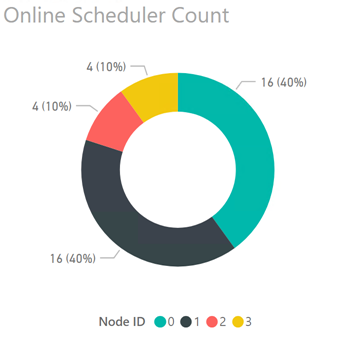
The chart below shows a summary of the online schedulers under CAL licensing:

Each new connection to the instance is assigned a NUMA node based on a round-robin algorithm, e.g. connection 1 is assigned to NUMA node 0, connection 2 is assigned to NUMA node 1, connection 3 to NUMA node 2, connection 4 to NUMA node 3, and so on. (For more information on how scheduling algorithms work in SQL 2012 see How It Works: SQL Server 2012 Database Engine Task Scheduling at https://blogs.msdn.microsoft.com/psssql/2013/08/13/how-it-works-sql-server-2012-database-engine-task-scheduling/)
Under CAL based licensing SQL Server used all 16 logical CPUs on NUMA nodes 0 and 1 (80% of online schedulers) and 4 logical CPUs each on NUMA nodes 2 and 3 (20% of online schedulers); due to the round-robin assignment of new connections each NUMA node handled up to 25% of the total query workload. This resulted in Nodes 0 and 1 being relatively idle while Nodes 2 and 3 are always in use. The imbalance in workload results in a noticeable difference in performance for queries running on Nodes 0 and 1 vs Nodes 2 and 3. Essentially, Nodes 2 and 3 have between 2-4x the load factor of Nodes 0 and 1 at any given time.

Further reading

Tuesday, June 11, 2019

.Net Server Performance - Important performance counters

The list of performance counters doesn't really a good fit to be inside a blog post. This is because it should be a living document. As and when we feel there is one more counter to be looked at we should add to the list. So its well suited as a gist which is easy to update than blog. Also someone interested can give pull request as well.

The main purpose of this list is to help collecting high level view about the performance of system. It may not tell which function or stored procedure is taking more time, but gives a view about where to start with. At least helps to determine whether to start from web server or database server.

This can be feed into an monitoring system such as Azure Application Insights for tracking the previous state. 

Tuesday, June 4, 2019

SQL Server Browser Service - a view through wire

What is SQL Server Browser Service

It is a windows service which helps the clients by providing information about SQL Server instances running in the machine. For example, if a client knows only SQL instance name say server1\namedInstance2, the SQL Server browser helps the client to find the exact port number of named instance. Port number is needed to connect to the to the SQL Server Engine if it is using TCP to connect and uses non standard 1433 port.

How SQL Server Browser works?

SQL Server Browser works over UDP port 1434. It doesn't seems we can change that UDP port as it defeats the purpose of endpoint discovery. In short clients ask information about SQL Instance and browser service answers it.

Refer the Microsoft documentation for more details.

How SQL Server Browser looks like from Wireshark?

SQL Server browser activities can be seen through wire, if we have right network tools installed. Wireshark is the best tool to begin with and its widely popular for these type of exploring. It is free to use. There is already a great article which shows how it works over the wire. Link is below


It is assumed that the application to SQL Server communication would be via TCP as normally  as best practice applications and databases are placed in different machines. If the named pipes or shared memory is used, the troubleshooting will vary.

Wireshark to see SQL Server Browser failure

Normally on development environment the 1434 port would be open and SQL Server Browser running in SQL Server machine. If developers code based on that assumption, it may fail in higher environments. Most of the developers know what might have happened. But some may not and ends up in complete darkness. The symptom of this issue will be connection failure from application to SQL Server database.

This post is mainly to demonstrate how to check network failures on SQL Server Browser operations. The prerequisite is the availability of Wireshark in the machine where application runs and basic knowledge how to run the same. The above link has some screenshots which would help to run Wireshark for UDP connections.

The failure scenario can be confirmed by below steps.

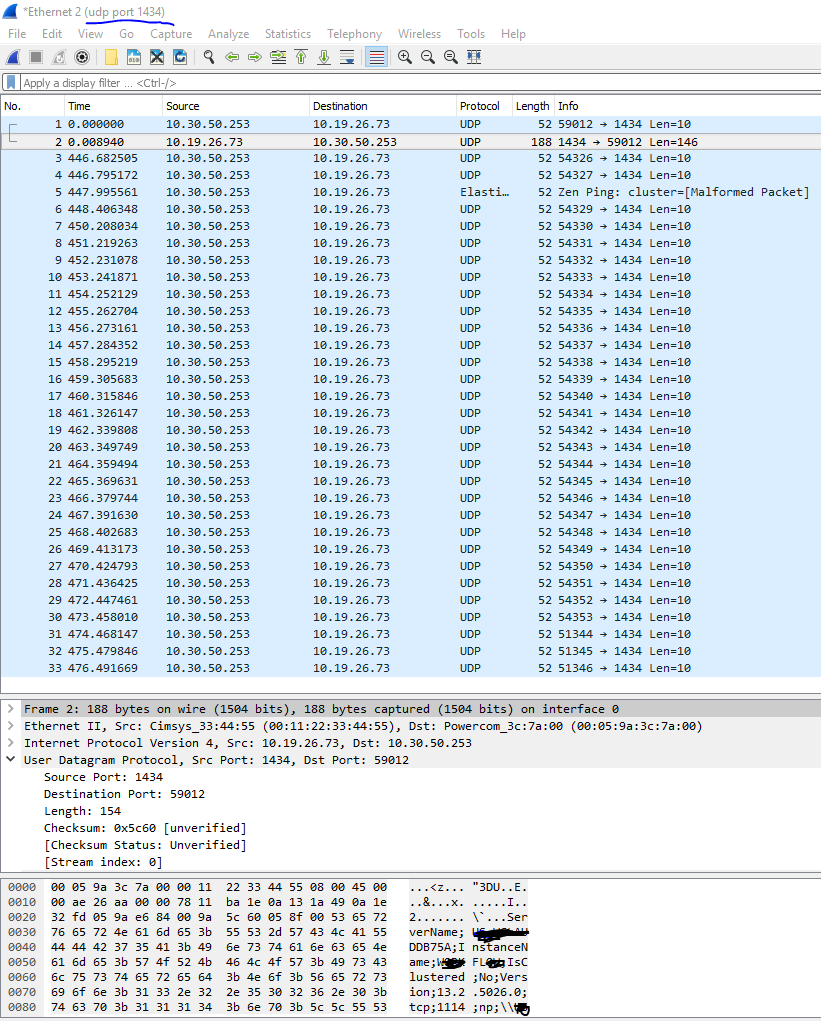
  1. Make sure the Wireshark is capturing UDP 1434 traffic in the machine where application runs.
  2. Reproduce the scenario. Better use SSMS or any test client tools to establish a connection than full application. Again if allowed to use SSMS or other tools in higher environments.
  3. If the UDP requests are made one after another like retry, there is an issue. Refer the screenshot below from the frames starting 3. The initial 2 frames shows the working scenario.
  4. The UDP will fail, if any of the below is true.
    1. The firewall rules blocks the port 
    2. The SQL Server Browser is not running in the SQL Server machine.

If the everything is in working state and the client application is not using specific TCP port to connect to SQL Server Instance, the client will get UDP response from server with the port number. Else it retries 30 times and times out.

We can easily filter the Wireshark logs if we already knows what is the SQL Server machine IP Address. The source would be the SQL Server machine IP and the destination application machine IP.

Caching the port number by client applications

The clients may cache the TCP port number what they got from UDP response. In such scenario based on the nature of the client, we may need to restart or wait for the cache expiry.

Similarly The SQL Server Browser might be stopped or communication is blocked in any other ways, during the normal working. If it happens, the old clients works but new clients don't. It is better to restart the clients to ensure there is connectivity.

https://stackoverflow.com/questions/53906521/where-is-the-cache-of-sql-server-browser-service-for-resolving-instance-names-p

References

https://docs.microsoft.com/en-us/sql/database-engine/configure-windows/troubleshoot-connecting-to-the-sql-server-database-engine?view=sql-server-2017
https://social.msdn.microsoft.com/Forums/sqlserver/en-US/d234c318-dead-4aab-bd2d-7c0cd8f4261a/sql-browser-and-1434-in-sql-server-2016?forum=sqldatabaseengine
https://www.mssqltips.com/sqlservertip/2436/what-does-my-sql-server-data-look-like-over-the-wire/

Tuesday, December 11, 2018

Encrypting the ADO.Net connection to SQL Server and verification

Why should we encrypt ADO.Net communication

We all might have heard about encrypting the web server traffic using http(s) protocol. It make sense to any beginner that it should be encrypted since the communication is going via vulnerable public internet. But ADO.Net is also providing us option to encrypt the connections to SQL Server Database. Lets why some reasons to encrypt.

Connecting from client machine to database server

Nobody might be doing direct connections from client to database using windows identity or custom identities. But it was an option people used earlier and if we ended up in legacy systems this is one thing to take care. A low hanging fruit to increase security.

Connecting from web or queue processing server to ADO.Net

This is more often scenario. The client machine to web server communication is already encrypted. Nobody can intercept it. Once the communication reaches the hosting environment, it is difficult for an outside attacker to intercept the communication between web server and database server. This is true if we are in a corporate environment with someone else taken care of the network level protection.

Still there are chance that some insider attacker can intercept.

When we are in cloud environment

Another reason to encrypt the database communication is the cloud hosting. Though the cloud vendor says they are the best in the world to secure everything and obliged to keep things secret, there is still a factor of belief. What if something goes wrong and someone intercept the communication? So it is better to encrypt than taking a chance.

If someone hacks into the environment and obtain the encryption key as well, there is nothing to be done. For example the cloud provider is in a country which is in war with our country and our application is significant enough to help them to win the war. Its Unavoidable. If there is effect, there will be some side effects. We save cost but exposed to less secure environment. 

How to encrypt the SQL Server Communication

Though encrypting the communication is to be final answer to the security, let's see how to encrypt. SQL Server supports mainly certificate based encryption. In other words the certificate as key for encryption or used for key exchange to finalize the encryption. Digging into the details of how it works is not in the scope of this post. Below are some links as those are readily available.

https://docs.microsoft.com/en-us/sql/database-engine/configure-windows/enable-encrypted-connections-to-the-database-engine

https://support.microsoft.com/en-us/help/316898/how-to-enable-ssl-encryption-for-an-instance-of-sql-server-by-using-mi

More visual help here.

When the connection gets encrypted? It is a great question. There are so many combinations of configuration and below link explains when the SQL Server encrypt, when it use self signed certificate, when it fails etc...
https://docs.microsoft.com/en-us/sql/relational-databases/native-client/features/using-encryption-without-validation?view=sql-server-2017

Problem 1 - When connecting from SQL Profiler

Client unable to establish connection ssl provider the target principal name is incorrect

https://stackoverflow.com/questions/37734311/mssql-with-ssl-the-target-principal-name-is-incorrect

We have to use the full computer name when connecting.

Other problems

There are variety of problems users reported when they enable encryption without reading all the docs. Some are related to permission of SQL Account to the certificate, some related to expired or wrong issued to certificates, some experienced because the certificate was in wrong store etc...

Verify the ADO.Net connection is encrypted

As we saw earlier, even after doing the settings there are chances of connection falling back to plain mode without encryption. This section is about how to ensure the connections are encrypted.

Using the sys.dm_exec_connections

There is a DMV called dm_exec_connections. It can be simply queries like below to check the connections and its encryption status.

SELECT session_id, connect_time,client_net_address, net_transport, auth_scheme, encrypt_option, local_tcp_port
FROM sys.dm_exec_connections
WHERE net_transport = 'TCP'

Play with the above code to explore more properties of  SQL server connections. If we need to check whether the connection is encrypted from .Net code, we have to use the @@SPID to get the connection detail in the same DMV.

What is the certificate used for encryption? - Registry

After we enable the encryption via user interface, we can go to registry and ensure the certificate. Below is the location in registry.

HKLM:\Software\Microsoft\Microsoft SQL Server\<SQL InstanceID>\MSSQLServer\SuperSocketNetLib

As instructed in the guidelines, the encryption is enabled per SQL Instance. So one machine can have 2 SQL Instances. One encrypted and other not.

What is the certificate used for encryption? - SQL ErrogLogs

The SQL logs is another place to ensure the certificate what is used for encryption.

References

https://blog.coeo.com/securing-connections-to-sql-server-with-tls
https://docs.microsoft.com/en-us/sql/database-engine/configure-windows/configure-client-protocols?view=sql-server-2017
https://docs.microsoft.com/en-us/sql/tools/configuration-manager/sql-native-client-11-0-configuration?view=sql-server-2017

https://gyorgybalassy.wordpress.com/2012/09/14/how-to-encrypt-sql-tds-connections/
https://msdn.microsoft.com/en-us/library/ee210043%28v=sql.105%29.aspx?f=255&MSPPError=-2147217396
https://stackoverflow.com/questions/25541281/what-is-the-default-network-protocol-in-sqlconnection-class

Tuesday, November 27, 2018

Architecture v/s Code - Validating sys admins in SQL Server

In the misused agile world, it is always difficult to make sure the code is following the Architecture or Architecture document is following the code. 'Misused agile' means, using the word agile to make developers work all day and night for frequent releases. They struggle to meet the releases and there are high chances for taking deviations, shortcuts or hacks which eventually ends up Architecture and code going in 2 separate directions.

One if the best way to ensure they are inline by using Simon Brown;s C4 architecture model. C4 clearly document the structure of the code. One area which that model is not exactly covering as is the security model of the execution. Architects has to review the deployment document before any deployment or at least after deployment to ensure the security model is right.

With no further introduction let us take a problem of service accounts having higher permissions than needed. Either as Architects we can review each and every DB Server Instance and raise alarms or defects. Or make it automated.

Below script gives the list of logins. By looking at the sysadmin flag we can determine the role and raise a alarms. This can even be integrated with CI/CD systems as validation rule to block the deployments, if database updates are going via CI/CD pipeline.

SELECT loginname, sysadmin

FROM sys.syslogins

ORDER by sysadmin DESC

Happy reviewing. 

Tuesday, August 21, 2018

PowerShell to create databases from backup

Below is PS code snippet to restore many databases from one DB backup. Useful if we need to load test. There could be version mismatch issues if we directly use the RelocateFile class. So use the small hack as shown in the snippet.

1..100 | foreach { 

    $sqlServerSnapinVersion = (Get-Command Restore-SqlDatabase).ImplementingType.Assembly.GetName().Version.ToString() 

    $assemblySqlServerSmoExtendedFullName = "Microsoft.SqlServer.SmoExtended, Version=$sqlServerSnapinVersion, Culture=neutral, PublicKeyToken=89845dcd8080cc91" 

    $RelocateData = New-Object "Microsoft.SqlServer.Management.Smo.RelocateFile, $assemblySqlServerSmoExtendedFullName"('<Data file group name in backup>', "<data folder>\$_.mdf") 
    $RelocateLogs = New-Object "Microsoft.SqlServer.Management.Smo.RelocateFile, $assemblySqlServerSmoExtendedFullName"('<Log file group name inbackup>', "<Log folder>\$_.ldf") 
    $RelocateFG = New-Object "Microsoft.SqlServer.Management.Smo.RelocateFile, $assemblySqlServerSmoExtendedFullName"('<any more file group name eg File stream>',"<data folder>\$_") 

    Restore-SqlDatabase ` 
        -ServerInstance "<server name>\<instance>" ` 
        -Database "<db name>$_" ` 
        -BackupFile "<path to bak file>" ` 
        -RelocateFile @($RelocateData,$RelocateLogs,$RelocateFG) 

    "Restored $_ DB" 
}

Some points

  • Change the value from 100 to increase the number of databases needed. 
  • The new DBS will be created with the number suffixed to their names. 
  • Relocating file is required. Else there could be collision with previous database.

Tuesday, February 13, 2018

Azure @ Enterprise - Moving databases from SQL VM to SQL Azure

Introduction

Enterprise will have so many databases running in its existing systems. If those systems are legacy the databases might have all the legacy features which SQL Azure (The PaaS offering not the SQL VM in Azure) does not support. How to move such databases to SQL Azure as part of Azure adoption. If anyone wonder why the SQL Azure is not backward compatible with standalone SQL Server versions welcome to PaaS. 

Research & Solution

If we google, we can get so many options on how we can move an on-premise database to SQL Azure. Some of those are as below.

After doing good research, the best option found to be the .bacpac mechanism using SQLPackage utility. As we can see in any production databases, the file groups will be all over the place to increase performance. the bacpac mechanism using SQLPackage will eliminate the file groups issue in it's latest versions.

Problems

But it may not be the easy and hurdle free migration road. Below are some issues.

SQLPackage fails on large tables

The SQLPackage.exe has its own timeouts. When there are large tables the timeouts may hit and it will error out. When it error out, there could be a message as follows.

Processing Table '[dbo].[large tables with millions of rows]'.
*** A transport-level error has occurred when receiving results from the server. (provider: TCP Provider, error: 0 - An existing connection was forcibly closed by the remote host.)

Solution

The message tells some network issue not specifically on timeout. But after trial and error this seems to be related to timeouts of SQLPackage.exe utility. It has some params to control the timeout. The usage is as follows

sqlpackage.exe /Action:Import /tsn:tcp:<databaseserver>.database.windows.net /tdn:<database name> /tu:<user> /tp:<password> /sf:<local path to file.bacpac> /p:DatabaseEdition=Premium /p:DatabaseServiceObjective=P15 /p:Storage=File /p:CommandTimeout=0 /TargetTimeout:600

The highlighted are 2 params worked out. The value depends on the size of the database. /p:Storage=File is must when we deal with large databases anyway. It cannot be the other option where memory is used which may drain out quickly.

SQL Azure Server supports only one collation

If the on-premise application is serving globally the collation of the database might have different than the collation supported by the SQL Azure Server.

If anyone is confused on whether there is a SQL Server for PaaS offering, yes there is one. This easily makes us think that there would be real VMs running behind he SQL PaaS offering.

Coming back to the problem, we can have database in SQL Azure with different collation as of SQL Azure instance. But if there are stored procedures which needs to access the system objects, they fail. The default answer would be to change the collation of SQL Azure Server. But unfortunately it is not supported. SQL Azure instance is kind of hard coded to 'SQL_Latin1_General_CP1_CI_AS' collation.  Microsoft has their own reason it seems. But as user what we can do?

Solution

Modify our SQL code to include collation or change the collation of our database to the collation of SQL Azure instance which is 'SQL_Latin1_General_CP1_CI_AS'. It is simple to say change the collation but in enterprise its sequence of approvals especially if the collation is set as standard across multiple applications.

Conclusion

It is nice and good to use Azure. It works well when the application is from scratch and cloud native. But when it comes to migration of existing applications, its nightmare. Sometimes feels like the Azure is not matured for enterprise.

https://msdn.microsoft.com/en-us/library/hh550080%28v=vs.103%29.aspx

https://github.com/Microsoft/vsts-tasks/issues/1441
https://social.msdn.microsoft.com/Forums/en-US/3dd204b3-603d-4c88-9f85-083f69323cd1/sqlpackage-publish-timeout?forum=ssdt
https://docs.microsoft.com/en-us/azure/sql-database/sql-database-connectivity-issues
https://stackoverflow.com/questions/16089321/restore-a-bacpac-file-to-sql-azure-with-large-database-size-sqlpackage-exe
https://blogs.msdn.microsoft.com/azuresqldbsupport/2017/01/31/using-sqlpackage-to-import-or-export-azure-sql-db/

Tuesday, October 31, 2017

Exposing Parquet file to SQL 2016 as well as Hadoop (Java/Scala)

This is just an architecture post explaining the possibility of Parquet file exposed to SQL 2016 databae via polybase and other applications accessing normally. The other applications can be anything such as data analytics code running in Hadoop cluster.

Mainly this kind of integration needed when we already have an transaction database such as SQL Server and we have to analyze data. Either we can have scheduled data movement using ETL technologies or we can use polybase to move data from an internal normal table to external polybase table which is backed by parquet file. If the solution is in Azure, the parquet file can be somewere in storage. Once the data is there in parquet file format the analytics algorithms can hit the same. Parquet file is mentioned here because of their familiarity in analytics community.

Below goes such an architecture.
Since the architecture may change over the time, LucidChart diagram is embedded. Please comment if this is not working. Thanks to LucidChart for their freemium model.

Details on implementation such as code snippets are good to share in separate post.

Tuesday, September 19, 2017

SQL 2016 - Create external polybase table on parquet file stored in Azure blob storage

This is a walk through on creating an external polybase table in SQL 2016 which stores data in Azure blob storage using parquet file format.

Prerequisite

The prerequisite is the basic knowledge about SQL Server and Microsoft Azure.

Use cases

One of the best use case is to move data between SQL Server transaction systems to Azure blob storage. Mainly if we are in data analytics world, there we can rarely see transactional relation databases. So we has to move data in between. eg: if we have internal or normal transaction table we can create external polybase table with same schema and do insert..select to move data from SQL Server to unstructured stores such as Azure blob or hadoop.

Azure storage account and blob setup

This is as straight forward as creating Azure storage account and blob container for any other purpose. Note down the storage account key and the container name to be used in SQL to setup connection.

Installing SQL 2016 with Polybase support

The polybase support came with SQL 2016. This Microsoft SQL Server 2016 feature requires Java runtime!!! Yes. Polybase seems a wrapper over Java libraries and those need JVM to run. Min inum required version for running polybase at the time of writing this post is JRE 7 Update 51

Once we have the JRE 1.7 version installed, we can install SQL 2016 with polybase support. Polybase has to be selected manually during the installation as it is not selected by default.

SQL Server level Settings

There are some settings to be done at the SQL Server level.

Enable Polybase

The below query will enable polybase export.

-- Enable INSERT into external table  
sp_configure 'allow polybase export', 1;  
reconfigure

Create password

This is the master key

-- Create a master key.
-- Only necessary if one does not already exist.
-- Required to encrypt the credential secret in the next step.
Create MASTER KEY   ENCRYPTION BY PASSWORD = '<Password>'

Database level settings

This is the step where the credential towards the Azure blob storage is setup in SQL Server database.

-- Create a database scoped credential
-- IDENTITY: Provide any string, it is not used for authentication to Azure storage.
-- SECRET: Provide your Azure storage account key.
go
CREATE DATABASE SCOPED CREDENTIAL AzureStorageCredential
WITH
    IDENTITY = 'user',
    SECRET = '<storage account key>'
; 
This doesn't tell what is the location the data resides. It just opens entire storage account to SQL Server.

Create data source

Now we can use the stored credentials to map to the Azure blob container path. This just tells where in the Storage account the data goes. The wasbs:// protocol is used to point blob storage path.

-- Create an external data source
-- TYPE: HADOOP - PolyBase uses Hadoop APIs to access data in Azure blob storage.
-- LOCATION: Provide Azure storage account name and blob container name.
-- CREDENTIAL: Provide the credential created in the previous step.

--  Example with sample Storage account,container name:polytest,storage account name: parquetstore
CREATE EXTERNAL DATA SOURCE AzureStorage
WITH (
    TYPE = HADOOP,
    LOCATION = 'wasbs://polytest@parquetstore.blob.core.windows.net',
    CREDENTIAL = AzureStorageCredential
); 

Create file format

One more setup required before creating the table is creation of the file format. This is required to tell what format to be used to store the table data.

-- Create an external file format
-- FORMAT_TYPE: Type of file format in Azure storage (supported: DELIMITEDTEXT, RCFILE, ORC, PARQUET).
-- FORMAT_OPTIONS: Specify field terminator, string delimiter, date format etc. for delimited text files.
-- Specify DATA_COMPRESSION method if data is compressed.

CREATE EXTERNAL FILE FORMAT [ParquetFileFormatSnappy]  
WITH (  
    FORMAT_TYPE = PARQUET,  
    DATA_COMPRESSION = 'org.apache.hadoop.io.compress.SnappyCodec'  
);

The data compression uses is Snappy. There are others as well.

Create external table

This is the last step. It creates external table with the file format, storage location and data source. 

-- CREATE AN EXTERNAL TABLE WITH PARQUET FILE.   
--A: Create the external table
-- Specify column names and data types. This needs to match the data in the sample file.
-- LOCATION: Specify path to file or directory that contains the data (relative to the blob container).
-- To point to all files under the blob container, use LOCATION='.'
CREATE EXTERNAL TABLE [dbo].[SampleTable_Parquet_External] (  
        [customerName] [nvarchar](100) NULL,
 [customerNumber] [varchar](70) NULL
)  
WITH (  
        LOCATION='/customerdata.parquet',  
        DATA_SOURCE = AzureStorage,  
        FILE_FORMAT = [ParquetFileFormatSnappy],  
        REJECT_TYPE = VALUE,  
        REJECT_VALUE = 0  
);

CRUD operations on external table

As it is stated by polybase technology, it don't support DML operations such as update, delete statements. We can just insert.

--Insert Data to the external table
INSERT INTO [dbo].[SampleTable_Parquet_External]
select * from dbo.[SampleTable_Internal]

Things to remember about polybase

The API seems granular. We can create file format, data source and all separately and use those when creating table.

As stated earlier it is mainly useful in big data analytics. But when we tried moving more than 300,000 records from SQL Server to blob we could see it just breaks. Still troubleshooting with Microsoft. Hopefully it might be something we did wrong.

Another issue faced was about data types. The polybase engine don't know all the data types and can move them. There are settings to say how may mismatches it should handle/forgive before it fails.

More limitations can be found here.

More reading

Tuesday, February 3, 2015

Dynamic SQL View using CONTEX_INFO

SQL Server supports creating views and I hope all knows what is a view. According to wiki its just a result set of query on data. Users can access it just like another table but it doesn't contain its own data like table. If we google for different between view and table we can get ton of links.

Below is a normal view definition.

CREATE VIEW CreditCards 
AS 
  (SELECT * 
   FROM   adventureworks2012.sales.creditcard 
   WHERE  cardtype = 'Vista')

In our day to day life most of the views we are creating has a static 'where' clause. Here we are
going to see how that part can be dynamic.

Create view by getting values from CONTEXT_INFO

CONTEXT_INFO gives us option to store values in the context of a session. It can be more compared to a static variable in programming. Here we are going to see how a view can be created which is affected by CONTEXT_INFO value.

Below is a sample view which is consuming the CONTEXT_INFO

CREATE VIEW creditcards 
AS 
  (SELECT * 
   FROM   adventureworks2012.sales.creditcard 
   WHERE  CardType = CONVERT(VARCHAR(25), Context_info())) 

If somebody call this view without setting the CONTEXT_INFO it will return the view which matches the where condition(CardType) with NULL. Else it returns proper data set.

Setting the CONTEXT_INFO

If we have already a view defined we can set the CONTEXT_INFO to our own values and select the view. The view will return proper values.

DECLARE @contextInfo VARBINARY(128) 

SET @contextInfo = CONVERT(VARBINARY(128), 'Vista') 
SET context_info @contextInfo 

SELECT * 
FROM   adventureworks2012.dbo.creditcards

The above query will return all the Sales.CreditCard with CardType='Vista'

One advantage is we can set this CONTEXT_INFO from code. More precisely from central data access before executing any other query. This way we can control centrally, what the tracks are getting from this view if they go via common data access.

http://jasondentler.com/blog/2010/01/exploiting-context_info-for-fun-and-audit/

Tuesday, October 21, 2014

Delete a SQL Server database schema with all its objects

Recently as part of R&D I had to delete all database schemas in a SQL Server Database. The major pain I foresee on identifying objects associated with it and deleting those in order. I was confident that somebody might have faced the same earlier and the script will be available as its, That's correct. I got a good link in first google itself. Its given below

http://ranjithk.com/2010/01/31/script-to-drop-all-objects-of-a-schema/#comment-428

Really thanks to this guy. But when I tried deleting the schema in my database using this SP, I got an error saying that the schema cannot be dropped as there are some user defined table types inside it. The technique which this guy used is to get the objects of schema is to query the sys.objects and that never gives the User Defined Table Types inside the schema.

SELECT *
FROM sys.objects SO
WHERE SO.schema_id = schema_id(@SchemaName) order by name

This might also be faced by some other people so read some comments but no luck. So had to spend sometime on the query and added the code to delete UDTT too.

--Add DROP TYPE statements into table
INSERT INTO #dropcode
SELECT 'DROP TYPE '+ @SchemaName + '.'+name
FROM   sys.types
WHERE  is_table_type = 1 and schema_id=schema_id(@SchemaName)

File can be downloaded from here
 
Once again thanks to Ranjith the author of original post and hope he wont mind me changing his work and redistributing

Tuesday, October 7, 2014

SQL Server internals - How to see where my data record stored

As I mentioned in many of my previous posts, its very difficult for me to learn something without seeing how its done internally. For example you can see how I explored .Net GC working in one my previous post. This time I am trying to learn how SQL Server stores that data internally.

Where SQL Server stores our tables & records?

As everybody knows, its in the disk only. But which file? Where its located. There are at least 2 files required for each database and we can see the file paths in the properties tab of SQL Server Database or query the details.

How the data records, tables are organized

We could see that the data is stored in normal files with extension .mdf,.ldf and .ndf. Does that mean we can open that in notepad and see it? Is the SQL Server just open the file and writing into it just like how we did in C/C++ labs in college?

Absolutely no. As SQL Server is a production ready software so it cannot do like academic code. It has more levels which optimize the storage techniques for maximum performance. One level is the file groups where we can specify more than one file for a group and associate with partition. Another level is the page. SQL Server considers a page as the atomic unit of storage. The page size is 8KB. It  does the IO operations such as reads / caches at page level only. Even if we need one record from a page, it reads the entire page.

Lets get into how the records are stored. As we know the physical storage order of records in SQL Server database is based on the clustered index and normally the primary key will be clustered index. We cannot have more than one physical storage order for data records. That's is why there is only one clustered index allowed.

How to inspect SQL Server pages

But there is something called non-clustered indexes. If the records cannot be physically stored in more than one order how they help us? Those are different data structures which tells the order of rows in a different way. Before going to "how the non-clustered indexes works" lets get full understanding about how the clustered index works and how to see the data inside page.

I am glad to say that people before me already thought in the same way and done enough hard work to explain the storage with good pictures. So why I need to do the task again? I just read their blogs and see understood how it works. So sharing the same via my blog.

Below is the blog post where I could see the storage is explained with undocumented SQL Server functions called DBCC IND & DBCC PAGE
http://www.mssqltips.com/sqlservertip/1578/using-dbcc-page-to-examine-sql-server-table-and-index-data/

References

http://www.practicalsqldba.com/2012/04/sql-server-index-fragmentation.html
https://www.simple-talk.com/sql/database-administration/sql-server-storage-internals-101/

My interest was about index fragmentation. So I did some more research on it and preparing my own post where we can see how fragmentation can be created and solved.