Showing posts with label Markdown. Show all posts

Tuesday, August 24, 2021

Generate pdf from markdown files in a folder using markdown-pdf

I am a big fan of markdown language for writing documents. One of the scenarios we encounter using markdown is to generate a pdf file or convert the markdown files to some other format. This post is to introduce an NPM package that converts markdown files to pdf file. It is considerably old but still does the job.

markdown-pdf

markdown-pdf npm library is open source software with MIT license. They have just enough documentation as well. It can be used as a command and as a library to use from our nodejs applications.

The limitations I found are as follows.

There is no direct API to convert an entire folder of markdown (.md) files. We have to iterate the folder by ourselves and give it all the file paths. Another problem is to insert page breaks between the markdown files. But that also can be overcome by using pre-processing markdown interceptor and some css tricks.

Sample code

Enough talking. The sample code to perform the below use cases with this library is available in GitHub repo.
  • How a folder can be given to markdown-pdf as there is no direct API
  • How to preprocess markdown files
  • How to give a custom CSS file

How it works

Internally it converts the markdown to HTML by using the remarkable npm library. Once the HTML files are available, it uses the phantomjs to load the HTML in the browser then print as pdf from there. It supports custom CSS files as well. 

Now it might be clear how the line breaks are inserted into the PDF files.

Use cases

If our documentation is prepared using markdown, the pdf file can be generated using this library through the CI/CD pipelines. 

Other libraries

References

Tuesday, January 26, 2021

Markdown table sorting

Problem

I restarted my crypto trading recently that I put on hold back in 2018. Last time it was mainly revolving around BitCoin, Ethereum, LiteCoin only. But this time it's a new world of DeFi (Decentralized Finance) and its ETH-based coins. When I analyzed I saw that there are a lot of things affecting the price along with the sentiments and real value. I really wanted to have a place where I can list my favorite coins with my favorite properties to analyze. First I thought of creating my Wikipedia page, but I saw it's already there and outdated. I am fine with editing that page but it's locked for editing with my points in the wiki. 
The second option is to start my own crypto page in GitHub as markdown. 

Now the actual problem came. The table on the wiki page is sortable but the markdown table is not by default. The problem can be summarised as 

How to create and publish a markdown page in GitHub pages that have sortable tables 

Approach

I found many approaches but a jQuery based table sorter worked without any complications. Below are the steps to get it integrated into GitHub repo.

How it works

We can attach it to any HTML page. First, make sure jQuery is added to the page. Second, refer to the tablesorter library and its style, etc...Finally, select the tables and attach that to the table sorter.

How to integrate into GitHub pages

The GitHub pages are processed by Jekyll. We can give the Jekyll layout in any GitHub repo by adding _layouts folder. The code is worth a thousand words. Please see the below page for the code reference.

https://github.com/mind-maps/cryptocurrency/blob/main/_layouts/default.html

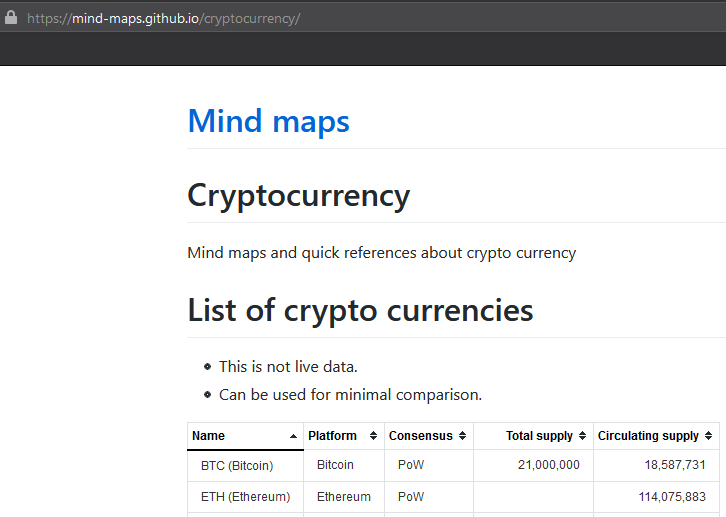
Below is the page in the repo where a sortable table is added.

https://mind-maps.github.io/cryptocurrency/

Solution

After working on the GitHub page for one day, I became lazy and did google again. Finally found the coinmarketcap.com site is providing login experience and can maintain a watch list there with the properties I want to analyze

Reference

https://tympanus.net/codrops/2009/10/03/33-javascript-solutions-for-sorting-tables/

Tuesday, July 7, 2020

Coding Presentations

Following the trend to code diagrams, now searching for options on how to code presentations. Don't get the 'coding' word. Its basically textual representation of diagrams and software (PlantUML) converting or compiling in to visual. There are many benefits of textual representation such as versionable, separation of art from content, etc...

This is post is about coding presentations. The Markdown format really influenced the industry. It is simple than HTML, less size, easy to work with, etc,. So the search mainly focused around presentation technologies that support Markdown.
 
Below is a humble comparison of presentation technologies. Ideally, this should be in Markdown and in Gist. It will be done later and update here. Till then bear with this HTML table format. 

Criteria

  • Free tools
  • Supports markdown either native or inside HTML
 NameMarkdown HTMLHow it works Pros Cons
 HackmdNative YesHostedGitHub integration
Freemium model
 
 MarpNative VS Code
CLI
 Less Documentation 
 RemarkJSInside HTML Yes Boilerplate start
Save and refresh browser
  
 RevealJSInside HTML Yes Hosted
Standalone
VS Code support
Transitions, 
Blogs, tutorials available

Markdown support is limited. eg: cannot add header using md
 Swipe Native Hosted  Live presentationOnly 5 presentations in free tier

What I ended up using is RevealJS. Below are the rationale
  • Transition support
  • Vertical slides
  • Editing in VS Code
  • Long time in the market. The first presentation I created in 2013 to take a session about HTML 5. The slide deck itself made the audience that HTML 5 is something really capable.
I don't think these technologies reached a point that can replace PowerPoint.

Other presentation technologies

Below are some other presentation technologies which are not in the above table.

Other comparisons