Showing posts with label jQuery. Show all posts

Tuesday, January 26, 2021

Markdown table sorting

Problem

I restarted my crypto trading recently that I put on hold back in 2018. Last time it was mainly revolving around BitCoin, Ethereum, LiteCoin only. But this time it's a new world of DeFi (Decentralized Finance) and its ETH-based coins. When I analyzed I saw that there are a lot of things affecting the price along with the sentiments and real value. I really wanted to have a place where I can list my favorite coins with my favorite properties to analyze. First I thought of creating my Wikipedia page, but I saw it's already there and outdated. I am fine with editing that page but it's locked for editing with my points in the wiki. 
The second option is to start my own crypto page in GitHub as markdown. 

Now the actual problem came. The table on the wiki page is sortable but the markdown table is not by default. The problem can be summarised as 

How to create and publish a markdown page in GitHub pages that have sortable tables 

Approach

I found many approaches but a jQuery based table sorter worked without any complications. Below are the steps to get it integrated into GitHub repo.

How it works

We can attach it to any HTML page. First, make sure jQuery is added to the page. Second, refer to the tablesorter library and its style, etc...Finally, select the tables and attach that to the table sorter.

How to integrate into GitHub pages

The GitHub pages are processed by Jekyll. We can give the Jekyll layout in any GitHub repo by adding _layouts folder. The code is worth a thousand words. Please see the below page for the code reference.

https://github.com/mind-maps/cryptocurrency/blob/main/_layouts/default.html

Below is the page in the repo where a sortable table is added.

https://mind-maps.github.io/cryptocurrency/

Solution

After working on the GitHub page for one day, I became lazy and did google again. Finally found the coinmarketcap.com site is providing login experience and can maintain a watch list there with the properties I want to analyze

Reference

https://tympanus.net/codrops/2009/10/03/33-javascript-solutions-for-sorting-tables/

Tuesday, March 13, 2018

Uploading large files from browser to ASP.Net web server - WebSockets

Problem

Most of the applications are now web applications. When we are in browser we are in restricted area. We cannot code freely to leverage machine's full capabilities. One of the area where the limitation applies is on uploading large files which is a normal use case. Small files we can easily upload using file input control. But when the file size grows we get into trouble. 
There are so many solutions out there including third party controls. But what if we need to write one from scratch? What are the options?

Alternatives

We can use ActiveX controls which helps to unleash the potential of the machine. With the arrival of HTML5 FileAPI we have more control in the HTML itself. There are so many third parties who are making use of the same. If there is a way to use ActiveX or third party controls, the problem is solved. Else or you think the existing solutions are not enough, continue reading.

Solutions

There are many ways to upload files. Below are the principles taken on the solution approach

Principles

  • Never use ActiveX
  • Read the file without breaking the browser memory (chunking)
  • Should support up to 25GB file minimum.
  • Support scaling
There are reasons behind the principles but are not relevant at this point. Below is the first solution and that is going to be discussed in this post.

WebSockets

One of the modern way is the WebSockets. Below goes a repo which demos how the file can be read async and sync methods and send via WebSockets.

https://github.com/joymon/large-file-upload-from-browser

Feels free to surf the repo and comment. Will be adding more development notes soon.

Results

  • Using a Web Worker and FileReaderSync API seems faster than async FileReader API.

Limitations

Below goes some limits
  1. The connection has to be open. Affects scaling.
  2. Socket connection management is tedious
  3. The server is slower in reading and writing the files. Client reports it send all the data.

References

Tuesday, October 27, 2015

Manipulate HTML string using jQuery

Scenario

We have a HTML string which may or may not have tables. We need to make sure the width of all tables and table columns are empty.

We are in a web page which already have reference to jQuery. We don't have access to manipulate the original web page. The html string is present in one known TextArea in the loaded page. 

Our Javascript code is going to run from browser address bar.

Solution

So many constraints. But this was one of my requirement to modify width of tables present in my Evernote web page. Evernote don't have support to edit the table width once its created.

The technique is simple as follows
  • Get / parse the string into jQuery object
  • Use find() to select the objects
  • Once the objects are selected apply the changes.
See the jsFiddle below
http://stackoverflow.com/questions/22143055/replacing-manipulating-element-in-html-string-using-jquery

Tuesday, November 19, 2013

ASP.Net MVC AJAX requests are not running in parallel when the Session is enabled

Recently I was into a mission of increasing the speed of an ASP.Net MVC web site which was continuously throwing exceptions (time outs) when the data increased to 10,000 records in one table.

Initially the site was taken care as stepchild which got less developers to work on and less allocation of design time as it is targeted to admin people who are less in number. Now the things changed suddenly and it needs to be a competitor for Facebook in terms of performance.

The main issue was due to lack of join support in OData. We fixed so many coding issues which are related to usage of WCF Data services which uses OData protocols internally. Then made most of the pages AJAX friendly. Implemented real lazy paging in grids. Earlier, the app was pulling all data to the client side and was doing paging in javascript.

The site became responsive in 5 seconds. Now a special issue got our attention. Multiple AJAX calls, we issued from javascript are not getting executed in parallel in the server side. In particular page, there are 2 AJAX requests made from jQuery. Based on the server logs, each takes 2 seconds to process. But when we looked in F12 tools, the second call ends only after 4 seconds. The search ended up in usage of session variables. By default 'only one thread can access particular Session'. In our case both the AJAX requests are executed from same page which means the execution of action methods will be serial.

Initially we though of getting rid of session usage in the whole application. But after sometime, we started thinging differently. We are not the ones who are facing this issue. Somebody might also faced it and resolved it. What they did to resolve this?

It simply ended in SessionState attribute where we can control the behaviour of session usage per Controller. Thanks to the authors of below blogs.

http://www.stefanprodan.eu/2012/02/parallel-processing-of-concurrent-ajax-requests-in-asp-net-mvc/
http://johnculviner.com/asp-net-concurrent-ajax-requests-and-session-state-blocking/

How to apply SessionState to action method level

http://sapoval.org/per-action-custom-sessionstateattribute

Tuesday, August 20, 2013

Dynamic rows with multiple file uploads in ASP.Net MVC

Scenario / Requirement

There is a dynamic grid with plus (+) button to add new rows. Each row has around 3 normal text columns and one column to upload file.

Solutions

Single post back

  • Render your model which is list / collection type using simple table layout
  • Make sure there is at least one item in the collection. That can be the empty item.
  • Use javascript / jQuery to clone a table row and append at the end.
  • Rename the id and name of the elements in new row to match the naming convention.
  • Use a submit button to post back the rows. You will get added rows in the model list.
For the above we had used the tutorial given in the below link. Thanks to Zorgo for the tutorial.

Now the multiple file upload part comes. To tackle that follow the below method.
  • Have one file input type in the rows which are rendered. Use the naming as follows
    • <input type="file" id='Skills_0__File' name='Skills_0__File' />
      
  • In the postback action method iterate through the Request.Files collection and get the streams
  • If the Request.Files[i].ContentLength = 0 avoid that file because the user had not selected file.

Pros

  • Easy to implement.

Cons

Anyway I had modified the sample I got from the above link and uploaded. It can be downloaded from my sky drive by clicking on the below icon.

Multiple post back

This approach works as follows
  • There will be 1 post back for each file and one posting for the entities.If there are 8 records, there will be separate 8 post backs for files and one posting for the entities.
  • Each file will be posted separately. It returns the file id ie an reference to the server side where its saved. (If its saved in SQL Server or other database the primary key)
  • Associate that id to the row to be saved using jQuery / javascript
  • Post back the rows (entities) and when its saved in the server side, the row can be linked to the uploaded file. (If its in database use the foreign key relation)
  • Need to use iFrame to do posting of file input.

Pros

  • Data size limitation in http post back is resolved.

Cons

  • There are chances that the file upload succeeds and the subsequent record saving didn't success. This will result in orphan files which needs to be cleared as maintenance task.

Chunking

This involves separate reading mechanism or ActiveX controls to send files in chunks. This is useful if you need to transfer really big files. After completing each file the server side id needs to be updated to the new records and save after all file uploads.

We are planning to go with the second approach because we are not sure about the size of the files we need to upload. If the size of the expected files is small we can go with the first approach. So decide yourselves based on your scenario.

Tuesday, October 5, 2010

Starting jQuery

I have been hearing about jQuery from the day it is introduced. My thought was ,it is just a  javascript library and who wants it, where I have my favorite Silverlight with C# support & Flash. They served all the needs at client side / browser and I didn’t even cared about creating a sample using jQuery.

But now things changed with the arrival of HTML 5.It has so many capabilities which I thought a RIA can only support.What does that mean? Death of RIA technologies such as Silverlight & Flash? Most probably they will.If the normal HTML page is capable of rendering the rich web contents who will go for a third party RIA application?

That is about the UI.The story never ends with UI alone.What about the interactivity? That is the main attraction of RIA technologies.When HTML 5 comes how the interaction will take place? Obviously we need to write code to get the interaction.So in those days the hero will be javascript which is a good friend of HTML from the very beginning.

Next question.How much code we need to write to accomplish UI interactions like what Silverlight and Flash giving to us right now? Its a big .So what a normal developer will do? He just creates a library which is reusable in all his projects.That is what jQuery javascript library means.

If you still didn’t understand the importance of jQuery, here is the last sentence.Once the HTML 5 is in place we need javascript to make the page interactive and jQuery will help us to write less code to achieve more functionalities.We can also expect ASP.Net 5/6 emitting HTML 5 contents with stunning animations :-)

The main motivation to write this post is a seminar conducted in our company about jQuery.One of my colleagues explained it very well.

What is jQuery

jQuery is just a javascript library ie a .js file containing some functions and classes which helps the developer to write minimal code. For example lets consider the scenario of changing the width of a div on a button click.

The normal js code.

<script type="text/javascript">
   1: function btnIncrease_Click() {
   2:     div1.style.width = "400px";
   3: }
</script>
<body>
<div id="div1" style="width:100px;height:63px; background-color:Red" ></div>
<input type="button" name="btnIncrease" value ="Increase size" onclick="btnIncrease_Click()" />
</body>


The jQuery equivalent

<script src="Scripts/jquery-1.4.1-vsdoc.js" type="text/javascript"></script>
   1:  
   2: btn1<script type="text/javascript">$(document).ready(function () {
   3:         //$("#div1").fadeOut("normal", function () { });
   4:         $("#btn1").click(function () {
   5:             jQuery("#div1").width("400px");
   6:         });
   7:     });
</script>
<div id="div1" style="width:100px;height:63px; background-color:Red" ></div>
<input type="button" id="btn1" name="btnIncrease" value ="Increase size"/>


Its very simple in the first look if you are good in javascript.We are including a js file which is the jQuery library and using the ‘$’ symbol. We are calling the functions inside the library.The event subscription of the button.click,we are doing in the documentReady event.#btn1 will translate to the btn1 object and on its click we are changing the size of the div.

Ok.Let us think in another way.If you have 10 divs which are using same style class how will you change the size of all those divs? The jQuery implementation is given below.


<script type="text/javascript">
   1:  
   2:     $(document).ready(function () {
   3:         //$("#div1").fadeOut("normal", function () { });
   4:         $("#btn1").click(function () {
   5:             jQuery(".divStyle").width("200px");
   6:         });
   7:     });
</script>


Its very simple use .divStyle as the parameter and its done.

Visual Studio & Intellisense


I am from the Visual studio environement and I would like to be in it.So I obviously look for the VS intellisense support .And it is there if you use the vs specific version of jQuery.

jquery-1.4.1-vsdoc.js
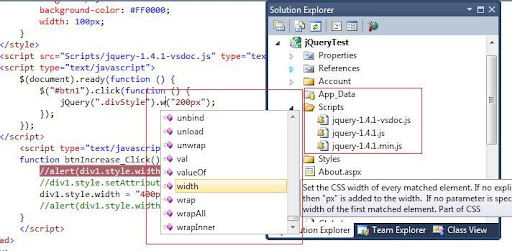
In VS2010 if you create a new ASP.Net project you can find the jQuery library in the scripts folder.The above picture shows 3 js files for jQuery which does the same job.If you use jquery-1.4.1-vsdoc.js you will the the intellisense as shown in the image.


Don’t confuse with the $ symbol which is there in the jQuery like me.Its just a variable.You may use jQuery instead of $.See the js file if you want to change it to your name.

if you are non Visual Studio developer download the jQuery library from http://docs.jquery.com/Downloading_jQuery