Note that this is just a GitHub project template, not released as dotnet command extension. In other words if this is made that way, anyone can easily use with below commanddotnet new <my template name>
Tuesday, October 12, 2021
GitHub template project for .Net console Menu driven applications having DI and Logging capabilities
Tuesday, February 9, 2021
Dev environment in GitHub (Not codespaces)
After scripting my dev machine setup, naturally, my next aim became scripting specific application environments. Below are some reasons
Why we need to script out per application environment?
- Different applications require different SDK versions, prerequisites. Making sure all apps are using the same version is time-consuming.
- Setting up the environment for one app to run may make another app fail.
The obvious answer I came to is containerization. The next question is where to run the container. It is GitHub codespaces. But it requires an invitation or we would be in the queue. So the next place is my own machine.
Solution
Finally ended up following multiple blog posts mentioned in references and reached to get it working. First I made my Hugo based personal website containerized. Below is the link to 2 files that are required to containerize.
https://github.com/joymon/site-hugo/tree/master/.devcontainer
One easy thing now in VS Code is an extension called "Remote Development" that packs multiple extensions required to run dev containers.
Hot reload / live-reload issue when using WSL2 backed containers in Windows
The problem I faced with this is the hot reload/live-reload is not working by just following the tutorials. This seems a known issue. One of the answers I have seen is to keep the file also in the Linux system. Another workaround people are suggesting is to use WSL1. 2 more are there. One to increase "fs.inotify.max_user_watches" property and the last one to use polling instead of subscribing to events to do hot reload.
More details can be found in the official documentation below.
https://docs.docker.com/docker-for-windows/wsl/#best-practices
https://docs.microsoft.com/en-us/windows/wsl/compare-versions#performance-across-os-file-systems
I am yet to test all those workarounds.
References
https://www.freecodecamp.org/news/put-your-dev-env-in-github/
https://markmcgookin.com/2020/11/12/vscode-devcontainer-using-dotnet5-0-net-5/
Tuesday, January 28, 2020
Enabled HTTP(s) on joymononline.in without any certificate cost
https://developers.google.com/web/fundamentals/security/encrypt-in-transit/why-https
https://www.forbes.com/sites/forbestechcouncil/2018/05/18/why-an-ssl-certificate-is-important-for-your-company-website/#4fffd6c21dc3
https://kinsta.com/knowledgebase/how-ssl-works/
Earlier it was an additional cost to protect web site using an SSL certificate. But nowadays there are a lot of ways to get encryption without extra cost.
Difference ways for free SSL on GitHub pages
Before GitHub started officially supporting SSL on custom domains it was little complicated. One way was using other services such as Cloudflare. But the problem is that it adds one more component and a point of failure. So it is better to go with the GitHub approach itself.My personal website joymononline.in is hosted in GitHub pages. So no cost for hosting. Only the domain registration needs money and it's done through GoDaddy. So both GitHub and the GoDaddy accounts have the changes to serve web site with HTTP. There is a separate post on how to serve a web site hosted in GitHub pages via a domain registered in GoDaddy.
Let's see how the HTTP(s) can be integrated into the mix.
Changes in GoDaddy
Updates to A records
Changes in GitHub
Troubleshooting
How bought my certificate?
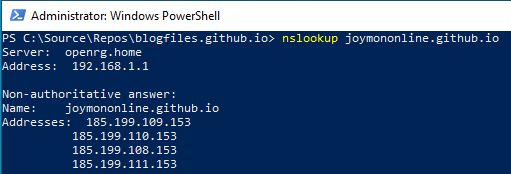
Checking the IP address
In Windows, we can use the below command to find the latest IP addressMore on free SSL
https://letsencrypt.org/getting-started/https://www.sslforfree.com
https://www.udemy.com/free-ssl-certificate/
References
https://github.blog/2018-05-01-github-pages-custom-domains-https/https://help.github.com/en/github/working-with-github-pages/securing-your-github-pages-site-with-https
Tuesday, October 30, 2018
Travis-CI - Continuous deployment to staging but production deployment only on tag commit
Background
Aim
- Have the CI & CD pipeline trigger for each and every commit going into GitHub. Deploy only to staging or testing area.
- Testing / staging area is GitHub pages hosted in the same repo. Deploy to staging should not trigger another build which ends up as infinite loop. Not into gh-pages branch but to \docs folder.
- When there is tagged commit deploy to production.
How its done
Avoid build on commit from Travis-CI bot
Build and deploy on commit tag
This is another condition we need to put into condition. If we don't put this Travis-CI will not build on tag commit. Below is one example.if: tag IS present OR commit_message != "Deploy joymon/prayerbook to github.com/joymon/prayerbook.git:master" OR tag = true
If we use tag = true alone it may not work. Needs more analysis on the Travis-CI yml schema.
A sample travis.yml file can be found below which works based on the above conditions.
https://github.com/joymon/prayerbook/blob/master/.travis.yml
References
https://stackoverflow.com/questions/18216991/create-a-tag-in-github-repositoryhttps://docs.travis-ci.com/user/conditions-v1
https://github.com/travis-ci/travis-ci/issues/8518
Disclaimer
Tuesday, August 28, 2018
Another .Net helper library via nuget package system
Background
.Net Core
Another areas where .Net was weak is AI, Machine Learning, distributed computing etc... Now there is ML.Net SDK also announced.
So what is next?
https://github.com/joymon/dotnet-helpers
This library uses multi targeting feature so that one code base can be compiled to multiple targets. This is useful especially to provide libraries for .Net Core.
Thanks to AppVeyor for giving free CI&CD support to publish to nuget repo.
Why I didn't join with other helper nuget libraries is described in the readme of the repo.
Tuesday, April 18, 2017
Serverless JoymonOnline.in - Dealing with GitHub API and its limits
Introduction
GitHub API limits
- The site is opened from corporate machines where the external IP is same and simultaneously more than 60 people from a company opens.
- The user has opened another site which does heavy GitHub anonymous activity and after that opens JoymonOnline.in.
Overcome free GitHub API limits using proxy service
const http=require('https'); var express = require('express'); var Webtask = require('webtask-tools'); var bodyParser = require('body-parser'); var app = express(); app.use(bodyParser.json()); app.get('/', function (req, res) { res.json({ message: 'Welcome to my api!.Currently it supports api/joymon/<name of github repo>. Not open for all repos ' }); }); app.get('/joymon/:projectName', function (req, res) { console.log(req.params); var callback = function(response) { var str = ''; response.on('data', function (chunk) { str += chunk; }); response.on('end', function () { res.json(JSON.parse(str)); res.end(str); }); }; http.request(getOptions(req.params.projectName),callback) .on('error',function(err){ console.log(err); res.json({ message: 'Soemthing went wrong when contacting GitHub API.' }); }) .end(); }); module.exports = Webtask.fromExpress(app); function getOptions(projectName) { return { method:'GET', host:'api.github.com', path:'/repos/joymon/'+projectName, uri:'https://api.github.com/repos/joymon/'+projectName, json:true, headers: {'User-Agent': 'Custom Header Demo works'} //Add dev key via header
}; }
If we have Webtask account, we can simply copy paste the above code and enjoy free service.
Client side changes
http://jsfiddle.net/joygeorgek/arp6bmrj/5/
Tuesday, March 21, 2017
GoDaddy to use Github pages
How to configure GoDaddy to use GitHub pages is already a solved problem. There are many sites which explains the same. Below are some.
http://captainwhippet.com/blog/2014/05/11/blog-setup-details.html
http://mycyberuniverse.com/web/configuring-a-godaddy-domain-name-with-github-pages.html