Showing posts with label sql. Show all posts

Tuesday, July 5, 2022

Azure @ Enterprise - Serverless problems - Functions scales but Azure SQL and .Net Connection Pooling fails

Ideally this could have been a Twitter tweet.

Never make a intermediate component Serverless that auto scale

Serverless¹ is relatively new buzzword in the industry. We normally jump into serverless offerings as they are really attractive to manage and operate. The main feature that comes with Serverless is the auto scale. The Serverless compute that host out code is expected to scale out as the traffic increase.

Problem

If everything is that easy what is the problem? Let us consider the below architecture.


In case the architecture is not understandable, leave a comment. At first as a developer, we may not see any problem. But let us see this from the operations perspective.

  • It runs most of the day time
  • Intermittent failure starts in the evening
  • In the night it works fine again

Root cause

Debugging this problem would not be a herculean task as far as there is proper logging.
The S3 Azure SQL tier has limits ² on how many connections. During the day there are only users the load they generate can be handled by S3 tier. Evening there is overlap. Demon apps starts and there are still users. Then it fails. Again in the night users are logged out and it serves all daemon apps.

The catch here is the Azure Functions will auto scale but the SQL cannot hence fails.

References

Tuesday, December 15, 2020

Azure @ Enterprise - Serverless scale problem - Functions in App Service Environment connecting to Azure SQL

This post is about working with Azure Functions in App Service Environment hereafter ASE. Not sure it is qualified to call a classic problem but we all get into trouble when we use the serverless scale model. That is mainly due to the inability to scale by the dependencies of the Serverless compute tier.
To be more clear the Azure Functions will scale out but underlying dependencies such as Azure SQL will not scale with Functions and eventually lead to system failure.

Problem

Let us take a scenario. There is Azure Function that is invoked by the Azure storage queue. There will be one instance of Function running all the time. When the queue has more than 100 messages in the queued state, the Function will scale out to 4 instances to complete processing. Then scale down to 1. 

Each Azure Function instance can dequeue the maximum of 32 messages in a batch.32 is a hard limit.

When the scale-out happens the Azure SQL fails as it cannot accept more connections.

Observations

The SQL server sp_who2 command shows there are a lot of connections in the sleeping state from the Function instances.
The Azure SQL is in General Purpose Gen 5, 4 vCores tier. It can accept only 400 connections.

Root cause

.Net has a default connection pool size of 100. There are other applications also connecting to the same database apart from the Function. 4 Function instances wanted to establish 4x100=400 connections which are not possible with the Azure SQL tier as the other applications also making a similar number of connections. Hence it says cannot accept more connections.

Solution(s)

There can be multiple solutions
  • Scale up the Azure SQL tier to General Purpose Gen 5, 8 vCores that can accept 800 concurrent connections.
  • Throttle the .Net connection pool to 32 or 64. This number is based on the maximum number of messages dequeued by one Function instance. So max connections from all 4 pools will be maxed 128 or 256. There are some left for the other applications as well.
  • The Serverless Azure SQL tier is an option. But please understand that the Serverless compute has a warmup delay after idle usage periods hence best suited for intermittent and unpredictable workloads that can afford this delay.

Happy Serverless

Tuesday, October 27, 2020

SQL Server from container - Getting started

Background

Historically not only installing SQL servers, but most of the software had difficulties. The container technology such as Docker magically solved this by packaging software as installed VM like images called docker images. It is easy as downloading the image and start using the software. 
There are a lot of ways to get it working for us if we want to get SQL instance up and running using containers.

Why SQL Server from a container?

Let us see the benefits of running from containers

Running with minimal efforts

No need to spend time installing and configuring. Below single command will get us started provided the Docker is preinstalled. 
This is really useful if we just need to test something out.

Tuesday, January 14, 2020

Issue in .Net accessing SQL FileStream stored in SQL FCI with CSV

Scenario

We have a .Net application which uses SQL as backend below are some more details

Application

  1. The application supports uploading files and it is stored in SQL Server Filestream.
  2. The application uses SqlFileStream API to interact with SQL Filestream
  3. Application is multitenant where each tenant gets its own database
  4. Since there are a lot of databases high availability is achieved with SQL FCI with CSV(Cluster Shared Volume)

Environment

  1. .Net version 4.6
  2. SQL 2016 (SP2-CU8) - 13.0.5426.0
  3. Hosted in Azure VM - Windows 2019
When the .Net SqlFileStream class save data and transaction is completed an exception is thrown saying 'The transaction has aborted'
It works well when accessing files in Filestream from SSMS using transact SQL

Symptom

There is no error when the SqlFileStream completes its operation. But fails on transaction commit. Below is the stack trace of the exception.

Exception


Inner Exception :
The transaction has aborted. 
STACK TRACE: 
at System.Transactions.TransactionStateAborted.EndCommit(InternalTransaction tx) 
at System.Transactions.CommittableTransaction.Commit() 
at System.Transactions.TransactionScope.InternalDispose() 
at System.Transactions.TransactionScope.Dispose() at 
----
Removed sensitive code
----
Inner Exception :The transaction could not be committed because an error occurred while tyring to flush FILESTREAM data to disk. A file may have been open at commit time or a disk I/O error may have occurred. '\v02-A60EC2F8-2B24-11DF-9CC3-AF2E56D89593\3d382d31-8c57-466a-a59c-57fc2e36a3b4\<schema name>\<table name>\FileStreamContent\483D9F8D-DA5A-47ED-AE6E-1F9B47AA865D\VolumeHint-CSVVolume1\728ea182a82949a5b58669091c7b7d53' was one of the one or more files involved. 
ErorrCode: 0xc0000128 
STACK TRACE: 
at System.Data.SqlClient.SqlConnection.OnError(SqlException exception, Boolean breakConnection, Action`1 wrapCloseInAction) 
at System.Data.SqlClient.TdsParser.ThrowExceptionAndWarning(TdsParserStateObject stateObj, Boolean callerHasConnectionLock, Boolean asyncClose) 
at System.Data.SqlClient.TdsParser.TryRun(RunBehavior runBehavior, SqlCommand cmdHandler, SqlDataReader dataStream, BulkCopySimpleResultSet bulkCopyHandler, TdsParserStateObject stateObj, Boolean& dataReady) at System.Data.SqlClient.TdsParser.Run(RunBehavior runBehavior, SqlCommand cmdHandler, SqlDataReader dataStream, BulkCopySimpleResultSet bulkCopyHandler, TdsParserStateObject stateObj) 
at System.Data.SqlClient.TdsParser.TdsExecuteTransactionManagerRequest(Byte[] buffer, TransactionManagerRequestType request, String transactionName, TransactionManagerIsolationLevel isoLevel, Int32 timeout, SqlInternalTransaction transaction, TdsParserStateObject stateObj, Boolean isDelegateControlRequest) 
at System.Data.SqlClient.SqlInternalConnectionTds.ExecuteTransactionYukon(TransactionRequest transactionRequest, String transactionName, IsolationLevel iso, SqlInternalTransaction internalTransaction, Boolean isDelegateControlRequest) 
at System.Data.SqlClient.SqlDelegatedTransaction.SinglePhaseCommit(SinglePhaseEnlistment enlistment)

Root cause

Microosoft was involved and they confirmed its an issue.Unfortunately not in a state to include moe details.

Resolution

No resolution unless the fix is available.

Workaround

Use non-CSV for storing the file stream data. Continue CSV for table data.

https://support.microsoft.com/en-us/help/4488817/fix-filestream-for-file-i-o-access-feature-can-t-be-enabled-when-you-u
https://serverfault.com/questions/684590/can-we-use-filestream-in-case-of-sql-server-cluster

Tuesday, November 26, 2019

Why my SQL Server is not using all the CPU cores when count > 40?

We recently upgraded one of the SQL Server environments from E32s V3 (32Cores, 256GB) to F64s V2 (64Cores, 128GB) Azure machine tier.  That was on the assumption that the CPU is peaked on load but memory is enough.

Surprisingly the application slowed down drastically!!

The initial hypothesis we came up is because of less RAM in the F64s V2(128GB) the system slowed down. But we didn't see any memory pressure in the performance counters. Then we run one more test and observed a peculiar behavior. During the load, not all 64 logical processors are getting utilized. That leads to further investigation and ended up in below message in SQL Server event logs


Date        11/20/2019 5:33:09 AM
Log        SQL Server (Archive #1 - 11/23/2019 2:05:00 PM)
Source        Server
Message
SQL Server detected 2 sockets with 16 cores per socket and 32 logical processors per socket, 64 total logical processors; using 40 logical processors based on SQL Server licensing. This is an informational message; no user action is required.

Licensing problem! Yes due to lack of Core-based licensing, it is not able to leverage all the cores. 

But wait a minute. We earlier had 32 cores only but now we have at least 40 cores in action though we have 64 in the machine. 40 should ideally perform better than 32.

In the meantime when we run the below query it returned all 64 cores.

SELECT cpu_count
FROM sys.dm_os_sys_info

We have Microsoft support and below is the response got from them on why with 40 cores it is not performing well. ie if SQLServer is capped by lack of core-based licensing, why it will slow down.

NUMA & SQL Server Schedulers

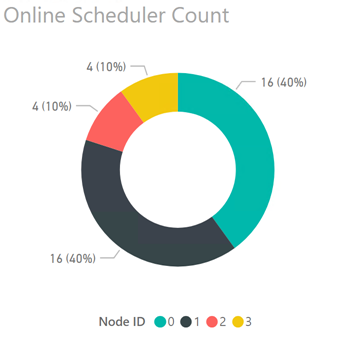
SQL Server has its own operating system (SQLOS) that handles task management. SQLOS assigns one scheduler per logical processor to handle user based queries. Schedulers that are available to run user queries are considered online; schedulers that could run user queries but are not available to do so are considered offline. When the SQLOS starts it brings schedulers online on the first NUMA node, then the second, third, etc. until all schedulers are online or the CAL limitation has been reached.
The chart below shows a summary of the online schedulers under CAL licensing:

Each new connection to the instance is assigned a NUMA node based on a round-robin algorithm, e.g. connection 1 is assigned to NUMA node 0, connection 2 is assigned to NUMA node 1, connection 3 to NUMA node 2, connection 4 to NUMA node 3, and so on. (For more information on how scheduling algorithms work in SQL 2012 see How It Works: SQL Server 2012 Database Engine Task Scheduling at https://blogs.msdn.microsoft.com/psssql/2013/08/13/how-it-works-sql-server-2012-database-engine-task-scheduling/)
Under CAL based licensing SQL Server used all 16 logical CPUs on NUMA nodes 0 and 1 (80% of online schedulers) and 4 logical CPUs each on NUMA nodes 2 and 3 (20% of online schedulers); due to the round-robin assignment of new connections each NUMA node handled up to 25% of the total query workload. This resulted in Nodes 0 and 1 being relatively idle while Nodes 2 and 3 are always in use. The imbalance in workload results in a noticeable difference in performance for queries running on Nodes 0 and 1 vs Nodes 2 and 3. Essentially, Nodes 2 and 3 have between 2-4x the load factor of Nodes 0 and 1 at any given time.

Further reading

Tuesday, February 3, 2015

Dynamic SQL View using CONTEX_INFO

SQL Server supports creating views and I hope all knows what is a view. According to wiki its just a result set of query on data. Users can access it just like another table but it doesn't contain its own data like table. If we google for different between view and table we can get ton of links.

Below is a normal view definition.

CREATE VIEW CreditCards 
AS 
  (SELECT * 
   FROM   adventureworks2012.sales.creditcard 
   WHERE  cardtype = 'Vista')

In our day to day life most of the views we are creating has a static 'where' clause. Here we are
going to see how that part can be dynamic.

Create view by getting values from CONTEXT_INFO

CONTEXT_INFO gives us option to store values in the context of a session. It can be more compared to a static variable in programming. Here we are going to see how a view can be created which is affected by CONTEXT_INFO value.

Below is a sample view which is consuming the CONTEXT_INFO

CREATE VIEW creditcards 
AS 
  (SELECT * 
   FROM   adventureworks2012.sales.creditcard 
   WHERE  CardType = CONVERT(VARCHAR(25), Context_info())) 

If somebody call this view without setting the CONTEXT_INFO it will return the view which matches the where condition(CardType) with NULL. Else it returns proper data set.

Setting the CONTEXT_INFO

If we have already a view defined we can set the CONTEXT_INFO to our own values and select the view. The view will return proper values.

DECLARE @contextInfo VARBINARY(128) 

SET @contextInfo = CONVERT(VARBINARY(128), 'Vista') 
SET context_info @contextInfo 

SELECT * 
FROM   adventureworks2012.dbo.creditcards

The above query will return all the Sales.CreditCard with CardType='Vista'

One advantage is we can set this CONTEXT_INFO from code. More precisely from central data access before executing any other query. This way we can control centrally, what the tracks are getting from this view if they go via common data access.

http://jasondentler.com/blog/2010/01/exploiting-context_info-for-fun-and-audit/

Tuesday, October 21, 2014

Delete a SQL Server database schema with all its objects

Recently as part of R&D I had to delete all database schemas in a SQL Server Database. The major pain I foresee on identifying objects associated with it and deleting those in order. I was confident that somebody might have faced the same earlier and the script will be available as its, That's correct. I got a good link in first google itself. Its given below

http://ranjithk.com/2010/01/31/script-to-drop-all-objects-of-a-schema/#comment-428

Really thanks to this guy. But when I tried deleting the schema in my database using this SP, I got an error saying that the schema cannot be dropped as there are some user defined table types inside it. The technique which this guy used is to get the objects of schema is to query the sys.objects and that never gives the User Defined Table Types inside the schema.

SELECT *
FROM sys.objects SO
WHERE SO.schema_id = schema_id(@SchemaName) order by name

This might also be faced by some other people so read some comments but no luck. So had to spend sometime on the query and added the code to delete UDTT too.

--Add DROP TYPE statements into table
INSERT INTO #dropcode
SELECT 'DROP TYPE '+ @SchemaName + '.'+name
FROM   sys.types
WHERE  is_table_type = 1 and schema_id=schema_id(@SchemaName)

File can be downloaded from here
 
Once again thanks to Ranjith the author of original post and hope he wont mind me changing his work and redistributing

Tuesday, March 25, 2014

If statement in SQLCMD

SQLCMD is a nice utility to automate the SQL scripts execution.I became the fan of it years ago when I first used it for automating database creation and version upgrade of databases. The past sql automations using sqlcmd.exe were relatively simple. Most of those were using tokens and those tokens will be replaced with actual values when the execution starts. The values for tokens will be supplied by initiating programs and those programs may be of .bat, .vbs or .ps1 files at the most it will be invoked from the installers.

Recently we came to a situation where a branching is required in SQLCMD scripting. Basically we need to change the value of the token at runtime based no a database SELECT query. At that moment I realized that sqlcmd doesn't have branching statements. Team's initial decision to mitigate it was to call the database from the initiator programs.But those will make the .bat files really heavy or may need to write another PowerShell script or exe to do the job and get the value for sqlcmd token.

But a tight google exercise unveiled the below link which explains how to imitate the branching in sqlcmd. Its nothing but creating dynamic .sql file based on query result and executing the same from its creator sql file. I don't think I need to replicate the details again. So just open the link and have fun.


Monday, September 9, 2013

SQL Query to find number of table rows stored in different partitions

Sometime if we are analysing production applications, we may need to check why some queries are taking more time. There are some case where all the data may be going to same database file which is against the partition strategy of the database. Below is the query which gets the details about how the table rows are distributed in partitions.


DECLARE @TableName sysname = 'Users';
SELECT p.partition_number, fg.name as FileGroup, p.rows
FROM sys.partitions p
    INNER JOIN sys.allocation_units au
    ON au.container_id = p.hobt_id
    INNER JOIN sys.filegroups fg
    ON fg.data_space_id = au.data_space_id
WHERE p.object_id = OBJECT_ID(@TableName)


We can directly evaluate the partition function as below to know what will be value of partition for a given value.This will also help us to determine which rows went to which partition. But the above is more handy to use.


$Partition.<partition name>(value)

Happy debugging.

Note: The credits for this query goes to my team mate who don't have a blog as of now. May be this will inspire him to start his blog :)

Monday, April 8, 2013

Is my SQL query running inside transaction scope?

Just another tip I got during inspecting a query written for a SSIS package. ie from the same incident which I explained in my last post about SQL. There was some part of SQL stored procedure which is not supposed to run in transaction. Since we don’t have transaction suppression support in SQL Server, the alternative took was as follows.

  • Find out whether the stored procedure is running in transaction.
  •  If so throw error. Since this SSIS package is supposed to be called from multiple places we cannot assume that it will not be called without transaction.

How to check for presence of transaction inside SQL SP

Its simple as checking the return value of XACT_STATE() function anywhere in SQL.The code snippet is given below for reference.
IF XACT_STATE() <> 0
BEGIN
    DECLARE @ProcName sysname = OBJECT_NAME(@@PROCID);
    RAISERROR('Stored procedure "%s" cannot be executed in a transaction.', 16, 1, @ProcName)
    RETURN;
END;

Putting it in a SP.

CREATE PROCEDURE dbo.spWillNotRunInTransaction 
AS
BEGIN
IF XACT_STATE() <> 0
BEGIN
    DECLARE @ProcName sysname = OBJECT_NAME(@@PROCID);
    RAISERROR('Stored procedure "%s" cannot be executed in a transaction.', 16, 1, @ProcName)
    RETURN;
END;
SELECT 'I am Independent...'
END
GO

Real time application

One of the real time use I could see is to simulate the .net model transaction suppression as mentioned below inside any stored procedure.


using (TransactionScope txScope =
           new TransactionScope(TransactionScopeOption.Suppress))
    {
        // Code indluding DB queries
        txScope.Complete();
    }


A link I obtained which explains about the unavailability of transaction suppression in SQL Server and how to tackle the situation by alternatives.
http://blogs.msdn.com/b/sqlprogrammability/archive/2008/08/22/how-to-create-an-autonomous-transaction-in-sql-server-2008.aspx

Monday, April 1, 2013

SQL query to get the SP name inside stored procedure.

Recently I had to scratch a SSIS package which was developed by Microsoft consultant. Got some interesting mechanisms while inspecting his stored procedures. Among those, the most noticed one was the technique to get the name of the stored procedure inside the same SP.If we see from the procedure execution point of view this is the current executing SP.
create PROCEDURE usp_WhatIsMyName
AS
BEGIN
    DECLARE @ProcName sysname = OBJECT_NAME(@@PROCID);
    select @ProcName --Returns usp_WhatIsMyName    
END
GO


This seems more like reflection in .Net where we can program the meta data. You may explore more on SQL meta data programming here.


Monday, February 25, 2013

SQL Server - FileStream content length using len and datalength

Basically there are some differences between len and datalength functions which almost all SQL developers may know. len() returns the no of characters by trimming the right side and datalength() returns the no of bytes used to store the data structure in the table.
I would like to add one more scenario to this comparison which is nothing but finding length of FileStream content. If you are new to SQL FileStream please refer this article. The scenario we were encountering was so simple. We had to list out all the files which are empty. To be more on business side, need to delete all the zero byte files in file stream storage table.
Below is the table def
CREATE TABLE [DocumentContent](
    [DocumentContentID] [uniqueidentifier] ROWGUIDCOL  NOT NULL,
    [FileStreamContent] [varbinary](max) FILESTREAM  NULL,
 CONSTRAINT [PK_DocumentContent] PRIMARY KEY NONCLUSTERED 
(
    [DocumentContentID] ASC
))
The initial query used to determine the list of blank files is
select DocumentContentID 
from DocumentContent 
where len(FileStreamContent) <=1
This works without errors but the time taken to execute is really huge and directly proportional to the no of documents in the table also the size of the documents. Sometimes exceeds 30 seconds and started getting timeouts and eventually deadlocks. So modified as follows.
select DocumentContentID 
from DocumentContent 
where datalength(FileStreamContent) <=1
It rocks. Now the query takes normal time even if the table has many rows.

Monday, April 23, 2012

Select top N rows in Android SQLite

I had heard a lot about SQLite which is embeddable and small makes it suitable for mobile devices. But never got a chance to work on SQLite until I started Android. Setting up the data base and tables are little lengthy .So may be blog about those details later. This post is to note down a difference in using normal SQL and SQLite to fetch the top n rows.
The scenario was simple. We are showing some notifications in the app which are periodically syncing with the database using WCF services. The Android app uses SQLite to store the notification locally so that users will never miss any notification. It requests the latest notifications by sending the id of last notification it has. Its simple to fetch the highest id of notification rows using the normal SQL .The normal SQL query will look as follows
--Don't look at the * in query.Its sample
Select Top 1 * 
From Notifications
Order By Id
Desc

But the top is not supported in SQLite. We need to use the other keyword limit. It just limits the number of rows fetched

public Cursor select(String condition,String orderBy,String limit,SQLiteDatabase db){
    String qry=String.format("select * from %s order by %s desc limit %s", TABLE_NAME,orderBy,limit);
    return db.rawQuery(qry,null);
}

Interested in SQLite ? There are some more limits to SQLite.For more details refer the below.
http://www.sqlite.org/limits.html

Tuesday, March 6, 2012

Moving ASP.Net Membership tables to production

Recently we were migrating our development database from local to Azure production db. The database has both application specific tables and aspnet membership tables.As usual the person who moved ignored all the development data by generating the table creation script alone with application specific seed data.

The system uses Azure ACS to have federated authentication from 3 identity providers. Google,Yahoo and our own custom identity provider using claims. The standard providers such as google and yahoo worked perfectly but the custom identity provider didn't. The error message shown was

The 'System.Web.Security.SqlMembershipProvider' requires a database schema compatible with schema version '1'. However, the current database schema is not compatible with this version. You may need to either install a compatible schema with aspnet_regsql.exe (available in the framework installation directory), or upgrade the provider to a newer version.

This clearly says we are missing something in the AspNet membership schema level. Not at all any seed data. But actually the issue is with seed data.ie we need to enable the features in the asp.net membership database. When we enable the features aspnet membership uses a table called aspnet_SchemaVersions to store the settings. This schema is confused with table schema in the error message. If you want to have more details you can try running the below query on a working aspnetdb.mdf.

SELECT feature,
       compatibleschemaversion,
       iscurrentversion
FROM   aspnet_schemaversions 


This is not our focus. Our focus is to get the issue resolved. Its simple we need to register the features into the asp net membership database which is ported to Azure. Open the SSMS and connect to Azure database and run the below queries.

EXEC [dbo].Aspnet_registerschemaversion
  N'Common',
  N'1',
  1,
  1

EXEC [dbo].Aspnet_registerschemaversion
  N'Role Manager',
  N'1',
  1,
  1

EXEC [dbo].Aspnet_registerschemaversion
  N'Membership',
  N'1',
  1,
  1 


If you are getting any error executing this sps make sure you have all the aspnet membership related stored procedures in the database. If not available run the membership related scripts which are available in your machine. You can find the scripts here in the location.

[InstallDrive]:\Windows\Microsoft.NET\Framework\v4.0.30319\InstallCommon.sql

If you don't want to take chance of running the scripts one by one use the tool aspnet_regsql

Wednesday, August 3, 2011

Collation and the temp tables

It’s a hack which I am going to describe in this post for the people who are working in tight delivery schedules. Hope everybody knows what is collation in SQL Server and how it cause issues if we use database objects in different collations in a query. Also note the task involved in changing an existing SQL Server instance to a different collation and how to change collation of system databases such as temp database or any other user database.

We were using SQL_Latin1_General_CP1_CI_AS collation till couple of months back and recently moved to Latin1_General_100_CI_AS_KS_WS collation. We created new database in Latin1_General_100_CI_AS_KS_WS and it worked in all the development machines without any issue .So we changed the testing servers to Latin1_General_100_CI_AS_KS_WS collation and it performed well. After some load testing we had to modify one SP which introduced temp tables. As it is related to load testing we first applied in the test server and it rocked. But when we take the same sp to development machines the a problem raised because we didn’t change the sql server instances of our development machines to Latin1_General_100_CI_AS_KS_WS which is a good time consuming process. That means the temp database is in different collation compared to our project database.

For example consider a simple scenario.We created a Address database in the Latin1_General_100_CI_AS_KS_WS collation where our sql server instance is in SQL_Latin1_General_CP1_CI_AS .We have a Person table (Id,Name) and Address Table (Id,PersonId,Address) which has person id as foreign key and we need to select details of some persons based on a particular person name list.Earlier we had a ‘in’ keyword based implementation and that we changed to temp table based implementation where the temp table is a table which has one column and it will be joined with the Address table to get the details. Ok its time to see some sql.

CREATE TABLE [dbo].[Person](
[Id] [int] NOT NULL,
[Name] [nvarchar](255) NULL,
PRIMARY KEY CLUSTERED
(
[Id] ASC
)


CREATE TABLE [dbo].[Address](
[Id] [int] NULL,
[PersonId] [int] NULL,
[Address] [nvarchar](max) NULL
) ON [PRIMARY]
GO
ALTER TABLE [dbo].[Address] WITH CHECK ADD CONSTRAINT [FK_Address_Person] FOREIGN KEY([PersonId])
REFERENCES [dbo].[Person] ([Id])

Here is the modified query to use the table variables which uses temp db.

IF NOT OBJECT_ID('tempdb..#Selected') IS NULL
DROP TABLE #Selected;
CREATE TABLE #Selected
(
Name nvarchar(255)
);
--Logic to fill the #Selected table
select #Selected.Name,[Address].[Address]
from #Selected join Person
on #Selected.name = Person.Name
join [Address]
on Person.Id =[Address].PersonId;


The error msg was “Cannot resolve the collation conflict between "Latin1_General_100_CI_AS_KS_WS" and "SQL_Latin1_General_CP1_CI_AS" in the equal to operation.”. This means the temp DB is still in SQL_Latin1_General_CP1_CI_AS collation and our DB is in Latin1_General_100_CI_AS_KS_WS collation which doesn’t allow us to do a comparison on strings.So as a hack or quick work around in development environment, we modified the query as follows which specifies the collation on the comparison.
IF NOT OBJECT_ID('tempdb..#Selected') IS NULL
DROP TABLE #Selected;
CREATE TABLE #Selected
(
Name nvarchar(255)
);
--Logic to fill the #Selected table
select #Selected.Name,[Address].[Address]
from #Selected join Person
on #Selected.name collate Latin1_General_100_CI_AS_KS_WS= Person.Name collate Latin1_General_100_CI_AS_KS_WS
join [Address]
on Person.Id =[Address].PersonId;


Happy scripting…

Thursday, July 28, 2011

Conditional insert query without duplicates

This is just a sql puzzle which raised during a long wait for the QA results on a build day.The puzzle seems simple.

  1. Need to insert the records with out duplicates.
  2. The query should consider all the fields.
  3. The query should be single line.ie single statement of query execution.

At first it feels simple as a simple where query. But when we start writing we realize that can we write a where clause in a insert query? Simply speaking how can we write a conditional insert query in sql.After we play with the sql server and queries we automatically come to the below query.

INSERT INTO Person (Name , EMail,Id) 
select 'joy', 'joymon@gmail.com',1
WHERE (
SELECT COUNT(*)
FROM Person
WHERE Name = 'joy' and email='joymon@gmail.com' and id=1) = 0;


The table can be created using.

CREATE TABLE [dbo].[Person](
[Name] [nchar](50) NULL,
[Id] int NOT NULL,
[EMail] [nchar](50) NULL)

Tuesday, June 14, 2011

Setting specific permissions on database objects for a DB user

From the days I am learning RDBMS ,I am hearing that its secured and we can set permissions at the DB object level.When I talk to my fellow DBAs they tell me that they can control so many things to stop hacking.They can restrict an application from executing queries and limit to only stored procedures,delete permission can be revoked on certain tables for the application etc…Since I have not much worked in a real production environment, I didn’t get a chance to try all these.As you know in the development environment developer is the king and he will be having all the permissions.
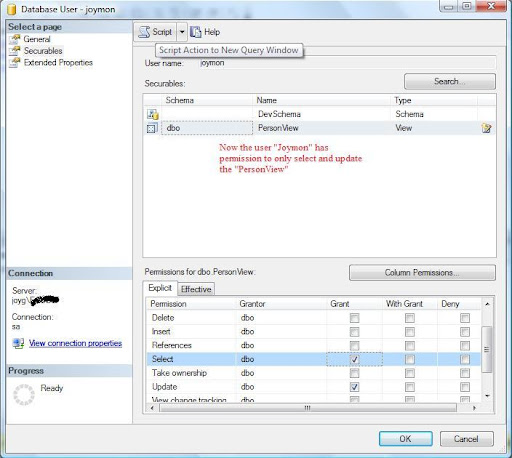
But last week I got a good opportunity to play with these permission settings.I had to grant update and select permission for a SQL database user on a particular view.Initially we did using the SQL Server Management Studio.It is very easy.Below are the steps.
  1. Navigate to <Your Database>->Security->Users and double click on the user to whom you need to grant or revoke permission.
  2. On the Database user window select the securables page.
  3. There are 2 portions at the right side.Top section is to select securables and below section for the Permissions on the selected securable.
  4. Add your securable using the search window.The search window can be poped up using the search button.
  5. You can add a securable in 3 modes.Specific database object,all object of specific type or all objects in a schema.
  6. Once you add the securable using the search window, the bottom pane will show you what are the permissions you can set on those db objects.
Very easy. Isn’t it? This will work out only if you are delivering your database as a backup.If you are planning to deliver the scripts, you can get the corresponding scripts on clicking the script button at the top of the Database user window.
Below is the Database user window where you can set the permissions visually.
This is the script generated when clicked on the button”Script Action to new query window”

use [AddressBook]
GO
GRANT SELECT ON [dbo].[PersonView] TO [joymon]
GO
use [AddressBook]
GO
GRANT UPDATE ON [dbo].[PersonView] TO [joymon]
GO

Friday, June 10, 2011

Querying all tables in a database using sp_foreachtable

Last week one of my colleague was struggling to write a sql script.After some time he came to me.His requirement was simple, he need to truncate all the tables in the DB.He wrote a script.But it was throwing exception because of foreign key relation ships.My first answer was to run that script for 10 or 20 times so that the child tables will get deleted in initial runs and in primary key tables will get deleted in last runs.A real hack!!isn’t it? I suggested this because he need to just clear a database for one time.

But after some time I thought of solving it properly.For that I didn’t try writing a new script or correcting his script.Just googled and got the below link.
http://stackoverflow.com/questions/155246/how-do-you-truncate-all-tables-in-a-database-using-tsql

It says 2 lines of code as follows.

-- disable all constraints
EXEC sp_msforeachtable 'ALTER TABLE ? NOCHECK CONSTRAINT all'

-- delete data in all tables
EXEC sp_MSForEachTable 'DELETE FROM ?'


Done.I again enforced the concept of modern programming especially in .Net and SQL server.ie “If you think your problem might be faced by somebody else, google it before even attempting”.


Also I would like to tell about the undocumented procedure sp_msforeachtable.Its very useful when you need to execute same operation in all the database tables.More details can be found in this link.Now a smart programmer you might have though whether there is anything for looping all the databases in the sql server instance.Yes its there.the name is sp_foreachdb.


Oh that is great.Everything related to db objects are available as for each?Unfortunately NO.But you can create your own foreach by following this article.Yes you can create your own  sp_foreachview,sp_foreachsp etc…I don’t think developers including sql developers need this very frequently.But the DBAs surely need this.


Happy scripting.

Sunday, June 5, 2011

SQL OpenRowSet

In simple words OpenRowSet is to fetch data from other sources which are not linked to the sql server in which a query is executing. When we say other data source it can be another sql server instance which is not linked to our sql server instance.

For example if you want to know the details of available databases in another sql server (local\sqlexpress) from your local instance of sql server, you can use the below query to execute

SELECT  *
FROM OpenRowSet ('SQLOLEDB',
'Server=(local)\sqlexpress;TRUSTED_CONNECTION=YES;',
'select * from sys.sysdatabases')


But when you execute this most probably you will receive an error as follows


Msg 15281, Level 16, State 1, Line 1

SQL Server blocked access to STATEMENT 'OpenRowset/OpenDatasource' of component 'Ad Hoc Distributed Queries' because this component is turned off as part of the security configuration for this server. A system administrator can enable the use of 'Ad Hoc Distributed Queries' by using sp_configure. For more information about enabling 'Ad Hoc Distributed Queries', see "Surface Area Configuration" in SQL Server Books Online.

What should we do now?

As usual google and find out the answer.Its only about enabling ad hoc distributed queries as follows


sp_configure 'Ad Hoc Distributed Queries', 1;
RECONFIGURE;

Now run the query again.You will see the result.ie you have queried another independent data source from your sql server.You can even query non databases such as excel,xml etc…

This is the mechanism  if you want to communicate between 2 sql databases which are residing in 2 different server instances without using linked servers.Interesting.Isn’t it.

Note : If the fmtonly is on it will return only the metadata.If you want to get the real data ,make sure fmtonly is off using the below statement in the server where you are running the above sql.

set fmtonly off 

Monday, May 30, 2011

Composite foreign key and order of columns

A simple database related thing which everybody knows.But I would like to post because this took around 4 hrs in our team.Let me come to the scenario. We have a database which has some primary and foreign keys.Its like a normal DB. Now we are doing some enhancements into it which brought a new column to all the primary keys .ie Composite primary key.

This introduces changes in all the other tables which refer using foreign keys.Since there are a number of tables in the database and all the table creation scripts were checked into TFS, we assigned some people to change the foreign key references.They were really new to project and they did their job in less time.We didn’t even run the scripts.But problems started when we run the changed table creation scripts.The error was

“There are no primary or candidate keys in the referenced table 'dbo.master' that match the referencing column list in the foreign key 'FK_Detail_Master'.”

For more details see the below scripts.

create table [master] (
Column1 int,
ColumnNew int
primary key(Column1,ColumnNew)
)
CREATE TABLE [dbo].[Detail](
Column1 [int] NULL,
ColumnNew [int] NULL,
[Column2] [nchar](10) NULL
) ON [PRIMARY]
GO
ALTER TABLE [dbo].[Detail] WITH CHECK ADD CONSTRAINT [FK_Detail_Master] FOREIGN KEY([Column1], [ColumnNew])
REFERENCES [dbo].[master] ( [ColumnNew],[Column1])
GO
ALTER TABLE [dbo].[Detail] CHECK CONSTRAINT [FK_Detail_Master]
GO

In the first look its little difficult to identity the issue.But the issue is simple.The order of fields specified is wrong.The Column1 should come first.ie as follows.

ALTER TABLE [dbo].[Detail]  WITH CHECK ADD  CONSTRAINT [FK_Detail_Master] FOREIGN KEY([Column1], [ColumnNew])
REFERENCES [dbo].[master] ([Column1], [ColumnNew])

It was a typo and may be overconfidence.But it costs a lot. We consulted with Dimitri Furman a Microsoft consultant for database and he confirmed the behavior.