Showing posts with label Azure Development. Show all posts

Tuesday, January 17, 2023

Azure @ Enterprise - Connection pooling behavior when JWT is used to authenticate into Azure SQL Server

Connection pooling in .Net is a hidden feature. We as consumer developers, cannot directly feel how the pooling happens behind the scenes. .Net is allowing us to clear the connection pool. We create a new SqlConnection and Close it after use. When we create a connection it uses an internal pooling mechanism and a connection object is associated with the object that we create and the closed connections go back to the pool.

This post is not to educate about simple connection pooling instead it talks about an issue encountered in production.

Issue

There is a .Net 6 Web API hosted in Azure App Service. It mainly accesses an Azure SQL database and storage blobs. When the load slightly increased, it started showing the below error.

System.Data.SqlClient.SqlException (0x80131904): Resource ID : 2. The session limit for the database is 600 and has been reached. See 'https://docs.microsoft.com/azure/azure-sql/database/resource-limits-logical-server' for assistance.

at System.Data.ProviderBase.DbConnectionPool.CheckPoolBlockingPeriod(Exception e)
 at System.Data.ProviderBase.DbConnectionPool.CreateObject(DbConnection owningObject, DbConnectionOptions userOptions, DbConnectionInternal oldConnection)
  at System.Data.ProviderBase.DbConnectionPool.UserCreateRequest(DbConnection owningObject, DbConnectionOptions userOptions, DbConnectionInternal oldConnection)
  at System.Data.ProviderBase.DbConnectionPool.TryGetConnection(DbConnection owningObject, UInt32 waitForMultipleObjectsTimeout, Boolean allowCreate, Boolean onlyOneCheckConnection, DbConnectionOptions userOptions, DbConnectionInternal& connection)
   at System.Data.ProviderBase.DbConnectionPool.TryGetConnection(DbConnection owningObject, TaskCompletionSource`1 retry, DbConnectionOptions userOptions, DbConnectionInternal& connection)
   at System.Data.ProviderBase.DbConnectionFactory.TryGetConnection(DbConnection owningConnection, TaskCompletionSource`1 retry, DbConnectionOptions userOptions, DbConnectionInternal oldConnection, DbConnectionInternal& connection)
   at System.Data.ProviderBase.DbConnectionInternal.TryOpenConnectionInternal(DbConnection outerConnection, DbConnectionFactory connectionFactory, TaskCompletionSource`1 retry, DbConnectionOptions userOptions)
   at System.Data.ProviderBase.DbConnectionClosed.TryOpenConnection(DbConnection outerConnection, DbConnectionFactory connectionFactory, TaskCompletionSource`1 retry, DbConnectionOptions userOptions)
   at System.Data.SqlClient.SqlConnection.TryOpen(TaskCompletionSource`1 retry)
   at System.Data.SqlClient.SqlConnection.Open()

Troubleshooting

Let us start the production war to bring it back.

Q&A about connection pooling

Before starting specific troubleshooting let's refresh the main points about connection pooling. Experts may skip this section

Are there many connection pools?

Yes, there are chances of having many connection pools. For each connection string, it creates and maintains a separate connection pool.

How many connections are in a pool?

By default 100 per pool. It is configurable through the connection string or via code

When all the connections are in use and a connection is requested from the pool what will happen?

It will throw an exception after the connection timeout. Looks like 

"Timeout expired. The timeout period elapsed prior to obtaining a connection from the pool. 
This may have occurred because all pooled connections were in use and max pool size was reached."

Does the SQL Server know the consumers are keeping connections in the pool?

Yes. To simply verify just run exec sp_who2 in the SQL server to check the connections from the client machine. Most of the connections will be in the Sleeping state.

How to check the pooling status of our application?

Take a memory dump of the application and analyze the crude way using WinDbg or use the DebugDiag tool.
Otherwise, monitor the Performance counters related to ADO.Net.

Specific steps to troubleshoot the issue

Let us look at some specifics about this issue

What are the Azure SQL specs?

Standalone database, tier - S0

What is exec sp_who returns from the database?

A lot of connections in the sleeping state.

Are there 600+ requests coming to the App Service per second?

No. There are only 10 requests per second.

Is there auto-scaling of app service instances?

No. There is only 1 app service instance. Questions such as "who in the world runs App Service with only one instance in production" are banned.

Any other application is making connections to the same database?

Yes. But that Azure Function is now disabled. 

Is the connection string or code have any customization of connection pool size?

No customization. Just working with the default 100

What is the authentication mechanism for Azure SQL?

It is the service principal / Azure app registration. Uses certificate to obtain JWT.

How many connection pools are there?

Only god knows until we take a memory dump and analyze it.

Will there be one connection pool per JWT considering JWT is part of the connection string?

Oh yeah...There are chances if the JWT is not cached. If each SqlConnection is created with a separate JWT, it will create many pools with one connection. If that happens, we will not get the timeout error from the connection pool, but the Azure SQL will run out of connections. Resulting in the same exception as mentioned above.

Is there any Microsoft official documentation for the above answer?

Not really. But a GitHub Issue answering the question.

For further clarification look at the source code of SqlConnectionPoolKey.CalculateHashCode()

Disclaimer

The actual root cause cannot be disclosed on social media such as this blog due to security, confidentiality, etc...

Tuesday, December 27, 2022

Azure @ Enterprise - DNS->PublicIP->Azure App Gateway->Pod Using App Gateway Ingress controller

This is another GitHub project introduction post. This time introduces a repo that shows how an end-to-end Azure solution can be set up from Azure DNS -> Public IP Address -> Azure App Gateway -> Azure Kubernetes Service with Application Gateway Ingress controller AGIC hereafter.

This is a standard use case of how to expose a web application from Kubernetes via standard Azure  networking services such as DNS, Public IP Address and AAG

Problem

When we want to route traffic to AKS, the primary question is how to set up the ingress. Traditionally we use NGINX ingress controller and it was not a question at all. Now with Azure Application Gateway Ingress Controller, we just need to justify the decision.

What is Application Gateway Ingress Controller?

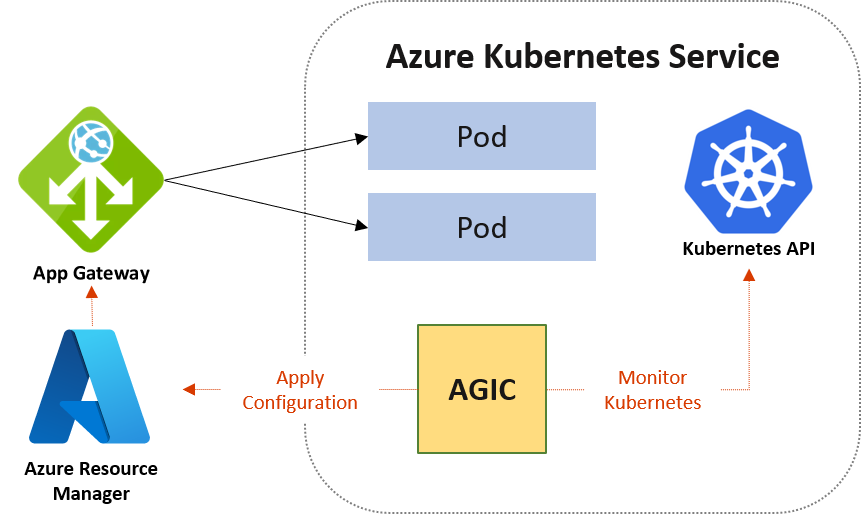
It is one of the Kubernetes Ingress controllers that can only work with Azure Application Gateway. The major differences with NGINX are
  • AGIC will monitor the cluster and update the Azure Application Gateway back with routing IPs.
  • AGIC uses Pod IPs as the backend instead of the service IP address. If there are 3 pods there will be 3 IPs in the Application Gateway backend pool
  • In order to update the Azure App Gateway, the AGIC should have Azure RBAC permissions via user-assigned managed identity. 

Photo credits go to the official docs.

My recommendation is not to use this AGIC as it's having issues.

There will be a separate post on issues with AGIC. 

Setting up

Below is the repo that has biceps and required PowerShell to set up end to end. 


Please note not all things are automated. Readme.md has the details.

References

https://github.com/paolosalvatori/aks-multi-tenant-agic

https://raw.githubusercontent.com/Azure/application-gateway-kubernetes-ingress/master/docs/examples/aspnetapp.yaml

https://github.com/Azure/application-gateway-kubernetes-ingress/blob/master/docs/setup/install-new.md

Tuesday, December 20, 2022

Azure @ Enterprise - Networking at pod level inside AKS using Calico

This post is to introduce networking inside the Kubernetes cluster at the pod level. There may be questions about why as application developers we need to worry about networking inside the Kubernetes cluster? 

It depends on how the Kubernetes cluster is planned in the organization. If we are lucky our project may be getting its own Kubernetes cluster. But often we ended up as a tenant inside another Kubernetes cluster. Our application may need to access a public API URL, if we set the networking rules at the cluster level, all the applications inside the cluster will get access. Organizations generally prefer something other than that. Also, we don't want some other application in the cluster accessing our database, Redis cache, etc... even if they have the credentials.
Hence we will end up dealing with the network policies at the pod level

Theory

Kubernetes defines networking policies as resource natively. But it doesn't have a built-in mechanism to enforce the networking rules.

For that, we need to use one of the network plugins. For more theory please read the docs. Now let us come to some practicals

Azure NPM v/s Calico

Since we are going to use Azure Kubernetes Service, we can focus on 2 plugins. Those are kinda natively supported by AKS.  One is Azure NPM (Network Policy Manager) and the other is Calico.

Though we may tend to think the Azure NPM is fully implemented in AKS as both start with Azure, the reality is otherwise. As of writing this post, the calico has better support including Windows Server 2019 in AKS. Some of the features of Azure NPM are still in preview. See the comparison of Azure NPM v/s Calico for more details.

As the title of the post shows we are going to use Calico.

Installation of Calico on AKS

As per calico documentation, there is a way to install calico on an existing AKS cluster. But when I followed it was not working efficiently.
So better enable Calico when we create the AKS cluster.

How the network policy looks like

The networking feels alien to at least some developers. It requires knowledge about IP addresses and notations, complex network setup screens or commands, etc. But don't worry the networking can be set up via YAML files.

If YAML feels alien to a developer nowadays he should rethink being a developer.

Sample

Enough theory. Please clone the below repo and check out how the networking policies can be applied.
Step-by-step details are not going to be added here as that sample will get more scenarios in the future.


All are welcome to give PRs or add issues to the repo.

References

Tuesday, May 24, 2022

Azure @ Enterprise - Disable AMQP over 5671 to use Websocket

Till today, my experience with Azure ServiceBus¹ is really good. Apps are running well in production that uses ServiceBus. One of the issues we faced is detailed in this blog post. It is nothing with the Azure but due to the stringent enterprise networking  

Problem

The application that consumes Azure ServiceBus works excellent in all the lower environments but not in the client's production environment. In production, it's not able to establish connectivity. All the required ports (5671 and 443) are open, and credentials are in place. Still, it is not able to communicate. 

Root cause

Since it works outside the enterprise environment, we are sure it's nothing with the code. Somewhere in the enterprise network, one of the devices doesn't like the plain AMQP² traffic going through it targeting port 5671³.

What is AMQP?

The 'Advanced Message Queuing Protocol' is the standard for messaging. It works cross-platform than vendor-specific protocols that existed prior to the adoption of AMQP.

Solution

Do not use plain AMQP targeting port 5671, instead use AMQP over Websockets that use port 443. 

By default, the .Net SDK for Azure ServiceBus uses AMQP over 5671. But there are mainly 2 ways to change the behavior.

Using the code switch

This is a coded solution where we have to change the transport type to AmqpWebSockers. Its as follows from .Net

The above sample uses the latest nuget SDK (Azure.Messaging.ServiceBus) as of this writing. There are legacy SDKs and the code will be slightly different than this. Similarly, we can control this from the non .Net SDKs as well.

Using the connection string

The second method is to construct a connection string⁴ that indicates the use of the Amqp over web sockets. Since it is straightforward details are omitted.

References

Tuesday, April 5, 2022

Azure @ Enterprise - Resubmitting messages from Service Bus dead-letter queue using various .Net SDKs

When we start using the Azure service bus for integration one of the operations job is to monitor and handle the messages in the dead-letter queue DLQ hereafter. As many of us already know, the DLQ is automatically created as a sub-queue with a naming convention. Messages will end up in DLQ when they are not deliverable or not processable. A non-processable situation occurs when the processors try to process but end up in exceptions and retry attempts exceed the Max delivery count. 

Problem

When we think of operations handling the DLQ, we think of manual troubleshooting of why messages failed and a PowerShell script that puts those messages back after fixing the issue. Obviously, some messages might be in the state to be reattempted. The issue here is that there is no built-in support for dealing with the data plane of Service Bus in the official library. I had written a previous post about how we can deal with the Service Bus data plane with PowerShell by writing custom snippets that interact with raw HTTP API.

Readers may be thinking why write PowerShell for operations, why can't operations just go to Azure Portal select all messages in DLQ, and hit the re-queue button. Unfortunately, there is no such feature available in Azure Portal

Solution

One way is to use already available Service Bus explorers provided by third parties other than in the label of Azure or Microsoft. There are some but not much user-friendly in my research. Hence this post about resubmitting the messages from DLQ using C#.

We can do this using PowerShell also but as I mentioned in the previous post we need to write a script to prepare raw HTTP messages. There are standard libraries in.Net that help us to write less code. 

High-level flow

This post is not going to have full code as the code is available in the GitHub repo. The high-level flow is as follows

  • Monitor and receive a message from DLQ using the peek and lock method.
  • Clone the message and send it to the queue again.
  • Complete the received message from DLQ. This will remove the message from DLQ
There is no operation on the message just to toggle it to be a normal message from DLQ.

Selecting the SDK

There are 3 official .Net SDKs to interact with Azure Service Bus Queues. There is already a post in this blog about the Dilemma of choosing the SDK.  The general guideline is to use the latest SDK which is Azure.Messaging.ServiceBus.

Sample location

There are already samples to resubmit messages from DLQ using the earliest SDK WindowsAzure.ServiceBus, its successor Microsoft.Azure.ServiceBus and the latest Azure.Messaging.ServiceBus. So there will be questions, why one more sample? 

The reason for putting together this sample was that none of the samples were fully usable when we encounter a situation of resubmitting 100+ messages from DLQ. One does support only AMQP which is blocked by the enterprise network etc... 

There are 3 samples in the below repo that shows how to resubmit using all the 3 SDKs.

https://github.com/ms-azure-demos/service-bus-queue-dlq-manager

The samples are targetting the legacy .Net Framework, not .Net Core. The Azure.Messaging sample can be easily targetted to .Net Core and higher versions.

References

https://dzone.com/articles/azure-service-bus-dead-letter-queues-1

https://docs.microsoft.com/en-us/samples/azure/azure-sdk-for-net/dead-letter-queues/

Tuesday, March 29, 2022

Azure @ Enterprise - How to cache JWT access token in MSAL.Net?

When we start using the MSAL.Net library to work with Azure Active Directory and experience its fluency and other features, we start thinking that has everything we need. If we take the simple example of obtaining a JWT access token, we naturally think that the library is caching the token based on the "exp" attribute. At least I came to multiple scenarios where developers thought, the library is caching access tokens but in reality it is not.

How to cache the JWT access tokens in MSAL.Net?

It is not easy and it is not the way we developers normally think a library will offer. 

First of all, we have to write code to get token from the cache. No, it won't return a null or empty string if the token is not present. Instead, it throws an exception. We have to catch that exception and acquire a token that the cache will intercept and update.
  • Try to get token from the cache using AcquireTokenSilent()
  • If it throws an exception try to get a token using other AcquireToken methods based on our authentication model.
This is not a workaround. It is the documented solution.

Tuesday, September 21, 2021

Azure @ Enterprise - PowerShell to send message to Azure Service Bus Queue

We all know that Azure and PowerShell are friends. This post discusses how can we use PowerShell to work with the data place of Azure Service Bus. The example here is about queueing a message into the Service Bus queue.

Problem

We did implement a messaging architecture using Azure Service Bus Queue. The consumer is a .Net app that connects to the Service Bus Queue using Service Principal + Certificate. It works fine in lower environments such as dev, QA, etc... but stopped working in higher environments. Below was the message.

"An existing connection was forcibly closed by the remote host ErrorCode: ConnectionReset (ServiceCommunicationProblem);"

As it is a higher environment, there is no way we can install troubleshooting tools or even don't have access to the Azure portal.

Troubleshooting

Since there is no portal access and cannot install tools we decided to simulate how the application consumes Service Bus using PowerShell.

The first step was easy to connect to Azure using cmdlets using the Service Principal+Certificate and generate JWT. But the next step was not easy.

By the way, this requires the installation of Az.Accounts PowerShell module in the production machine. :)

Since PowerShell is considered an admin thing than a dev tool, admins normally allow it.

Challenge

The problem is that there is no official PowerShell package from Microsoft to work with the data place of ServiceBus. The official PowerShell module supports control plane functions such as create service bus namespace(New-ServiceBusNamespace), create queues (New-AzServiceBusQueue), etc. Even interacting with the data plane is not there in Azure CLI. We were not able to find any community-built PowerShell cmdlets too except for some tutorials on how to send messages.  

Solution

Finally, we had to get our hands dirty by making HTTP calls from PowerShell. The REST endpoints are properly documented to easily craft the requests. The PowerShell source code to send messages is available on GitHub.

https://github.com/ms-azure-demos/servicebus-queues-powershell

The root cause of the problem

When we run the PowerShell script from the same machine the app is running, it worked!!!. That eliminated the questions of what ports are open etc. The remaining difference between the .Net application sending messages v/s PowerShell was the AMQP v/s simple HTTP. .Net application uses AMQP by default and we didn't put an option in the application to fall back to HTTP. We checked whether the ports are open and they are. Hence concluded the higher environment network is not allowing AMQP traffic. Some network devices are on the way that doesn't like the AMQP traffic. 

Tuesday, April 20, 2021

Azure @ Enterprise - Tracing to Console in different Azure SDKs for .Net

Introduction

Microsoft constantly improves the SDKs. As a side effect, we have to work with new SDKs. Earlier SDK names start with MicsoftAzure or WindowsAzure, next it was Microsoft.Azure. The recent one starts with Azure. Sometimes it's easy to migrate to the latest SDK, but sometimes it's difficult. There is one full post about the dilemma of choosing the Azure SDKs.

The best practice is to be with the latest and greatest version of SDKs

Every time the SDK changes, the logging mechanism also may change. This post is to discuss differences in SDK logging. For simplicity, we are going to look at the logging mechanism that outputs into the console. The same mechanism can be leveraged to write into any other persistent storage.

Why logging is important?

It really depends on the time developers are getting to release products in quality. But whatever the case today or tomorrow we as developers will end up debugging why our code failed in certain situations. The Azure works by HTTP WebAPIs and these SDKs are mainly wrapping that HTTP requests. If we are running in an unrestricted environment, we may not encounter any issues. But if it is from an enterprise environment that has its own hardening policies and restrictions, we will definitely encounter issues and end up debugging. If we are able to see the requests payloads in the console, it would be easy to debug at least in development time. Or just be use our friend Fiddler.

Azure.*

Let us start with the latest SDK as of today. Not sure if it's V12(Storage Blobs) or V4(KeyVault Secrets) or V7 (ServiceBus). The nuget packages are all starting with Azure. are the latest. It all starts from this GitHub repo where the source code lives. There is a documentation page that explains how the logging can be achieved using these SDKs. The essence of the approach is as follows.

Tuesday, February 23, 2021

[Video] Azure @ Enterprise - ROPC flow in Azure AD

Here is the next video about authentication using Microsoft Identity Platform formerly Azure Active Directory Developer Platform.

Here we discuss ROPC flow in OAuth that is not recommended but a use case for it. The sample uses C# .Net


Additional references

https://medium.com/@dany74q/service-to-service-auth-with-azure-ad-msi-oauth-2-0-step-by-step-a1aed196b1e1

https://docs.microsoft.com/en-us/azure/active-directory/develop/msal-authentication-flows

https://docs.microsoft.com/en-us/azure/active-directory-b2c/add-ropc-policy?tabs=app-reg-ga&pivots=b2c-user-flow

Tuesday, February 16, 2021

Azure @ Enterprise - Dilemma of choosing .Net SDK for ServiceBus Queue

If you want to skip all my stories and want to understand what is the .Net SDK to use with Azure ServiceBus, please use the Azure.Messaging.ServiceBus nuget package. No more suspense.

Others welcome to the story. 

All we wanted was to dequeue Azure ServiceBus Queue messages in the synchronous fashion inside the .Net 4.6.1 application. 

WindowsAzure.ServiceBus Library and Microsoft.ServiceBus.Messaging namespace

The first nuget library we got was WindowsAzure.ServiceBus which has Microsoft.ServiceBus.Messaging. This library has a class called QueueClient. That has a synchronous dequeue mechanism using ReceiveBatchAsync() method. Unfortunately, this library needs .Net 4.6.2. If it is not an enterprise, upgrading the .Net framework version would not be a big deal. But upgrading an application having half a million lines of code in the enterprise that too working in regulated industry is a thing. So had to say bye to this technique.

Another reason to say bye is the new library named Microsoft.Azure.ServiceBus and the migration instructions from WindowsAzure.ServiceBus.

Microsoft.Azure.ServiceBus Library and Microsoft.Azure.ServiceBus namespace

This library has migration guidelines from the community at least. It appeared to be the way to go. It supports .Net 4.6.1. This also has a QueueClient class. But this QueueClient doesn't have a mechanism to synchronously dequeue messages. It accepts a callback via RegisterMessageHandler() and suitable for daemon apps. Our app is not a daemon.

We got stuck here and since we had a channel to MSFT we decided to activate it. They suggested a third library which comes next.

Later we figured out there is a way in Microsoft.Azure.ServiceBus library to dequeue messages in sync way. This link explains the same using MessageReceiver class. But we are planning to use the below one which Microsoft confirms the way forward.

Azure.Messaging.ServiceBus

As per Microsoft, this library is the way to go. They are making all SDK names starting with Azure prefix now. The good thing we are seeing is that now Microsoft is preparing the migration guide from older SDKs.

Migration into Azure.Messaging.ServiceBus

From WindowsAzure.ServiceBus to Azure.Messaging.ServiceBus migration guide issue. Note that this is not yet available. At least there is an issue to track it.

Samples

The below link will take us to the code to dequeue messages in sync using Azure.Messaging.ServiceBus library.

https://github.com/joymon/azure-demos/blob/master/intergation/service-bus/service-bus-queue-basic/AzureMessagingServiceBusDequeuer.cs

It also has the code snippets we tested using other libraries. Get the full project to run it.

Conclusion

Those libraries are still in development. That is the interesting thing. 

LibraryLast release
WindowsAzure.Messagingv6.0.3 - 5 months ago
Microsoft.Azure.ServiceBusv5.1.1 - 24 days ago
Azure.Messaging.ServiceBusv7.0.1 - 25 days ago

The above table shows the recent releases as of writing this blog post.

Due to NDA, I am not supposed to disclose the names. But big thanks MSFT guy(s) for your support. Innovation and changes are always welcome from Microsoft. But one humble request is to slow down innovation a little bit and consider stability. That helps people like us who develop apps for the regulated enterprises.

Happy coding...

Tuesday, June 2, 2020

Azure @ Enterprise - Experiments with the smallest possible VM B1ls- Part 1 - Installing UI and Remote desktop

Experiments with the smallest possible VM Bl1s series
  1. Installing UI and Remote Desktop
  2. Installing web server
  3. Installing proxy

Introduction

Though cloud providers come up with abstracted PaaS solutions, the IaaS will be there for a while. The main problem with virtual machines is their cost. If we want to host a web site, it is very cheap to use PaaS option. Even in Azure, there is a free tier for Azure App Service also a freemium option in Azure Functions. AWS had a very low-cost VM from the earlier. But Azure added a similar one named B1ls last year only in the burstable B series. 
This is a series of posts on experimenting with that machine. It has only1 vCPU and 512MiB RAM. There are some other attempts with B1ls series on the internet which are interesting ones even to deploy docker swarm cluster.

Azure v/s AWS low-cost VMs

Below is a simple comparison of Azure v/s AWS in this low-cost burstable VMs scenario.

 Criteria Azure B1ls AWS T3.nano and T3a.nano  Comments
 Cost$.0052/h $.0047/h for T3a.nano
 CPU1 vCPU2 vCPU (up to 2.5 GHz) Hz of Azure to be filled
 Memory512 MiB .5 GiB 
Storage 4 GiB SSD  TBD 

Remote desktop

This experiment is to follow the Azure documentation to install a desktop environment into B1ls and try whether we can remote into. SSH works great.

The article followed is here. It uses xfce4 desktop environment which seems the lightweight option possible. Then xrdp to expose the remote desktop service.

After struggles, finally, I was able to get something thought not the full remote desktop. The screenshot is below.

Issued faced

Issue 1 - Not able to get lock to install

Error message
testadmin@PrimaryVM:~$ sudo apt-get -y install xfce4
E: Could not get lock /var/lib/dpkg/lock-frontend - open (11: Resource temporarily unavailable)
E: Unable to acquire the dpkg frontend lock (/var/lib/dpkg/lock-frontend), is another process using it?
testadmin@PrimaryVM:~$ sudo apt-get -y install xfce4
E: Could not get lock /var/lib/dpkg/lock-frontend - open (11: Resource temporarily unavailable)
E: Unable to acquire the dpkg frontend lock (/var/lib/dpkg/lock-frontend), is an other process using it?


Troubleshooting
Followed all most all the techniques mentioned in this tutorial. Fortunately I was able to get it installed.

Issue 2 - Slowness

The installation was very slow. Finally, I had to take a workaround in the experiment by scaling up for the installation and scaling down to B1ls to do remote desktop.

Tuesday, April 21, 2020

Deploying PlantUML Server container to Azure App Service

Background

PlantUML is a plain text language for writing diagrams. We just type the diagram specifications and diagram visual can be generated from the same. Easy to version control, easy to compare what changed, etc...
Visual Studio Code helps us to edit the diagram easily with preview and the environment is easy to setup. We can commit the diagrams to GitHub or any version control which can be rendered using PlantUML server. www.plantuml.com has a free service that we can use to render the diagrams from GitHub.com which even we an embed in web sites.

There is a separate tutorial on publishing rendered PlantUML diagrams using the www.plantuml.com provided rendering server.

Problem

The problem with using www.plantuml.com provided rendering is that it uses HTTP. No secure HTTP(s). An example URL is given below.


There is an issue in the repo but not yet resolved.

Solution

One possible solution is to host the PlantUML server ourselves with our favorite hosting provider. If budget is a constraint, there are free hosting providers. Since its a Java application, we cannot host with GitHub pages or static file hosting providers. Another option is to host with cloud providers using their free tiers. Microsoft Azure has such an offering called App Service. They even allow containers to be hosted there.

This post is describing how we can host containerized PlantUML-Server in Azure App Service.

Steps

Below are steps to host our own PlantUML rendering server.
  1. Create Azure Web Sites
    1. Select Linux containers
    2. Image source = "Docker Hub"
    3. Repository Access = "Public"
    4. Image and optional tag = "plantuml/plantuml-server:tomcat"
    5. Create App Service
    6. If there are issues in Refreshing the container image
      1. Go to "Configuration Blade" look for "DOCKER_REGISTRY_SERVER_URL" setting
      2. Change to https://hub.docker.com if it is https://index.docker.io
  2. Prepare the URL
    1. Normal URL - http://www.plantuml.com/plantuml/proxy?src=<URL to .puml>
      1. eg:http://www.plantuml.com/plantuml/proxy?fmt=svg&cache=no&src=https://raw.githubusercontent.com/mind-maps/software/master/debugging/windows-network-debugging.puml
    2. Azure App Service URL - https://<app service name>.azurewebsites.net/proxy?src=<URL to .puml>
      1. eg:https://plantuml.azurewebsites.net/proxy?fmt=svg&cache=no&src=https://raw.githubusercontent.com/mind-maps/software/master/debugging/windows-network-debugging.puml
The only place where some confusion may occur is the container settings. Below is the screenshot to make things clear

Troubleshooting

Below are some issues faced during the initial setup. The steps above already taking care of the solution.

Docker registry server URL

When we create Azure App Service, by default it points to https://index.docker.io. As of writing this post, that shows it has plantuml/plantuml-server when we search. But throws HTTP 404 when we click on the link. But the https://hub.docker.com works fine. This issue is already in Docker Forums.

URL difference

Below is the URL if we use the proxy provided by plantuml.com

http://www.plantuml.com/plantuml/proxy?src=<URL to .puml>

When we host the PlantUML server the URL has to change the format is below for Azure App Service URL
https://<app service name>.azurewebsites.net/proxy?src=<URL to .puml>

The difference is that we don't need the /plantuml path just after the domain.

Tuesday, March 24, 2020

Azure @ Enterprise - Chatbot failed to work with Cognitive Speech Service - Enter Browser Speech API

Background

Chatbots are becoming an essential feature of software applications. Its the new user interface. Microsoft supports Chatbots via Azure Bot Service. It supports multiple channels including text to speech and speech to text when hosted inside a web page using DirectLine channel. 

Issue

We had to use Cognitive Services - Speech Services to get the text to speech and speech to text. The main is that when we started chatbot there was only Bing Speech integration. Then the progression was to Cognitive Services - Speech Services. 
Around  06Feb2020 2PM EST, we could see that the speech service integration is not working in the development environment. We were troubleshooting some other issues and wasted some hours thinking the issue started because of our trial and error changes.  Once we get back into the track, we tested in QA environment then further into Microsoft samples. 
We could see the TTS and STT are not working there too.

We had Microsoft support, raised tickets and did escalations. They entered into the calls within hours. They started the normal procedure of asking for samples and all as we had some customizations in chatbot related to styling and all.

Workaround

During the process, we could see one sample that saying about web browser speech with BotFramework. It was added just one month back only. Link below


It uses the speech capabilities provided by the Chrome browser which is part of W3C specifications. Since it is from browser, it should not have a dependency on Cognitive Services. As per caniuse.com Chrome supports the feature from early as v25

We thought of giving a try if the issue is between BotFramework and CognitiveServices.

Luckily it worked. But the voice was not configurable like what we can do in Cognitive Services Speech service. Luckily we are only supporting Chrome as of now. This workaround should have been the solution. But another catch here is that the feature is still experimental as per Mozilla.
https://developer.mozilla.org/en-US/docs/Web/API/SpeechRecognition

Solution

Ideally, the above workaround should be a solution for most of the teams which support only Chrome and its free from the browser. But since we work for the enterprise, the voice change was not acceptable. Money was not a problem to get the required voice so we just waited for Microsoft to fix. Microsoft fixed it within a couple of days. 
Fortunately or unfortunately there is no entry into the Azure Status History and they have some wired explanations for it.

At last, everybody became happy.
The END 

Tuesday, February 11, 2020

Azure @ Enterprise - Microsoft Identity Platform - Minimal steps to get Client Credentials Flow for AppService WebApp

Introduction

We are going to enable AAD authentication to AppService WebApp which has both browser applications as well as API. API can be tested by Postman.

Phases

Create and host application having web pages as well as API.
Create an Azure App registration.
Settings in App service to enable authentication.

Testing

The application tested from both browser as well as Postman

Browser

It is easy as browsing the URL. It will redirect to the login page then after entering credentials it will redirect back to the application URL.

Postman

This has 2 steps. Generating JWT is the first step. Then using that JWT in the authorization header, invoke the Web API.

Video


The issue which may encounter

References

https://azuretrendz.wordpress.com/2019/09/27/testing-with-postman/
https://docs.microsoft.com/en-us/azure/active-directory/develop/v2-oauth2-client-creds-grant-flow
https://docs.microsoft.com/en-us/azure/active-directory/develop/v1-oauth2-client-creds-grant-flow
https://docs.microsoft.com/en-us/azure/active-directory/develop/scenario-daemon-app-registration
https://docs.microsoft.com/en-us/azure/app-service/app-service-web-tutorial-auth-aadpp-service-web-tutorial-auth-aad
https://docs.microsoft.com/en-us/azure/active-directory/develop/scenario-protected-web-api-app-registration#if-your-web-api-is-called-by-a-daemon-app

Tuesday, December 17, 2019

Azure @ Enterprise - Truth about Cosmos DB SLA

Azure Cosmos DB is getting really high hype similar to how Service Fabric was getting some years ago. It is advertised as the defacto standard for data storage. The main reason people think it will solve all their problems is because of its SLA. I don't think Microsoft is advertising it as the one storage solution for all. They still recommend other storage solutions based on requirements. But somehow the industry thinks Cosmos DB as the ultimate one. Especially managers who stopped hands-on years ago but follows tech news and blogs :)

What is the problem with SLA? Since Microsoft has to reimburse on failure, it is bound to lot of conditions. It's not only Microsoft, even if we are providing a service with SLA, we will also have some sort of conditions associated with it. Below are the conditions for Cosmos DB latency SLA.

As is says the application should be in the same local Azure region. It cannot be a mobile application connecting to Cosmos DB directly through the internet or the application running on-premise.
Next, is the accelerated networking enabled. Accelerated networking is free but available in some VM tiers. Not sure what is the case with containers and App services.
Then comes the protocol. It cannot be the HTTP(s) which has its own overheads.

The below links explain the same.

https://azure.microsoft.com/en-au/support/legal/sla/cosmos-db/v1_3/ - Updated May 2019
https://azure.microsoft.com/en-us/blog/azure-documentdb-service-level-agreements/

Happy Architecting.

Tuesday, November 19, 2019

Azure @ Enterprise - Microsoft Identity Platform - Minimal configurations to enable AAD authentication in AppService WebApp

Welcome to Azure @ Enterprise series. In this post, we are going to discuss something about the Microsoft Identity Platform formerly known as Azure Active Directory Developer Platform or AAD v1. We will be seeing how to enable authentication to an Azure AppService Webapp using the Microsoft Identity Platform. There are many tutorials available on the internet to do the same thing. So why one more?

This tutorial is to demonstrate the procedure with minimal configuration settings. Please note that this is not the quickest. For the quickest, please refer to the link provided which uses the express configuration mode.

https://microsoft.github.io/AzureTipsAndTricks/blog/tip184.html

The problem with express settings is that we cannot understand what is going on behind the scene. Sometimes we don't get predictable results when we want to replicate in different environments.

Prerequisite

It would be really great if we have a basic understanding of some concepts to understand better.

- Basic knowledge about web applications and authentication
- Basic knowledge about Azure Web Apps and hosting to Azure
- Basic knowledge about Azure Active directory

Phase 1 - Create and host web application to Azure web app

The aim of this phase is clear as just hosting a new web application into the Azure web app. After hosting, the web application is expected to be accessible anonymously through the internet by just using its URL. Anonymous means without any login mechanism. We will be using Microsoft Visual Studio 2019 to complete the steps in this phase. It can create and host web applications to Azure as App Service Web App.

This phase has multiple steps. The first step open Visual Studio 2019, then creates a new web project. Do some changes to distinguish our application. Test by pressing the run button. It will start a development web server and open the browser pointing to the development server.

Once we feel comfortable with the application, we can publish it to Azure App Service Web App. 
  1. Right-click on the project
  2. Select publish
  3. It will open
Note the URL of the web app which is ending with .azurewebsites.net. Let's take the application URL as https://aadapp.azurewebsites.net/

Phase 2 - Create an Azure AD App Registration

The second phase is to create an App Registration in Azure Active directory. 

The first step here is to go to the Azure portal then to Active directory and click 'App registration' to reach the app registrations page. Create new app registration. Give the name. It is just a display name. For the time being, select the first option in the "Supported account types" radio button group. This will not help if we need to get users from other AAD tenants logged into our application. The next input which is Redirect URI labeled optional is the tricky one. For the use case in this post, we need to fill the URI. The URL is our Azure App Service Web app URI suffixed with '.auth/login/aad/callback'

In this case, the URI would be

Now its time to click the 'Register' button which creates app registration.

The next step is to clean up unwanted settings in App Registrations so that it has minimal settings. Go to 'Authentication'. Click on the 'Try out the new experience' button. This blade would someday get rid of the old experience so better to try the new experience at the earliest. We need the 'Redirect URI'. Logout URL we can skip for now. Make sure the ID Token is checked in the Implicit grant section. No need to treat as a public client as we are not using any of the flows listed. Supported account types section has the value which allows authentication of accounts in one AAD tenant. 

Now lets clean up the Certificates and secrets blade. Since this App registration is not going to be used for getting tokens it doesn't require any secrets.
Next blade called 'API permissions' will have some permissions filled up by default. For our use case that is not required. So let us remove it.
'Expose as API' blade has scopes and authorized client applications. Those are not required for our use case. Simply clean those too in case something there.
The other blades 'Owners', 'Roles and administrators' don't have anything with the auth flow. Manifest has the JSON representation of the resource. Nothing to do there.

Phase 3 - Enable Web App to authenticate via App Registration

Previous phases created a publicly accessible web application and app registration. Apart from Redirect URI, there is no relation between those 2 things. The web application still works anonymously. This phase is to connect the web application to the app registration so that it will force the users to get authenticated via Azure AD.

The first step is to go to the 'Authentication / Authorization' blade. Then turn the App Service Authentication on.
Now select the action to take when a request is not authenticated. It is 'Log in with Azure Active Directory'.
The next step is to configure the Active Directory provider. Click on the Activity Directory option to see the settings. Select the Advanced mode as we are all advanced users. Enter the App registration id into the 'Client ID' field. Isser Url is essential and it can be crafted by prefixing https://login.microsoftonline.com/ to the Azure Active Directory Tenant Id.  It will end up something like below.

https://login.microsoftonline.com/ea1945af-c42b-4482-89e8-abf25ba86249

Press 'OK' then click on 'Save' to save settings to the web application.

Testing

Make sure the cache is cleared in case it is the same browser instance that opened the page earlier. Better open an incognito window and browse the App Service Web App URL. It will redirect to the Azure AD login page. Enter the credentials of a user who is in the same Active Directory Tenant. Remember the setting we gave while creating App registration. If the credentials are right, the browser will redirect back to our Azure App Service Web application URL and shows the page.

More testing

How do we ensure the login really happened? Is it serving the page anonymously even after login? We can see the logged-in user details using a magic URL.
https://aadapp.azurewebsites.net/.auth/me

Video

Step by step video can be found on youtube.

References & Troubleshooting

Details about the openid configuration.
https://login.microsoftonline.com/{AAD Id}/v2.0/.well-known/openid-configuration

https://login.microsoftonline.com/common/v2.0/.well-known/openid-configuration

Tuesday, October 22, 2019

Azure @ Enterprise - Microsoft Identity Platform OAuth Mind map

Security is always tough for developers. They know how to make the app work in their machine. But clueless about how it has to work in real production with the highest security possible. It becomes more difficult when they need to understand protocols and implementation details of standards such as OAuth, Microsoft Identity Platform, etc...

I am not an exception from the above-said developer group. Learned the Azure AD and its mechanism the hard way and finally decided to make a mind map out of the knowledge. 

It is attached below. Click on the image to open SVG version to click on the links.

Since it uses a textual drawing tool called Plant UML, the source code is available. It is present in GitHub. As we all know Azure is evolving very rapidly. Any changes are welcome in the form of a pull request.


More mind maps

Tuesday, October 8, 2019

Azure @ Enterprise - Where is Diagnostics logs settings blade of App Service Web App

This would be the simplest post in this blog. It is nothing but a renaming happened in Azure App Service.

Background

Enabling diagnostics is essential for most of the Azure resources especially if we are moving to Azure with teams that are not ready to use Azure. The teams refer to the different functional teams in the application life cycle such as developers, testers, installation team and finally the support.

Problem

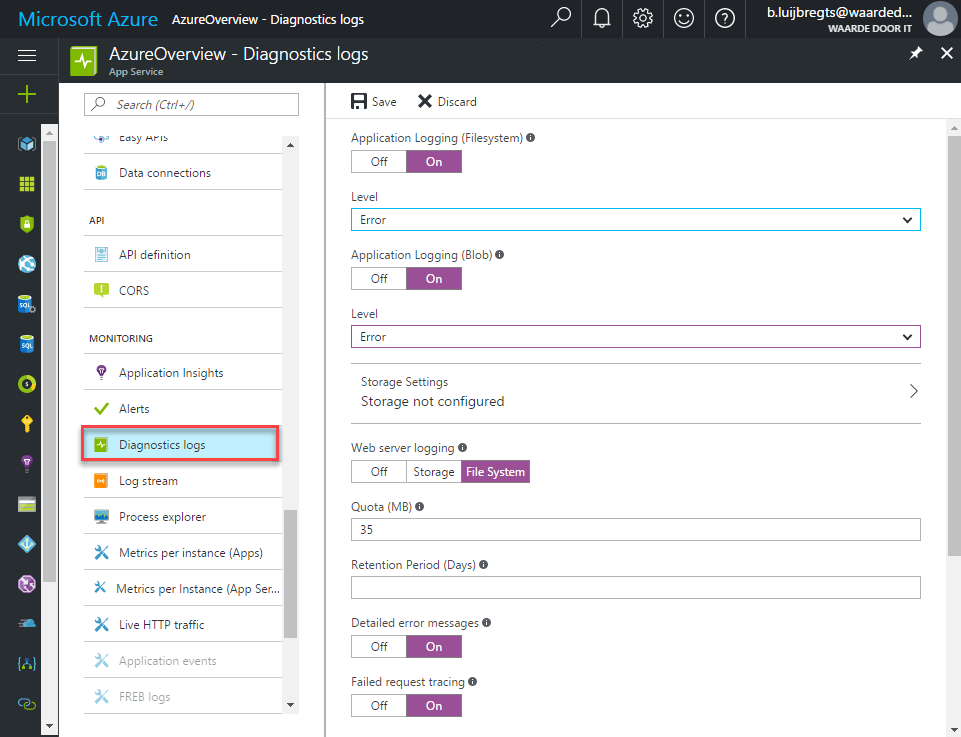
Earlier we used to see the diagnostics logs as its proper name under the 'MONITORING' section. Our installation documentation will have this name refers to the installation team. See the below.

But later this was simply changed. People are confused about where it is relocated especially who those are not working every day with Azure but occasionally going there to install or configure applications. They are doing it because they only have access to the Azure portal. The application installation documentation might not be caught with this name change. 

How Microsoft handles renames

Forget about us as application developers not changing the documentation to include the new name, Microsoft itself took some time to update their documentation. As part of embracing open source and as part of feedbacks, Microsoft changed to an open documentation model. After that, the responsibility of making sure the documentation is up to date seems shifted to the community than Microsoft as a vendor. The good part of that open documentation repo is in GitHub and we can easily trace the change.

Below is the trace of communication in the form of GitHub issue regarding the name change from "Diagnostics logs" to "App Service logs".

https://github.com/MicrosoftDocs/azure-docs/issues/33044

The issue logged 10Jun2019 and completed just 20 days ago as per the issue history. Really interesting to read.

So where is Diagnostics logs settings blade of Azure App Service?

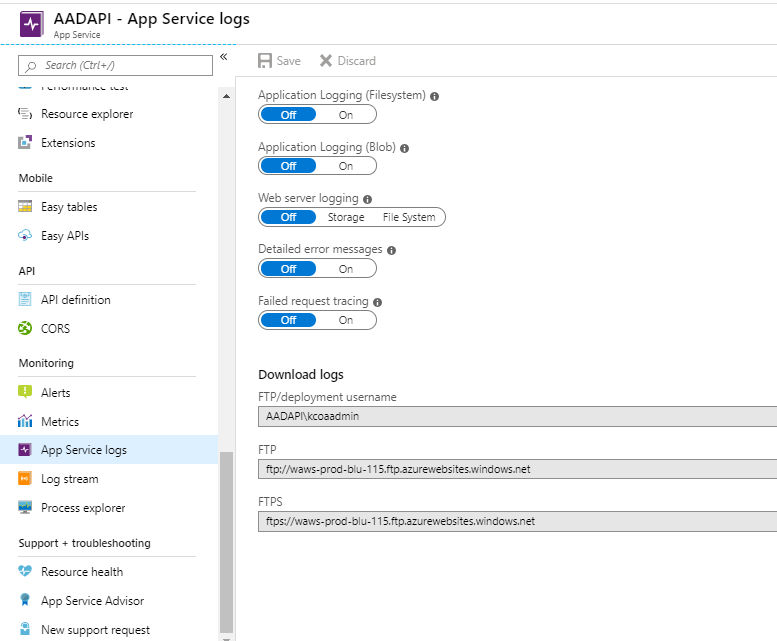
It got renamed to App Service logs. The new screenshot goes as below.

Tuesday, October 1, 2019

Azure @ Enterprise - Debugging App Service with Azure AD authentication issues

Not sure how many might have encountered the situation of debugging Azure App Service. Though Microsoft says it is PaaS (Platform as a Service) model, behind the scene it is IIS VMs on steroids. That is good in one way as we can debug in depth. Let us see one debug situation related to AAD authentication in App Service Web App.

Environment

A simple web application served from MVC action and it has some buttons making AJAX calls to the WebAPI Endpoints hosted in the same web application itself. Hosted as Azure App Service Web App. Application Insights configured through the portal itself.

AAD authentication enabled from the Azure Portal without any code change. No module, middleware or injectors used to deal with AAD done by development.

Issue - Symptom

After enabling AAD authentication and protection, the application returns HTTP 500 error instead of redirecting to the login page.

Analysis

Application Insights shows no activity. This is a point of confusion that the request reached to our web app or not. If not where in the Azure App Service runtime it failed.

Enabled logging in App Service. Then it started showing the below log for single HTTP request.
---
2019-10-01T18:39:11  Welcome, you are now connected to log-streaming service. The default timeout is 2 hours. Change the timeout with the App Setting SCM_LOGSTREAM_TIMEOUT (in seconds).
<!DOCTYPE html PUBLIC "-//W3C//DTD XHTML 1.0 Strict//EN" "http://www.w3.org/TR/xhtml1/DTD/xhtml1-strict.dtd">
<html xmlns="http://www.w3.org/1999/xhtml"><head><title>IIS Detailed Error - 500.79 - Internal Server Error</title>
<style type="text/css"><!--body{margin:0;font-size:.7em;font-family:Verdana,Arial,Helvetica,sans-serif;}code{margin:0;color:#006600;font-size:1.1em;font-weight:bold;}.config_source code{font-size:.8em;color:#000000;}pre{margin:0;font-size:1.4em;word-wrap:break-word;}ul,ol{margin:10px 0 10px 5px;}ul.first,ol.first{margin-top:5px;}fieldset{padding:0 15px 10px 15px;word-break:break-all;}.summary-container fieldset{padding-bottom:5px;margin-top:4px;}legend.no-expand-all{padding:2px 15px 4px 10px;margin:0 0 0 -12px;}legend{color:#333333;;margin:4px 0 8px -12px;_margin-top:0px;font-weight:bold;font-size:1em;}a:link,a:visited{color:#007EFF;font-weight:bold;}a:hover{text-decoration:none;}h1{font-size:2.4em;margin:0;color:#FFF;}h2{font-size:1.7em;margin:0;color:#CC0000;}h3{font-size:1.4em;margin:10px 0 0 0;color:#CC0000;}h4{font-size:1.2em;margin:10px 0 5px 0;}#header{width:96%;margin:0 0 0 0;padding:6px 2% 6px 2%;font-family:"trebuchet MS",Verdana,sans-serif;color:#FFF;background-color:#5C87B2;}#content{margin:0 0 0 2%;position:relative;}.summary-container,.content-container{background:#FFF;width:96%;margin-top:8px;padding:10px;position:relative;}.content-container p{margin:0 0 10px 0;}#details-left{width:35%;float:left;margin-right:2%;}#details-right{width:63%;float:left;overflow:hidden;}#server_version{width:96%;_height:1px;min-height:1px;margin:0 0 5px 0;padding:11px 2% 8px 2%;color:#FFFFFF;background-color:#5A7FA5;border-bottom:1px solid #C1CFDD;border-top:1px solid #4A6C8E;font-weight:normal;font-size:1em;color:#FFF;text-align:right;}#server_version p{margin:5px 0;}table{margin:4px 0 4px 0;width:100%;border:none;}td,th{vertical-align:top;padding:3px 0;text-align:left;font-weight:normal;border:none;}th{width:30%;text-align:right;padding-right:2%;font-weight:bold;}thead th{background-color:#ebebeb;width:25%;}#details-right th{width:20%;}table tr.alt td,table tr.alt th{}.highlight-code{color:#CC0000;font-weight:bold;font-style:italic;}.clear{clear:both;}.preferred{padding:0 5px 2px 5px;font-weight:normal;background:#006633;color:#FFF;font-size:.8em;}--></style>
</head>
<body><div id="content"><div class="content-container"><h3>
HTTP Error 500.79 - Internal Server Error</h3><h4>The page cannot be displayed because an internal server error has occurred.</h4></div><div class="content-container"><fieldset><h4>
Most likely causes:</h4><ul>
<li>IIS received the request; however, an internal error occurred during the processing of the request. The root cause of this error depends on which module handles the request and what was happening in the worker process when this error occurred.</li>
<li>IIS was not able to access the web.config file for the Web site or application. This can occur if the NTFS permissions are set incorrectly.</li>
<li>IIS was not able to process configuration for the Web site or application.</li>
<li>The authenticated user does not have permission to use this DLL.</li>
<li>The request is mapped to a managed handler but the .NET Extensibility Feature is not installed.</li> </ul></fieldset></div><div class="content-container"><fieldset>
<h4>Things you can try:</h4><ul>
<li>Ensure that the NTFS permissions for the web.config file are correct and allow access to the Web server's machine account.</li>
<li>Check the event logs to see if any additional information was logged.</li>
<li>Verify the permissions for the DLL.</li>
<li>Install the .NET Extensibility feature if the request is mapped to a managed handler.</li>
<li>Create a tracing rule to track failed requests for this HTTP status code. For more information about creating a tracing rule for failed requests, click <a href="http://go.microsoft.com/fwlink/?LinkID=66439">here</a>. </li> </ul></fieldset></div><div class="content-container"><fieldset>
<h4>Detailed Error Information:</h4><div id="details-left"><table border="0" cellpadding="0" cellspacing="0"><tr class="alt">
<th>Module</th><td>&nbsp;&nbsp;&nbsp;EasyAuthModule_32bit</td></tr><tr><th>Notification</th><td>&nbsp;&nbsp;&nbsp;BeginRequest</td></tr>
<tr class="alt"><th>Handler</th><td>&nbsp;&nbsp;&nbsp;ExtensionlessUrlHandler-Integrated-4.0</td></tr><tr><th>Error Code</th><td>&nbsp;&nbsp;&nbsp;0x80004005</td></tr>
</table></div><div id="details-right"><table border="0" cellpadding="0" cellspacing="0"><tr class="alt"><th>Requested URL</th><td>&nbsp;&nbsp;&nbsp;https://httpcaching:80/</td></tr><tr><th>Physical Path</th><td>&nbsp;&nbsp;&nbsp;D:\home\site\wwwroot</td></tr><tr class="alt"><th>Logon Method</th><td>&nbsp;&nbsp;&nbsp;Not yet determined</td></tr><tr><th>Logon User</th><td>&nbsp;&nbsp;&nbsp;Not yet determined</td></tr>
</table><div class="clear"></div></div></fieldset></div>
<div class="content-container"><fieldset><h4>More Information:</h4>This error means that there was a problem while processing the request. The request was received by the Web server, but during processing a fatal error occurred, causing the 500 error.<p><a href="http://go.microsoft.com/fwlink/?LinkID=62293&amp;IIS70Error=500,79,0x80004005,14393">View more information &raquo;</a></p><p>Microsoft Knowledge Base Articles:</p>

</fieldset></div></div></body></html><!DOCTYPE html PUBLIC "-//W3C//DTD XHTML 1.0 Strict//EN" "http://www.w3.org/TR/xhtml1/DTD/xhtml1-strict.dtd">
<html xmlns="http://www.w3.org/1999/xhtml"><head><title>IIS Detailed Error - 500.79 - Internal Server Error</title><style type="text/css"><!--body{margin:0;font-size:.7em;font-family:Verdana,Arial,Helvetica,sans-serif;}code{margin:0;color:#006600;font-size:1.1em;font-weight:bold;}.config_source code{font-size:.8em;color:#000000;}pre{margin:0;font-size:1.4em;word-wrap:break-word;}ul,ol{margin:10px 0 10px 5px;}ul.first,ol.first{margin-top:5px;}fieldset{padding:0 15px 10px 15px;word-break:break-all;}.summary-container fieldset{padding-bottom:5px;margin-top:4px;}legend.no-expand-all{padding:2px 15px 4px 10px;margin:0 0 0 -12px;}legend{color:#333333;;margin:4px 0 8px -12px;_margin-top:0px;font-weight:bold;font-size:1em;}a:link,a:visited{color:#007EFF;font-weight:bold;}a:hover{text-decoration:none;}h1{font-size:2.4em;margin:0;color:#FFF;}h2{font-size:1.7em;margin:0;color:#CC0000;}h3{font-size:1.4em;margin:10px 0 0 0;color:#CC0000;}h4{font-size:1.2em;margin:10px 0 5px 0;}#header{width:96%;margin:0 0 0 0;padding:6px 2% 6px 2%;font-family:"trebuchet MS",Verdana,sans-serif;color:#FFF;background-color:#5C87B2;}#content{margin:0 0 0 2%;position:relative;}.summary-container,.content-container{background:#FFF;width:96%;margin-top:8px;padding:10px;position:relative;}.content-container p{margin:0 0 10px 0;}#details-left{width:35%;float:left;margin-right:2%;}#details-right{width:63%;float:left;overflow:hidden;}#server_version{width:96%;_height:1px;min-height:1px;margin:0 0 5px 0;padding:11px 2% 8px 2%;color:#FFFFFF;background-color:#5A7FA5;border-bottom:1px solid #C1CFDD;border-top:1px solid #4A6C8E;font-weight:normal;font-size:1em;color:#FFF;text-align:right;}#server_version p{margin:5px 0;}table{margin:4px 0 4px 0;width:100%;border:none;}td,th{vertical-align:top;padding:3px 0;text-align:left;font-weight:normal;border:none;}th{width:30%;text-align:right;padding-right:2%;font-weight:bold;}thead th{background-color:#ebebeb;width:25%;}#details-right th{width:20%;}table tr.alt td,table tr.alt th{}.highlight-code{color:#CC0000;font-weight:bold;font-style:italic;}.clear{clear:both;}.preferred{padding:0 5px 2px 5px;font-weight:normal;background:#006633;color:#FFF;font-size:.8em;}--></style>
</head><body><div id="content"><div class="content-container"><h3>HTTP Error 500.79 - Internal Server Error</h3><h4>The page cannot be displayed because an internal server error has occurred.</h4></div><div class="content-container"><fieldset><h4>Most likely causes:</h4><ul> <li>IIS received the request; however, an internal error occurred during the processing of the request. The root cause of this error depends on which module handles the request and what was happening in the worker process when this error occurred.</li> <li>IIS was not able to access the web.config file for the Web site or application. This can occur if the NTFS permissions are set incorrectly.</li> <li>IIS was not able to process configuration for the Web site or application.</li> <li>The authenticated user does not have permission to use this DLL.</li> <li>The request is mapped to a managed handler but the .NET Extensibility Feature is not installed.</li> </ul></fieldset></div><div class="content-container"><fieldset><h4>Things you can try:</h4><ul> <li>Ensure that the NTFS permissions for the web.config file are correct and allow access to the Web server's machine account.</li> <li>Check the event logs to see if any additional information was logged.</li> <li>Verify the permissions for the DLL.</li> <li>Install the .NET Extensibility feature if the request is mapped to a managed handler.</li> <li>Create a tracing rule to track failed requests for this HTTP status code. For more information about creating a tracing rule for failed requests, click <a href="http://go.microsoft.com/fwlink/?LinkID=66439">here</a>. </li> </ul></fieldset></div>
<div class="content-container"><fieldset><h4>Detailed Error Information:</h4><div id="details-left"><table border="0" cellpadding="0" cellspacing="0"><tr class="alt"><th>Module</th><td>&nbsp;&nbsp;&nbsp;EasyAuthModule_32bit</td></tr><tr><th>Notification</th><td>&nbsp;&nbsp;&nbsp;BeginRequest</td></tr><tr class="alt"><th>Handler</th><td>&nbsp;&nbsp;&nbsp;StaticFile</td></tr><tr><th>Error Code</th><td>&nbsp;&nbsp;&nbsp;0x80004005</td></tr>
</table></div><div id="details-right"><table border="0" cellpadding="0" cellspacing="0"><tr class="alt"><th>Requested URL</th><td>&nbsp;&nbsp;&nbsp;https://httpcaching:80/favicon.ico</td></tr><tr><th>Physical Path</th><td>&nbsp;&nbsp;&nbsp;D:\home\site\wwwroot\favicon.ico</td></tr><tr class="alt"><th>Logon Method</th><td>&nbsp;&nbsp;&nbsp;Not yet determined</td></tr><tr><th>Logon User</th><td>&nbsp;&nbsp;&nbsp;Not yet determined</td></tr>
</table><div class="clear"></div></div></fieldset></div>
<div class="content-container"><fieldset><h4>More Information:</h4>This error means that there was a problem while processing the request. The request was received by the Web server, but during processing a fatal error occurred, causing the 500 error.<p><a href="http://go.microsoft.com/fwlink/?LinkID=62293&amp;IIS70Error=500,79,0x80004005,14393">View more information &raquo;</a></p><p>Microsoft Knowledge Base Articles:</p>
</fieldset></div></div></body></html>
2019-10-01T18:39:21  PID[11164] Information The Modules dll of version 1.0.0 has already been loaded.
2019-10-01T18:39:21  PID[11164] Critical    System.Reflection.TargetInvocationException: Exception has been thrown by the target of an invocation. ---> 
System.Reflection.TargetInvocationException: Exception has been thrown by the target of an invocation. ---> 
Microsoft.Azure.AppService.Middleware.ConfigurationErrorsException: The provided Issuer URL is not a valid absolute URI stringat Microsoft.Azure.AppService.Middleware.ModuleConfig.set_OpenIdIssuer(String value)--- 
End of inner exception stack trace ---
at System.RuntimeMethodHandle.InvokeMethod(Object target, Object[] arguments, Signature sig, Boolean constructor)
at System.Reflection.RuntimeMethodInfo.UnsafeInvokeInternal(Object obj, Object[] parameters, Object[] arguments)
at System.Reflection.RuntimeMethodInfo.Invoke(Object obj, BindingFlags invokeAttr, Binder binder, Object[] parameters, CultureInfo culture)
at System.Reflection.RuntimePropertyInfo.SetValue(Object obj, Object value, BindingFlags invokeAttr, Binder binder, Object[] index, CultureInfo culture)
at System.Reflection.RuntimePropertyInfo.SetValue(Object obj, Object value, Object[] index)
at Microsoft.Azure.AppService.Middleware.MiddlewareConfig.TryLoadConfig(Type type, HttpContextBase context)
at Microsoft.Azure.AppService.Middleware.ModuleConfig.EnsureConfigLoaded(HttpContextBase context)--- 
End of inner exception stack trace ---
at System.RuntimeMethodHandle.InvokeMethod(Object target, Object[] arguments, Signature sig, Boolean constructor)at System.Reflection.RuntimeMethodInfo.UnsafeInvokeInternal(Object obj, Object[] parameters, Object[] arguments)
at System.Reflection.RuntimeMethodInfo.Invoke(Object obj, BindingFlags invokeAttr, Binder binder, Object[] parameters, CultureInfo culture)at Microsoft.Azure.AppService.Middleware.ModuleManager.LoadModuleConfig(HttpContextBase context)at Microsoft.Azure.AppService.Middleware.ModuleManager.LoadAllModulesAndGetEnabledModules(HttpContextBase context)
at Microsoft.Azure.AppService.Middleware.HttpModuleDispatcher.EnsureInitialized(HttpContextBase context)at Microsoft.Azure.AppService.Middleware.HttpModuleDispatcher.<DispatchAsync>d__11.MoveNext()
2019-10-01T18:39:21  PID[11164] Information Sending response: 500.79 Internal Server Error
2019-10-01T18:39:21  PID[11164] Information The Modules dll of version 1.0.0 has already been loaded.
2019-10-01T18:39:21  PID[11164] Critical    System.Reflection.TargetInvocationException: Exception has been thrown by the target of an invocation. ---> System.Reflection.TargetInvocationException: Exception has been thrown by the target of an invocation. ---> Microsoft.Azure.AppService.Middleware.ConfigurationErrorsException: The provided Issuer URL is not a valid absolute URI stringat Microsoft.Azure.AppService.Middleware.ModuleConfig.set_OpenIdIssuer(String value)--- End of inner exception stack trace ---at System.RuntimeMethodHandle.InvokeMethod(Object target, Object[] arguments, Signature sig, Boolean constructor)at System.Reflection.RuntimeMethodInfo.UnsafeInvokeInternal(Object obj, Object[] parameters, Object[] arguments)at System.Reflection.RuntimeMethodInfo.Invoke(Object obj, BindingFlags invokeAttr, Binder binder, Object[] parameters, CultureInfo culture)at System.Reflection.RuntimePropertyInfo.SetValue(Object obj, Object value, BindingFlags invokeAttr, Binder binder, Object[] index, CultureInfo culture)at System.Reflection.RuntimePropertyInfo.SetValue(Object obj, Object value, Object[] index)at Microsoft.Azure.AppService.Middleware.MiddlewareConfig.TryLoadConfig(Type type, HttpContextBase context)at Microsoft.Azure.AppService.Middleware.ModuleConfig.EnsureConfigLoaded(HttpContextBase context)--- End of inner exception stack trace ---at System.RuntimeMethodHandle.InvokeMethod(Object target, Object[] arguments, Signature sig, Boolean constructor)at System.Reflection.RuntimeMethodInfo.UnsafeInvokeInternal(Object obj, Object[] parameters, Object[] arguments)at System.Reflection.RuntimeMethodInfo.Invoke(Object obj, BindingFlags invokeAttr, Binder binder, Object[] parameters, CultureInfo culture)at Microsoft.Azure.AppService.Middleware.ModuleManager.LoadModuleConfig(HttpContextBase context)at Microsoft.Azure.AppService.Middleware.ModuleManager.LoadAllModulesAndGetEnabledModules(HttpContextBase context)at Microsoft.Azure.AppService.Middleware.HttpModuleDispatcher.EnsureInitialized(HttpContextBase context)at Microsoft.Azure.AppService.Middleware.HttpModuleDispatcher.<DispatchAsync>d__11.MoveNext()
2019-10-01T18:39:21  PID[11164] Information Sending response: 500.79 Internal Server Error#Software: Microsoft Internet Information Services 8.0

---
The first part of the log is an HTML document. That can be viewed in the browser if we save that part into a .html file.

The second portion is a call stack. See the red highlighted area. It says the Issuer URL is not correct. Unfortunately, the Issuer URL in portal configuration was the GUID of the tenant. Not the proper URL.

Fix

Change the Issuer URL to its proper format using the tenant id. Sample below.
https://login.microsoftonline.com/<AAD Tenant Id>

Please note that all debugging sessions would not be this easy. Especially where multiple applications involved and calling each other.