Showing posts with label Azure Automation. Show all posts

Tuesday, March 26, 2024

Azure @ Enterprise - App Service Deployment Error: ENOENT: no such file or directory, open

I was fiddling with deployment via the Kudo console in the Azure app service. Removed one file as part of testing. The expectation was that the next deployment would put the file back.

The next deployment from GitHub actions failed with the below message.

33      Cleaning up temp folders from previous zip deployments and extracting pushed zip file /tmp/zipdeploy/5b7989fd-9794-4ed0-8bfc-dbf1f18c686b.zip (4.31 MB) to /tmp/zipdeploy/extracted
34
Error: Failed to deploy web package to App Service.
35
Error: Deployment Failed, Package deployment using ZIP Deploy failed. Refer logs for more details.
36
App Service Application URL: https://<app service web app name>.azurewebsites.net


test

No more details on failure in GH Actions logs. There was an error as shown below in the Azure AppService Deployment center.

Error: ENOENT: no such file or directory, open '/home/site/wwwroot/Azure.Core.dll

That was the exact file I removed earlier.

Debugging

Hypothesis 1

The file may be open in a Kudu console, hence unable to access it. 

But even after closing, the error persisted.

Hypothesis 2

The App Service deployment action in GHActions requires the file to be present there as that may be keeping track of files.

Even after manually uploading the file, the issue persists

Solution

Finally attempted the Microsoft-certified solution of Restarting the App service. It worked.

The order is to stop the App service, do the deployment, and start again.

Tuesday, June 27, 2023

Azure @ Enterprise - Upload certificate to App registration using PowerShell

Warning

All characters and events in this post are fictional. Any resemblance or similarity to any actual events entities or persons is entirely coincidental

Developer: Hi there, as you know we are excited to release the next version that uses Azure AD-based authentication. All the 100 development, testing till prod deployment instances require their own Azure app registrations. Also, require certificates added for authentication to outside services. Certificates can be shared across lower environments.

Install Manager: Oh. It is not possible to have one app registration per application instance. It is not manageable.

Developer: What? Are you not paid for managing instances? Hope you are not doing charity.

Install Manager: Yeah I know you are funny. We cannot manage that many app registrations and certificates.

Developer: What do you mean by managing? 

Install Manager: Oh boy, higher environments are not like your toy dev instances. It is serious business. Do you know the certificates are not forever? On that day they expire, we need to upload a new certificate to all your dev and test app registrations.

Developer: Hey, we are in 2023. Don't you guys automate?

Install Manager: We don't do automation here.

Developer: It is not huge code. Just use the simple PowerShell commands that any system admin knows.

Install Manager: Enough boy. We don't have skilled people here. If you want, you code it and give it to us.

Developer: Oh ok..here you go.

Tuesday, December 6, 2022

Azure @ Enterprise - AGIC on AKS - Unexpected status code '403' while performing a GET on Application Gateway.

Context

When we want to route traffic from the internet to AKS through the Azure Application Gateway (AAG for short), there are 2 approaches to set up ingress in AKS. The traditional NGINX way where the flow is one way. But with  Application Gateway Ingress Contoller (AGIC for short), there is one more approach to solving the problem. AAG can route to the Pod IPs if it knows. 

  • Who will let AAG knows about the pod IPs? 
    • It is the AGIC running inside the AKS.
  • How does the AGIC authenticate to modify the AAG?
    • Using user-assigned managed identity with necessary permissions

Problem

When we simply create the AKS cluster with AGIC enabled, we expect that we can pass the pre-created managed identity to the AGIC that has permission to AAG. Note that the AGIC is not installed separately, instead enabling using AKS add-on. We are in the DevOps automation world, so we normally look for a declarative mechanism to do it. Obviously, the bicep will come on our way. When we look at the office bicep reference for AKS-managed clusters details on AGIC enablement are not available as of writing this post.  But there are links at the bottom to one of the ARM examples having AGIC capability. 

It has a section located at properties->addonProfiles->ingressApplicationGateway where we can give the details of AAG and the identity.

Since the ARM and bicep are like JavaScript and TypeScript, it is relatively easy to prepare the bicep given the equivalent ARM template.

After conversion when the bicep is run below warning showed up

Warning BCP073: The property "identity" is read-only. Expressions cannot be assigned to read-only properties. If this is an inaccuracy in the documentation, please report it to the Bicep Team. [https://aka.ms/bicep-type-issues]

If someone cares about the warning, he is not a developer. So ignored it and proceeded. Poor Azure documentation which is calling for help.

But after the creation of AKS it started showing errors when accessing via AAG. The logs of AGIC ingress pod shows the below error. 

kubectl logs ingress-appgw-deployment-<a random string> -n kube-system

E1206 02:34:30.289515       1 client.go:170] Code="ErrorApplicationGatewayForbidden" Message="Unexpected status code '403' while performing a GET on Application Gateway. You can use 'az role assignment create --role Reader --scope /subscriptions/<subid>/resourceGroups/K8ClusterWithAGIC --assignee dfb5d05b-cc65-46fa-a0b8-9fe93ebfed9e; az role assignment create --role Contributor --scope /subscriptions/1cd7467f-530b-4278-94ef-de3f5da74e0c/resourceGroups/<rgName>/providers/Microsoft.Network/applicationGateways/myappgw --assignee dfb5d05b-xxxx-xxxx-xxxx-9fe93ebfed9e' to assign permissions. AGIC Identity needs atleast has 'Contributor' access to Application Gateway 'myappgw' and 'Reader' access to Application Gateway's Resource Group '<rgName>'." InnerError="network.ApplicationGatewaysClient#Get: Failure responding to request: StatusCode=403 -- Original Error: autorest/azure: Service returned an error. Status=403 Code="AuthorizationFailed" Message="The client '41ff78bf-xxxx-xxxx-xxxx-180e4c7970a2' with object id '41ff78bf-3b92-xxxx-xxxx-180e4c7970a2' does not have authorization to perform action 'Microsoft.Network/applicationGateways/read' over scope '/subscriptions/<subid>/resourceGroups/<rgName>/providers/Microsoft.Network/applicationGateways/myappgw-' or the scope is invalid. If access was recently granted, please refresh your credentials.""

Step 1

Wonder why there is a section called solution? will come to know soon. The error is somewhat clear. But my pre-created managed identity has permissions. When we closely look we can see 2 issues 
  1. The error message shows a different client id of MI instead of what we have given.
  2. Since the client id used is different. It is newly created and obviously, it doesn't have permission to manage AAG.
The first issue because it is not using the identity that we passed to the bicep. We should have taken the warning seriously.

The solution is to give contributor access to AAG. Let us worry about the least permission later. The name of the newly created identity follows the below convention so it is easy to search.

"ingressapplicationgateway-<cluster name>"

Problem 2

Once we fix the issue, we may be thinking all good as AGIC has permission to AAG to create listeners, backend pools, and settings. But it is not enough as the below error started showing up.

E1206 02:59:09.217888       1 controller.go:141] network.ApplicationGatewaysClient#CreateOrUpdate: Failure sending request: StatusCode=0 -- Original Error: Code="LinkedAuthorizationFailed" Message="The client '41ff78bf-xxxx-xxxx-xxxx-180e4c7970a2' with object id '41ff78bf-xxxx-xxxx-xxxxx-180e4c7970a2' has permission to perform action 'Microsoft.Network/applicationGateways/write' on scope '/subscriptions/<subid>/resourceGroups/<rgName>/providers/Microsoft.Network/applicationGateways/myappgw'; however, it does not have permission to perform action 'Microsoft.ManagedIdentity/userAssignedIdentities/assign/action' on the linked scope(s) '/subscriptio957", FieldPath:""}): type: 'Warning' reason: 'FailedApplyingAppGwConfig' network.ApplicationGatewaysClient#CreateOrUpdate: Failure sending request: StatusCode=0 -- Original Error: Code="LinkedAuthorizationFailed" Message="The client '41ff78bf-xxxx-xxxx-xxxx-180e4c7970a2' with object id '41ff78bf-xxxx-xxxx-xxxx-180e4c7970a2' has permission to perform action 'Microsoft.Network/applicationGateways/write' on scope '/subscriptions/<subid>/resourceGroups/<rgName/providers/Microsoft.Network/applicationGateways/myappgw'; however, it does not have permission to perform action 'Microsoft.ManagedIdentity/userAssignedIdentities/assign/action' on the linked scope(s) '/subscriptions/<subid>/resourcegroups/<rg>/providers/Microsoft.ManagedIdentity/userAssignedIdentities/myappgw-ManagedIdentity' or the linked scope(s) are invalid."

Step 2

Here we can see 2 problems

  1. The error message is misleading with the same client id and object id. In fact, they are different. It seems people at Microsoft itself are confused about this AAD security mechanism.
  2. AGIC identity is looking for permissions on the identity of AAG.
God knows why the AGIC requires permission on AAG's managed identity to manage the AAG details. This issue can also be fixed by giving a contributor permission to the managed identity of AAG.

Happy debugging...

Read the docs

This is the standard answer we get when we do trial and error. As of writing this post, the permission on the identity of AAG is not mentioned in the brownfield installation.

References

  1. https://www.torivar.com/2022/09/16/aks-with-agic-existing-agw/ - Almost the same experience but with Terraform IaC

Tuesday, September 21, 2021

Azure @ Enterprise - PowerShell to send message to Azure Service Bus Queue

We all know that Azure and PowerShell are friends. This post discusses how can we use PowerShell to work with the data place of Azure Service Bus. The example here is about queueing a message into the Service Bus queue.

Problem

We did implement a messaging architecture using Azure Service Bus Queue. The consumer is a .Net app that connects to the Service Bus Queue using Service Principal + Certificate. It works fine in lower environments such as dev, QA, etc... but stopped working in higher environments. Below was the message.

"An existing connection was forcibly closed by the remote host ErrorCode: ConnectionReset (ServiceCommunicationProblem);"

As it is a higher environment, there is no way we can install troubleshooting tools or even don't have access to the Azure portal.

Troubleshooting

Since there is no portal access and cannot install tools we decided to simulate how the application consumes Service Bus using PowerShell.

The first step was easy to connect to Azure using cmdlets using the Service Principal+Certificate and generate JWT. But the next step was not easy.

By the way, this requires the installation of Az.Accounts PowerShell module in the production machine. :)

Since PowerShell is considered an admin thing than a dev tool, admins normally allow it.

Challenge

The problem is that there is no official PowerShell package from Microsoft to work with the data place of ServiceBus. The official PowerShell module supports control plane functions such as create service bus namespace(New-ServiceBusNamespace), create queues (New-AzServiceBusQueue), etc. Even interacting with the data plane is not there in Azure CLI. We were not able to find any community-built PowerShell cmdlets too except for some tutorials on how to send messages.  

Solution

Finally, we had to get our hands dirty by making HTTP calls from PowerShell. The REST endpoints are properly documented to easily craft the requests. The PowerShell source code to send messages is available on GitHub.

https://github.com/ms-azure-demos/servicebus-queues-powershell

The root cause of the problem

When we run the PowerShell script from the same machine the app is running, it worked!!!. That eliminated the questions of what ports are open etc. The remaining difference between the .Net application sending messages v/s PowerShell was the AMQP v/s simple HTTP. .Net application uses AMQP by default and we didn't put an option in the application to fall back to HTTP. We checked whether the ports are open and they are. Hence concluded the higher environment network is not allowing AMQP traffic. Some network devices are on the way that doesn't like the AMQP traffic. 

Tuesday, September 14, 2021

Azure @ Enterprise - PowerShell log in as service principal + certificate and generate JWT access token

The enterprise always loves to increase the security posture. One authentication approach enterprise takes in Azure is App registration with a service principal. The advantage here is that the service principal can use certificates to authenticate instead of passwords. Certificates are secure than passwords as those can be centrally managed.

Problem

If our application uses the service principal + certificate and it is working fine, there is no issue. But the problem starts when something goes wrong. If we log in to the portal using our credentials and try scenarios that are failing, we may see everything works fine. But things go wrong when the application logs in using service principal. It may be a permission issue, expired certificates or passwords, etc...

What if the problems appeared first in production where enterprises don't allow any changes to the environment. ie no debugging tools are allowed to install etc...

Solution

The solution is to troubleshoot the scenario as close as how the application works. We have to log in as the service principal and try the application scenarios. 

As always in enterprise the best method to troubleshoot in production environments is PowerShell. Below goes the code to log into Azure from PowerShell using service principal and generating a JWT access token.

The Connect-AzAccount cmdlet provides different ways to log in. Using the service principal is one of the methods.
Please note that the Az.Accounts need a minimum of Windows PowerShell 5.1 or PowerShell 7 version.

Once the PowerShell session is authenticated, we can perform various operations as the service principal. 

In most cases, the access token is not really required. There are PowerShell SDKs for most of the Azure services. We can directly use them. But in some cases like interacting with the data plane of Service Bus, we may need to use the access token and embed it in the Authorization header of the HTTP request.

Limitations

It reads the certificate from the personal store unless loaded from a file. We cannot pass an X509Certificate object to the Connect-AzAccount cmdlet. There is already an issue in GitHub to track it.

Update : 2021-10-30

What if we don't have permission to install Az.Accounts module?

Recently, I came to one production debugging situation where there is no permission to install the Az.Accounts module and even no connectivity to the internet to get the module. The only way is to write everything ourselves. Fortunately, someone had already done that and it is available publicly. If interested read the official docs.

Tuesday, March 19, 2019

Azure @ Enterprise - Downloading all the VSOnline / Azure DevOps load test .har files together

Background

After performing a load test via Azure Test Plans or Visual Studio Online, it produce the http archive  files with .har extension. Those .har files are available in the Azure DevOps portal as part of test results and we can download to analyze the nature of load test. But the problem is that we need to download files one by one. Its tedious to do via portal.

Solution

As everyone knows, the Azure is built around ReSTful Web APIs. The Portal UI itself is a wrapper around those APIs. Lets see how can we download those files easily using the same API layer.

Figuring out Url

Below Url gives the details of WebAPI which we can invoke to interact with the load tests.


In short, the url format is below
https://<organization name>.vsclt.visualstudio.com/_apis/clt/testRuns/<Run GUID>/results?api-version=5.0

The GUID of test run can be obtained from the portal URL, when we are in the individual test run page. If we try with the integer sequence number what we are seeing the test runs list, it will not work.

Security

The MSDN documentation says Personal Access Token and type Basic.  That means, when we put the PAT, we have to use base64 encoding. The best way to make sure its working, is via Postman. Below are the steps.
  • In Postman, make sure the http method is GET and enter the intended URL by replacing the organization name and Run GUID.
  • Go to Authorization tab and select TYPE as "Basic Auth".
  • Enter any user name or leave it empty and inside the password text box, put the Personal Access Token.
  • Press on 'Send' buttong to send the API request to Azure DevOps, and we should get data in JSON format.

What is the role of storage account and how to access files

The WebAPI call /testRuns/<GUID>/results gives a JSON as explained above not the .har files which we need. Instead of .har files or har data, it has a link to Azure Blob Storage. Notice that the link has some query string which have the SAS token details. 

Azure developers already knows how to download files from an Azure blob storage, if they get a URL with SAS token suffixed to it.

But for the benefit of testers and automation guys the below link has been given which explains, how to download files from Azure blob storage using a tool called Azure Storage Explorer. It is free as of now.


Once the connection is established in Azure Storage Explorer to storage account using the SAS token, we can navigate to the correct GUID folder of test run. Then to /TestResult/Diagnostics folder to download .har files.

Another way is to use another command line tool called AzCopy.exehttps://docs.microsoft.com/en-us/azure/storage/common/storage-use-azcopy which download the files from Azure Storage Account in higher speeds. AzCopy.exe needs the SAS token to be passed into it via command line switches. Since that is not in the scope of this post, letting it to learners.

Tuesday, March 12, 2019

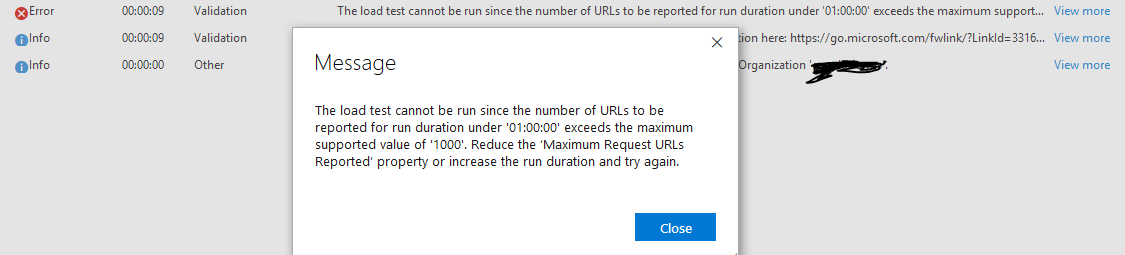
Azure DevOps formerly VSOnline load testing - The load test cannot be run since the number of URLs...

The Azure DevOps or old VS Online or Azure dev test labs is a nicer option to do load testing. They have hosted agents or we can bring our own agents. Agents means the distributed load generator machines.
Below is one error message we may encounter when we load test enormous applications.

The load test cannot be run since the number of URLs to be reported for run duration under '01:00:00' exceeds the maximum supported value of '1000'. Reduce the ‘Maximum Request URLs Reported’ property or increase the run duration and try again.


The best way to fix is to follow what the error message says.

https://stackoverflow.com/questions/24250153/web-load-test-with-mvc-route-parameters-creates-many-instance-urls
https://social.msdn.microsoft.com/Forums/en-US/ffc16064-c6fc-4ef7-93b0-4decbd72167e/maximum-number-of-unique-web-test-requests-exceeded?forum=vstswebtest

Below is the URL to the error codes Azure DevOps / VS Online load test may produce. This is another way to tackle the issue.

https://devblogs.microsoft.com/devops/visual-studio-cloud-load-testing-error-codes/

If it didn't solve with above steps, try the old school techniques such as restarting Visual Studio instance which used to submit job to VSO, restart machine itself or resubmit multiple times.

It is really wired, but this is what it is.

Tuesday, July 31, 2018

Azure @ Enterprise - Time bound SAS for WebJob to dequeue ServiceBus Queue messages

Context

Enterprise in 'Azure @ Enterprise' series refers to companies or projects which have stringent security measures and process guidelines which a normal developer may not think of. Or are not expected in the self service cloud world. Often the security measures are taken to make sure that the responsibility is moved to some other party or vendor so that people at Enterprise are free from low level details of those concerns.

If we are in non enterprise projects, developing a queued back end processing in Azure is super cool with Azure Queue and WebJobs. But in enterprise that is not the case, we have to make sure the service supports virtual network or not. Will that support encryption at rest as well as in transit. If it encrypt can the enterprise provide key etc...Basically enterprise don't want to fully trust the cloud vendor though in reality vendor own all and have full control.

Problem

Enterprise may evaluate Azure ServiceBus Queue is better than the Azure Storage Queue as per current feature sets and the standards what it used to evaluate. It may come out viceversa. If it demand key rotation for ServiceBus connection string with expiry, it is little difficult, if we had used only configuration(web.config or app.config) based connection string.

Even if it is not enterprise project, it is good practice to rotate the keys with expiry as long as the ServiceBus don't support hosting it inside the vNet. If it support hosting inside vNet, the attack surface could be less. Currently any Tom,Dick or Harry can launch brute force attack against the service bus end points.

Key rotation will not remove the attack surface but reduce the possibility of a successful attack.

https://feedback.azure.com/forums/216926-service-bus/suggestions/15619302-add-service-bus-to-vnet

Solution

It is possible to have key rotation even with the attribute based WebJob functions. We can have expiry to the keys as well. Lets see step by step.

Generating time based SAS (Shared Access Signature)

It is supported in ServiceBus. In order to generate one we need one Shared Access Policy. Normally when we create the SB instance, there will be 'RootManagerSharedAccessKey' with primary and secondary keys.

Ideally this is supposed to be done outside of the main application such as Azure Automation Code and the generated new time based SAS has to be in KeyVault. This will help to have only automation account knowing the high privileged Shared Access Policy key and WebJobs know only KeyVault secret name where the the time based Shared Access Signature is stored by Automation Runboook. If application has access to the KV, it can retrieve the SAS. 

Since the code to do SAS rotation using Azure Automation Runbook is not under the scope of this post, omitting that code. If anyone request through comments section, the code will be provided.

WebJob to read SAS and dequeue

Now lets come to WebJob code side. Before we start the JobHost to listen using RunAndBlock() on the thread, there is option to override to specify the connection string to the ServiceBus which uses the time based SAS. Below goes the code.

private static void RunAndBlock()
{
    var config = new JobHostConfiguration();
    config.UseServiceBus(ServiceBusConfigurationFactory.Get());

    if (config.IsDevelopment)
    {
        config.UseDevelopmentSettings();
    }
    var host = new JobHost(config);            
    host.RunAndBlock();
}

static class ServiceBusConfigurationFactory
{

    /// <summary>
    /// Returns the SB configuration
    /// </summary>
    /// <returns></returns>
    /// <remarks>Change this to read from Azure KV</remarks>
    internal static ServiceBusConfiguration Get()
    {
        return new ServiceBusConfiguration() {
            ConnectionString = BuildsSBConnectionString(GetITimeSensitiveSASTokenProvider().Get()),
        };
    }

    private static string BuildsSBConnectionString(string sharedAccessSignatureToken)
    {
        ServiceBusConnectionStringBuilder builder = new ServiceBusConnectionStringBuilder();
        builder.SharedAccessSignature = sharedAccessSignatureToken;
        builder.Endpoints.Add(new Uri("https://<name of SB instance>.servicebus.windows.net/"));
        string finalCon = builder.ToString();
        return finalCon;
    }

    private static ITimeSensitiveSASTokenProvider GetITimeSensitiveSASTokenProvider()
    {
        return new KVBasedimeSensitiveSASTokenProvider();
    }
}

The code is mostly self explanatory. When the first time main() of WebJob is started, it will get the ServiceBusConfiguration from the factory class. Factory uses provider class which knows how to talk to Azure KV or some other store where the SAS is present. Once the SAS is present, the connection string can be built from it.

One thing to remember is that the SAS is not connection string. Connecton string has to be 

Things to remember when working with ServiceBus

API Collision

There are 2 dependencies when we work with Azure ServiceBus. Microsoft.Azure.ServiceBus.dll & Microsoft.ServiceBus.dll and they both has classes with same name. Sometimes its very difficult to get the code compiled if downloaded as snippet.

What if the token expires after RunAndBlock() is invoked?

At least in testing there were no issues to the dequeued messages. All new instances of WebJob process, it takes the new connection string.

Tuesday, April 24, 2018

Azure @ Enterprise - Automation for scaling down HDInsight after busy hours

Introduction

Every software system involve many manual jobs to maintain it. From monitoring health, periodically maintaining indexes, updating operating systems, taking backups etc...Azure trying to automate those tasks as  much as possible using a service called Azure Automation. This post is about using Azure Automation for automatically scaling down HDI clusters in non peak hours.

Ideally speaking the cluster can be deleted after use. But the problem is that it takes a lot of time to create. In case a job is submitted after hours, it needs a lot of time. So better scaling down is an option. As always its not a silver bullet. Choose accordingly.

Azure Automation basics

There are so many tutorials available to get started using Azure Automation. Below are the high level information about Azure Automation.
  • Automation allows us to write Runbooks using PowerShell & Python workflow. Runbook is the real logic what to do.
  • Runbooks can even be graphical ie drag and drop coding.
  • Runbook can be exposed via Webhooks or scheduled to trigger execution. Each execution is called Job and we get the JobId to track progress.
  • Webhook clearly separate the credentials and connections from the code. So that, those secrets can be managed by the deployment guys.
  • It has the app store model to distribute Runbooks called Runbooks gallery. We can upload our Runbooks too.
Some links on how to do things in Automation

https://docs.microsoft.com/en-us/azure/automation/automation-first-runbook-textual
https://vincentlauzon.com/2015/11/01/azure-runbook-a-complete-simple-example/
https://docs.microsoft.com/en-us/azure/automation/automation-runbook-gallery
https://www.c-sharpcorner.com/article/create-runbooks-to-automate-tasks-in-azure-automation/

Gallery

Coming back to the context of this post. We have to automatically scale down the HDICluster in off peak hours. Don't there a runbook exist in the gallery to do the same? 

Yes there is one, but that doesn't seems to work if we have multiple Subscriptions. Hence this post. 

Contacted the author of the Runbook and informed the same. Hopefully there will be updated version soon. Below is the link.

Below is one link about Runbook gallery to get started.

Runbook for scaling down HDICluster

Directly writing the code as the approach is straight forward

    $SubscriptionName = "<Subscription Name>"
    $ResourceGroupName = "<Resource Group where the HDICluster resides not the automation account>" 
    $ClusterName = "<name of the cluster. No need of azurehdinsight.net>"
    [Int] $Nodes = 1
    
    $connectionName = "AzureRunAsConnection"
    Write-Verbose "Starting Scaling cluster $ClusterName to $Nodes nodes..."
    try
    {
        # Get the connection "AzureRunAsConnection "
        $servicePrincipalConnection=Get-AutomationConnection -Name $connectionName         

        Write-Output "Logging in to Azure..."
        Add-AzureRmAccount `
            -ServicePrincipal `
            -TenantId $servicePrincipalConnection.TenantId `
            -ApplicationId $servicePrincipalConnection.ApplicationId `
            -CertificateThumbprint $servicePrincipalConnection.CertificateThumbprint 
    }
    catch {
        if (!$servicePrincipalConnection)
        {
            $ErrorMessage = "Connection $connectionName not found."
            throw $ErrorMessage
        } else{
            Write-Error -Message $_.Exception
            throw $_.Exception
        }
    }
    Select-AzureRMSubscription -SubscriptionName $SubscriptionName
    Write-Output "Scaling cluster $ClusterName to $Nodes nodes..."
    Set-AzureRmHDInsightClusterSize `
        -ResourceGroupName $ResourceGroupName `
        -ClusterName $ClusterName `
        -TargetInstanceCount $Nodes

Please note the parameters are avoided to reduce code size. Ideally the values should comes as parameters.

Prerequisites

Azure AD App

"AzureRunAsConnection" is the name of connection at the automation account level which is going to be the identity of the Runbook code. 
The above code is tested with an Azure AD Application with certificate based authentication. The certificate associated with Azure AD App has to be uploaded to Automation account. Credentials are not at the Runbook level. Meaning multiple Runbooks in the Automation account can share same credentials.

Importing modules

The Runbook needs 2 additional modules which are not present already in Automation.
  • AzureRM.profile
  • AzureRM.HDInsight
Below goes one link how to add modules.


The interesting thing here is AzureRM.HDInsight depend on the AzureRM.profile. So first we need to add AzureRM.profile. Though the message says it is added, it is an async operation. So before the addition is not fully complete, if we try to add the AzureRM.HDInsight we get the same dependency missing error.

Scheduling the Runbook

Scheduling is simple as connecting the Runbook with a Schedule and associating the parameter values. 

Azure Automation @ Enterprise?

Enterprises can drastically reduce the cost to maintain systems if they start using Automation. Automation can be done even without Azure Automation. Powershell was also there earlier. But the advantage with Azure Automation is the blend of scalable infrastructure and automation language. The automation authors doesn't need to worry about where its going to run. Just write the code and give to Azure to execute.
Automation can even be used as part of multi-tenant application to isolate the security boundaries. One such mechanism is via Webhooks. High privilege tasks such as creating an HDICluster can be limited to an Azure AD App and Automation can run using that identity. The applications who knows the Webhook secret URL can only invoke and get the job done. Application doesn't need to know about the infrastructure details such as the virtual network name, sub nets etc.. All those can be local to the Automation Account.

One of my favorite slogan in software engineering is 'Solve our problems before we solve others'. The Azure Automation really helps in that context.