Showing posts with label VS 2008. Show all posts

Monday, July 30, 2012

Not able to compile due to missing temp files

Have you ever encountered an error like below which makes your beautiful C# or VB.Net code as just txt file. I believe if the code is not getting compiling its just like a txt file. You must have seen if you are a frequent user of windows disk clean up utility or CCleaner.

“Visual Studio 2010 “cannot find” C:\Users\[USERNAME]\AppData\Local\Temp\1\.NETFramework,Version=v4.0.AssemblyAttributes.vb “

Please don’t doubt your code when you see problems like this after cleaning your temp files using any cleaning utilities. Why this is happening is because of Microsoft Visual Studio’s usage of temp space to achieve its functionalities. When VSTS cannot find the temp file which was copied earlier it reports errors.

Do a clean and rebuild on your solution to solve this issue. Never doubt your code or your team members like what I did when I first saw this error Smile. Goto the below link to see what MSFT is saying about the same error.

http://connect.microsoft.com/VisualStudio/feedback/details/515041/unable-to-open-module-file-when-an-existing-solution-is-loaded

Monday, November 14, 2011

Generic retry mechanism & catch using generic exception type

Couple of weeks back we faced one situation where a portion of our code breaks due to a IIS not available situation and we were advised to implement a retry mechanism.Hope I can talk about that server down problem in future posts. The retry mechanism needs to implement based on the exception which will occur on that particular scenario. We tried test code by putting the try catch block and could see its working in one place. But there  are a bunch of other areas we need to modify the code.Also in future too developers may need to use this retry mechanism.
The architect resting in me jumped and said that we can use a generic retry mechanism using .net generics. My colleagues were in little confusion about how to achieve a generic mechanism for retry where the size and location of code differs and spread out in 150 projects.With the help of Action delegate I was able to convince them and the subsequent google gave us ready made code to do the same.
public static void ExecuteWithRetry( Action action, UInt16 noOfAttempts )
{
    //Validate args:Throw exception on retryCount=0
    int count = 1;
    for (; ; count++)
    {
        try
        {
            action();
            break;
        }
        catch (ReTryableException ex)
        {
            Log(ex, count);
            if (count == noOfAttempts) throw;
        }
    }
}

Everybody became happy like after the first fight seen in movies. We know that the movie needs to complete its 2 hours with excitement and for that villain  should come back with more power. Here too the villain come back when the perfectionist in me put forward the suggestion of making it real generic so that we can move to the utility project and can be consumed by other fellow developers as well. So we rewrote the logic as follows.


public static void ExecuteWithRetry<TException> ( Action action, UInt16 noOfAttempts ) where TException :Exception   
{
    //Validate args:Throw exception on retryCount=0
    int count=1;
    for(;;count++)
    {
        try
        {
            action();
            break;
        }
        catch (TException ex)
        {
            Log(ex, count);
            if (count == noOfAttempts) throw;
        }
    } 
}

Oh what an idea sir ji…There was one more suggestion came to make retry after specific interval. But before that we tried to integrate modified function in our app.

Catching exception using generic type

Here starts the second part of the story. When we run from Visual studio it didn’t hit the catch block!!! Theoretically there are no issues but practically it failed. At least for some moment surrounding people even I thought that our understanding about either Exception handling or generics is wrong. Even we thought of getting rid of this concept and write redundant retry code everywhere. But when we came back to our original state , we googled it and find that it is a BUG in .Net when running inside Visual Studio debugging mode.We tried running by double clicking the application and it works perfect.We were also able to see this bug in the Microsoft connect and says its fixed.

There is on workaround available for this issue its as follows

catch (Exception ex)
{
    TException tEx = ex as TException;
    if (tEx != null) { /*Process */}
    else throw;
}

This changed my perception

“The bug is there only due to poor dev’s coding mistake never by compilers, development tools or the framework”

to

“Compilers, development tools and frameworks are also coded by developers”.

Later I happen to read a post about fixing a compiler bug which enforced my perception.

Monday, October 24, 2011

Fusion log viewer fuslogvw ie Assembly Binding Log Viewer

When you work with .net and your dlls are scattered around GAC, application bin, or reference assemblies its very difficult to check which version of dll is loaded in the application. Without knowing that you cannot ensure that your code changes are in effect. For small projects you can put Console.WriteLine or Messagebox.Show to indicate your code change .But when we talk about bigger applications with hundreds of project and thousands of code files ,it is not practical.Also there are chances that your message box code might get checked into the code repository which gives fun for others.

Another scenario is creating and maintaining AppDomains .There are concepts like ApplicationBasePath, PrivateBinPath for the appdomains which decides from where the runtime should load the assembly or what is the sequence in searching for assembly. If you are versioning your application there are chances for MissingMethodException if the loaded assembly is not compatible with the versions.

All these things says we need to profile/inspect the assembly loading behavior in .net on the fly to make sure the dlls are loaded from correct location and it is the Fusion log viewer which comes with Visual Studio.

Starting the tool
  • Make sure the registry entry HKLM\Software\Microsoft\Fusion\ForceLog is 1
  • Goto visual studio command prompt.
  • Type and enter 'fuslogvw'
  • This will bring you the tool window.Make sure the log path is correct.
  • Now run your assembly.
  • Once the application loads click on the refresh button in the assembly log viewer.
  • You got the details of assemblies loaded with loading history and from which location
This is very useful in my current project to identify assembly loading where we have versioning and play with AppDomains all around.

Tuesday, January 4, 2011

Loading SOS dll from Visualstudio for debugging

The Windbg is really an amazing debugging tool.With sos.dll we can even realize the working of garbage collector through windbg. Earlier my understanding was ,I need to use Windbg to use sos.dll for debugging.Now I realized that we can even load the sos.dll from immediate window of visual studio while debugging. Its very cool.One tool for everything...

Below are some links which explains how to load sos debugger from VSTS immediate window and see the memory details.

http://blog.mohammadjalloul.com/blogs/mo/archive/2010/02/21/the-large-object-heap.aspx
http://blogs.msdn.com/b/vijaysk/archive/2007/11/15/sos-your-visual-studio.aspx
http://msdn.microsoft.com/en-us/library/yy6d2sxs%28v=VS.100%29.aspx

Note : The Express edition of Visual studio doesn’t support this sos debugging.

Friday, December 19, 2008

Writing Smart Tags for Windows as well as Web Controls to show help and about.

What are Smart Tags

Smart tags support was introduced in VS 2005.They helps us to do configuration of custom controls very easily in both Windows forms and Web.They also provide access to frequently used properties as well as to most important ones.

How to use smart tags

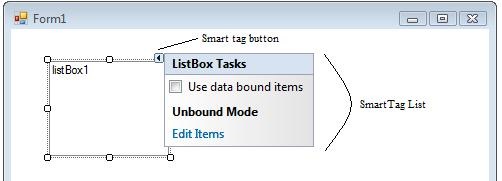
If a control is enabled with smart tags ,it will get the smart tag button at top right when we select the same in Visual Studio editor.A click on that button will show the smart tags.The button visually looks like an arrow towards right.
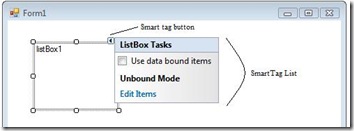
SmartTagOnWinForms

Creating smart tags for our own custom controls.

Usually smart tags are used to edit control properties or to configure the control itself.Here I am going to show a simple one in both ASP.Net and Windows forms which shows about and help boxes on smart tag click.

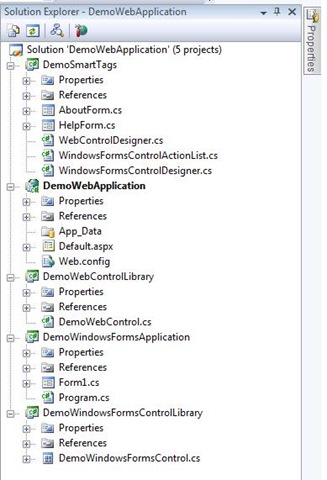
The solution contains 5 projects

  • DemoWebControlLibrary : A asp.net control library project holds the custom web control named "DemoWebControl"
  • DemoWindowsFormsControlLibrary: Contains the custom windows forms control named "DemoWindowsFormsControl"
  • DemoWebApplication & DemoWindowsFormsApplication: Hosts the DemoWebControl and DemoWindowsformsControl respectively
  • DemoSmartTags : Class library contains the smart tag implementation for both Web and Windows forms controls.
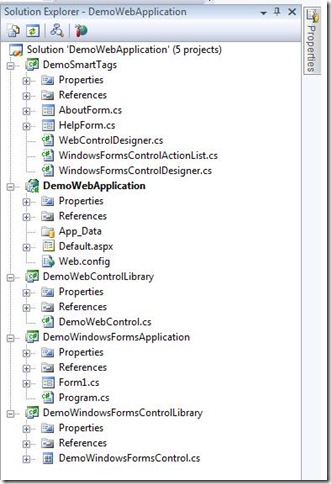
prjstruct

There is no need to talk about the controls library project and application projects which hosts them.So lets talk about the DemoSmartTags project.

That project contains 2 windows forms named "AboutForm" and "HelpForm".They are nothing but normal windows forms in which we are displaying the contents.

Another 2 main files / classes are WebControlDesigner and WindowsFormsControlDesigner.They are inherited from System.Web.UI.Design.ControlDesigner and System.Windows.Forms.Design.ControlDesigner respectively and are playing an important role in showing the smart tags.

Both these classes overrides a property called DesignerActionListCollection which is a collection of different actionlists.

public override DesignerActionListCollection ActionLists
       {
           get
           {
               if (actionLists == null)
               {
                   actionLists = new DesignerActionListCollection();
                   actionLists.Add(new ControlActionList(this));
               }
               return actionLists;
           }
       }

Here the ControlActionList is same for both windows forms and web controls.This class defines the actual smart tags and add to the collection.

public class ControlActionList : DesignerActionList
   {
       ComponentDesigner _ComponentDesigner;

        public ControlActionList
           (ComponentDesigner comp)
           : base(comp.Component)
       {
           _ComponentDesigner = comp;
       }
}

Below is the code which creates action items or smart tags and associates to the designer.

public override DesignerActionItemCollection GetSortedActionItems()
       {
           DesignerActionItemCollection col = new DesignerActionItemCollection();
           DesignerActionMethodItem helpItem = new DesignerActionMethodItem(this, "ShowHelp", "Help");

           col.Add(helpItem);
           DesignerActionMethodItem aboutItem = new DesignerActionMethodItem(this, "ShowAbout", "About");

           col.Add(aboutItem);
           return col;
       }

Now it is surprising.Which is the handler that handles the click event? We need to have methods named "ShowHelp" and "ShowAbout".The runtime will automatically call those methods up on click.Not getting why implementation is like this which uses reflection..Strange...

public void ShowHelp() { ShowForm(newHelpForm()); } public void ShowAbout() { ShowForm(newAboutForm()); }

We can't directly show the forms here.We have to use IUIService interface to accomplish the task.

void ShowForm(Form form)
       {
           IUIService service = (IUIService)_ComponentDesigner.Component.Site.GetService(typeof(IUIService));
           if (service != null)
           {
               service.ShowDialog(form);
           }
       }
 

We have completed creating the designer and smart tags.Now we have to associate these designers to the respective web and windows forms controls.

Use the Designer attribute to do the same.

[Designer(typeof(WebControlDesigner))]
   [DefaultProperty("Text")]
   [ToolboxData("<{0}:ServerControl1 runat=server></{0}:ServerControl1>")]
   public class DemoWebControl : WebControl
   {}

[Designer(typeof(WindowsFormsControlDesigner))]
   public partial class DemoWindowsFormsControl : UserControl
   {}

Now compile and open the hosting form or page in designer.Create instance of the control and pops up the smart tags.

Sample can be located here.