Showing posts with label HDInsight. Show all posts

Tuesday, June 19, 2018

Azure @ Enterprise - HDInsight name availability check in portal

Whether it is good or not Azure HDInsight needs unique name across Azure to create new instance. This leads to the requirement of name availability check feature. There are multiple mechanisms like calling API or checking the URL https://<proposed hdi name>.azurehdinsight.net for existence. 

Lets see how the Azure portal handles this check?

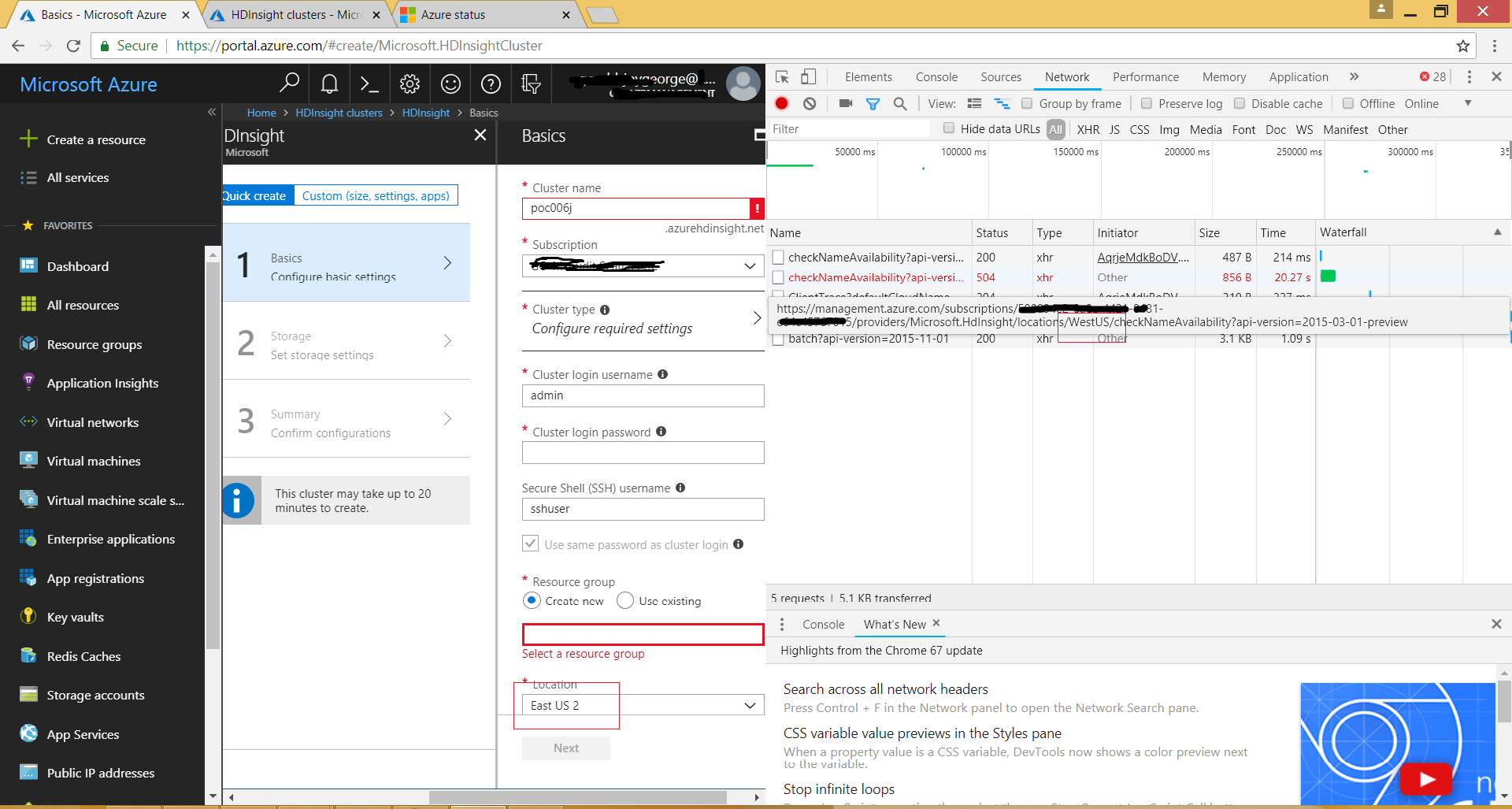
Azure Portal using CheckNameAvailability API for HDInsight cluster

The best friend is F12 browser tools to check how a web app like Azure Portal works
It is clear that it is trying to check name using the API partially documented below.

https://docs.microsoft.com/en-us/rest/api/cdn/checknameavailabilitywithsubscription/checknameavailabilitywithsubscription

But the above article talks only about checking the name using Microsoft.Cdn provider. HDInsight with check name availability seems undocumented. Below is the URL format for doing so which portal uses.

POST https://management.azure.com/subscriptions/{subscriptionId}/providers/Microsoft.HDInsight/checkNameAvailability

Why the API end point is to West US while the resource to be created in East US?

This is the magic of portal. It seems portal is hosted in West US and thus it uses the API end points there. When the screenshot was taken the portal was opened from New Jersey,USA without any VPN and ISP seems from East US itself. So no chance for Azure to redirect client to West US by recognizing the location. 

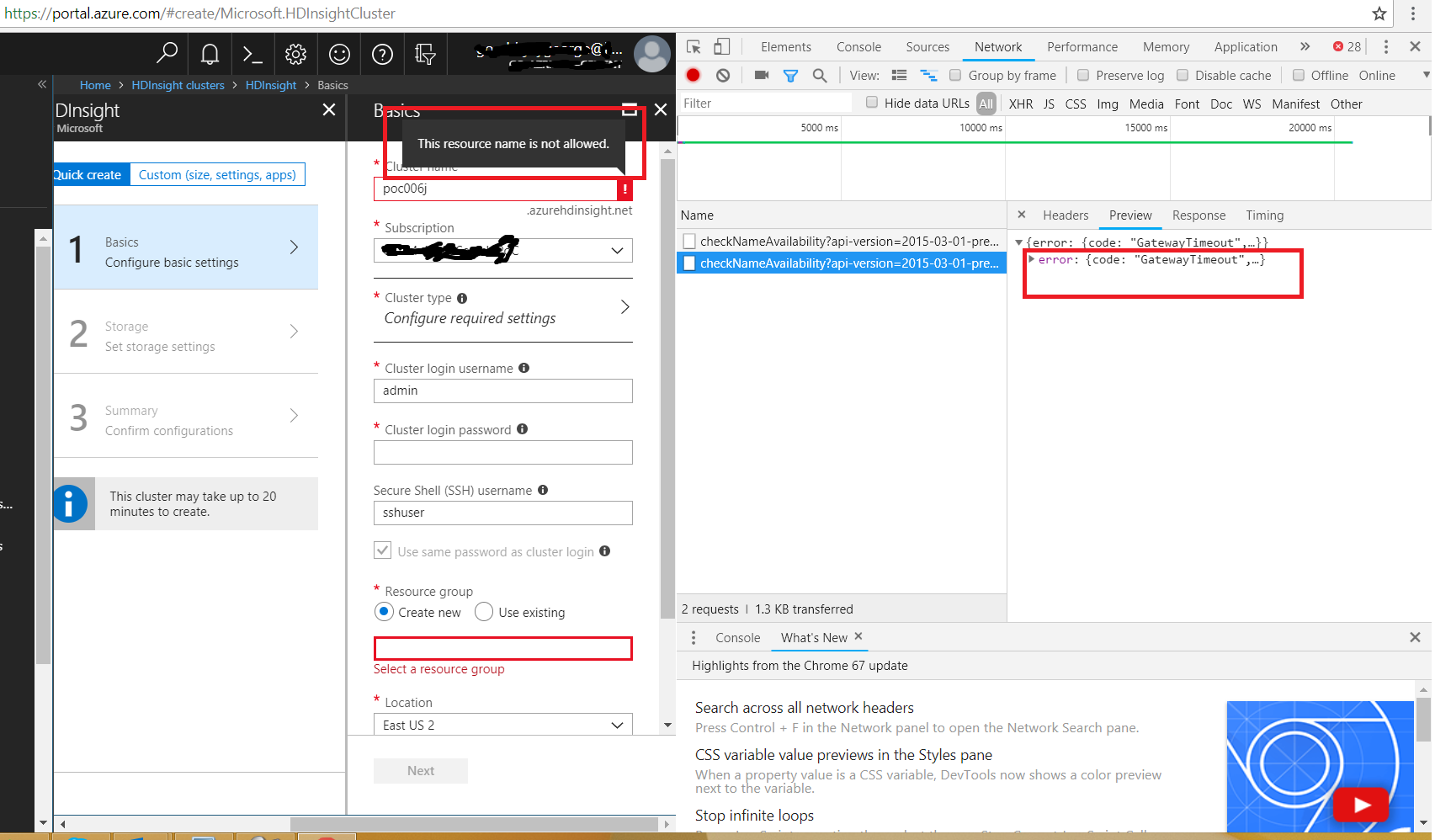
Why there is Http 504 in the screenshot?

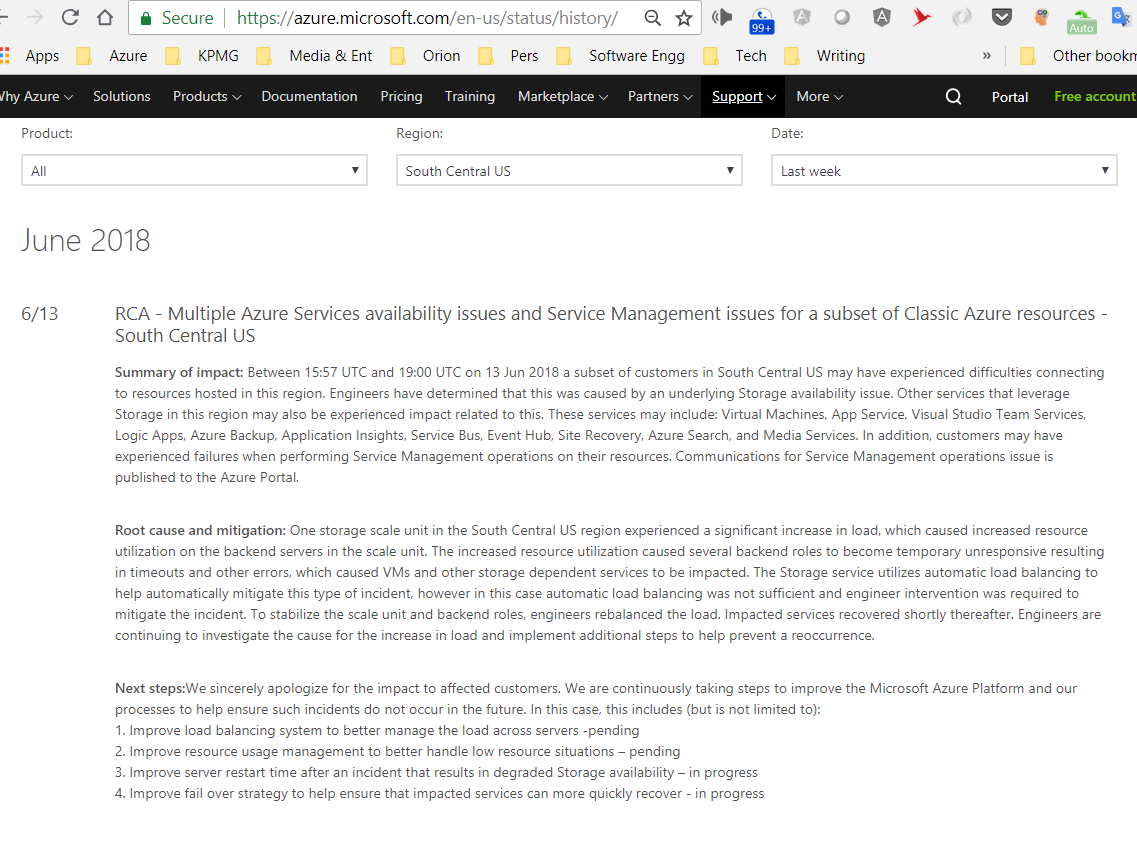
This story seems related with an outage happened last Wednesday (13Jun2018) in South Central US Azure region. During that time, if we tried to create HDInsight it will show the name is not available. 

Under the hood it tries to reach to the West US end point for checking for the name availability and it error out with gateway timeout. It might be because internally it is not able to contact SouthCentral region. When the timeout happens, Portal thinks the name is not available and displays the message. What a thinking? 

Ideally it should have been understood the http 504 and acted accordingly. As per Azure or any cloud design philosophy, failures are expected. Why not accept that failure occurred in the portal itself?

As it is mentioned the issue seems related with outage in South Central US, there is no proof ensuring causation only the time range is same. Screenshot of outage details below.

It was fun to debug this by sitting near to a Microsoft ADM. The same has been communicated to Microsoft via him. Hopefully they will fix it soon.

Happy debugging...

Tuesday, May 15, 2018

Azure @ Enterprise - Finding how many nodes are really created for one HDInsight cluster

When we create an Azure HDICluster, it internally creates virtual machines. In the Azure portal's cluster creation blade, it asks for the details about Head and Worker nodes. We cannot set the no of head nodes but worker nodes. All good till now.

But @ enterprise, if the HDInsight cluster need to be in vNet, there could be issues on lack of IP Addresses available in the subnet. Its gets worse if the creation needs to happen dynamically in a multi tenant application. It is very difficult to do calculation on the IP address requirements of HDICluster, if we don't know the internals of how many VMs get created as part of one HDInsight cluster regardless of worker nodes.

Is that not available publicly? Yes it is and below are links towards it.
https://blogs.msdn.microsoft.com/azuredatalake/2017/03/10/nodes-in-hdinsight/
https://docs.microsoft.com/en-us/azure/hdinsight/hdinsight-hadoop-port-settings-for-services

The above tells for Spark it create Head nodes, ZooKeeper nodes and Gateway nodes. How to validate how many machines created or how to verify the facts ourselves. The portal never tells how many machines get created, if we navigate to already created HDICluster resource blade. PowerShell object of HDICluster instance too doesn't have direct info about the internal machines created. So what is the alternative?

PowerShell to retrieve nodes

Again PowerShell and some string comparisons to rescue. Below goes the script.

$hdiClusterName = "<name of cluster without domain>"

"Assumption 1 - The vNet and subnet of all nodes are same."
"Assumption 2 - The vNet, Public IPAddresses & NIC are in same resource group"
"Assumption 3 - There will be a gateway nodes fof HDICluster and public ip address for gateway is in format publicIpgateway-<internal id>"
"Assumption 4 - A unique internal id is used to name the nodes,NICs, public addresses etc...This script heavily depend on that internal id based naming convention"

"--------------------------------------------------------"

$resource =(Get-AzureRmResource -ResourceId (Get-AzureRmHDInsightCluster -clustername $hdiClusterName).Id)

$hdiClustersVNetResourceGroupName = (Get-AzureRmResource -ResourceId $resource.Properties.computeProfile.roles[0].virtualNetworkProfile.id).ResourceGroupName

"ResourceGroup of vNet assiciated with HDI cluster- $hdiClustersVNetResourceGroupName"

$publicAddress = (Get-AzureRmPublicIpAddress -ResourceGroupName $hdiClustersVNetResourceGroupName) | Where-Object {$_.DnsSettings.DomainNameLabel -eq $hdiClusterName}

$publicIpgatewayName = $publicAddress.Name

$hdiClusterInternalId = $publicIpgatewayName.Split('-')[1]

"Internal Id of HDI used to create nodes - $hdiClusterInternalId"

"Below are the NICs used by $hdiClusterName HDI Cluster. Each NIC corresponds to one node."

$nics = Get-AzureRmNetworkInterface -ResourceGroupName $hdiClustersVNetResourceGroupName
$nics = $nics | Where-Object {$_.Name -like "*$hdiClusterInternalId"}
$nics | Select-Object -Property Name

As we can see the script relies on the naming convention of NICs. If Microsoft changes it the script will fail.

From the list we can see it creates 2 Head nodes, 3 ZooKeeper and 2 Gateway nodes along with minimum 1 worker node. Minimum 8 IP Addresses will be consumed for one HDInsight cluster. At the time of writing this post the ZooKeeper and Gateway nodes seems free. The charge is only for Head and Worker node(s)

Ambari Portal

Another way is via Ambai portal. If we navigate to the below URL, we can see the head nodes and ZooKeeper nodes. But not able to see the gateway nodes.

https://<cluster name>.azurehdinsight.net/#/main/hosts

Happy scripting...

Tuesday, May 1, 2018

Azure @ Enterprise - Finding Subnet of HDICluster via PowerShell

Enterprise love putting resources into virtual network(vNet) thinking that, it brings certain high level of free security via isolation. HDInsight clusters can also be put into vNet. What to do if we have a HDICluster which is added to Subnet earlier and we don't know the Subnet name now?

Silly question. Isn't it? Just go to portal and see the cluster properties. That is what below MSDN article says.
https://docs.microsoft.com/en-us/azure/hdinsight/hdinsight-administer-use-portal-linux#list-and-show-clusters

Unfortunately our corporate subscription is only showing vNet name in the properties not Subnet. So how to get the Subnet name?

Finding Subnet of HDICluster

Powershell help us here. Below goes the script

$hdiClusterName = "POC001Joy"
$hdiCluster = (Get-AzureRmHDInsightCluster -clustername $hdiClusterName)
$resourceProperties =(Get-AzureRmResource -ResourceId (Get-AzureRmHDInsightCluster -clustername $hdiClusterName).Id).properties
$resourceProperties.computeProfile.roles[0].virtualNetworkProfile.subnet

It simply gets the object of HDInsight resource and navigate to the required property. The object model is little confusing but its there.

The above PowerShell script can be directly entered into Azure Portal or run after logging into Azure from PowerShell window / ISE.

An issue has been added to the MSDN documentation article related to this missing subnet name.

Enjoy Scripting...

Tuesday, April 10, 2018

Azure @ Enterprise - Tuning the HDIClusters programatically

HDInsight Cluster

HDInsight shortly referred to as HDI is the Microsoft wrapper around Hadoop and other open source data analytics technologies such as Spark. It depends on the Harton works platform. It can be installed onpremise and available in Azure as well, in the form of platform service. 

In Azure, the advantage is that the scaling can be easily done though it takes around 15 mins. We can create a cluster for specific workloads and delete after it is done. This help us to save lot of money as its costly during running time.

HDInsight @ Enterprise

At enterprise the workloads differ and there could be different application teams wants to use HDICluster for their various workloads. Either all can write the code to create HDICluster using the Azure management APIs in every application or there could be a common service which can be used to serve the applications. When we have common service and different application workloads have different cluster demands, we need to adjust the cluster properties. 

Setting the cluster properties is really complex since the properties are spread across in different levels. There are properties at cluster level such as no of worker nodes, node manager level, Livy job submission level, worker JVM properties etc... Getting these properties under control is a big challenge.

Sometimes we may need to reuse the clusters before deleting it to save time of cluster creation. At the time of writing this post, it takes around 15-20 mins to get a new cluster created. If the common service can give the clusters to subsequent consumers, it would save a good amount of time.

Manually

Manually we can easily adjust the properties from Azure portal and the Ambari views of specific cluster.  Some links are given below.

https://docs.microsoft.com/en-us/azure/hdinsight/hdinsight-hadoop-manage-ambari
https://docs.microsoft.com/en-us/azure/hdinsight/hdinsight-changing-configs-via-ambari
https://docs.microsoft.com/en-us/azure/hdinsight/spark/apache-spark-resource-manager
https://docs.microsoft.com/en-us/azure/hdinsight/hdinsight-administer-use-portal-linux

After setting some properties the cluster needs restart. The portal shows whether to restart or not based on the property what is changed.

API

It is easy to adjust the properties at the cluster level using Azure APIs. But when it comes to the properties inside cluster such as the Node Manager heap size etc...we have to rely on the Ambari API. Below are some links to do the same.

https://docs.microsoft.com/en-us/azure/hdinsight/hdinsight-hadoop-manage-ambari-rest-api#example-update-configuration
https://community.hortonworks.com/content/supportkb/49134/how-to-stop-start-a-ambari-service-component-using.html

Using these APIs is the toughest thing in the API world. We have to get the current settings and do the changes to that and send back with a new label. Something similar to how we do in the coding. Get latest, do change and commit the change set.

If the jobs are submitted using Livy, there is option for sending some parameters which are at that job level. Examples of those parameters are the executor_core.

https://docs.microsoft.com/en-us/azure/hdinsight/spark/apache-troubleshoot-spark#how-do-i-configure-a-spark-application-by-using-livy-on-clusters

Handle restarts

As mentioned earlier some properties require the cluster to restart. The UI shows a warning to restart. What to do when we use the API? The best answer is to restart the service after setting the properties regardless whether restart needed or not :)

https://community.hortonworks.com/questions/50823/ambari-rest-api-to-restart-all-services.html
https://community.hortonworks.com/questions/123749/api-restart-the-services-that-restart-is-required.html
https://stackoverflow.com/questions/45739985/api-restart-the-services-that-restart-is-required

Since the usage is pretty much straightforward, not including any code snippets. But if anyone facing issues with these APIs, please comment in this post.

Tuesday, September 26, 2017

What is wasb(s) protocol for accessing Azure blob storage

WASB Protocol

I didn't get a chance to study wasb(s) protocol before I had to use it for HDInsight related tasks. So it was trial and error in the initial time. That lead me to take a decision to write detailed post on the wasb protocol since it helps us especially when we are Hadoop in Azure world.

But before writing, thought of googling for similar work. Why should there be one more post in the internet with same content? The results were interesting. Below are the links explaining what is wasbs protocol for accessing Azure storage blob.

https://blogs.msdn.microsoft.com/cindygross/2015/02/03/why-wasb-makes-hadoop-on-azure-so-very-cool/
https://blogs.msdn.microsoft.com/cindygross/2015/02/04/understanding-wasb-and-hadoop-storage-in-azure/

But these were not answering all the questions I had. So decided to add those here.

Can .Net access the wasbs:// url

.Net really don't need to access Azure blob storage via wasbs protocol. It can access via SDK using corresponding object model. Or it can access using https protocol.

References

Tuesday, August 22, 2017

Starting Scala Spark - Setting up local development environment

When someone comes to me and says 'this can be or cannot be done using .Net, SQL or Browser', I know whether it is really possible or not. Recently someone came to me and said 'we cannot connect to SQL Server database from Scala and load data frames, if Scala is running inside Azure HDInsight Spark cluster'. To be frank I did some google immediately but there are no direct answer to that scenario. In the internet, every one talking about loading data from Azure blob and all into Spark data frame and doing parallel data processing. But, if Spark is an in-memory distributed execution technology, why can't it read from SQL Server database and load data frame and do the processing? Scala is just another JVM language. Spark is written in Scala so it too runs on JVM and JVM has connectivity to SQL Server. So theoretically yes, but I don't have confidence to say practically yes.

It leads to the dilemma of  'should Software Architects code' or depend on what the development team says? Since I am in the 'yes should code' side, I decided to start exploring Spark so that next time I should be able to handle Spark same like how I am handling .Net and browser side technologies. 

The topics I should cover are Scala, Spark, Azure HDInsight.

This post just aims to some one who wants to learn Spark data processing technology at high level so that it can be integrated to other applications. Not to go in depth to become Spark data processing expert programmer.

Installation

First step is to setup the development environment. Learning Spark or Scala in Azure HDInsight environment is not a cost effective decision. There is already good tutorials explaining the development environment setup. One such is given below which talks about setting up Spark environment in Windows machines.

https://msdn.microsoft.com/en-us/magazine/mt595756.aspx

This is little old article. It worked for most of the steps. Below are some we may need to revisit for latest versions

Spark version

The instructions are little old regarding the version numbers though the concept remains same. One is regarding the Scala version which is suitable for Spark. The idea is to first select the Spark version and then select the Scala version. At the time of writing this article, the Spark version is 2_2_0 and corresponding Scala version is 2.12.3 (Spark works from Scala 2.11 on wards). The Scala version support is mentioned in the Spark downloads page.

WinUtils.exe

Another dependency is the winutils.exe which has to be in the \hadoop folder. It can be downloaded by googling. One such link is given below.

The location of the winutils can be C:\hadoop\bin\winutils.exe where the PATH environment variable points to the c:\hadoop folder.

After following the steps mentioned in the tutorial, we may get into multiple different issues. One such issue is given below.

Error

This may happen once we run the Spark shell after installation. The problem is that the Spark context variable 'sc' is not initialized. If this is not, we cannot do any Spark activities though we can issue Scala code. The error message is as follows. The font size is reduced to view more in less space.

C:\spark_2_2_0\bin>spark-shell
Using Spark's default log4j profile: org/apache/spark/log4j-defaults.properties
Setting default log level to "WARN".
To adjust logging level use sc.setLogLevel(newLevel). For SparkR, use setLogLevel(newLevel).
17/08/22 17:33:26 WARN NativeCodeLoader: Unable to load native-hadoop library for your platform... using builtin-java classes where applicable
17/08/22 17:33:29 WARN General: Plugin (Bundle) "org.datanucleus.store.rdbms" is already registered. Ensure you dont have multiple JAR versions of the same plugin in the classpath. The URL "file:/C:/spark_2_2_0/jars/datanucleus-rdbms-3.2.9.jar" is already registered, and you are trying to register an identical plugin located at URL "file:/C:/spark_2_2_0/bin/../jars/datanucleus-rdbms-3.2.9.jar."
17/08/22 17:33:29 WARN General: Plugin (Bundle) "org.datanucleus.api.jdo" is already registered. Ensure you dont have multiple JAR versions of the same plugin in the classpath. The URL "file:/C:/spark_2_2_0/jars/datanucleus-api-jdo-3.2.6.jar" is already registered, and you are trying to register an identical plugin located at URL "file:/C:/spark_2_2_0/bin/../jars/datanucleus-api-jdo-3.2.6.jar."
17/08/22 17:33:29 WARN General: Plugin (Bundle) "org.datanucleus" is already registered. Ensure you dont have multiple JAR versions of the same plugin in the classpath. The URL "file:/C:/spark_2_2_0/jars/datanucleus-core-3.2.10.jar" is already registered, and you are trying to register an identical plugin located at URL "file:/C:/spark_2_2_0/bin/../jars/datanucleus-core-3.2.10.jar."
17/08/22 17:33:35 WARN ObjectStore: Version information not found in metastore. hive.metastore.schema.verification is not enabled so recording the schema version 1.2.0
17/08/22 17:33:35 WARN ObjectStore: Failed to get database default, returning NoSuchObjectException
java.lang.IllegalArgumentException: Error while instantiating 'org.apache.spark.sql.hive.HiveSessionStateBuilder':
  at org.apache.spark.sql.SparkSession$.org$apache$spark$sql$SparkSession$$instantiateSessionState(SparkSession.scala:1053)
  at org.apache.spark.sql.SparkSession$$anonfun$sessionState$2.apply(SparkSession.scala:130)
  at org.apache.spark.sql.SparkSession$$anonfun$sessionState$2.apply(SparkSession.scala:130)
  at scala.Option.getOrElse(Option.scala:121)
  at org.apache.spark.sql.SparkSession.sessionState$lzycompute(SparkSession.scala:129)
  at org.apache.spark.sql.SparkSession.sessionState(SparkSession.scala:126)
  at org.apache.spark.sql.SparkSession$Builder$$anonfun$getOrCreate$5.apply(SparkSession.scala:938)
  at org.apache.spark.sql.SparkSession$Builder$$anonfun$getOrCreate$5.apply(SparkSession.scala:938)
  at scala.collection.mutable.HashMap$$anonfun$foreach$1.apply(HashMap.scala:99)
  at scala.collection.mutable.HashMap$$anonfun$foreach$1.apply(HashMap.scala:99)
  at scala.collection.mutable.HashTable$class.foreachEntry(HashTable.scala:230)
  at scala.collection.mutable.HashMap.foreachEntry(HashMap.scala:40)
  at scala.collection.mutable.HashMap.foreach(HashMap.scala:99)
  at org.apache.spark.sql.SparkSession$Builder.getOrCreate(SparkSession.scala:938)
  at org.apache.spark.repl.Main$.createSparkSession(Main.scala:97)
  ... 47 elided
Caused by: org.apache.spark.sql.AnalysisException: java.lang.RuntimeException: java.lang.RuntimeException: The root scratch dir: /tmp/hive on HDFS should be writable. Current permissions are: rwx------;
  at org.apache.spark.sql.hive.HiveExternalCatalog.withClient(HiveExternalCatalog.scala:106)
  at org.apache.spark.sql.hive.HiveExternalCatalog.databaseExists(HiveExternalCatalog.scala:193)
  at org.apache.spark.sql.internal.SharedState.externalCatalog$lzycompute(SharedState.scala:105)
  at org.apache.spark.sql.internal.SharedState.externalCatalog(SharedState.scala:93)
  at org.apache.spark.sql.hive.HiveSessionStateBuilder.externalCatalog(HiveSessionStateBuilder.scala:39)
  at org.apache.spark.sql.hive.HiveSessionStateBuilder.catalog$lzycompute(HiveSessionStateBuilder.scala:54)
  at org.apache.spark.sql.hive.HiveSessionStateBuilder.catalog(HiveSessionStateBuilder.scala:52)
  at org.apache.spark.sql.hive.HiveSessionStateBuilder.catalog(HiveSessionStateBuilder.scala:35)
  at org.apache.spark.sql.internal.BaseSessionStateBuilder.build(BaseSessionStateBuilder.scala:289)
  at org.apache.spark.sql.SparkSession$.org$apache$spark$sql$SparkSession$$instantiateSessionState(SparkSession.scala:1050)
  ... 61 more
Caused by: java.lang.RuntimeException: java.lang.RuntimeException: The root scratch dir: /tmp/hive on HDFS should be writable. Current permissions are: rwx------
  at org.apache.hadoop.hive.ql.session.SessionState.start(SessionState.java:522)
  at org.apache.spark.sql.hive.client.HiveClientImpl.<init>(HiveClientImpl.scala:191)
  at sun.reflect.NativeConstructorAccessorImpl.newInstance0(Native Method)
  at sun.reflect.NativeConstructorAccessorImpl.newInstance(NativeConstructorAccessorImpl.java:62)
  at sun.reflect.DelegatingConstructorAccessorImpl.newInstance(DelegatingConstructorAccessorImpl.java:45)
  at java.lang.reflect.Constructor.newInstance(Constructor.java:423)
  at org.apache.spark.sql.hive.client.IsolatedClientLoader.createClient(IsolatedClientLoader.scala:264)
  at org.apache.spark.sql.hive.HiveUtils$.newClientForMetadata(HiveUtils.scala:362)
  at org.apache.spark.sql.hive.HiveUtils$.newClientForMetadata(HiveUtils.scala:266)
  at org.apache.spark.sql.hive.HiveExternalCatalog.client$lzycompute(HiveExternalCatalog.scala:66)
  at org.apache.spark.sql.hive.HiveExternalCatalog.client(HiveExternalCatalog.scala:65)
  at org.apache.spark.sql.hive.HiveExternalCatalog$$anonfun$databaseExists$1.apply$mcZ$sp(HiveExternalCatalog.scala:194)
  at org.apache.spark.sql.hive.HiveExternalCatalog$$anonfun$databaseExists$1.apply(HiveExternalCatalog.scala:194)
  at org.apache.spark.sql.hive.HiveExternalCatalog$$anonfun$databaseExists$1.apply(HiveExternalCatalog.scala:194)
  at org.apache.spark.sql.hive.HiveExternalCatalog.withClient(HiveExternalCatalog.scala:97)
  ... 70 more
Caused by: java.lang.RuntimeException: The root scratch dir: /tmp/hive on HDFS should be writable. Current permissions are: rwx------
  at org.apache.hadoop.hive.ql.session.SessionState.createRootHDFSDir(SessionState.java:612)
  at org.apache.hadoop.hive.ql.session.SessionState.createSessionDirs(SessionState.java:554)
  at org.apache.hadoop.hive.ql.session.SessionState.start(SessionState.java:508)
  ... 84 more
<console>:14: error: not found: value spark
       import spark.implicits._
              ^
<console>:14: error: not found: value spark
       import spark.sql
              ^
Welcome to
      ____              __
     / __/__  ___ _____/ /__
    _\ \/ _ \/ _ `/ __/  '_/
   /___/ .__/\_,_/_/ /_/\_\   version 2.2.0
      /_/

Using Scala version 2.11.8 (Java HotSpot(TM) 64-Bit Server VM, Java 1.8.0_144)
Type in expressions to have them evaluated.
Type :help for more information.

scala> val sf = sc.textFile("C:\\Temp\\joygazure.publishsettings")
<console>:17: error: not found: value sc
       val sf = sc.textFile("C:\\Temp\\joygazure.publishsettings")

Fix

If we analyze the log carefully we can see there is a permission issue to tmp folder related to hive. Did we install hive? Not explicitly. What is the relation with initializing Spark context and hive folder permissions. At first it might not seems related but ultimately they are related.


c:\hadoop\bin\winutils.exe chmod 777 c:\tmp\hive

Monday, November 4, 2013

Why my HDInsight Hadoop job failed

This post assumes that the reader had read my previous post about Hadoop HDInsight Installation issues. My aim was to run a simple Hadoop Map Reduce task in Win 7 - 64 bit machine using HDInsight

When I run my first Hadoop application from Visual Studio, I got the below result in console windows with a status of 'Job failed'.


Output folder exists.. deleting.
File dependencies to include with job:
[Auto-detected] <drive>:\Joy\Code\DotNet\HDInsight\HadoopTest\bin\Debug\HadoopTest.vsh
ost.exe
[Auto-detected] <drive>:\Joy\Code\DotNet\HDInsight\HadoopTest\bin\Debug\HadoopTest.exe

[Auto-detected] <drive>:\Joy\Code\DotNet\HDInsight\HadoopTest\bin\Debug\Microsoft.Hado
op.MapReduce.dll
[Auto-detected] <drive>:\Joy\Code\DotNet\HDInsight\HadoopTest\bin\Debug\Microsoft.Hado
op.WebClient.dll
[Auto-detected] <drive>:\Joy\Code\DotNet\HDInsight\HadoopTest\bin\Debug\Newtonsoft.Jso
n.dll
packageJobJar: [] [/<drive>:/Hadoop/hadoop-1.1.0-SNAPSHOT/lib/hadoop-streaming.jar] <drive>:
\Users\<username>\AppData\Local\Temp\streamjob4051103269437643633.jar tmpDir=null
13/10/21 22:19:07 WARN security.ShellBasedUnixGroupsMapping: got exception tryin
g to get groups for user <logged in user's name without domain\>
org.apache.hadoop.util.Shell$ExitCodeException: GetLocalGroupsForUser error (222
1): The user name could not be found.

        at org.apache.hadoop.util.Shell.runCommand(Shell.java:454)
        at org.apache.hadoop.util.Shell.run(Shell.java:369)
        at org.apache.hadoop.util.Shell$ShellCommandExecutor.execute(Shell.java:
573)
        at org.apache.hadoop.util.Shell.execCommand(Shell.java:659)
        at org.apache.hadoop.util.Shell.execCommand(Shell.java:642)
        at org.apache.hadoop.security.ShellBasedUnixGroupsMapping.getUserGroups(
ShellBasedUnixGroupsMapping.java:65)
        at org.apache.hadoop.security.ShellBasedUnixGroupsMapping.getGroups(Shel
lBasedUnixGroupsMapping.java:41)
        at org.apache.hadoop.security.Groups.getGroups(Groups.java:79)
        at org.apache.hadoop.security.UserGroupInformation.getGroupNames(UserGro
upInformation.java:1041)
        at org.apache.hadoop.mapreduce.JobSubmissionFiles.getStagingDir(JobSubmi
ssionFiles.java:107)
        at org.apache.hadoop.mapred.JobClient$2.run(JobClient.java:872)
        at org.apache.hadoop.mapred.JobClient$2.run(JobClient.java:866)
        at java.security.AccessController.doPrivileged(Native Method)
        at javax.security.auth.Subject.doAs(Subject.java:396)
        at org.apache.hadoop.security.UserGroupInformation.doAs(UserGroupInforma
tion.java:1136)
        at org.apache.hadoop.mapred.JobClient.submitJobInternal(JobClient.java:8
66)
        at org.apache.hadoop.mapred.JobClient.submitJob(JobClient.java:840)
        at org.apache.hadoop.streaming.StreamJob.submitAndMonitorJob(StreamJob.j
ava:917)
        at org.apache.hadoop.streaming.StreamJob.run(StreamJob.java:122)
        at org.apache.hadoop.util.ToolRunner.run(ToolRunner.java:65)
        at org.apache.hadoop.util.ToolRunner.run(ToolRunner.java:79)
        at org.apache.hadoop.streaming.HadoopStreaming.main(HadoopStreaming.java
:50)
        at sun.reflect.NativeMethodAccessorImpl.invoke0(Native Method)
        at sun.reflect.NativeMethodAccessorImpl.invoke(NativeMethodAccessorImpl.
java:39)
        at sun.reflect.DelegatingMethodAccessorImpl.invoke(DelegatingMethodAcces
sorImpl.java:25)
        at java.lang.reflect.Method.invoke(Method.java:597)
        at org.apache.hadoop.util.RunJar.main(RunJar.java:156)
13/10/21 22:19:07 WARN security.UserGroupInformation: No groups available for us
er joyg
java.io.IOException: No groups found for user <user name>
        at org.apache.hadoop.security.Groups.getGroups(Groups.java:81)
        at org.apache.hadoop.security.UserGroupInformation.getGroupNames(UserGro
upInformation.java:1041)
        at org.apache.hadoop.mapreduce.JobSubmissionFiles.getStagingDir(JobSubmi
ssionFiles.java:107)
        at org.apache.hadoop.mapred.JobClient$2.run(JobClient.java:872)
        at org.apache.hadoop.mapred.JobClient$2.run(JobClient.java:866)
        at java.security.AccessController.doPrivileged(Native Method)
        at javax.security.auth.Subject.doAs(Subject.java:396)
        at org.apache.hadoop.security.UserGroupInformation.doAs(UserGroupInforma
tion.java:1136)
        at org.apache.hadoop.mapred.JobClient.submitJobInternal(JobClient.java:8
66)
        at org.apache.hadoop.mapred.JobClient.submitJob(JobClient.java:840)
        at org.apache.hadoop.streaming.StreamJob.submitAndMonitorJob(StreamJob.j
ava:917)
        at org.apache.hadoop.streaming.StreamJob.run(StreamJob.java:122)
        at org.apache.hadoop.util.ToolRunner.run(ToolRunner.java:65)
        at org.apache.hadoop.util.ToolRunner.run(ToolRunner.java:79)
        at org.apache.hadoop.streaming.HadoopStreaming.main(HadoopStreaming.java
:50)
        at sun.reflect.NativeMethodAccessorImpl.invoke0(Native Method)
        at sun.reflect.NativeMethodAccessorImpl.invoke(NativeMethodAccessorImpl.
java:39)
        at sun.reflect.DelegatingMethodAccessorImpl.invoke(DelegatingMethodAcces
sorImpl.java:25)
        at java.lang.reflect.Method.invoke(Method.java:597)
        at org.apache.hadoop.util.RunJar.main(RunJar.java:156)
13/10/21 22:19:08 INFO util.NativeCodeLoader: Loaded the native-hadoop library
13/10/21 22:19:08 WARN snappy.LoadSnappy: Snappy native library not loaded
13/10/21 22:19:08 INFO mapred.FileInputFormat: Total input paths to process : 4
13/10/21 22:19:08 INFO streaming.StreamJob: getLocalDirs(): [c:\hadoop\HDFS\mapr
ed\local]
13/10/21 22:19:08 INFO streaming.StreamJob: Running job: job_201310212213_0001
13/10/21 22:19:08 INFO streaming.StreamJob: To kill this job, run:
13/10/21 22:19:08 INFO streaming.StreamJob: C:\Hadoop\hadoop-1.1.0-SNAPSHOT/bin/
hadoop job  -Dmapred.job.tracker=localhost:50300 -kill job_201310212213_0001
13/10/21 22:19:08 INFO streaming.StreamJob: Tracking URL: http://127.0.0.1:50030
/jobdetails.jsp?jobid=job_201310212213_0001
13/10/21 22:19:10 INFO streaming.StreamJob:  map 0%  reduce 0%
13/10/21 22:19:42 INFO streaming.StreamJob:  map 100%  reduce 100%
13/10/21 22:19:42 INFO streaming.StreamJob: To kill this job, run:
13/10/21 22:19:42 INFO streaming.StreamJob: C:\Hadoop\hadoop-1.1.0-SNAPSHOT/bin/
hadoop job  -Dmapred.job.tracker=localhost:50300 -kill job_201310212213_0001
13/10/21 22:19:42 INFO streaming.StreamJob: Tracking URL: http://127.0.0.1:50030
/jobdetails.jsp?jobid=job_201310212213_0001
13/10/21 22:19:42 ERROR streaming.StreamJob: Job not successful. Error: # of fai
led Map Tasks exceeded allowed limit. FailedCount: 1. LastFailedTask: task_20131
0212213_0001_m_000000
13/10/21 22:19:42 INFO streaming.StreamJob: killJob...
Streaming Command Failed!


Did you get any thing from this log? There were basically 2 problems. 
  1. WARN - Not able to get groups 
  2. ERROR Job not successful

Error :Job not successful

Lets first focus on the error as always.The starting point of this investigation should be the log and where we can find the logs? Here comes the job tracker. Notice the tracking URL mentioned in the output http://127.0.0.1:50030/jobdetails.jsp?jobid=job_201310212213_0001
Browse to this page

We can easily find a table like the below one in that page
Kind% CompleteNum TasksPendingRunningCompleteKilledFailed/Killed
Task Attempts
map100.00%
400042 / 0
reduce100.00%
100010 / 0
This table gives the details about map reduce tasks executed. In the last column (Failed/Killed Task Attempts) we can see a link. Its highlighted in blue above for reference. Navigate to that link to get more information.

Now we are entering more detailed log page. There will be a table which describes about attempts, tasks error etc..Our target is the last column titled as 'Logs'. Select the 'Last 4KB' link to navigate to there.

This takes us to a page with URL of the below kind
http://<FQDN>:50060/tasklog?attemptid=attempt_201310212213_0001_m_000000_0&start=-4097

Welcome to .Net!!! Here we can see logs which tells more about our .net application. Earlier we were seeing Java related call stack. an example log is pasted below


Unhandled Exception: Microsoft.Hadoop.MapReduce.StreamingException: The user type could not be loaded. DLL=HadoopTest.exe, Type=HadoopTest.SentenceMapper ---> 
System.BadImageFormatException: Could not load file or assembly 'file:///c:\hadoop\HDFS\mapred\local\taskTracker\joylocal\jobcache\job_201310290904_0001\attempt_201310290904_0001_m_000000_0\work\HadoopTest.exe' or one of its dependencies. An attempt was made to load a program with an incorrect format.
   
at System.Reflection.RuntimeAssembly._nLoad(AssemblyName fileName, String codeBase, Evidence assemblySecurity, RuntimeAssembly locationHint, StackCrawlMark& stackMark, IntPtr pPrivHostBinder, Boolean throwOnFileNotFound, Boolean forIntrospection, Boolean suppressSecurityChecks)
   
at System.Reflection.RuntimeAssembly.InternalLoadAssemblyName(AssemblyName assemblyRef, Evidence assemblySecurity, RuntimeAssembly reqAssembly, StackCrawlMark& stackMark, IntPtr pPrivHostBinder, Boolean throwOnFileNotFound, Boolean forIntrospection, Boolean suppressSecurityChecks)
   
at System.Reflection.RuntimeAssembly.InternalLoadAssemblyName(AssemblyName assemblyRef, Evidence assemblySecurity, RuntimeAssembly reqAssembly, StackCrawlMark& stackMark, Boolean throwOnFileNotFound, Boolean forIntrospection, Boolean suppressSecurityChecks)
   
at System.Reflection.RuntimeAssembly.InternalLoadFrom(String assemblyFile, Evidence securityEvidence, Byte[] hashValue, AssemblyHashAlgorithm hashAlgorithm, Boolean forIntrospection, Boolean suppressSecurityChecks, StackCrawlMark& stackMark)
   
at System.Reflection.Assembly.LoadFrom(String assemblyFile)   
at Microsoft.Hadoop.MapReduce.MapperMain.Main()
   --- End of inner exception stack trace ---
at Microsoft.Hadoop.MapReduce.MapperMain.Main()
at Microsoft.HdInsight.MapDriver.Program.Main(String[] args)
java.lang.RuntimeException: PipeMapRed.waitOutputThreads(): subprocess failed with code -532462766
 at org.apache.hadoop.streaming.PipeMapRed.waitOutputThreads(PipeMapRed.java:362)

This tells that, when the Apache Hadoop framework which is written in Java tried to invoke our MapReduce tasks which is written in C#.Net, there was an exception in our .Net code related to the executable's image format.

The easiest method to solve this is to google the error message. As usual, the first google result was point to stackoverflow.com and it solved my problem. Below are the causes of that problem

  1. The program is not running as admin;
  2. The executables are missing (paths in log files)
  3. Whether .net framework is working for the corresponding version?
  4. The building target is x86 instead of x64

Lesson 1

The .Net assembly we are creating for Hadoop MapReduce tasks should be targeting to 64bit environment.

WARN - got exception trying to get groups for user ****

This took so much time. As the type says WARN, it was not causing any issues to the execution of Hadoop MapR jobs.But still I felt this is something interesting to solve. The first aim was to understand the warning. Basically it says, 'it is not able to retrieve windows groups of user who is running the program'. As I have logged in to this system with my company login (company domain\username), it shows my user name without the domain name prefix.

Attempt 1 - Editing dfs.web.ui

I tried googling the error message. The links said that, I need to edit the hdfs-site.xml which is present in the location <install drive>:\Hadoop\hadoop-1.1.0-SNAPSHOT\conf\hdfs-site.xml

I modified the dfs.web.ui section in that file but no luck.Actually that section itself was not there.So I added it. This file is something to be studied later.

Attempt 2 - Understanding the Hadoop source code

Now we don't have any chance. We need to go back to the past days where internet was not there to google. Really I had programmed 2 of my academic projects without googling as internet was not common at that time. This will be really hard to digest for the people who starts coding with google.

If we are true programmers and confident in our algorithmic skills, understanding source code will not be a problem even if we are seeing that language for the first time. This case is more simple. Hadoop is open source written in Java and anybody can see the source code.

As we can see in the stack trace, there is a Shell class which is executing the command which is retrieving the groups of user. What is the command and where from its coming? Only way is to browse the source code of Util.Shell class available in the below link

Here is a small tricky part or the point where people who don't know the programming principles needs to spend more time. The method name is runCommand() which doesn't tell anything about users or groups. Yes the source code is written by great programmers who follows SOLID principles where each class and method will be doing single responsibility. The command which is used to get the user groups will be coming from somewhere outside of this method. More precisely, in one of the previous methods in the call stack.

When we manually inspect the call stack, we can see the logic of retrieving the groups of the user may be more likely present in the class ShellBasedUnixGroupsMapping and method getGroups().If we further digg down the code path, we can see that, it is calling Shell.getGroupsForUserCommandShell.getGroupsForUserCommand() method to get the command. Lets see the code of getGroupsForUserCommand method

public static String[] getGroupsForUserCommand(final String user) {
   //'groups username' command return is non-consistent across different unixes
   return (WINDOWS)? new String[] { WINUTILS, "groups", "-F", "\"" + user + "\""}
                   : new String [] {"bash", "-c", "id -Gn " + user};
}

WINUTIL.exe command

We can assume that WINDOWS token will be true as we are running it in windows machine. When its called, it will return the command as follows.

winutils groups -F <user name as it reached via param>

In our case the chance for user name format as short name is 100%, because the log says it. Can we execute the command ourself in the same way how system is doing? To do that we need to get the path to WINUTILS.exe file

What is the path to winutil command file? Simple search the Hadoop folder. We can find at <install drive>:\Hadoop\hadoop-1.1.0-SNAPSHOT\bin

Now we can try to executing the command
<drive>:\Hadoop\hadoop-1.1.0-SNAPSHOT\bin>winutils groups -F <short username> (This failed)

<drive>:\Hadoop\hadoop-1.1.0-SNAPSHOT\bin>winutils groups -F <DOMAIN>\username (Success)

We can reach to a conclusion that this command will not work and nobody should be able to execute MapReduce tasks. But people claims that they are able to execute Hadoop tasks using HDInsight. Are there any more tests remaining?

Lets try executing the command with hadoop username. .\Hadoop is a local user which is created when we install Hadoop.

<drive>:\Hadoop\hadoop-1.1.0-SNAPSHOT\bin>winutils groups -F hadoop (Success)

Solution - Execute the HDInsight Hadoop task in the context of local user

It gives the light. When we try to run Hadoop application in the context of local user it may work. Immediately I created a local user in the machine and run the application. It worked !!!

So where its trimming the user name? Or which method says the user groups needs to be retrieved based on short user name? Some more source code analysis revealed it. Its the UserGroupInformation.getGroupNames() method

public synchronized String[] getGroupNames() {
   ensureInitialized();
   try {
     List<String> result = groups.getGroups(getShortUserName());
     return result.toArray(new String[result.size()]);
   } catch (IOException ie) {
     LOG.warn("No groups available for user " + getShortUserName());
     return new String[0];
   }
}

Now things are clear. I am finding a way to confirm this with Hadoop developers.

Tuesday, October 29, 2013

Hadoop HDInsight Installation issues

I am closely watching movements in the big data for around 2 years. I tried to learn more about processing huge data set when I was writing a series about artificial intelligence. As any other developer, at one point I started feeling that we need more power to process big data sets which cannot be given by one machine. Even if the machine has the power, it cannot hold that much large data set in it's hard drive. It leads to thoughts of distributed computing. The problem is that, it is known from the college days but no idea how to implement or how to see real distributed processing in action?

The research often ends up in 'Google search indexing and how they process huge volume of internet data'. Since their techniques are secret, the only one way is Hadoop which is again a technique unveiled by them.

I tried installing original Apache Hadoop but not able to successfully execute a Map Reduce task in it. As I am working in a delivery focused company, the time available for the research activities is very less. Months later, I saw the Microsoft implementation of Hadoop in Azure. There was again a bottle neck. Even though it was free, it needs a valid credit card number. Due to some self enforced rules, I decided not to use credit cards. Time passed away, Microsoft released HDInsight to windows servers and desktops. I became happy. But there was a simple limitation. It requires Win7 64bit machine to install HDInsight. I was using 32bit Vista at that time. To get Win7 64 only for me, in the off shore team was a big task. After getting approvals after approvals, finally I got my machine upgraded to Win7 64bit. Immediately I installed HDInsight. I checked all the Apache services, dashboard, HDFS & Hadoop command line.

Again the busy project release time came. One project after another. The installation remained there. Recently things settled. The projects I am handling are in clam state and its the time for me to explore.

Hadoop installation issues

After this long time, I tried to open the Hadoop dashboard web site. It simply says "Internal Server Error". I checked the app pool and the corresponding HadoopAppPool is not running. When I tried to run it, I got an error in the event viewer related to authentication of .\Hadoop user which is running the app pool. I thought that the password might be expired. There is no chance for change in the password. Sometimes if we set the credentials again it may work. But what is the password of local Hadoop user?

I looked into the services.msc for all Apache services and could see all are stopped. I tried to start but failed due to authentication issues. All the services are by default installed to run using .\hadoop service account which is created when we install hadoop. Finding the password of local Hadoop user became essential now. Below is the error which I could see in event viewer.


Windows could not start the Apache Hadoop hiveserver2 service on Local Computer.

Error 1069: The service did not start due to a logon failure.

Finding the password of local Hadoop user

The search for getting the password of hadoop user ended in a file located at C:\Hadoop\singlenodecreds.xml. It shows an encrypted value instead of actual password. So how to decrypt it?


$xml = Import-Clixml -Path "C:\Hadoop\singlenodecreds.xml"
 
$psCred = New-Object System.Management.Automation.PSCredential $import.Username, ($xml.Password | ConvertTo-SecureString)
 
Write-Host $psCred.GetNetworkCredential().Password

The above PowerShell will do it. If it can be retrieved in this way, why Microsoft encrypted it in the file? Only HDInsight team knows? May be when its installed in multiple machines, it makes sense.

Getting the password solved the problem? Absolutely no. I was able to set the credentials but got the same error

Reinstalling Hadoop

Now its the time to reinstall Hadoop. Before that I just googled for similar issues and most of them resolved the issue by either formatting the machine or installing it in a fresh virtual machine. I uninstalled and installed hadoop using Microsoft Web Platform Installer. This time all the services are running. But I cannot see the Hadoop dashboard and WebAPI applications in IIS. 

Some people says that, if the hadoop dashboard is not coming we can install it by executing the below PowerShell script.


cd C:\HadoopFeaturePackSetup\HadoopFeaturePackSetupTools
.\winpkg.ps1 ..\Packages\HadoopWebApi-winpkg.zip install -CredentialFilePath c:\Hadoop\Singenodecreds.xml
.\winpkg.ps1 ..\Packages\HadoopDashboard-winpkg.zip install -CredentialFilePath c:\Hadoop\Singenodecreds.xml

In my case I was not able to find both HadoopWebApi-winpkg.zip & HadoopDashboard-winpkg.zip in C:\HadoopFeaturePackSetup\HadoopFeaturePackSetupTools folder. Is my company firewall blocking these files from getting downloaded? Seems this is the time to get a deep dive into Web Platform Installer.

The internals of web platform installer needs a full post.So let me summarize. I could see that the web platform installer is requesting http://www.microsoft.com/web/webpi/4.5/toolsproductlist.xml to get the details about HDInsight installer. The Id of HDInsight in the xml file is 'HDINSIGHT-PREVIEW'. When I opened the xml file I could see that the size of installer is 30.300 MB, but when I manually download the file from http://go.microsoft.com/fwlink/?LinkId=269735 (Its also mentioned in xml)its around 3.800MB .May be the downloaded file MSSingleNodeInstaller.msi is corrupted or there is some firewall issue. But if firewall is playing in between I cannot touch the file itself.. This is something problematic and is not under my control. So I posted in MSDN and Stackoverflow. Then started refreshing :)

Do I really need working Hadoop dashboard to work with Hadoop

Now answers for couple of hours. May be most of the Hadoop experts are in the eastern side of the earth and as I am working from India, I need to wait till they get up. But time is money. I thought of taking a chance. Why can't try executing a Hadoop Job?
The reasons behind this is, 
  1. Microsoft created HDinsight on top of Apache Hadoop.
  2. Apache Hadoop is working. At least all the services are running.
  3. Dashboard is created in ASP.Net which may be just a portal for showing the results. I can see the results by using command line.There are more developers out there who are using Hadoop without ASP.Net dashboard.
I started coding my hadoop job using Visual studio and executed it.Surprisingly, I didn't get any errors which says 'I occurred due to lack of Hadoop dashboard or HadoopWeb API". But obviously there were errors which I can explain in next post.

What were the issues

The root issue is 'I didn't read the HDInsight release notes'
  • The password of Hadoop user will expire and the release note has mentioned the same with a script to correct it.
  • The dashboard is removed from latest installation which is done via web platform installer.This also mentioned in the release notes.If we need to get details of result and status of map reduce jobs we need to use the PowerShell commands.
  • The size of the MSSingleNodeInstaller.msi file is correct in 4.6 version of WebPI http://www.microsoft.com/web/webpi/4.6/toolsproductlist.xml
More links to installation